
Master Batch Normalization (BatchNorm) — the technique that stabilized deep learning and became a standard in almost every modern neural network. Learn how it works, why it’s so powerful, and how to use it properly in PyTorch.
Table of Contents
- Introduction: Why Your Deep Network is Struggling
- What Exactly is a “Batch”?
- Batch Normalization in the Real World
- The Core Concept: Internal Covariate Shift and the Fix
- How Batch Normalization Actually Works (With Math Explained)
- Hyperparameters & Best Practices (with Indian Analogies)
- Smashing the speed limit
- nn.BatchNorm1d vs nn.BatchNorm2d
- Common Problems & Gotchas
- Putting It All Together in PyTorch
- The BatchNorm Visualizer
- Summary & Key Takeaways
Introduction: Why Your Deep Network is Struggling
You increased the number of layers, used better optimizers, and still your model trains slowly, loss oscillates, and you’re forced to use tiny learning rates.
Batch Normalization is often the missing piece. It acts like a stabilizer for your neural network — allowing it to train faster, deeper, and more reliably. Think of an audio mixer. If one instrument is screaming at 150 decibels and another is whispering at 2 decibels, the song sounds awful. Batch Normalization acts like an automatic volume knob. It takes the output of a layer and forces all the numbers to have a nice, balanced “volume” before passing them to the next layer.
What Exactly is a “Batch”?
When training AI, you don’t feed it one image at a time (too slow) or all 10,000 images at once (your computer would explode). You send them in “mini-batches” (like 32 images at a time). BatchNorm looks at these 32 images as a team and calculates the average “volume” of that specific team.
Batch Normalization in the Real World
- Swiggy/Zomato Demand Prediction: During heavy rain in Mumbai, order patterns change suddenly. BatchNorm helps models quickly adapt to these shifting data distributions.
- Groww / Zerodha Stock Models: Stock data is highly volatile. BatchNorm keeps training stable despite constantly changing statistical properties.
- Tesla Waymo Self-Driving Systems: Processing camera feeds in rapidly changing environments needs very deep networks. BatchNorm is heavily used for stable and fast training.
The Core Concept: Internal Covariate Shift
Batch Normalization normalizes the input to every layer for each mini-batch so that the data fed to the layer has mean ≈ 0 and standard deviation ≈ 1.
This solves Internal Covariate Shift — the problem where the distribution of inputs to a layer keeps changing as previous layers’ weights are updated during training.
How Batch Normalization Actually Works
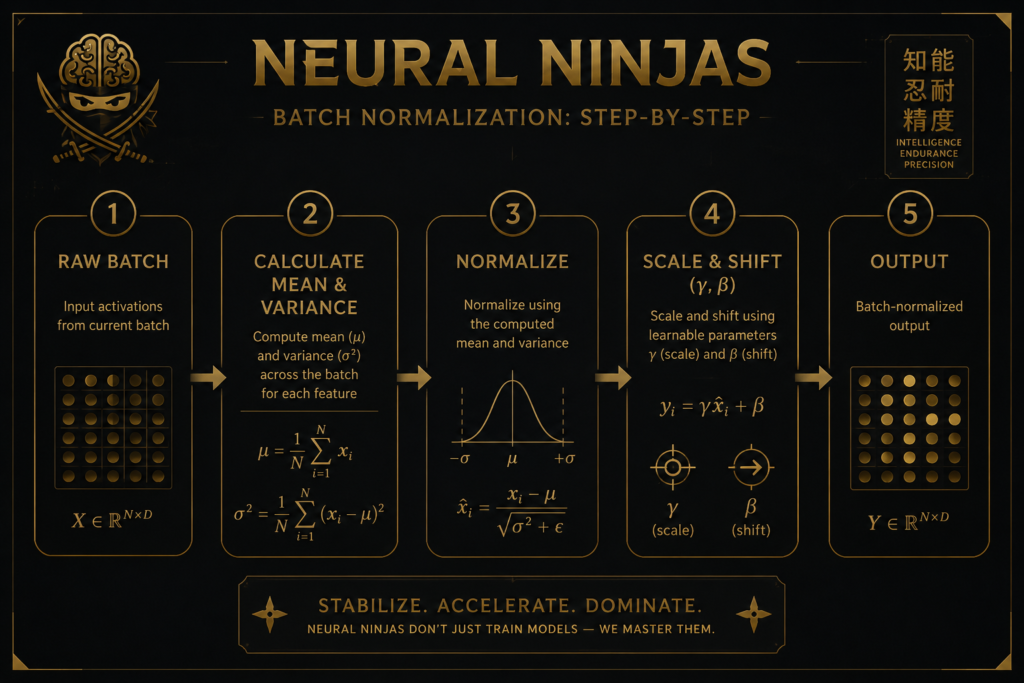
Let’s say we have a mini-batch of data.
Step 1: Calculate Batch Statistics
For the current mini-batch:
- μB = Mean of the batch
- σB^2 = Variance of the batch
Step 2: Normalize
x̂⁽ⁱ⁾ = (x⁽ⁱ⁾ - μB) / √(σB² + ε)
This makes the values centered around 0 with unit variance. (epsilon is a tiny number like 1e-5 added to prevent division by zero.)
Step 3: Scale & Shift (Learnable Parameters)
y⁽ⁱ⁾ = γ x̂⁽ⁱ⁾ + β
Here, γ (gamma) and β (beta) are learnable parameters. The network can decide during training whether it wants the normalized values as they are, or wants to scale and shift them again.
This learnable scale & shift is what makes BatchNorm powerful — it gives the network flexibility while still getting the benefits of normalization.
Hyperparameters & Best Practices
- Momentum (in BatchNorm): Default is 0.1. Analogy: Like how much you trust the new traffic pattern vs old average while driving in Delhi. Higher momentum = more trust in past statistics.
- eps (epsilon): Usually 1e-5. Just a safety number to avoid division by zero.
- Gamma (γ) and Beta (β): If we always force the data to be perfectly centered at zero, we might accidentally erase important patterns the AI worked hard to learn. So, PyTorch gives the AI two special, trainable dials: Gamma (which stretches the data) and Beta (which shifts it).
These are learnable parameters that allow the network to restore representation power.
Gamma () = Scale parameter
It multiplies the normalized value. It controls how much the normalized output should be stretched or compressed.If γ=1, it keeps the unit variance.
If γ>1, it increases variance.
If γ<1, it decreases variance.
Beta (β) = Shift parameter
It is added to the normalized value. It controls the offset or bias.If β=0, it keeps the zero mean.
If β>0, it shifts the mean upward.
If β<0, it shifts the mean downward.
Why are they (γ and β) needed?
Normalization forces the data to have zero mean and unit variance, which restricts the network’s expressive power.
By introducing γ and β, the network can:
Learn the optimal mean and variance for each layer
Decide whether to keep normalized values or revert to original-like distribution
Preserve the identity mapping (if γ=1 and β=)
Smashing the Speed Limit
Remember Learning Rate Schedulers? Without BatchNorm, if you push the learning rate too hard, the network crashes. Because BatchNorm keeps all the numbers perfectly stable and safe, you can crank your learning rate way up! Your model will train in a fraction of the time.

nn.BatchNorm1d (For Flat Data) :-
If you are working with flat lists of numbers (like a standard Linear layer predicting stock market numbers or a 1D sensor array), you simply drop in nn.BatchNorm1d().
nn.BatchNorm2d (For Robot Eyes) :-
If you are building Convolutional Neural Networks (CNNs) for image recognition or robotic vision, your data is 2-Dimensional (height and width). You use nn.BatchNorm2d(num_features). The num_features is just the number of channels (like the 3 RGB colors of an image) coming out of your previous layer. When setting up nn.BatchNorm2d, you can tweak a setting called momentum (default is 0.1). This controls how fast the “running diary” updates. A momentum of 0.1 means the new batch updates the historical average by exactly 10%.
Best Practices:
- Place BatchNorm after the Conv/Linear layer but before the activation (ReLU).
- Use model.train() and model.eval() correctly — BatchNorm behaves differently in both modes.
- For very small batch sizes (≤8), prefer GroupNorm or LayerNorm instead.
Common Problems & Gotchas
1. Very Small Batch Size BatchNorm becomes noisy with batch size 2 or 4.
2. Forgetting train/eval mode This is one of the most common mistakes.
Before (Wrong):
model.eval() # Forgot to switch back to train modemodel.train() # During training
model.eval() # During inference / validationPutting It All Together in PyTorch
import torch
import torch.nn as nn

class CNNWithBatchNorm(nn.Module):
    def __init__(self, num_classes=10):
        super().__init__()

        self.features = nn.Sequential(
            nn.Conv2d(3, 64, kernel_size=3, padding=1),
            nn.BatchNorm2d(64),           # 64 = output channels of previous Conv2d
            nn.ReLU(inplace=True),
            nn.MaxPool2d(2),

            nn.Conv2d(64, 128, kernel_size=3, padding=1),
            nn.BatchNorm2d(128),          # Must match output channels
            nn.ReLU(inplace=True),
            nn.MaxPool2d(2),
        )

        self.classifier = nn.Sequential(
            nn.Flatten(),
            nn.Linear(128 * 8 * 8, 512),
            nn.BatchNorm1d(512),          # For Linear layers
            nn.ReLU(inplace=True),
            nn.Dropout(0.5),
            nn.Linear(512, num_classes)
        )

    def forward(self, x):
        x = self.features(x)
        x = self.classifier(x)
        return x
The BatchNorm Visualizer
What’s happening in this GIF?
Left Side (The Wild West):
The red data points are bouncing all over the screen like crazy. Sometimes their group gets bigger, sometimes it shrinks. If AutoGrad tries to compute gradients on this chaotic data, the engine would either crash—or at best, run painfully slow.
Right Side (The Ninja Shield):
The blue data points have BatchNorm applied to them. No matter how much the left-side data shakes and shifts, the right-side data stays perfectly locked in place! Its center remains exactly where Beta (β=1.5 or −1.5) has set it, and its spread remains exactly where Gamma (γ=2.0) has fixed it.
🥷Summary & Key Takeaways
- Batch Normalization reduces Internal Covariate Shift by normalizing each mini-batch.
- It allows higher learning rates and faster, more stable training.
- Always use nn.BatchNorm2d() after Conv layers and nn.BatchNorm1d() after Linear layers.
- Remember to handle model.train() vs model.eval() mode properly.
- ReLU + BatchNorm is still one of the strongest combinations in modern deep learning.
- Use
nn.BatchNorm2dfor CNNs andnn.BatchNorm1dfor flat data.
Keywords: Batch Normalization PyTorch, BatchNorm, nn.BatchNorm2d, Internal Covariate Shift, deep learning stabilization.

