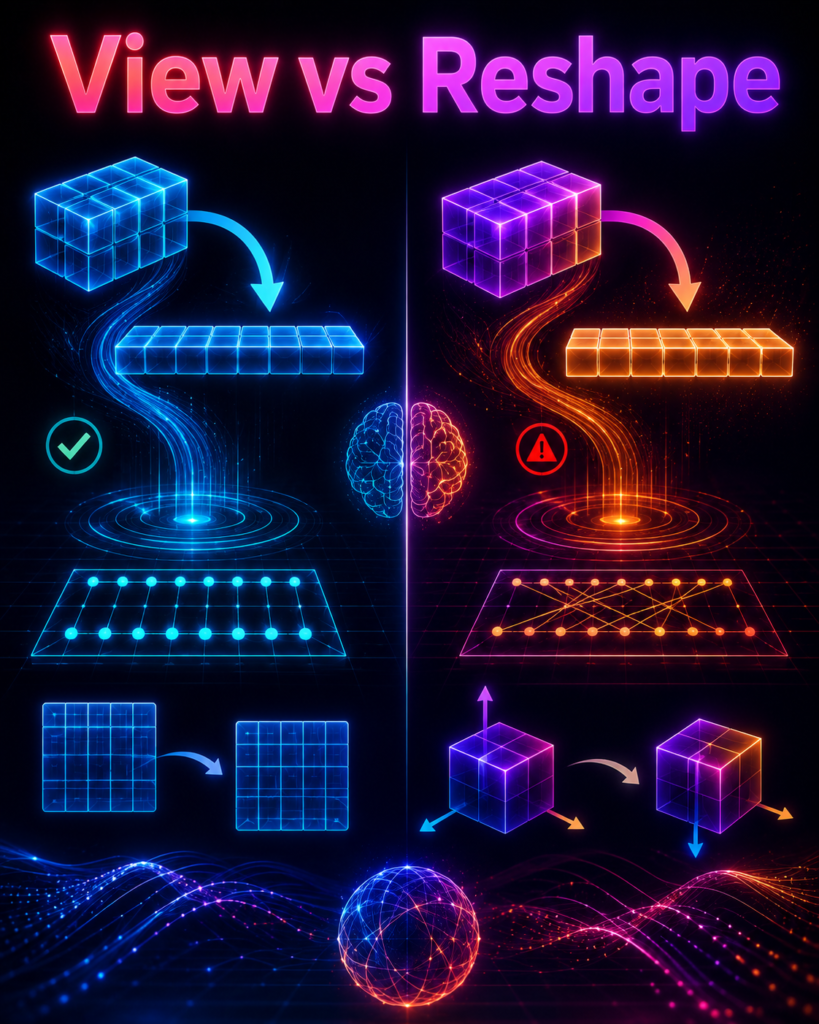
.view(), .reshape(), and .permute() don’t physically move your data. They just change the rules for how PyTorch reads that flat array. Get those rules wrong, and PyTorch won’t crash. It will just silently read your memory backward, turning your image data into static noise, and it won’t warn you..reshape() and .permute() interchangeably, that’s likely why your model trains fine but fails on the test set. Let’s look at how “strides” actually work so you can fix this for good.The 2 AM Debugging Nightmare
Three months ago, I was building a Vision Transformer from scratch. Everything looked smooth. Code ran without any errors, the training loss was dropping nicely, and I was super confident the model was learning.
Then I ran it on the test set. Result? Pure garbage accuracy. It was literally guessing randomly.
I spent the next two hours staring at the code, thinking PyTorch had a bug. Spoiler: It didn’t. I did.
# ❌ WRONG: Shape looks right, but image data gets scrambled!
x = x.view(batch_size, num_patches, embed_dim)

# ✅ RIGHT: Rotates the actual image blocks correctly!
x = x.permute(0, 2, 1)
The problem? I used .view() when I should have used .permute().
Here is the tricky part: PyTorch didn’t give any error or warning. The code ran perfectly because the numbers added up. But under the hood, .view() was taking my image pixels and mixing them up like a shuffled deck of cards.
To my model, every input image looked like TV static noise.
This mistake happens to almost everyone. Fixing it isn’t about memorizing complex code—it’s about understanding how PyTorch actually sees and stores your data.
Memory is Just a Long Line of Numbers
Here’s the thing most people miss: your multi-dimensional tensor is actually just a single, continuous line of numbers in your computer’s memory.
When you create a 2D matrix like this:
tensor([[1, 2, 3],
        [4, 5, 6]])
PyTorch doesn’t save it as a grid. It lays it out in a flat line:
[1, 2, 3, 4, 5, 6]
That’s it. Just one long line of numbers saved side by side.
So how does PyTorch turn a flat line into rows and columns? It uses two simple cheat codes: Shape and Stride.
tensor.shapetells PyTorch what the grid looks like. (For example: 2 rows, 3 columns).tensor.stride()is the step count. It tells PyTorch how many numbers to jump in that flat line to reach the next row or column.
For our 2 x 3 grid above, the Stride is (3, 1):
To move down to the next row: Skip 3 numbers in the flat line.
To move right to the next column: Skip 1 number.
This is why shape operations exist:
.view()and.reshape()just change the instructions on how to read the line..permute()and.transpose()change the jump rules (strides) so PyTorch steps through the line in a different order.
Now, let’s look at how each operation works in practice.
The Four Operations :
1. .view() — The Ultra-Fast Speedster 🏃
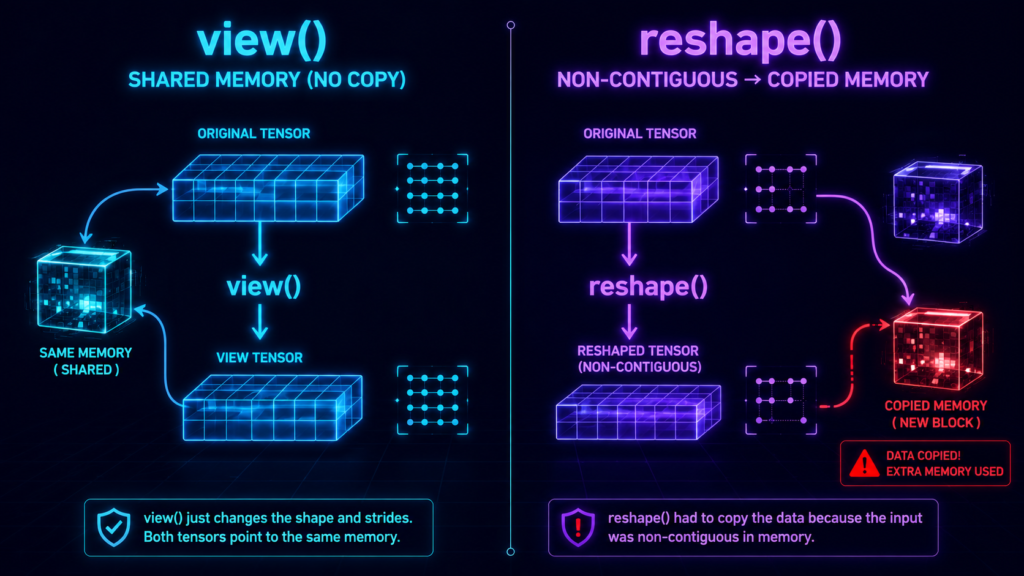
What it does: Changes the grid layout without moving numbers in memory. It uses zero extra RAM because it reuses the exact same array.
The Catch: It is super picky. It only works if your data is stored in one smooth, uninterrupted line in memory. If you flipped or transposed the tensor earlier,
.view()freaks out and crashes with aRuntimeError.When to use: Right after creating a tensor, or when you are 100% sure your tensor is stored sequentially.
import torch

x = torch.arange(12).reshape(3, 4)
y = x.view(4, 3)  # Shapes change, zero extra memory!

# Changing y also changes x because they share the exact same memory!
y[0, 0] = 999
print(x[0, 0])  # Outputs: 999
2. .reshape() — The Safe Guardrail 🛡️
What it does: It tries to act like
.view()to save memory. But if your tensor is scrambled, it won’t crash—it silently creates a fresh copy of your data in a brand-new memory slot.The Catch: Because it copies data silently when needed, it can eat up extra RAM without warning you.
When to use: When you just want your code to run safely without random crashes.
x = torch.arange(12).reshape(3, 4)
x_t = x.transpose(0, 1)  # Scrambles the straight memory line

# .view() would crash here, but .reshape() handles it safely by copying!
y = x_t.reshape(12)
print(x_t.data_ptr() == y.data_ptr())  # False (Data was copied to new memory)
3. .transpose() — The 2D Axis Swapper 🔄
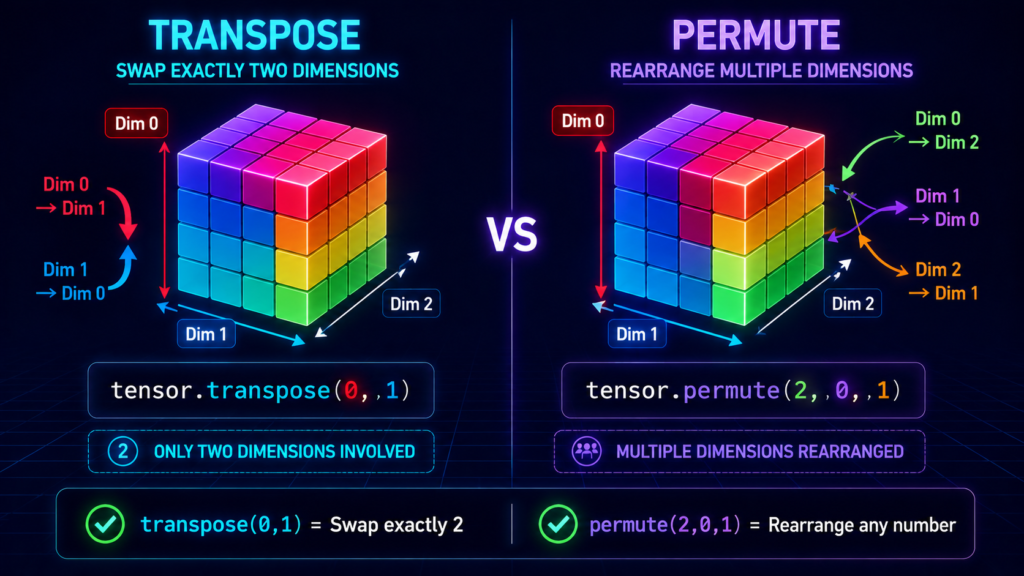
What it does: Swaps exactly two dimensions (like flipping rows and columns in a table). It changes the reading rules instantly without moving physical data.
The Catch: The flipped tensor is no longer stored sequentially in memory, so calling
.view()right after this will cause a crash.When to use: Standard 2D matrix flips or basic axis swaps.
x = torch.arange(6).reshape(2, 3)
x_t = x.transpose(0, 1)  # Swaps rows and columns (Shape becomes 3x2)

print(x_t.is_contiguous())  # False (Reading rules changed, data didn't move)

4. .permute() — The Multi-Axis Shuffler 🧩
What it does: Rearranges any number of dimensions in whatever custom order you want. It’s like
.transpose(), but on steroids.The Catch: Just like
.transpose(), it changes reading order without physically moving elements, making the output non-sequential.When to use: Reordering image channels (converting
[Batch, Channels, Height, Width]to[Batch, Height, Width, Channels]) or shuffling dimensions in Transformer attention layers.
# Image format conversion: NCHW -> NHWC
images = torch.randn(32, 3, 224, 224)
images_nhwc = images.permute(0, 2, 3, 1) # Shape becomes: [32, 224, 224, 3]
# Transformer attention: [Batch, Seq, Heads, Dim] -> [Batch, Heads, Seq, Dim]
x = torch.randn(2, 10, 8, 64)
x_attn = x.permute(0, 2, 1, 3) # Shape becomes: [2, 8, 10, 64]
🧠 PyTorch Tensor Memory Simulator
Click buttons to see how operations affect physical memory layout
Logical Tensor View
Shape:
(2, 3)
Stride:
(3, 1)
Status:
✓ Contiguous
Physical Memory (1D)
Data Ptr:
0x7f8a1c000
Elements:
6
🎯 Read Order:
Initial State
We start with a 2×3 tensor [1,2,3,4,5,6]. Shape is (2,3) and Stride is (3,1). Memory is perfectly contiguous.
Real World Use Cases (Why You Actually Need These)
1. Flattening Images for Neural Networks
When passing image data to a fully connected layer, you need a flat vector.
# CNN output shape: [batch, channels, height, width]
features = torch.randn(32, 64, 7, 7)  # 32 images, 64 channels, 7x7 feature map

# Flatten for FC layer
flat_features = features.view(features.size(0), -1)  # Shape: [32, 64*7*7]
print(flat_features.shape)  # torch.Size([32, 3136])
2. Channels Last Memory Format for Performance
PyTorch 2.0+ supports channels last format for up to 35% faster convolution.
# Standard NCHW format
model = ResNet18()
input = torch.randn(32, 3, 224, 224)

# Convert to NHWC (channels last) for faster convolution
model = model.to(memory_format=torch.channels_last)
input = input.to(memory_format=torch.channels_last)

# Model now runs faster on supported operators
output = model(input)
3. Transformer Attention Heads
One of the most common uses of permute in modern deep learning.
# Multi-head attention requires careful dimension ordering
batch_size, seq_len, num_heads, head_dim = 2, 10, 8, 64
# Input: [batch, seq_len, num_heads * head_dim]
x = torch.randn(batch_size, seq_len, num_heads * head_dim)
# Split into heads: [batch, seq_len, num_heads, head_dim]
x = x.view(batch_size, seq_len, num_heads, head_dim)
# Permute for attention: [batch, num_heads, seq_len, head_dim]
x = x.permute(0, 2, 1, 3) # [2, 8, 10, 64]
print(x.shape) # torch.Size([2, 8, 10, 64])
THE CONTIGUOUS MEMORY :
What Does “Contiguous” Mean?
A tensor is contiguous when its elements are stored side-by-side in memory in a perfectly smooth, left-to-right order—row by row, with zero gaps.
Contiguous: A 2 x 3 tensor saved in memory as
[1, 2, 3, 4, 5, 6].Non-Contiguous: After running
.transpose(), PyTorch pretends it is a 3 x 2 grid, but the memory layout is still physically ordered as[1, 2, 3, 4, 5, 6]. To read it row-by-row, PyTorch has to jump back and forth (1 -> 4 -> 2 -> 5 -> 3 -> 6).
Why Should You Care?
.view()will crash: It refuses to run on non-contiguous tensors.Slower training: Jumping around in memory slows down GPU operations.
Hidden memory copies: Operations like
.reshape()or.contiguous()will silently duplicate your data to fix the order.
How to Fix Non-Contiguous Tensors ?
import torch

# 1. Create a clean, contiguous tensor
x = torch.arange(12).reshape(3, 4)

# 2. Transpose it -> Now it's non-contiguous!
x_t = x.transpose(0, 1)

# ❌ BAD: .view() crashes on non-contiguous data
# x_t.view(12)  # Triggers RuntimeError!

# ✅ FIX 1: Fix memory layout first, then use .view()
x_fixed = x_t.contiguous().view(12)

# ✅ FIX 2: Use .reshape() (It handles non-contiguous memory automatically)
x_safe = x_t.reshape(12)
Tip: Calling
.contiguous()or.reshape()on a non-contiguous tensor creates a brand-new copy in memory. Use them wisely so you don’t accidentally run out of GPU memory!
The Comparison Matrix (Quick Reference) :
| Operation | Element Order Changed? | Works on Non-Contiguous? | Zero Memory Copy? | Use Case |
|---|---|---|---|---|
.view() | ❌ No | ❌ No (Crashes) | ✅ Yes | High-performance flattening/splitting |
.reshape() | ❌ No | ✅ Yes | ⚠️ Copies if needed | Safe reshaping when memory isn’t critical |
.transpose() | ✅ Yes | ✅ Yes | ✅ Yes | Swapping exactly two dimensions |
.permute() | ✅ Yes | ✅ Yes | ✅ Yes | Rearranging multiple axes |
PyTorch 2.0+ Best Practices :
Use torch.compile with Your Shape Operations
PyTorch 2.0’s torch.compile optimizes tensor operations aggressively.
import torch
@torch.compile
def attention(x):
# PyTorch 2.0 will optimize these operations
x = x.view(batch, seq, heads, dim)
x = x.permute(0, 2, 1, 3)
return x
# Now these operations run MUCH faster.
Channels Last Memory Format for Modern GPUs
# For RTX 4090/H100, channels last gives significant speedup
model = MyModel().to(memory_format=torch.channels_last)
Use -1 for Automatic Dimension Inference
# Let PyTorch figure it out
x = torch.randn(32, 64, 7, 7)
flat = x.view(x.size(0), -1) # PyTorch computes 64*7*7
print(flat.shape) # torch.Size([32, 3136])
Check Contiguous State
# Debugging tool
if not x.is_contiguous():
print(“Warning: Tensor is non-contiguous! This might cause issues.”)
x = x.contiguous()
Common Mistakes and Their Fixes :
❌ Mistake 1: Using .view() After .transpose()
# This code WILL crash
x = torch.arange(12).reshape(3, 4)
x = x.transpose(0, 1)
x = x.view(12) # RuntimeError! View doesn’t support non-contiguous
Fix: Either:
x = x.contiguous().view(12) # Fix 1
# OR
x = x.reshape(12) # Fix 2
❌ Mistake 2: Confusing .view() With .permute()
# You want to change NCHW to NHWC
x = torch.randn(32, 3, 224, 224)
# WRONG – This is mixing up channels and spatial dimensions
x_wrong = x.view(32, 224, 224, 3) # Data order is corrupted!
# RIGHT – permute rotates the axes correctly
x_right = x.permute(0, 2, 3, 1) # Correct order change
❌ Mistake 3: Assuming .reshape() Is Always Safe
x = torch.randn(1000, 1000) # 1 million elements
x_t = x.transpose(0, 1) # Non-contiguous
# This looks fine, but check memory!
y = x_t.reshape(1000000) # This created a COPY
# On GPU, this means memory duplicated = OOM risk!
Quick Diagnostic Code
Add this to your debugging toolkit:
def diagnose_tensor(tensor, name=”tensor”):
“””Quick diagnostic for tensor issues.”””
print(f”{name}:”)
print(f” Shape: {tensor.shape}”)
print(f” Stride: {tensor.stride()}”)
print(f” Contiguous: {tensor.is_contiguous()}”)
print(f” Data pointer: {tensor.data_ptr()}”)
print(f” Memory: {tensor.element_size() * tensor.numel() / 1e6:.2f} MB”)
x = torch.arange(12).reshape(3, 4)
diagnose_tensor(x, “Original”)
# Original:
# Shape: torch.Size([3, 4])
# Stride: (4, 1)
# Contiguous: True
# Data pointer: 14012345678
# Memory: 0.00 MB
x_t = x.transpose(0, 1)
diagnose_tensor(x_t, “After transpose”)
# After transpose:
# Shape: torch.Size([4, 3])
# Stride: (1, 4) # Notice the stride change!
# Contiguous: False # Now non-contiguous!
# Data pointer: 14012345678 # Same memory!
# Memory: 0.00 MB
The TL;DR Cheat Sheet 🎯
Use .view() when:
You need zero memory overhead
The tensor is contiguous (just created it)
You’re flattening or reshaping with no axis changes
Use .reshape() when:
You’re not sure about contiguity
You want code that doesn’t crash
Memory overhead is acceptable
Use .transpose() when:
You need to swap EXACTLY two dimensions
You want matrix transpose (2D)
You’re doing mathematical operations
Use .permute() when:
You need to rearrange ANY number of dimensions
Converting NCHW ↔ NHWC
Transformer attention heads reordering
The Golden Rule: view() shares memory, reshape() copies if needed, transpose() and permute() rearrange access patterns without moving data.
Final Words :
Look, every PyTorch developer goes through this phase. You’ll copy-paste some code, it’ll work, you’ll think you understand, and then one day your model will silently corrupt your data and you’ll lose 6 hours of training.
The key insight is understanding that view() and reshape() change the shape of the data without changing the order of elements. While transpose() and permute() change the order of elements by changing how PyTorch reads them from memory.
That difference – shape vs order – is what separates working models from models that look right but produce garbage output.
My advice? Build a mental model of how tensors are stored in memory. Practice with small tensors. Print shapes, strides, and memory addresses. Once you understand how PyTorch “pretends” a flat array is a multi-dimensional tensor, these operations become intuitive.
And for the love of all that’s holy, when you’re debugging, always ask: “Am I changing the shape or am I changing the order?” The answer will save your model.

