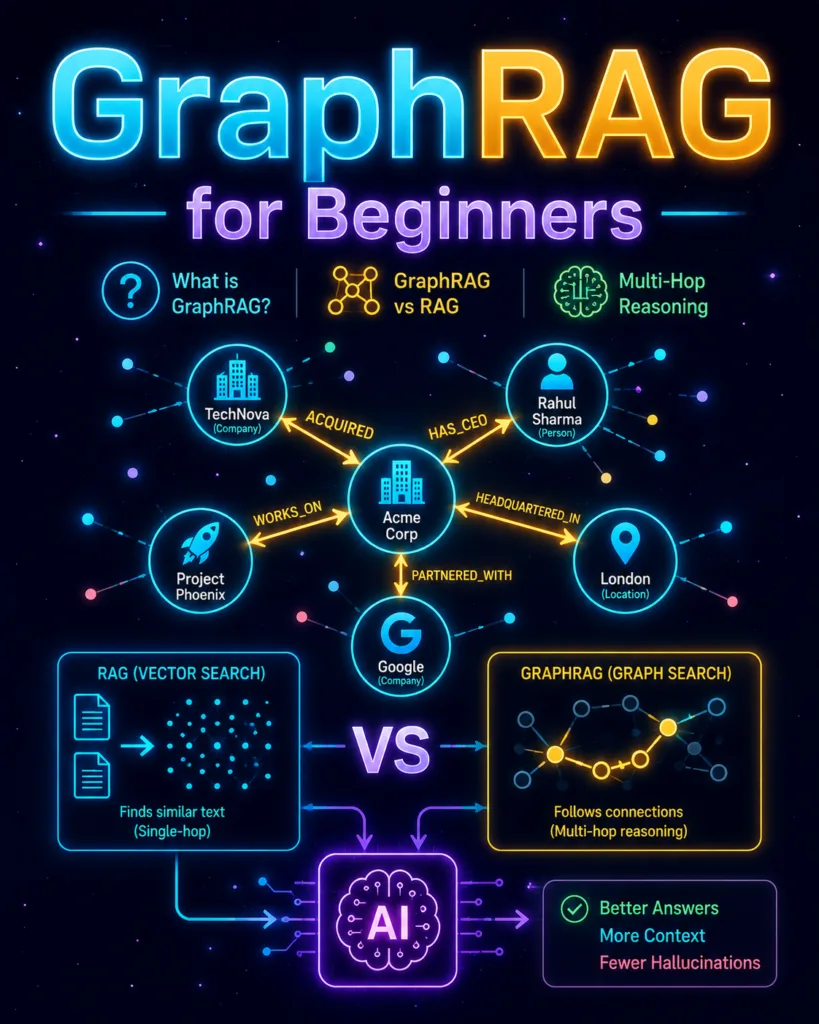
GraphRAG vs RAG: When to Use Multi-Hop Reasoning in AI?
Discover how GraphRAG works, when to use it over standard vector RAG, and how to build an AI that connects the dots. Perfect for beginners!
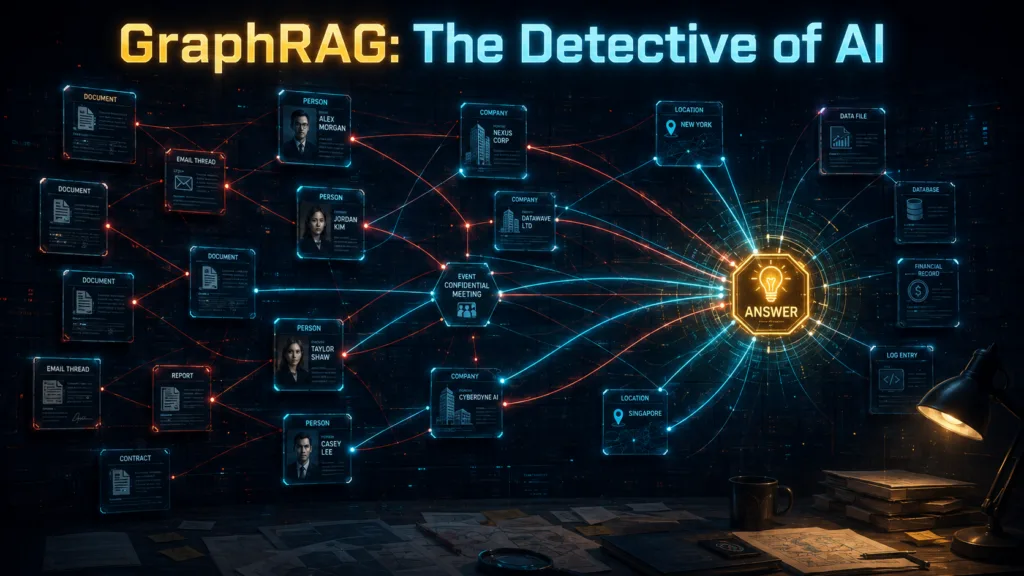
If you have ever watched a detective movie, you have probably seen the wall. Photos pinned everywhere. Newspaper clippings. Names. Phone numbers. Maps. A suspicious-looking person in the middle. And red string connecting everything.
The detective stares at the wall for a few seconds and suddenly says:
“Wait… these two cases are connected.”
That is one of the easiest ways to understand GraphRAG.
Traditional RAG is good at finding relevant information.
GraphRAG goes a step further. It tries to understand how pieces of information are connected.
That small difference changes the kind of questions an AI system can answer.
In this guide, we will understand GraphRAG from scratch without assuming that you already know graph databases, Cypher, knowledge graphs, ontology, or multi-hop reasoning.
Before GraphRAG, What Problem Are We Trying to Solve?
Suppose your company has 10,000 internal documents – Policies. Employee records. Reports. Contracts. Emails. Meeting notes.
Now you ask:
“How many annual leave days do permanent employees receive?”
A normal RAG system can handle this very well. It may retrieve a paragraph such as:
“All permanent employees are entitled to 24 days of annual paid leave.”
The LLM reads the retrieved text and answers:
24 days.
Perfect.
A normal RAG pipeline looks roughly like this:
User Question
      ↓
Vector Search
      ↓
Relevant Document Chunks
      ↓
LLM
      ↓
Answer
Now let us make the question more interesting:
“Which managers approved leave for employees working on Project Phoenix?”
The complete answer may not exist in one paragraph.
One document might say:
Rahul works on Project Phoenix.Another:
Rahul reports to Priya.And another:
Priya approved Rahul's leave request.The system now has to connect:
Rahul
   ↓ WORKS_ON
Project Phoenix

Rahul
   ↓ REPORTS_TO
Priya

Priya
   ↓ APPROVED
Rahul's Leave
We are no longer just retrieving similar text. We are connecting facts. And this is where GraphRAG enters the room wearing a trench coat.
1. What Exactly Is GraphRAG?
GraphRAG stands for Graph Retrieval-Augmented Generation.
If you want the absolute simplest mental model to carry with you, write this down:
Standard RAG finds the dots.
GraphRAG connects the dots.
Traditional RAG chops your documents into thousands of disconnected paragraphs. If an answer requires combining facts from three different paragraphs, traditional RAG often panics.
GraphRAG doesn’t just store isolated paragraphs. It reads your documents, extracts the entities, and builds a living map of how they interact.
Instead of searching blindly through text, the AI can traverse a map that looks like this:
Rahul ──WORKS_AT──> TechNova
TechNova ──ACQUIRED_BY──> Acme Corp
Rahul ──REPORTS_TO──> Priya
Priya ──WORKS_AT──> London Office
Now, the AI doesn’t just have a pile of shredded documents. It has a high-definition GPS map of your data.
The Biggest Myth in GraphRAG Before we go any further, we need to clear up a massive misunderstanding. Because of YouTube tutorials, beginners almost always think:
❌ GraphRAG = Neo4j
Please do not think this. GraphRAG is not a single piece of software. It is not a fixed tool you just install. Neo4j is simply one brand of database you can use to store a graph. Some systems use specialized graph databases, some combine standard vector databases with graph routing, and some just build custom graph communities in memory.
A much smarter, production-level mental model is this:
✅ GraphRAG = Graph-Structured Knowledge (The Map) + Retrieval (Finding the right spot on the map) + LLM Reasoning (The Detective explaining the map)
It is an architecture, not a product.
2. The GraphRAG Dictionary: Three Terms You Actually Need
Graph database terminology sounds intimidating. But here is a secret: most of it is just social networking terminology wearing a suit.
To understand GraphRAG, you only need to know three words.
1. Node: The Noun (The Pin on the Board) A node represents a distinct entity. It is the “Thing”. That entity can be a person, a company, a project, a city, a document, or even a concept. For example:
(Rahul)
(TechNova)
(Project Phoenix)
(London)
Think about LinkedIn. Your profile is a node. The company you work for is another node. The university you graduated from is another node. On our detective’s investigation board, the nodes are the photos and newspaper clippings pinned to the wall.
2. Edge: The Verb (The Red String) Having a board full of photos is useless if you don’t know how they connect. An edge connects two nodes and tells us exactly how they are related.
For example: (Rahul) ──WORKS_AT──> (TechNova)
Here:
Rahul is a node.
TechNova is another node.
WORKS_AT is the edge.
Another example: (TechNova) ──ACQUIRED_BY──> (Acme Corp)
Edges are the red strings. They are the secret sauce that turns a random collection of nouns into useful, actionable knowledge.
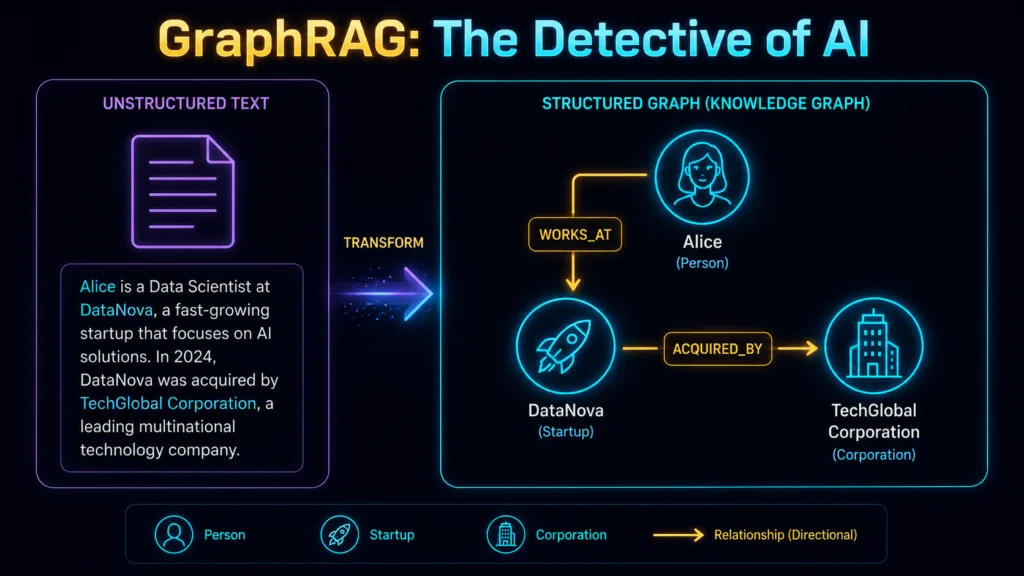
3. Triplet: The Complete Sentence (The Fact) When you combine two Nodes and an Edge, you get a Triplet. It always follows a simple logical structure:
[Subject] → [Relationship] → [Object]
For example: Rahul → WORKS_AT → TechNova Or: Acme Corp → ACQUIRED → TechNova
Triplets are the atomic units of a knowledge graph. They are complete facts. Now, imagine an AI extracting thousands or millions of these triplets from your boring PDFs and emails.
Instead of a flat, disconnected pile of files that looks like this:
📄 Document 1
📄 Document 2
📄 Document 3
You suddenly get a living, breathing map that looks like this:
                  ┌──WORKS_ON──> Project Phoenix
                  │
Rahul ────────────┼──WORKS_AT──> TechNova
                  │
                  └──REPORTS_TO──> Priya
                                         │
                                         └──WORKS_AT──> London
That is the beginning of a knowledge graph.
3. Why Do We Need GraphRAG?
Imagine our fictional company Acme Corp has 1,000 documents. Somewhere inside them are these facts.
Document 17
Acme Corp acquired TechNova in 2025.Document 384
Rahul Sharma is the CEO of TechNova.Document 721
Before joining TechNova, Rahul Sharma worked as a machine-learning engineer at Google.Now the user asks:
“What was the professional background of the CEO of the startup Acme acquired last year?”
Notice what is missing.
The user never said:
TechNova.
The user never said:
Rahul Sharma.
And the full answer is not sitting inside one convenient paragraph.
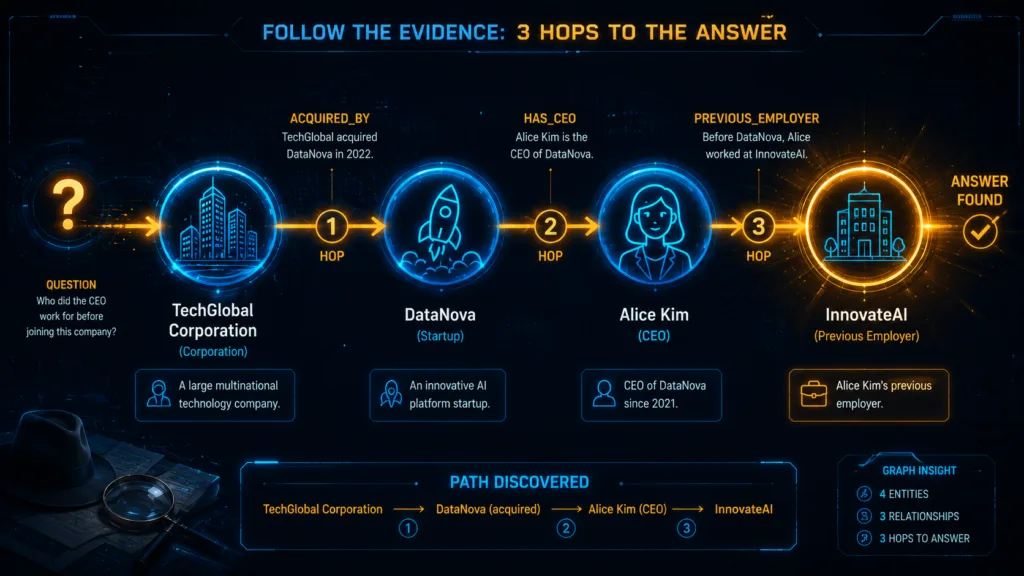
The system needs to discover this chain:
Acme Corp
    ↓ ACQUIRED
TechNova
    ↓ HAS_CEO
Rahul Sharma
    ↓ PREVIOUSLY_WORKED_AT
Google
This is called multi-hop reasoning or multi-hop retrieval.
Hop 1
Acme Corp → ACQUIRED → TechNovaHop 2
TechNova → HAS_CEO → Rahul SharmaHop 3
Rahul Sharma → PREVIOUSLY_WORKED_AT → GoogleOne fact leads to another. Then another. Eventually, the system reaches the answer. Exactly like the detective following the red string.
4. When Should You Actually Use GraphRAG?
This matters because GraphRAG looks exciting enough to make people use it where they should not.
Graphs look cool.
Graph databases look cool.
Multi-hop reasoning sounds cool.
And suddenly someone is building a knowledge graph to answer:
“What is our refund policy?”
Please do not.
GraphRAG becomes useful when relationships are an important part of the question.
For fraud analysis:
Person
   ↓ OWNS
Company A
   ↓ TRANSFERRED_MONEY_TO
Company B
   ↓ OWNED_BY
Person's Relative
For legal analysis:
Company
   ↓ SIGNED
Contract
   ↓ MODIFIED_BY
Amendment
   ↓ AFFECTS
Liability Clause
For supply-chain analysis:
Product
   ↓ USES
Component
   ↓ SUPPLIED_BY
Vendor
   ↓ OPERATES_IN
High-Risk Region
For cybersecurity:
Employee
   ↓ USED
Device
   ↓ CONNECTED_FROM
IP Address
   ↓ ASSOCIATED_WITH
Security Incident
GraphRAG is especially useful when users ask:
- Who is connected to whom?
- What depends on what?
- What chain of events led here?
- Which companies are indirectly connected?
- How are these two entities related?
- What happened before or after this event?
Those are graph-shaped questions.
5. How GraphRAG Works: From Document to Answer
A practical GraphRAG pipeline might look like this:
Documents
     ↓
Parsing & Chunking
     ↓
Entity Extraction
     ↓
Relationship Extraction
     ↓
Entity Resolution
     ↓
Knowledge Graph
     ↓
Indexes / Embeddings
     ↓
User Question
     ↓
Seed Entity Retrieval
     ↓
Graph Traversal
     ↓
Relevant Evidence
     ↓
LLM
     ↓
Final Answer
Different systems implement these stages differently, but this is a solid mental model.
Step 1: Ingestion
First, we provide the system with data.
That could include:
- PDFs,
- emails,
- contracts,
- reports,
- CRM records,
- web pages,
- support tickets,
- database rows.
Suppose a document contains:
Rahul Sharma joined TechNova as CEO in 2024.At this stage, it is still plain text.
Step 2: Entity Extraction
The system identifies important entities.
From:
Rahul Sharma joined TechNova as CEO in 2024.it might extract:
Rahul Sharma
Type: Person
and:
TechNova
Type: Company
Step 3: Relationship Extraction
Now the system extracts the relationship.
Conceptually:
Rahul Sharma
      ↓
    CEO_OF
      ↓
TechNova
Or, in graph notation:
(Rahul Sharma)-[:CEO_OF]->(TechNova)Now our raw text has become structured knowledge.
6. Entity Resolution: Where Things Start Getting Messy
Suppose your documents mention the exact same company across different pages, but written in slightly different ways:
- Microsoft
- Microsoft Corp.
- Microsoft Corporation
- MSFT
Should your graph contain four different company nodes? Probably not.
But a naive AI extraction pipeline doesn’t know that. It will read the text literally and accidentally create four isolated nodes:
- (Microsoft)
- (Microsoft Corp.)
- (Microsoft Corporation)
- (MSFT)
Imagine our detective pinning four different photos of the exact same suspect on the investigation board and treating them as four completely different people. The red strings connecting evidence to that suspect would be scattered across four different places. The detective would never see the full picture.
In GraphRAG, this destroys your retrieval accuracy. If a user asks, “Which employees work at Microsoft?”, the database might only check the (Microsoft) node and completely ignore all the employees linked to the (MSFT) node.
To fix this, GraphRAG systems require Entity Resolution (sometimes called Canonicalization). This is the process of acting like a smart detective—identifying aliases, removing duplicates, and merging them into one single “Master” node.
Conceptually, the pipeline groups them together:
Microsoft Corp. ──┐
Microsoft Corp ───┼──> Canonical Entity ──> (Microsoft)
MSFT ─────────────┘
This may sound like boring data cleaning. It is not.
In GraphRAG, data cleaning is the foundation of the entire system. A badly resolved graph guarantees that your AI will miss obvious connections, making all its multi-hop reasoning completely unreliable.
7. The Entry Node Problem
Now suppose your graph contains five million nodes.
The user asks:
“Which projects are connected to the company Rahul joined after leaving Google?”
Where should retrieval begin?
At Rahul?
Google?
The company?
The project?
Searching the entire graph blindly would be inefficient. So GraphRAG systems often need to identify a useful seed node or entry point first. One approach is semantic search.
Conceptually:
User Question
      ↓
Embedding Model
      ↓
Candidate Entities

Rahul Sharma       0.94
Rahul Verma        0.63
Google             0.59
TechNova           0.51

      ↓
Select likely seed
      ↓
Rahul Sharma
      ↓
Graph Traversal
This reveals an important lesson:
Vector search and GraphRAG are not enemies.
They often work together.
Vector search can help find where to enter the graph.
Graph traversal can then help explore the relationships around that point.
8. Where Do Graph Databases and Cypher Fit In?
GraphRAG does not automatically mean Neo4j.
A graph is a data structure. Neo4j is a graph database designed to store and query graph-shaped data efficiently. If you do use Neo4j, one of the main query languages you will encounter is Cypher.
Suppose the graph contains:
Rahul ──WORKS_AT──> AppleAnd we want to find people who work at Apple.
A Cypher query might look like this:
MATCH (p:Person)-[:WORKS_AT]->(c:Company {name: "Apple"})
RETURN p.name;
At first glance, this looks slightly hostile.
It becomes much easier when we break it apart.
(p:Person)
(p:Person)Parentheses represent a node.
Person is the node label.
p is simply a variable name.
You can read it as:
“Find a Person and call that person
p.”
[:WORKS_AT]
[:WORKS_AT]Square brackets represent the relationship.
->
The arrow represents direction:
Person → WORKS_AT → Company(c:Company {name: "Apple"})
This means:
“Find a Company node whose name is Apple.”
RETURN p.name
RETURN p.name;This tells Neo4j to return the matched person’s name.
So this:
MATCH (p:Person)-[:WORKS_AT]->(c:Company {name: "Apple"})
RETURN p.name;
basically means:
Find people connected to Apple through a
WORKS_ATrelationship and return their names.
Much less scary.
9. What is Cypher, and Can the LLM Generate Cypher Automatically?
Before we talk about the magic, we need to answer a basic question: What exactly is Cypher?
If you store data in a traditional spreadsheet or a relational database, you use a language called SQL to ask it questions. If you store data in a graph database (like Neo4j), you use a language called Cypher.
Cypher is a query language designed specifically for finding patterns in graphs. It is the language that allows you to tell the database which “red strings” you want to follow. But why is it so important for GraphRAG? Because your graph database holds all the evidence, but it only understands Cypher. The user, on the other hand, only speaks plain English. We need a translator.
The Magic of Text-to-Cypher :
So, does the user need to learn Cypher to use GraphRAG? No. This is where the LLM steps in. This pattern is called Text-to-Cypher.
The user asks a normal question: “Which employees work at Apple?”
Behind the scenes, the pipeline works like this:
Natural-Language Question
↓
LLM (Acting as translator)
↓
Generated Cypher Query
↓
Graph Database
↓
Raw Results
↓
LLM (Acting as speaker)
↓
Natural-Language Answer.
Instead of the user writing code, the LLM instantly generates:
MATCH (p:Person)-[:WORKS_AT]->(c:Company {name: "Apple"}) RETURN p.name;
The graph database executes this query, follows the relationships, and returns the raw matching records. Then, the LLM reads those records and converts them back into a polite, human-readable sentence for the user.
The Catch: The Detective Needs Supervision This Text-to-Cypher pipeline sounds like magic, but there is a major warning for production systems: Do not assume LLM-generated database queries are automatically safe or correct.
LLMs are prone to hallucination. If left unchecked, the model may:
Misunderstand your graph’s ontology (schema).
Invent a relationship that does not exist in the database.
Generate invalid Cypher syntax that causes an error.
Write a query that accidentally retrieves millions of nodes and crashes the system.
Completely misunderstand the user’s original intent.
For this reason, production GraphRAG systems never let the LLM touch the database blindly. They enforce strict validation, provide the LLM with the exact schema, use read-only database permissions, and set strict query limits.
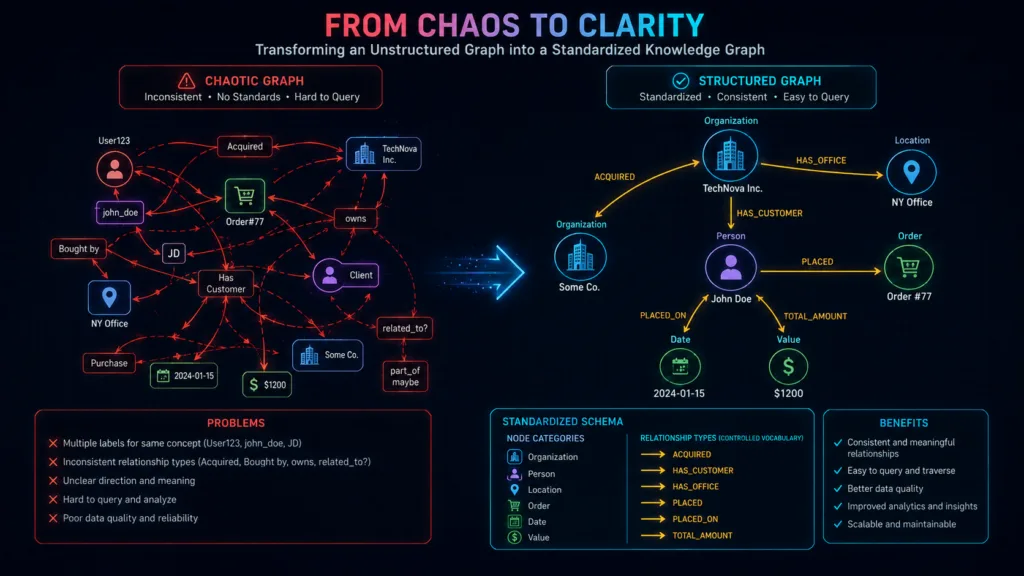
10. Ontology: The Graph’s Grammar Book
Another scary-looking word: Ontology.
Fortunately, the idea is incredibly simple. An ontology is just a controlled vocabulary—a strict rulebook for your graph. Suppose you tell your system it is only allowed to use these specific Node types:
- Person
- Company
- Project
- Location
And these specific Relationship types:
- WORKS_AT
- MANAGES
- LOCATED_IN
- ACQUIRED
Why is this strict rulebook necessary? Because LLMs are creative. If you let an LLM extract relationships freely without an ontology, it will read five different documents and extract:
- WORKS_AT
- EMPLOYED_BY
- EMPLOYEE_OF
- WORKING_FOR
- HAS_JOB_AT
To a human, these five relationships mean exactly the same thing. But to a graph database, they are five completely different paths.
Now imagine this chaos happening across millions of extracted facts. Your knowledge graph has just invented its own collection of dialects. Later, when you query the graph to find everyone who WORKS_AT TechNova, the database will completely miss the people labeled EMPLOYED_BY TechNova. The detective’s red string just broke.
A good ontology forces the LLM to pick from a predefined “dropdown menu” rather than inventing its own words. It keeps your graph clean, searchable, and predictable.
11. The Hidden Cost of GraphRAG
A standard vector RAG indexing pipeline might look like:
Documents
    ↓
Chunking
    ↓
Embeddings
    ↓
Vector Database
GraphRAG may involve much more:
Documents
    ↓
Parsing
    ↓
Chunking
    ↓
Entity Extraction
    ↓
Relationship Extraction
    ↓
Entity Resolution
    ↓
Graph Construction
    ↓
Embeddings
    ↓
Indexes
    ↓
Possibly Graph Clustering
    ↓
Possibly Community Summaries
That means more:
- model calls,
- processing time,
- engineering effort,
- storage,
- validation,
- maintenance.
This is why GraphRAG can be significantly more expensive to build and maintain than a simple vector RAG system.
So here is an important rule:
Do not build a knowledge graph because GraphRAG sounds advanced. Build one because your questions genuinely require relationships.
12. Do I Actually Need Neo4j?
No.
At least, not automatically.
For a tiny experiment, you can represent a graph directly in Python:
graph = {
    "Rahul": ["TechNova"],
    "TechNova": ["Acme Corp"]
}
You could also use:
- graph libraries,
- relational tables,
- document databases,
- vector stores with entity metadata,
- custom graph-like structures.
So why use a graph database?
Because once you need:
- deep relationship traversal,
- graph pattern matching,
- path queries,
- graph algorithms,
- large relationship-heavy datasets,
- graph visualization,
- repeated multi-hop queries,
a graph-native database becomes much more useful.
The better question is not:
“Do I need Neo4j for GraphRAG?”
It is:
“Does my application benefit enough from graph-native storage and traversal to justify adding a graph database?”
That is a much better architecture question.
13. What Happens When the LLM Extracts a Wrong Relationship?
Suppose a document says:
Rahul attended a conference organized by TechNova. But the extraction model makes a mistake. It incorrectly creates:
Rahul → WORKS_AT → TechNova The source never said that. Now imagine that false relationship enters your graph. Later, a user asks a question, and the query traverses that exact edge. The LLM receives that false relationship as evidence and confidently tells the user:
“Rahul works at TechNova.” One extraction mistake has now become reusable, structured misinformation. This is exactly why serious GraphRAG systems require Provenance.
What is Provenance? Provenance is just a fancy engineering word for “keeping the receipt” or “showing your work.” Think about our detective looking at the investigation board. If there is a red string connecting a suspect to a crime scene, another detective should be able to point at that string and ask: “Who put this string here, and based on what evidence?” If the answer is “I don’t know, it just appeared,” the case is thrown out.
In GraphRAG, provenance means every single edge must be able to answer: “Where exactly did you come from?”
Instead of storing only a naked relationship:
Rahul → WORKS_AT → TechNova A production system stores the relationship attached to its paper trail:
Relationship: WORKS_AT
Source Document: employee_directory.pdf
Page: 17
Exact Quote (Evidence): “Rahul Sharma joined TechNova…”
Extraction Confidence: 0.94 Now, when the AI gives an answer that looks suspicious, you don’t have to guess why it hallucinated. You can click on the relationship, trace it back to Page 17 of the specific PDF, look at the exact quote, and realize the extraction model made a mistake. Provenance turns a black-box AI into a fully auditable system.
14. Updating the Graph Is Harder Than It Looks
Suppose Monday your graph contains:
Rahul → CEO_OF → TechNovaThen on Tuesday, a new document says:
Rahul Sharma resigned from TechNova and joined NeuralWorks.What should happen?
Delete the old relationship?
Replace it?
Keep both?
Add dates?
What if another document still says Rahul is CEO?
Which source is newer?
Which source is more trustworthy?
Now you are no longer just doing retrieval.
You are doing knowledge management.
A better representation might preserve history:
Rahul
   │
   ├── CEO_OF → TechNova
   │            valid_until: 2026-08
   │
   └── JOINED → NeuralWorks
                valid_from: 2026-08
This introduces issues such as:
- incremental indexing,
- temporal relationships,
- versioning,
- conflict resolution,
- source priority,
- entity merging.
This is one of the biggest differences between a GraphRAG demo and a production GraphRAG system.
15. GraphRAG vs Standard RAG
| Feature | Standard Vector RAG | GraphRAG |
|---|---|---|
| Direct factual lookup | Excellent | Usually unnecessary overhead |
| Semantic document search | Excellent | Often combined with it |
| Relationship-heavy questions | Limited | Strong |
| Multi-hop questions | Can struggle | Strong |
| Setup complexity | Lower | Higher |
| Indexing cost | Usually lower | Potentially much higher |
| Explainable relationship paths | Limited | Strong |
| Entity management | Minimal | Very important |
| Updating data | Relatively simple | More complex |
| Best use | Find relevant information | Connect relevant information |
GraphRAG is not “better RAG.”
It is better for a different type of problem.
16. A More Realistic Production Architecture
A production system is usually more complicated than:
User
 ↓
Graph
 ↓
LLM
A more realistic architecture might look like:
                    USER QUESTION
                          │
                          ↓
                  Query Understanding
                          │
             ┌────────────┴────────────┐
             ↓                         ↓
      Vector Retrieval          Entity Retrieval
             │                         │
             └────────────┬────────────┘
                          ↓
                    Seed Entities
                          │
                          ↓
                   Graph Traversal
                          │
                          ↓
             Relevant Nodes + Edges
                          │
                          ↓
                  Source Evidence
                          │
                          ↓
                    Context Builder
                          │
                          ↓
                         LLM
                          │
                          ↓
                 Grounded Response
This is why hybrid architectures are so useful.
Vector search finds semantically relevant information.
Entity retrieval helps identify graph entry points.
Graph traversal connects facts.
Source documents provide evidence.
The LLM turns the retrieved context into a readable answer.
You do not always need:
Vector OR GraphOften the better answer is:
Vector + Graph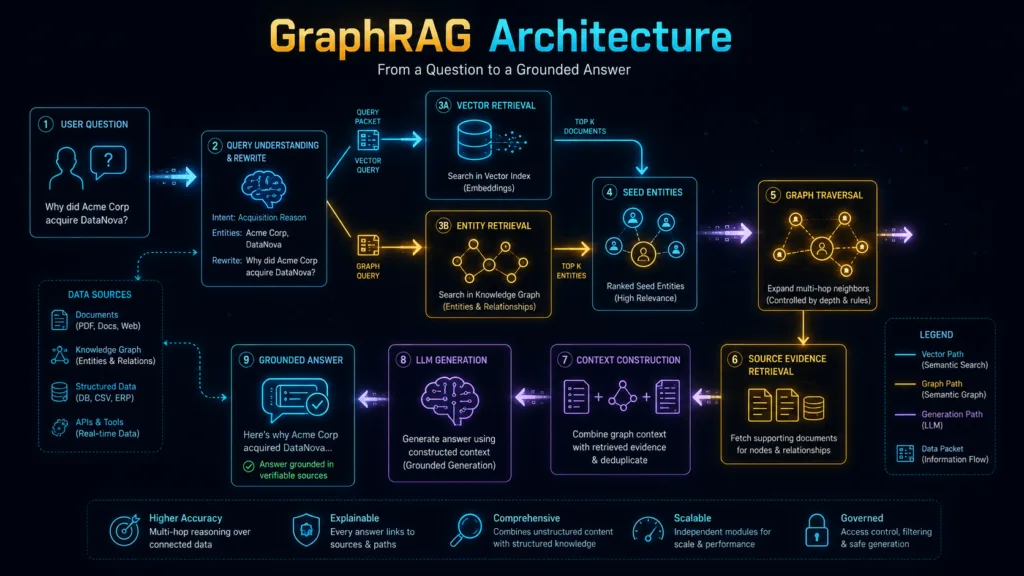
17. The Questions Beginners Ask Most Often
“When should I use GraphRAG instead of vector RAG?”
Use standard RAG when the answer can usually be retrieved directly from relevant text.
Example:
“What is our leave policy?”
Consider GraphRAG when answering requires connecting multiple entities or relationships.
Example:
“Which managers approved leave for employees working on Project Phoenix?”
⭐ Rule of Thumb: RAG or GraphRAG?
Need to find a fact?
Start with Vector RAG.Need to connect several facts or relationships?
Consider GraphRAG.Need both semantic search and relationship traversal?
Use a Hybrid Vector RAG + GraphRAG architecture.Do not choose GraphRAG because it sounds more advanced. Choose it when the shape of the question is actually a graph.
“Why does my GraphRAG system still hallucinate?”
Because graphs do not magically make LLMs truthful.
Your graph itself may contain:
- incorrect entities,
- false relationships,
- duplicated nodes,
- missing edges,
- outdated data,
- badly resolved identities.
GraphRAG can retrieve structured evidence.
But:
Bad graph in → convincing nonsense out.
Validation still matters.
“What is the best GraphRAG framework?”
There is no universal winner.
You will commonly see GraphRAG systems built around:
- Microsoft GraphRAG,
- Neo4j GraphRAG,
- LlamaIndex graph tooling,
- LangChain or LangGraph orchestration,
- custom graph + vector retrieval pipelines.
The framework is less important than understanding the architecture.
Frameworks change. The problem stays the same.
18. Should You Use GraphRAG for Your Project?
Before adding another database and turning a simple RAG application into a small distributed system, ask yourself:
Question 1
Are important answers spread across multiple documents?
Question 2
Do relationships between entities matter?
Question 3
Do users ask multi-hop questions?
Question 4
Would paths like this be useful?
Person → Company → Project → Vendor → LocationQuestion 5
Do you need to explain how two facts are connected?
If most answers are no, start with standard RAG.
Seriously.
You may save yourself weeks of unnecessary complexity.
If several answers are yes, GraphRAG becomes worth exploring.
The Mental Model You Should Remember
Forget the terminology for a moment.
Imagine two investigators.
Investigator #1: Standard RAG
You ask:
“Find everything mentioning TechNova.”
The investigator searches the archive and returns seven relevant documents.
Useful.
Fast.
Efficient.
Investigator #2: GraphRAG
You ask:
“How is TechNova connected to Project Phoenix?”
The investigator looks at the evidence board:
TechNova
   ↓ OWNED_BY
Acme Corp
   ↓ RUNS
Project Phoenix
   ↓ USES_VENDOR
DataCore
Then says:
“Here is the connection.”
That is the difference.
Standard RAG retrieves the evidence.
GraphRAG helps trace the relationships inside the evidence.
And in many real systems, the best solution is to let both investigators work together.
Final Takeaway
GraphRAG sounds intimidating because it arrives surrounded by terms such as:
Knowledge Graphs.
Cypher.
Entity Resolution.
Graph Traversal.
Ontology.
Multi-hop Reasoning.
But underneath all that terminology is one simple idea:
Some questions cannot be answered by finding one relevant paragraph. You have to connect multiple pieces of information.
Nodes represent the things. Edges represent the relationships. Retrieval finds the useful part of the graph. Graph traversal follows the connections. The LLM converts that evidence into a useful answer. So, the next time you see a complicated GraphRAG architecture diagram, picture the detective wall.
Photos are the nodes.
Red strings are the edges.
Following several strings is multi-hop traversal.
Finding the right photo to begin with is seed-node retrieval.
And the detective explaining what all those connections mean?
That is your LLM.
GraphRAG is not magic. It is just a much more organized way of connecting the dots.

