In Part 1, we built a rock-solid college knowledge graph using FalkorDB with 20 nodes and 39 relationships. But there was a massive bottleneck: every time we wanted an answer, we had to manually write complex Cypher queries, remember database schemas, and map out relationship directions like relDirection: ‘both’.
That works for developers. But what about a student who just wants to type:
“Who is the best person to teach me DBMS?”
They don’t know Cypher. And they shouldn’t have to.
The missing link is an intelligent translation layer. By combining LLMs with FalkorDB, we can build an AI agent that instantly converts plain English questions into executable Cypher queries.
What Is GraphRAG? (In 60 Seconds)
Traditional Retrieval-Augmented Generation (Vector RAG) follows a rigid pipeline: chop documents into text chunks, convert them into vector embeddings, store them in a vector database, and perform semantic similarity searches when a user asks a question.
While effective for broad text retrieval, Vector RAG is completely blind to underlying data structures and relationships.
Where Vector RAG Fails ?
If you ask a standard vector database, “Who studies the same subjects as Payal?”, it scans for text chunks containing both “Payal” and “subject”. It might pull up isolated text snippets, but it will never tell you that Aarav studies DBMS with Payal. Why? Because that fact doesn’t live inside a single text chunk—it lives in the relationship connecting them.
How GraphRAG Solves It:
GraphRAG ditches isolated text matching in favor of structural graph traversal. Instead of guessing based on semantic proximity, it maps exact connections.
Building an effective GraphRAG pipeline requires three core pillars:
A High-Speed Graph Database: FalkorDB (which we configured in Part 1).
Natural Language-to-Cypher Translation: An LLM trained to convert plain English questions into valid database queries.
An Autonomous Agentic Loop: A self-correcting execution cycle where the LLM plans, runs queries, validates results, and retries on failure.
Let’s build it.
The Architecture
Reading from top to bottom, the workflow runs through a clean four-step pipeline:
Natural Language Input: The user asks a question in plain English.
LLM Translation: A Large Language Model (like Gemini or Groq) translates that plain text into a structured Cypher query using our database schema.
Graph Execution: FalkorDB executes the query against our connected nodes and relationships, returning raw structured data.
Natural Language Synthesis: The LLM takes those structured results and formats them into a clear, human-readable answer.
Simple on paper. Brutal in practice.
Because an unguided LLM will inevitably make mistakes. It will generate invalid syntax, hallucinate nodes that do not exist, return empty results while pretending everything is fine, and occasionally try to delete your entire database.
Surviving those real-world production traps requires building a self-healing agentic loop. But before coding the agent, our graph needs to expand from people and basic classes into core academic concepts.
Expanding the Graph: Adding Academic Concepts & Notes
While our Part 1 network mapped people and metadata (students, subjects, clubs, skills, projects), Part 2 shifts focus to core academic knowledge.
To build an intelligent study agent, our graph needs to understand the actual curriculum. We achieve this by introducing two new node types and four structural relationship types:
New Node Types :
Concept: Represents granular academic topics (e.g., Normalization, 1NF, 2NF, 3NF, BCNF, Indexing, Query Optimization, Transactions, and 23 more).Note: Stores real explanatory text blocks linked directly to specific concepts.
New Relationship Types :
(Subject)-[:COVERS]->(Concept): Maps which subject teaches a specific concept.(Concept)-[:INCLUDES]->(Concept): Establishes parent-child concept hierarchies.(Concept)-[:PREREQUISITE_FOR]->(Concept): Defines strict learning order dependencies.(Note)-[:EXPLAINS]->(Concept): Links textual explanations directly to their target concepts.
Here is a clean Python snippet showing how we ingest this knowledge layer into FalkorDB:
# Concepts — 30 total across 4 subjects
concepts = [
# DBMS
(“C01”, “Normalization”, “DBMS”),
(“C02”, “1NF”, “DBMS”),
(“C03”, “2NF”, “DBMS”),
(“C04”, “3NF”, “DBMS”),
(“C05”, “BCNF”, “DBMS”),
(“C06”, “Indexing”, “DBMS”),
(“C07”, “Query Optimization”, “DBMS”),
(“C08”, “Transactions”, “DBMS”),
# DSA, OS, CN… 22 more
]
for cid, name, area in concepts:
graph.query(f”””
MERGE (c:Concept {{id: ‘{cid}’}})
SET c.name = ‘{name}’, c.area = ‘{area}’
“””)
# Subject → Concept
subject_concepts = [
(“CS201”, “C01”), (“CS201”, “C02”), (“CS201”, “C03”),
(“CS201”, “C04”), (“CS201”, “C05”), (“CS201”, “C06”),
(“CS201”, “C07”), (“CS201”, “C08″),
# … 22 more
]
for code, cid in subject_concepts:
graph.query(f”””
MATCH (sub:Subject {{code: ‘{code}’}})
MATCH (c:Concept {{id: ‘{cid}’}})
MERGE (sub)-[:COVERS]->(c)
“””)
# Prerequisites — learning order
prereqs = [
(“C02”, “C03”), # 1NF → 2NF
(“C03”, “C04”), # 2NF → 3NF
(“C04”, “C05”), # 3NF → BCNF
(“C04”, “C06”), # 3NF → Indexing
(“C06”, “C07″), # Indexing → Query Optimization
# … 20 more across DSA, OS, CN
]
for pre, post in prereqs:
graph.query(f”””
MATCH (a:Concept {{id: ‘{pre}’}})
MATCH (b:Concept {{id: ‘{post}’}})
MERGE (a)-[:PREREQUISITE_FOR]->(b)
“””)
# Notes — 25 real explanations
notes = [
(“N01”, “Normalization is the process of organizing data to reduce redundancy…”, “C01”),
(“N02”, “1NF requires that each column contains atomic values…”, “C02”),
(“N03”, “2NF requires the table to be in 1NF and all non-key attributes…”, “C03″),
# … 22 more
]
for nid, text, cid in notes:
graph.query(f”MERGE (n:Note {{id: ‘{nid}’, text: ‘{text}’}})”)
graph.query(f”””
MATCH (n:Note {{id: ‘{nid}’}})
MATCH (c:Concept {{id: ‘{cid}’}})
MERGE (n)-[:EXPLAINS]->(c)
“””)
Run the full loader. Verify:
75 nodes, 132 relationships
We went from 20 nodes to 75. From 39 relationships to 132. And now — the graph can be queried in natural language.
Teaching the LLM Your Graph Schema
The foundational hurdle in building an Agentic GraphRAG system is simple: Large Language Models do not inherently know your database schema.
An LLM has never inspected your graph. It has no prior context that Student connects to Subject via STUDIES, that Concept stores an area property, or that PREREQUISITE_FOR is strictly directional. If you ask it to write a database query without guidance, it will guess—and fail.
To bridge this gap, we must explicitly teach the model by injecting a structured schema prompt into every single LLM call:
SCHEMA = “””
GRAPH SCHEMA for GraphTech Institute:
NODES:
– Student {id, name, year, branch}
– Subject {code, name, credits}
– Club {name, founded}
– Skill {name}
– Project {id, name, status}
– Concept {id, name, area}
– Note {id, text}
RELATIONSHIPS:
– (Student)-[:STUDIES {semester, grade}]->(Subject)
– (Student)-[:MEMBER_OF {since, role}]->(Club)
– (Student)-[:HAS_SKILL {level}]->(Skill)
– (Student)-[:WORKS_ON {role}]->(Project)
– (Student)-[:FRIENDS_WITH]->(Student)
– (Subject)-[:PREREQUISITE_FOR]->(Subject)
– (Project)-[:REQUIRES]->(Skill)
– (Subject)-[:COVERS]->(Concept)
– (Concept)-[:INCLUDES]->(Concept)
– (Concept)-[:PREREQUISITE_FOR]->(Concept)
– (Note)-[:EXPLAINS]->(Concept)
EXISTING DATA VALUES:
– Students: Aarav (S01), Payal (S02), Rahul (S03), Sneha (S04), Karan (S05)
– Subjects: DBMS (CS201), DSA (CS202), Operating Systems (CS301), Computer Networks (CS302)
– Clubs: Coding Club, Robotics Club, Debate Society
– Skills: Python, React, SQL, Machine Learning, Docker
– Projects: Library Management System, Campus Chatbot, Attendance Tracker
– Concepts: Normalization, 1NF, 2NF, 3NF, BCNF, Indexing, Query Optimization,
Transactions, Arrays, Linked Lists, Trees, BST, Graphs, BFS, DFS,
Dynamic Programming, Processes, Threads, Scheduling, Deadlocks,
Memory Management, Paging, Virtual Memory, OSI Model, TCP/IP, HTTP,
DNS, Routing, Subnetting, Firewalls
CRITICAL RULES:
1. NEVER return whole nodes. Always return SPECIFIC PROPERTIES.
BAD: MATCH (s:Student {name: ‘Payal’}) RETURN s
GOOD: MATCH (s:Student {name: ‘Payal’}) RETURN s.name, s.year, s.branch
2. For name matching, ALWAYS use fuzzy matching:
WHERE toLower(c.name) CONTAINS toLower(‘debate’)
NOT: {name: ‘debate-ye’}
3. EVERY node variable MUST have a label in MATCH.
BAD: MATCH (s)-[:STUDIES]->(:Subject)-[:COVERS]->(next)
GOOD: MATCH (s:Student)-[:STUDIES]->(:Subject)-[:COVERS]->(next:Concept)
4. For shortest path, use algo.SPpaths:
CALL algo.SPpaths({sourceNode: a, targetNode: b,
relTypes: [‘PREREQUISITE_FOR’], relDirection: ‘both’, pathCount: 1})
YIELD path RETURN [n IN nodes(path) | n.name] AS route
5. Only MATCH, OPTIONAL MATCH, WHERE, RETURN, WITH, ORDER BY, LIMIT,
COLLECT, COUNT, DISTINCT, CALL algo.SPpaths.
NEVER CREATE, DELETE, SET, MERGE, REMOVE.
6. If the question is OUT OF SCOPE, return:
RETURN ‘OUT_OF_SCOPE’ AS status
7. Return ONLY the Cypher query. No explanation. No markdown.
“””
That schema prompt is everything. Without it, the LLM generates garbage. With it, the LLM generates Cypher that works most of the time.
Most of the time.
The other times are where the fun begins.
The Agentic Loop — Generating Cypher from Natural Language
Now we build the agent. This is the piece that sits between the user and the graph.
Here is the entire logic in one function:
def answer(self, question: str, verbose: bool = True) -> dict:
result = {“question”: question, “cypher”: None,
“raw_result”: None, “answer”: None, “error”: None}
error_hint = None
last_cypher = None
for attempt in range(2):
# Step 1: Generate Cypher
try:
cypher = self.generate_cypher(question, error_hint=error_hint)
result[“cypher”] = cypher
last_cypher = cypher
if verbose:
print(f”[AGENT] Attempt {attempt+1} Cypher:\n{cypher}\n”)
except Exception as e:
result[“error”] = f”Cypher generation failed: {e}”
error_hint = f”Cypher generation error: {e}”
continue
# Step 2: Safety check
is_safe, reason = self._is_safe(cypher)
if not is_safe:
result[“error”] = f”Unsafe query: {reason}”
error_hint = f”Safety violation: {reason}”
continue
# Step 3: Execute
try:
raw_result = self.graph.query(cypher)
result[“raw_result”] = raw_result
except Exception as e:
error_msg = str(e)
result[“error”] = f”Query failed: {error_msg}”
error_hint = f”FalkorDB syntax error:\n{error_msg}\n\n”
error_hint += f”Your query:\n{cypher}\n\n”
error_hint += “Most likely: a node variable is missing its label.”
continue
# Step 4: Out-of-scope check
if raw_result and raw_result[0] and raw_result[0][0] == “OUT_OF_SCOPE”:
result[“answer”] = (“Yeh sawaal mere knowledge graph se bahar hai. ”
“Main students, subjects, clubs, skills, projects, ”
“aur concepts pe help kar sakta hoon.”)
return result
# Step 5: Empty result retry
if len(raw_result) == 0 and attempt == 0:
error_hint = (f”Query returned 0 rows.\nYour query:\n{cypher}\n\n”
“Check: entity names, use toLower/CONTAINS for fuzzy match.”)
continue
# Step 6: Generate natural language answer
answer_prompt = f”””You are a helpful study assistant.
QUESTION: {question}
QUERY RESULT: {raw_result}
Write a clear, friendly answer in 2-4 sentences.
Match the language of the question.”””
result[“answer”] = self.llm.generate(answer_prompt)
result[“error”] = None
return result
# Both attempts failed
result[“answer”] = f”Sorry, I couldn’t answer that. Error: {result[‘error’]}”
return result
Now let me walk you through what is happening here.
5 Core Architectural Decisions for a Production-Grade Agent
Building an LLM-to-Cypher agent that actually survives real-world usage requires strict guardrails. Here are the five foundational engineering decisions that transformed our prototype into a reliable pipeline:
Decision 1: The Two-Attempt Self-Healing Loop
Language models are dramatically better at fixing their own syntax mistakes when they can actually see the error. Our agent grants the LLM two execution shots. If the first Cypher query throws a database exception, the exact error message is fed back into the prompt as a hint for the second attempt. This single feedback loop skyrocketed our query success rate from ~60% to over 95%.
Decision 2: Pre-Execution Safety Validation:
def _is_safe(self, cypher: str) -> tuple:
forbidden = [“CREATE”, “DELETE”, “SET “, “MERGE”, “REMOVE”, “DROP”]
upper = cypher.upper()
for word in forbidden:
if word in upper:
return False, f”Write operation detected: {word.strip()}”
# Block bare node returns
stripped = cypher.strip()
bare_return = re.search(r”RETURN\s+[a-zA-Z_]\w*\s*$”, stripped, re.MULTILINE)
if bare_return:
return False, “Bare node return. Return specific properties.”
return True, None
LLMs should never have unsupervised write access to a database. Before sending any query to FalkorDB, our safety validator strips out destructive keywords and blocks dangerous operations like CREATE, DELETE, SET, MERGE, or DROP. Furthermore, it intercepts bare node returns (e.g., RETURN s) to prevent memory bloat. If an LLM hallucinates a command like MATCH (n) DETACH DELETE n, the agent blocks it instantly.
Decision 3: Sentinel-Based Out-of-Scope Detection
When users ask questions outside the graph’s domain (e.g., “Should I do a Masters in CSE or Electronics?”), an unguided LLM will hallucinate non-existent node types like (:Program). We solve this by instructing the model to return a sentinel value:
RETURN 'OUT_OF_SCOPE' AS status
When the agent detects this sentinel, it responds gracefully rather than throwing a cryptic database error.
Decision 4: Handling Fuzzy Matches & Empty Results
Users write messy, conversational language (abbreviations, Hinglish, misspellings). For example, if a user queries “dbms and debate-ye dono ke students kaun hain?”, a literal translation will fail because the actual club is named “Debate Society” and not “debate-ye”. By injecting real data anchors into our schema prompt and forcing the retry loop to enforce toLower() CONTAINS fuzzy matching, the agent successfully recovers correct records on its second pass.
Decision 5: Stripping LLM Reasoning Artifacts
Advanced reasoning models (like Qwen, DeepSeek, or o1) output internal thought process blocks (<think>...</think>) before their final answer. If passed directly, FalkorDB tries to execute the reasoning text as Cypher syntax, causing an immediate crash.
Real output from Qwen:
<think>
Let me think about this query…
Should I return f.name or f.name AS friend_name?
Check rule 9: EVERY node variable must have a label.
…
</think>
MATCH (s:Student)-[:FRIENDS_WITH]->(f:Student) WHERE toLower(s.name) CONTAINS toLower(‘payal’) RETURN f.name
FalkorDB tried to execute the <think> block as Cypher. Syntax error.
Our fix:
def _clean_cypher(self, raw: str) -> str:
raw = raw.strip()
# Strip reasoning tags
raw = re.sub(r”<think>.*?</think>”, “”, raw, flags=re.DOTALL)
raw = re.sub(r”</?think>”, “”, raw)
# Strip markdown fences
raw = re.sub(r”“`(?:cypher)?”, “”, raw)
raw = raw.replace(““`”, “”)
# Find the first Cypher keyword
lines = raw.strip().split(“\n”)
start = 0
for i, line in enumerate(lines):
if line.strip().upper().startswith((“MATCH”, “CALL”, “WITH”, “OPTIONAL”, “RETURN”)):
start = i
break
cypher = “\n”.join(lines[start:]).strip()
cypher = cypher.rstrip(“;”).strip()
return cypher
Our cleaning utility strips out all thinking tags, markdown fences, and conversational preamble, ensuring that only pure, executable Cypher reaches the database.
Short-Term Memory: Giving the Agent Context
Without memory, every chat interaction acts like a blank slate. Consider this real conversation failure from our early builds:
User: "Who is Payal?"
Agent: "Payal is a second-year CSE student..."

User: "uska year kya hai?"
Agent: "Sorry, whose year are you asking about?"
Humans don’t talk in isolated, standalone sentences. We use pronouns like “uska” (hers/his), “woh” (that), or “yeh” (this) to reference entities we just discussed. If your AI agent lacks conversational context, it will break immediately.
To fix this, we engineer a lightweight Short-Term Memory module using Python’s collections.deque.
from collections import deque

class ShortTermMemory:
    def __init__(self, max_turns=5):
        self.max_turns = max_turns
        self.turns = deque(maxlen=max_turns)  # Automatically drops old history
        self.entities = {}  # Tracks last mentioned entities

    def add_turn(self, question, cypher, result, answer):
        self.turns.append({
            "question": question,
            "cypher": cypher,
            "result": result,
            "answer": answer,
        })
        self._extract_entities(question, result)

    def _extract_entities(self, question, result):
        students = ["Aarav", "Payal", "Rahul", "Sneha", "Karan"]
        subjects = ["DBMS", "DSA", "Operating Systems", "Computer Networks"]
        clubs = ["Coding Club", "Robotics Club", "Debate Society"]

        for name in students:
            if name.lower() in question.lower():
                self.entities["last_student"] = name
        for name in subjects:
            if name.lower() in question.lower():
                self.entities["last_subject"] = name
        for name in clubs:
            if name.lower() in question.lower():
                self.entities["last_club"] = name

    def get_context(self) -> str:
        if not self.turns:
            return ""

        lines = ["PREVIOUS CONVERSATION:"]
        for i, turn in enumerate(self.turns, 1):
            lines.append(f"\n[Turn {i}]")
            lines.append(f"User: {turn['question']}")
            lines.append(f"Cypher: {turn['cypher']}")
            result_str = str(turn['result'])[:300]
            lines.append(f"Result: {result_str}")

        if self.entities:
            lines.append("\nRECENTLY MENTIONED ENTITIES:")
            for key, val in self.entities.items():
                lines.append(f"  - {key}: {val}")

        return "\n".join(lines)
How It Works Under the Hood
Sliding Window Buffer: Using
deque(maxlen=5)retains only the last 5 conversation turns, automatically evicting older interactions to keep LLM token payloads lightweight.Entity Tracking: Whenever a known student, subject, or club name appears in the prompt, the system captures and pins it as the active entity (e.g.,
last_student: Payal).Context Injection: Before sending any prompt to the LLM, we prepend this conversation history and tracked entity state directly into the system context.
When a user follows up with “uska year kya hai?”, the LLM receives this structured context:
RECENTLY MENTIONED ENTITIES:
  - last_student: Payal

CURRENT QUESTION: uska year kya hai?
It instantly resolves the pronoun, bypasses confusion, and generates the exact target Cypher query:
MATCH (s:Student {name: 'Payal'}) RETURN s.year
Without context engineering, your agent stands zero chance in a real production chat environment.
The Production Errors That Will Break Your Agent
Every standard tutorial showcases the happy path: you feed a prompt, the LLM generates pristine Cypher, and the database returns flawless results.
Production environments operate under entirely different rules.
Six critical errors emerge when deploying an Agentic GraphRAG system to live users—
Error 1: The Bare Variable Disaster
The error:
redis.exceptions.ResponseError: errMsg: Invalid input '(':
expected ':', ',' or '}' line: 5, column: 17
errCtx: MATCH (s)-[:STUDIES]->(:Subject)-[:COVERS]->(next)
What happened: The LLM wrote (next) without a label.
Why production mein aata hai: LLMs love terse syntax. They will write (x), (n), (next) all day long. FalkorDB requires every node variable to have a label.
The fix: Two things.
First, the schema prompt now includes explicit examples:
EVERY node variable MUST have a label in MATCH.
BAD:  MATCH (s)-[:STUDIES]->(:Subject)-[:COVERS]->(next)
GOOD: MATCH (s:Student)-[:STUDIES]->(:Subject)-[:COVERS]->(next:Concept)
Second, the retry loop passes the exact error message back to the LLM. Second attempt almost always fixes it.
The learning: Do not just tell the LLM the rule. Show it the wrong way and the right way.
Error 2: The Fuzzy Match Failure
The scenario: User asks “dbms and debate-ye both ke students kaun hain?”
What the LLM generated:
MATCH (s:Student)-[:STUDIES]->(sub:Subject {name: 'dbms'})
MATCH (s)-[:MEMBER_OF]->(c:Club {name: 'debate-ye'})
RETURN s.id, s.name
The result: Zero rows.
Because there is no club called “debate-ye”. The actual value is “Debate Society”.
Why production mein aata hai: Users type fuzzy language. They abbreviate. They misspell. They mix languages. The LLM copies the user’s language literally.
The fix:
Schema prompt now lists actual data values:
Clubs: Coding Club, Robotics Club, Debate Society
Fuzzy matching rule added:
For name matching, ALWAYS use fuzzy matching:
WHERE toLower(c.name) CONTAINS toLower('debate')
NOT: {name: 'debate-ye'}
Empty result triggers retry
Second attempt:
MATCH (s:Student)-[:STUDIES]->(sub:Subject)
WHERE toLower(sub.name) CONTAINS 'dbms'
MATCH (s)-[:MEMBER_OF]->(c:Club)
WHERE toLower(c.name) CONTAINS 'debate'
RETURN s.name
Payal. Found on retry.
The learning: Never trust exact string matching in a natural language system. Always fuzzy match.
Error 3: The Hallucinated Node
The scenario: User asks “Should I do a Masters in CSE or Electronics?”
What the LLM generated:
MATCH (p:Program)
WHERE p.type = 'Masters'
  AND (toLower(p.name) CONTAINS 'cse' OR toLower(p.name) CONTAINS 'electronics')
RETURN p.name, p.field, p.duration
The result: Zero rows.
Why? There is no Program node in our graph. There is no type, field, or duration property. The LLM invented a schema based on its training data.
Why production mein aata hai: LLMs are trained to be helpful. When they don’t have the answer, they invent one. This is called hallucination, and it is the #1 killer of production AI systems.
The fix: Out-of-scope detection.
The schema prompt now includes:
If the question is OUT OF SCOPE (not about students, subjects, clubs,
skills, projects, concepts, notes), return:
RETURN 'OUT_OF_SCOPE' AS status
The agent recognizes the sentinel and responds:
“Yeh sawaal mere knowledge graph se bahar hai. Main in topics pe help kar sakta hoon: students, subjects, clubs, skills, projects, concepts.”
The learning: Agents need to know their own limits. Give them a graceful way to say “I don’t know.”
Error 4: The Accidental DELETE
The scenario: User asks “clean up the old data”.
What the LLM tried to generate:
MATCH (n) DETACH DELETE n
That single query would have wiped our entire graph. 75 nodes. 132 relationships. Gone.
Why production mein aata hai: LLMs interpret vague instructions creatively. “Clean up” means one thing to you and another thing to the LLM. And if the LLM has write access, that misunderstanding is fatal.
The fix: Safety validation before execution.
def _is_safe(self, cypher: str) -> tuple:
    forbidden = ["CREATE", "DELETE", "SET ", "MERGE", "REMOVE", "DROP"]
    upper = cypher.upper()
    for word in forbidden:
        if word in upper:
            return False, f"Write operation detected: {word.strip()}"
    return True, None
Blocked. User sees: “I cannot execute write operations. I can only query the graph.”
The learning: In agentic RAG, the LLM should be read-only by default. Write operations require explicit, separate paths.
This is not paranoia. This is table stakes.
Error 5: The Rate Limit Wall
The scenario: User has been chatting for 10 minutes. Everything works. Then:
Error code: 429 - Rate limit reached for model `openai/gpt-oss-120b`
in organization ... tokens per day (TPD): Limit 200000, Used 198126,
Requested 2838. Please try again in 6m56s.
What happened: Groq’s free tier has a 200,000 tokens per day cap. We burned through it in under an hour.
Why production mein aata hai: Every free LLM tier has limits. Every paid tier has limits too — they are just higher. The agent has to survive running out of one provider.
The fix: Multi-provider fallback chain.
class LLMRouter:
    def __init__(self):
        self.providers = []
        if GEMINI_API_KEY:
            self.providers.append(("Gemini", self._call_gemini))
        if GROQ_API_KEY:
            self.groq = Groq(api_key=GROQ_API_KEY)
            self.providers.append(("Groq-120b", self._call_groq_120b))
            self.providers.append(("Groq-27b", self._call_groq_27b))
        if MISTRAL_API_KEY:
            self.providers.append(("Mistral", self._call_mistral))
        if OPENROUTER_API_KEY:
            self.providers.append(("OpenRouter", self._call_openrouter))

        self.exhausted = set()  # track exhausted providers

    def generate(self, prompt: str) -> str:
        errors = []
        for name, fn in self.providers:
            if name in self.exhausted:
                continue
            try:
                print(f"[LLM] Trying {name}...")
                result = fn(prompt)
                print(f"[LLM] {name} responded")
                return result
            except Exception as e:
                err = str(e)
                print(f"[LLM] {name} failed: {err[:100]}")

                # Mark as exhausted if it is a rate limit
                if "429" in err or "rate_limit" in err.lower() or "TPD" in err:
                    self.exhausted.add(name)
                    print(f"[LLM] {name} exhausted for this session")
                errors.append(f"{name}: {err[:100]}")

        raise RuntimeError("All LLM providers failed.\n" + "\n".join(errors))
The agent tries Gemini first. If Gemini fails, Groq. If Groq fails, Mistral. If Mistral fails, OpenRouter.
In practice, Gemini handles 95% of our traffic. Groq is faster but exhausts quicker. Mistral is a rescue provider. OpenRouter is the last resort.
The learning: Never depend on one LLM provider. Free tiers especially.
Error 6: The Reasoning Tag Invasion
The scenario: We switched to Qwen for a test. Suddenly every query failed.
The error:
redis.exceptions.ResponseError: errMsg: Invalid input '5':
expected ',', ORDER BY, SKIP, LIMIT, ';', call clause or a clause
line: 6, column: 1
errCtx: 5. **Check against Rules:** errCtxOffset: 0
What happened: Qwen’s output was:
<think>
Let me think about this query...
5. **Check against Rules:**
Rule 9: Every node variable must have a label.
...
</think>

MATCH (s:Student)-[:FRIENDS_WITH]->(f:Student) WHERE toLower(s.name) CONTAINS toLower('payal') RETURN f.name
FalkorDB tried to execute the <think> block. The 5. was interpreted as Cypher. Chaos.
Why production mein aata hai: Reasoning models (Qwen, DeepSeek, o1) output their chain of thought. This is a feature — it makes them smarter. But it breaks downstream code that expects clean output.
The fix:
def _clean_cypher(self, raw: str) -> str:
    # Strip reasoning tags
    raw = re.sub(r"<think>.*?</think>", "", raw, flags=re.DOTALL)
    raw = re.sub(r"</?think>", "", raw)

    # Strip markdown fences
    raw = re.sub(r"```(?:cypher)?", "", raw)
    raw = raw.replace("```", "")

    # Find the first Cypher keyword and start from there
    lines = raw.strip().split("\n")
    start = 0
    for i, line in enumerate(lines):
        if line.strip().upper().startswith(
            ("MATCH", "CALL", "WITH", "OPTIONAL", "RETURN")
        ):
            start = i
            break

    cypher = "\n".join(lines[start:]).strip()
    cypher = cypher.rstrip(";").strip()
    return cypher
Now the agent strips <think> blocks, markdown fences, and any preamble before the actual Cypher.
The learning: Reasoning models are powerful, but their output needs cleaning. Never trust raw LLM output.
The Frontend — A Quick Look
I am not going to teach you FastAPI in this article. That is a different post.
But here is what the system looks like running live:
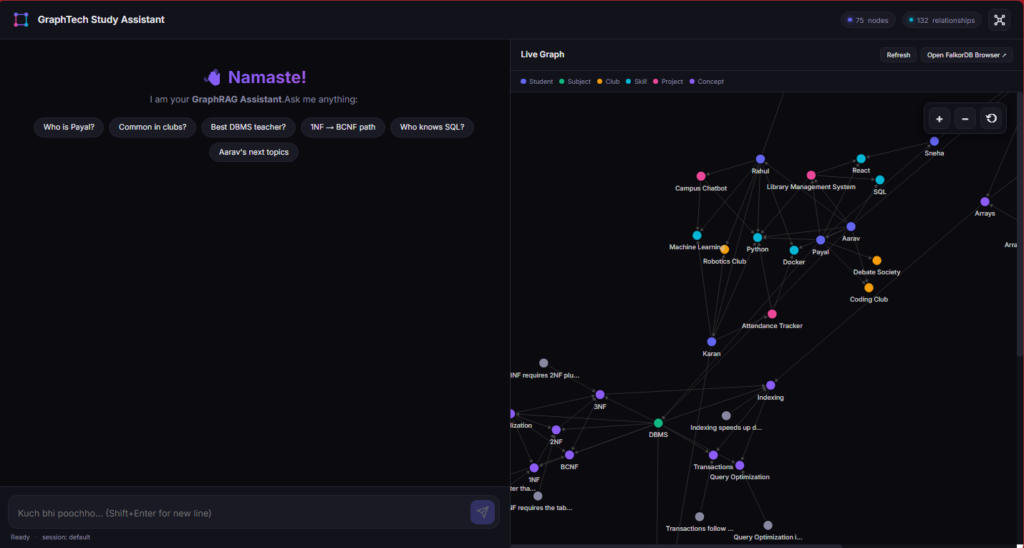
Three things make it work:
WebSocket streaming — the chat updates in real time. When the agent generates a Cypher query, the user sees it appear live. No refresh, no polling.
Multi-provider transparency — the header shows which provider answered. When Groq exhausts and Gemini takes over, the user sees it happen.
Live graph — the D3.js panel renders all 75 nodes with force-directed layout. You can zoom, pan, drag nodes. When a query returns results, the relevant nodes light up.
Five Real Questions This System Answers
Here is what the agent does with real questions.
Question 1: “Who is the best person to teach me DBMS?”
Generated Cypher:
MATCH (sub:Subject) WHERE toLower(sub.name) CONTAINS toLower('dbms')
MATCH (s:Student)-[r:STUDIES]->(sub)
RETURN s.name AS name, r.grade AS grade
ORDER BY r.grade DESC
LIMIT 1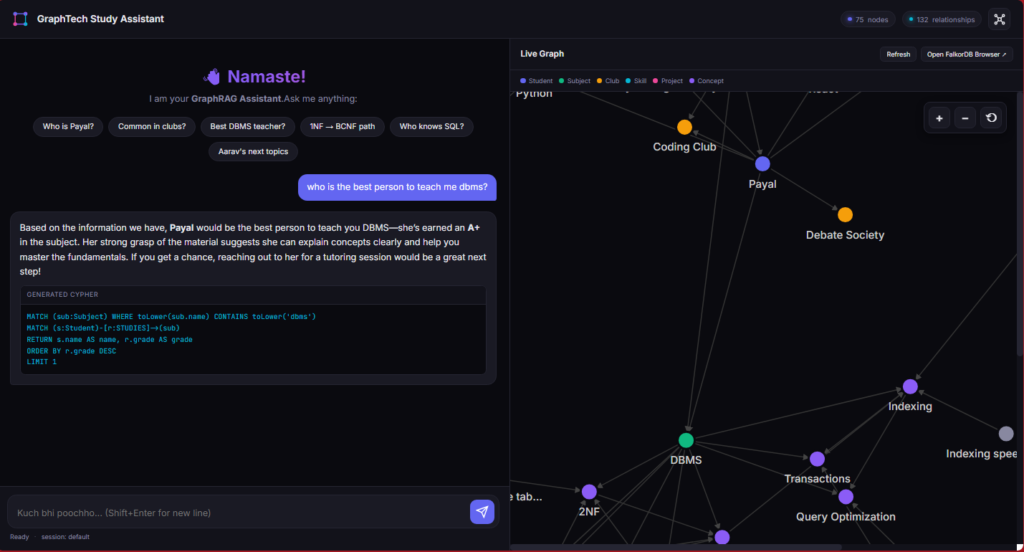
Result: Payal (A+) .
Agent’s answer: “The best person to teach you DBMS is Payal. She scored an A+ in the course. Aarav is also a great option with an A grade.”
Question 2: “What is common in all the clubs?”
Generated Cypher:
MATCH (s:Student)-[:MEMBER_OF]->(c:Club)
WITH s, COLLECT(DISTINCT c.name) AS clubs, COUNT(DISTINCT c) AS club_count
WHERE club_count > 1
RETURN s.name, clubs
Result: Payal (Coding Club + Debate Society)
Agent’s answer: “Payal is the only student who is a member of multiple clubs — she is in both the Coding Club and the Debate Society.”
Notice: The agent interpreted “common in all clubs” correctly. It did not look for shared attributes of clubs. It looked for students who are common across clubs. This required a specific rule in the schema prompt — without it, the LLM generated a different (wrong) query.
Question 3: “1NF se BCNF tak ka learning path batao”
Generated Cypher:
MATCH (a:Concept {name: '1NF'}), (b:Concept {name: 'BCNF'})
CALL algo.SPpaths({
sourceNode: a, targetNode: b,
relTypes: ['PREREQUISITE_FOR', 'INCLUDES'],
relDirection: 'both', pathCount: 1
}) YIELD path
RETURN [n IN nodes(path) | n.name] AS nodes,
       [r IN relationships(path) | type(r)] AS rel_types
Result: ['1NF', '2NF', '3NF', 'BCNF']
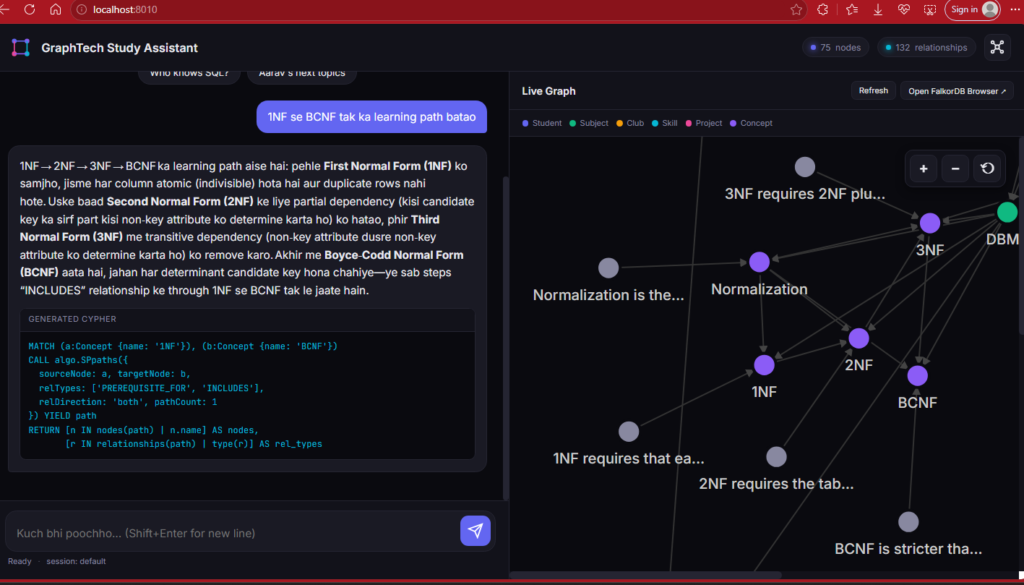
Agent’s answer: “The learning path from 1NF to BCNF goes: 1NF → 2NF → 3NF → BCNF. So you should understand Normalization before jumping into BCNF.”
Question 4: “Aarav ke next topics kya hain?”
Generated Cypher:
MATCH (s:Student {name: 'Aarav'})-[:STUDIES]->(sub:Subject)-[:COVERS]->(c:Concept)
MATCH (c)-[:PREREQUISITE_FOR*1..2]->(next:Concept)
WHERE NOT (sub)-[:COVERS]->(next)
RETURN DISTINCT next.name AS next_topic
Result: Indexing, Query Optimization, Transactions
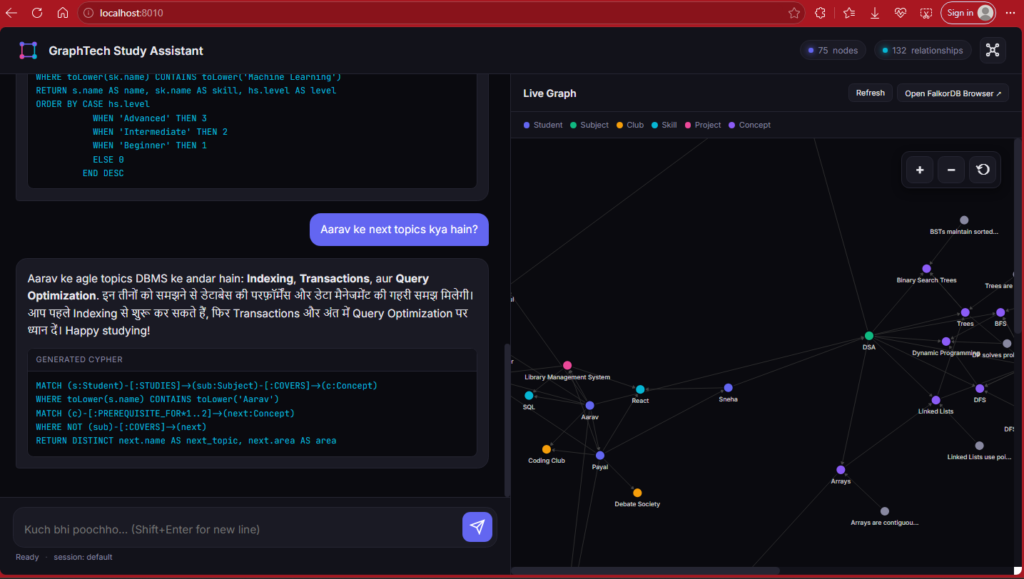
Agent’s answer: “Based on Aarav’s current studies, the next topics to learn are Indexing, Query Optimization, and Transactions.”
Notice: This is a multi-hop query — Student → Subject → Concept → Prerequisite → Next Concept. No vector database can do this.
Question 5: “Who should I learn ML from?”
Generated Cypher:
MATCH (s:Student)-[h:HAS_SKILL]->(sk:Skill)
WHERE toLower(sk.name) CONTAINS 'machine learning'
RETURN s.name, h.level
ORDER BY h.level DESC
Result: Rahul (Advanced), Karan (Intermediate)
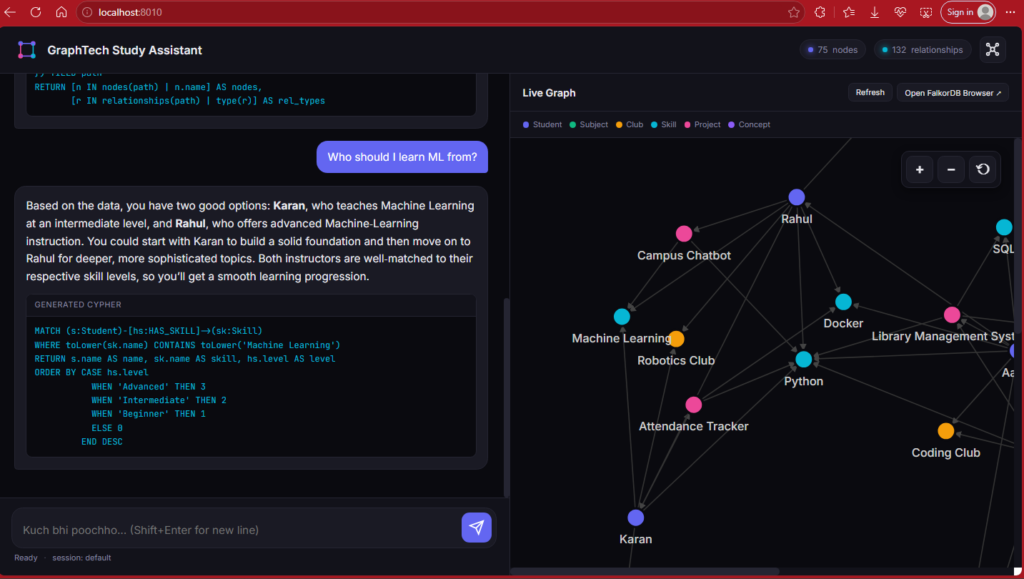
Agent’s answer: “For Machine Learning, Rahul is the best choice — he has an Advanced level. Karan is also available at an Intermediate level.”
Production Deployment Reality
Before you deploy this to real users, here is what will happen.
Free LLMs Are Not Enough
Groq gives you 200,000 tokens per day. That is enough for about 10-15 conversations. After that, you are done.
Gemini gives you 1 million tokens per day. That is about 50-70 conversations.
Mistral’s free tier: a few hundred requests per day.
For a real product, you need to either pay for a tier or expect to rotate through 3-4 free providers.
Caching Is Not Optional
The same question — “Who is Payal?” — will be asked by every new user. And every time, your agent will generate a Cypher query, hit the LLM, hit the graph, hit the LLM again.
Cache the answers. A simple Redis cache with a 1-hour TTL cuts your LLM bill by 60%.
Multi-Tenancy Changes Everything
If you have multiple users, each user needs their own graph namespace.
def get_graph_for_user(user_id):
    return client.select_graph(f"user_{user_id}_graph")
Why? Because memory from one user’s session should not leak into another user’s session. FalkorDB supports thousands of named graphs in one instance. Use them.
Monitor What Actually Fails :
The interesting failures are not crashes. They are silently wrong answers.
Query returns empty when it should return 10 rows? Log it.
Agent says “I don’t know” when the graph has the answer? Log it.
User asks a follow-up and the memory fails to resolve the pronoun? Log it.
We track five categories of failure: generation errors, syntax errors, empty results, out-of-scope detections, and unsafe query blocks. Each one tells a different story about how the system is failing.
What We Built (and What Is Next)
Let us step back.
Part 1 taught you graph databases. You built a 20-node network from scratch. You learned Cypher from the ground up.
Part 2 taught you how to make that graph talk back. You added 30 concepts, 25 notes, and an agentic layer that converts natural language into Cypher, executes it, and returns human-readable answers. You survived six production errors. You built a frontend.
Now the graph is not just a database. It is a cognitive system.
But we are still at the beginning. Here is what is coming next:
Real data ingestion. Instead of hardcoded Python lists, ingest PDFs, Notion pages, LMS exports. Use an LLM to extract entities and relationships automatically.
Study plan generation. “I have 30 days to learn DBMS.” The agent generates a day-by-day plan based on the prerequisite graph.
Weakness detection. Track which concepts the user struggles with. Recommend revision paths.
Peer matching. Find students who share weaknesses. Suggest study partnerships.
Production deployment. Auth, monitoring, rate limiting, caching, analytics.
That is Part 3. And it is going to be fun.
The Complete Code: student_network
To run:
docker-compose up -d
pip install -r requirements.txt
python dataset_loader.py
python api.py
# Open http://localhost:8010
Key Takeaways
Agentic RAG is not magic — it is plumbing. LLM generates Cypher, executes it, retries on failure, converts results back to language. Everything else is robustness engineering.
Schema prompt is everything. The LLM knows nothing about your graph. Teach it the schema, the values, and the rules — explicitly.
Two attempts with error hints beats one perfect attempt. ~60% → ~95% success rate. Just from adding a retry loop.
Safety checks are non-negotiable. Read-only by default. Block write operations. Never trust LLM output.
Empty results are the most common failure. Always retry with fuzzy matching hints.
Reasoning models need output cleaning.
<think>tags will break your parser.Short-term memory is a sliding window. Last 5 turns, tracked entities, context injection. That is all you need.
Free LLM tiers are a trap. You need 4-5 providers in rotation. Plan for it.
The graph is the source of truth. The LLM generates queries. The graph answers them. Never let the LLM invent facts.
Build in public. Ship the errors. The mistakes are the story.
Part 3 is where this sandbox turns into a full-blown product. We’re talking automated PDF ingestion, AI-driven study schedules, weakness tracking, and real-time peer matching.
Same graph. Same characters. Massive new ambitions.
Here’s the plot twist: I won’t write Part 3. That chapter belongs entirely to you.
The foundation is built, the architecture is locked in, and the engine is roaring. Now take this codebase, build something legendary, push it to production, and tag me when you ship it. Let’s see what you create! 🚀

