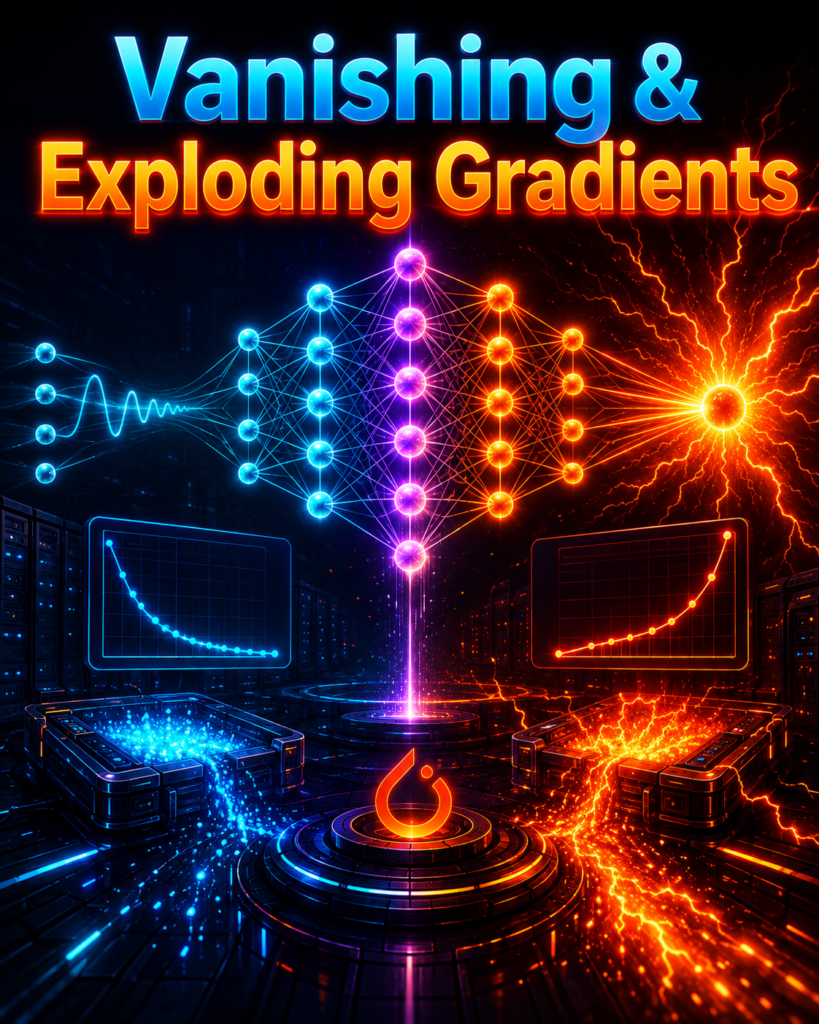
– Vanishing & Exploding Gradients in PyTorch: Detection, Debugging, and Fixes.
Loss stuck at 2.3? Suddenly turning into NaN? Learn how to detect and fix vanishing/exploding gradients using PyTorch hooks, gradient clipping, and proper initialization. Includes real code and interview prep.
Table of Contents
Skip 3 Hours of Confusion
One interactive simulation > Ten textbook chapters. See it, tweak it, own it.
The 30-Second Picture in Your Head
What’s Actually Happening?
Why This Happens (And Why It’s Not Your Fault)
How to Know If You’re Screwed
PyTorch Hooks: Your Secret Weapon
The Right Way to Clip Gradients
Fix It Before It Breaks: Initialization & BatchNorm
Residual Connections: The Gradient Superhighway
Real-World: Fixing a Dead 100-Layer Network
Freshers’ Interview Cheat Sheet
Visual Guide: When to Use What
FAQs
The Bottom Line
1. The 30-Second Picture in Your Head
Picture this.
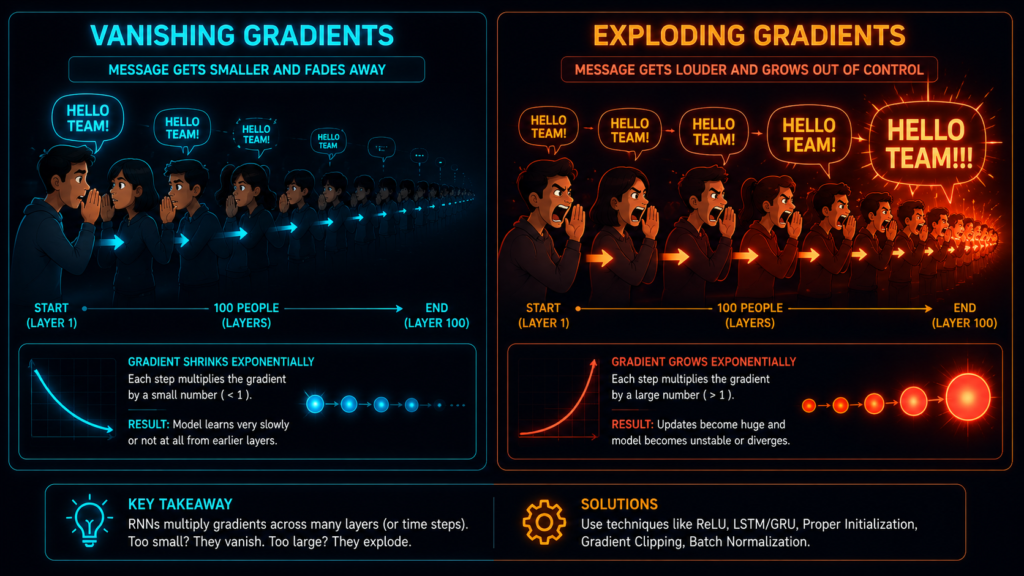
You’re in a stadium. 100 people are standing in a line, passing a message from the front to the back.
Person 1 whispers to Person 2: “The answer is 42.”
Person 2 whispers to Person 3: “The answer is… 42?”
By the time the message reaches Person 100, it’s become: “The answer is… something about cats?”
That’s vanishing gradients.
Now imagine the opposite. Person 1 shouts: “THE ANSWER IS 42!” Person 2 shouts louder: “THE ANSWER IS 42!!” By Person 100, it’s a deafening roar that blows out everyone’s eardrums.
That’s exploding gradients.
Your neural network is that stadium. Gradients are the message. And if they vanish or explode, your model learns nothing or crashes entirely.
2. What’s Actually Happening?
You’ve built your deep neural network. You’re excited. You hit “run training.” And then…
Scenario 1: The Dead Model:
Epoch 1: Loss = 2.3456
Epoch 2: Loss = 2.3455
Epoch 3: Loss = 2.3456
Epoch 4: Loss = 2.3455
...
Epoch 50: Loss = 2.3456
Nothing changes. Your model is learning absolutely nothing.
Why? The gradients reaching the early layers are so small they might as well be zero. Weights don’t update. Model stays frozen.
Scenario 2: The Exploding Model
Epoch 1: Loss = 2.3453
Epoch 2: Loss = 2.8912
Epoch 3: Loss = 5.2345
Epoch 4: Loss = 12.4567
Epoch 5: Loss = NaN
Everything was fine, and then suddenly — boom — your loss prints NaN. Your model just exploded.
Why? Gradients got so large they overflowed floating-point precision. Weights blew up. Training crashed.
Scenario 3: The Zombie Model
Your model predicts the exact same class for every single input. Dead neurons everywhere. The model is “alive” but brain-dead.
Why? ReLU neurons got stuck at zero. Once a neuron outputs zero, its gradient is zero forever. It never recovers.
3. Why This Happens (And Why It’s Not Your Fault)
Let’s crack open the math. Don’t worry – I’ll keep it painless.
The Chain Rule from Hell :
Let’s crack open the math. To understand why your PyTorch model is dying, we need to look at backpropagation and how the chain rule in neural networks actually works.
When you call loss.backward(), PyTorch calculates the gradients by working backward from the output to the input. It multiplies the derivatives of every single layer together.
Mathematically, the gradient for the weights in your very first layer ($w_1$) looks like this:
Every single fraction in this equation represents a derivative at a specific layer. And here is where the vanishing gradient problem starts: every multiplication is an opportunity for things to go wrong.
Why Gradients Vanish ?
If you’re using Sigmoid, its derivative is at most 0.25.
Sigmoid derivative ≤ 0.25
Now imagine 100 layers. Each layer multiplies gradients by ≤ 0.25 and weights that are often < 1.
0.25 × 0.9 × 0.25 × 0.9 × 0.25 × 0.9 × ... = effectively zero
After 100 layers, your gradient is basically 0.0000000000000000000000000000000000000000001.
Net result: The early layers learn nothing. They’re stuck forever.
Why Gradients Explode ?
If your initial weights are too large, each layer multiplies gradients by numbers > 1.
2.5 × 2.5 × 2.5 × 2.5 × ... = huge numbers → NaN
Net result: Weights blow up, loss becomes NaN, training crashes.
The Simple Comparison
| Problem | What Happens | What You See |
|---|---|---|
| Vanishing | Gradients become ~0 | Loss is stuck |
| Exploding | Gradients become infinite | Loss becomes NaN |
4. How to Know If You’re Screwed :
Before you fix anything, you need to know if you have a problem. Here’s how.
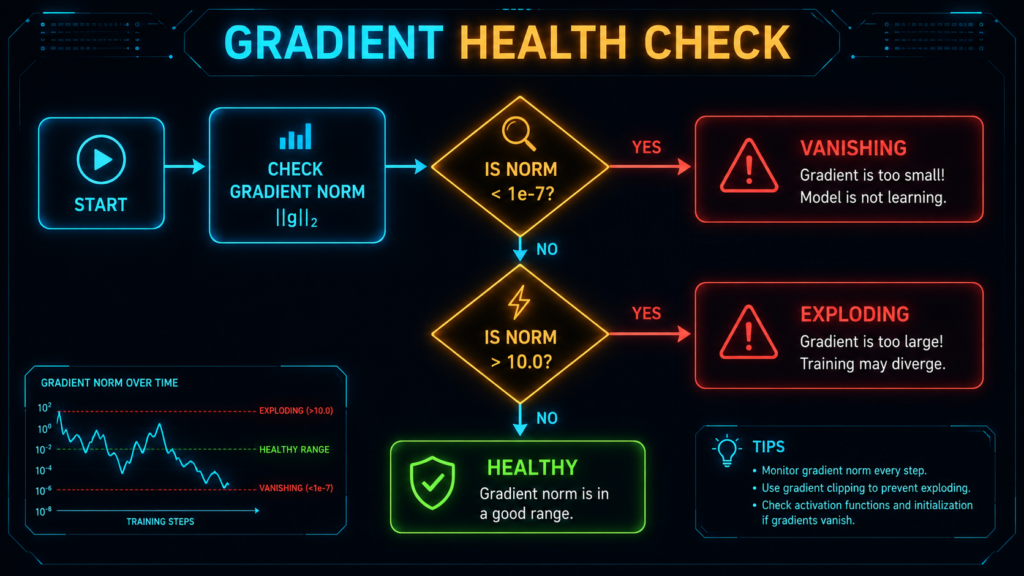
Method 1: The Gradient Norm Check
This is the single most useful thing you can add to your training loop.
def check_gradient_health(model):
    """Are your gradients healthy or dying?"""
    total_norm = 0.0
    for p in model.parameters():
        if p.grad is not None:
            total_norm += p.grad.data.norm(2).item() ** 2
    total_norm = total_norm ** 0.5

    if total_norm < 1e-7:
        print(f"💀 GRADIENT VANISHING! Norm: {total_norm:.2e}")
        return "vanishing"
    elif total_norm > 10.0:
        print(f"💥 GRADIENT EXPLODING! Norm: {total_norm:.2f}")
        return "exploding"
    else:
        print(f"✅ Gradients healthy. Norm: {total_norm:.4f}")
        return "healthy"
But wait – those thresholds (1e-7 and 10.0) aren’t universal.
For a tiny model, 1e-5 might be fine. For a massive Transformer, 1e-8 might be normal. The context matters. Start with these, but adjust based on what you see.
Method 2: Inspect Individual Layers
Sometimes the problem is in one specific layer.
def inspect_layer_gradients(model):
    """Find which layer is causing problems"""
    for name, param in model.named_parameters():
        if param.requires_grad and param.grad is not None:
            grad = param.grad
            grad_norm = grad.norm().item()

            # Color code based on health
            if grad_norm < 1e-7:
                status = "🔴 VANISHING"
            elif grad_norm > 10.0:
                status = "🔥 EXPLODING"
            elif torch.isnan(grad).any():
                status = "💀 NaN DETECTED"
            else:
                status = "✅ OK"

            print(f"{name:40s} | Norm: {grad_norm:.4e} | {status}")
Method 3: Detect NaN the Instant It Happens
def catch_nan_gradient(model):
    """Find exactly which layer produces the first NaN"""
    def hook_fn(name):
        def hook(grad):
            if torch.isnan(grad).any():
                print(f"🚨 FIRST NaN FOUND in {name} at step {step_counter}")
                print(f"   Gradient stats: min={grad.min():.2e}, max={grad.max():.2e}")
                return grad
        return hook

    # Register hooks on all parameters
    for name, param in model.named_parameters():
        if param.requires_grad:
            param.register_hook(hook_fn(name))
Method 4: Check If Weights Are Actually Changing
def track_weight_changes(model, epoch):
    """Track how much weights change between epochs"""
    if not hasattr(track_weight_changes, 'previous'):
        track_weight_changes.previous = {}
        for name, param in model.named_parameters():
            if param.requires_grad:
                track_weight_changes.previous[name] = param.data.clone()
        return

    for name, param in model.named_parameters():
        if param.requires_grad:
            diff = (param.data - track_weight_changes.previous[name]).norm().item()
            if diff < 1e-7:
                print(f"⚠️ {name}: NOT LEARNING! Change: {diff:.2e}")
            track_weight_changes.previous[name] = param.data.clone()
5. PyTorch Hooks: Your Secret Weapon
Hooks are the most powerful debugging tool you have. Most people don’t use them. That’s their loss.
What’s a Hook?
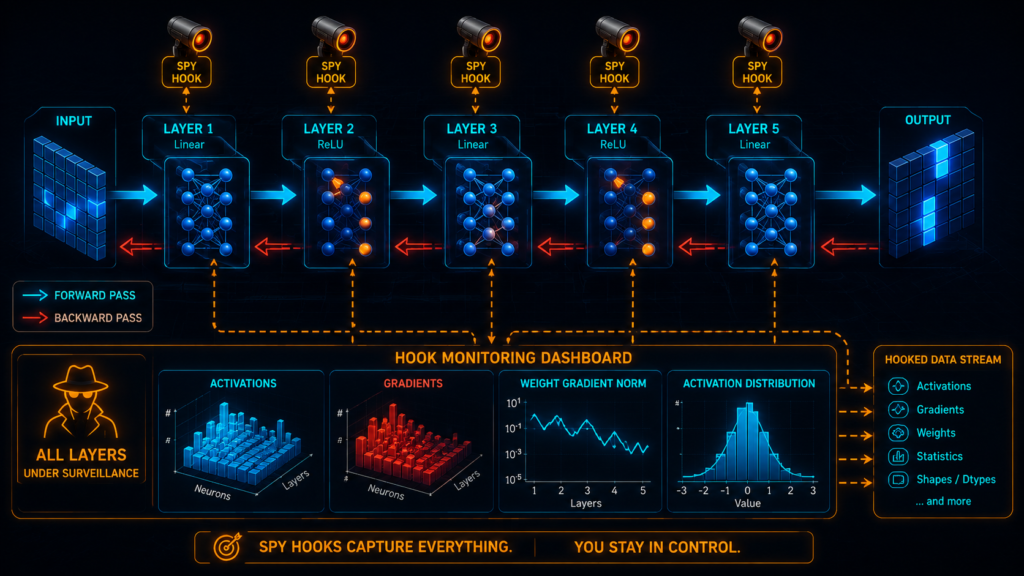
Think of a hook like a spy camera you install in your neural network. It watches what happens during the forward pass (forward hooks) or backward pass (backward hooks) and reports back to you.
You can also use hooks to change what happens – like secretly editing the message before it reaches the next person in the stadium.
The Simplest Hook (Print Gradients)
import torch
import torch.nn as nn

# Create a simple tensor
x = torch.ones(5, requires_grad=True)
y = 2 * x
y.retain_grad()  # Important: save gradient for non-leaf tensors

# Register a hook that prints the gradient
def print_gradient(grad):
    print(f"Gradient: {grad}")
    return grad

y.register_hook(print_gradient)

loss = y.mean()
loss.backward()  # This triggers the hook
# Output: Gradient: tensor([0.2000, 0.2000, ...])
The Hook That Actually Saves Your Model
class GradientWatchdog:
    """A watchdog that detects and logs gradient problems"""

    def __init__(self, model, log_file=None):
        self.model = model
        self.log_file = log_file
        self.handles = []
        self.grad_history = {}

        # Install spies on every layer
        for name, param in model.named_parameters():
            if param.requires_grad:
                handle = param.register_hook(
                    lambda grad, n=name: self.watch_gradient(grad, n)
                )
                self.handles.append(handle)
                self.grad_history[name] = {'norms': [], 'means': []}

    def watch_gradient(self, grad, name):
        """Watch and log gradient statistics"""
        grad_norm = grad.norm().item()
        grad_mean = grad.mean().item()

        self.grad_history[name]['norms'].append(grad_norm)
        self.grad_history[name]['means'].append(grad_mean)

        # Raise alerts
        if grad_norm < 1e-7:
            print(f"🚨 {name}: VANISHING! Norm: {grad_norm:.2e}")
        elif grad_norm > 100:
            print(f"💥 {name}: EXPLODING! Norm: {grad_norm:.2f}")
        elif torch.isnan(grad).any():
            print(f"💀 {name}: NaN DETECTED!")

    def get_summary(self):
        """Get a summary of gradient health"""
        summary = {}
        for name, history in self.grad_history.items():
            if history['norms']:
                avg_norm = sum(history['norms']) / len(history['norms'])
                max_norm = max(history['norms'])
                min_norm = min(history['norms'])

                summary[name] = {
                    'avg_norm': avg_norm,
                    'max_norm': max_norm,
                    'min_norm': min_norm,
                    'status': '✅ OK' if (min_norm > 1e-7 and max_norm < 100) else '⚠️ ISSUE'
                }
        return summary

    def cleanup(self):
        """Remove all hooks to prevent memory leaks"""
        for handle in self.handles:
            handle.remove()

# Usage
watchdog = GradientWatchdog(model)

for epoch in range(10):
    for batch in dataloader:
        optimizer.zero_grad()
        loss = criterion(model(x), y)
        loss.backward()  # Watchdog catches problems here
        optimizer.step()

    summary = watchdog.get_summary()
    for name, stats in summary.items():
        if stats['status'] == '⚠️ ISSUE':
            print(f"⚠️ {name}: Avg norm = {stats['avg_norm']:.2e}")

watchdog.cleanup()  # Don't forget this!
Modifying Gradients in a Hook (Advanced)
You can actually change gradients as they flow backward. This is like editing the message as it passes through the stadium.
def gradient_clipper(max_val=1.0):
    """Clip gradients to prevent exploding"""
    def hook(grad):
        return torch.clamp(grad, -max_val, max_val)
    return hook

def gradient_scaler(scale=0.5):
    """Scale gradients down"""
    def hook(grad):
        return grad * scale
    return hook

# Apply to a specific layer
for name, param in model.named_parameters():
    if 'fc1' in name:  # Only clip fc1
        param.register_hook(gradient_clipper(1.0))
Common Hook Mistakes :
Mistake 1: Forgetting to Remove Hooks
# ❌ BAD - Memory leak!
handle = layer.register_forward_hook(my_hook)
# Hook stays forever

# ✅ GOOD - Clean up!
handle = layer.register_forward_hook(my_hook)
# Later...
handle.remove()  # Remove when done
Mistake 2: Checking Gradients Before .backward()
# ❌ BAD - This returns None
print(model.fc1.weight.grad)  # None!

# ✅ GOOD - Check after backward
loss = criterion(output, y)
loss.backward()
print(model.fc1.weight.grad)  # Now it works
Mistake 3: Not Returning Modified Gradients
# ❌ BAD - This does nothing
def bad_hook(grad):
    new_grad = grad * 2
    # No return! Original gradient used

# ✅ GOOD - Return modified gradient
def good_hook(grad):
    return grad * 2  # This replaces the gradient
6. The Right Way to Clip Gradients
Gradient clipping is the simplest fix for exploding gradients. Here’s exactly how to do it.
The Correct Training Loop Order
for epoch in range(num_epochs):
    for batch in dataloader:
        # 1. Reset gradients
        optimizer.zero_grad()

        # 2. Forward pass
        output = model(x)
        loss = criterion(output, y)

        # 3. Backward pass (compute gradients)
        loss.backward()

        # 4. CLIP GRADIENTS RIGHT HERE
        #    After backward, before optimizer step!
        torch.nn.utils.clip_grad_norm_(model.parameters(), max_norm=1.0)

        # 5. Update weights
        optimizer.step()
The Wrong Order (What Beginners Do)
# ❌ WRONG - Clipping after optimizer step does nothing!
loss.backward()
optimizer.step()
torch.nn.utils.clip_grad_norm_(model.parameters(), max_norm=1.0)  # Too late!
clip_grad_norm_ vs clip_grad_value_
# Option 1: clip_grad_norm_ (Recommended)
# Clips by global norm. Preserves direction of gradients.
torch.nn.utils.clip_grad_norm_(model.parameters(), max_norm=1.0)

# Option 2: clip_grad_value_
# Clips each value individually. Changes direction.
torch.nn.utils.clip_grad_value_(model.parameters(), clip_value=0.5)
| Method | What It Does | When to Use |
|---|---|---|
clip_grad_norm_ | Scales so total norm ≤ max_norm | Most cases. Preserves direction. |
clip_grad_value_ | Clips each value to ±clip_value | When individual outliers are the problem. |
Why clip_grad_norm_ is usually better:
Imagine you have 100 gradients. 99 are normal, 1 is huge. clip_grad_norm_ scales all of them down slightly. clip_grad_value_ only clips the huge one. Which is better? Usually clip_grad_norm_ because it preserves the relative direction of all gradients.
How to Choose the Clip Value?
# Start with these values
max_norm = 1.0      # For clip_grad_norm_
clip_value = 0.5    # For clip_grad_value_

# Monitor gradient norms during training
# If gradients consistently exceed max_norm, increase it
# If training is unstable, decrease it
7. Fix It Before It Breaks: Initialization & BatchNorm
The best way to fix vanishing/exploding gradients is to prevent them from happening in the first place.
Weight Initialization: The Right Way
The Problem: If you initialize weights too small, gradients vanish. If you initialize them too large, gradients explode.
The Solution: Use the correct initialization for your activation function.
import torch.nn as nn
import torch.nn.init as init

class ProperlyInitializedModel(nn.Module):
    def __init__(self):
        super().__init__()
        self.fc1 = nn.Linear(784, 256)
        self.fc2 = nn.Linear(256, 128)
        self.fc3 = nn.Linear(128, 10)

        # Xavier Initialization (for Sigmoid/Tanh)
        # Keeps variance the same across layers
        init.xavier_uniform_(self.fc1.weight)
        init.xavier_uniform_(self.fc2.weight)
        init.xavier_uniform_(self.fc3.weight)

        # OR...

        # He Initialization (for ReLU)
        # Specifically designed for ReLU - prevents dying neurons
        init.kaiming_uniform_(self.fc1.weight, nonlinearity='relu')
        init.kaiming_uniform_(self.fc2.weight, nonlinearity='relu')
        init.kaiming_uniform_(self.fc3.weight, nonlinearity='relu')

        # Bias initialization (usually zero is fine)
        init.zeros_(self.fc1.bias)
        init.zeros_(self.fc2.bias)
        init.zeros_(self.fc3.bias)
When to Use Which Initialization:
| Activation Function | Best Initialization | Why |
|---|---|---|
| ReLU | He (Kaiming) | Prevents dying ReLU, good gradient flow |
| Sigmoid | Xavier (Glorot) | Keeps activations in linear region |
| Tanh | Xavier (Glorot) | Keeps activations in linear region |
| LeakyReLU | He (Kaiming) | Same as ReLU |
Batch Normalization: The Gradient Savior
Batch Normalization normalizes activations so they stay in a healthy range. It’s like a thermostat for your neural network.
class ModelWithBatchNorm(nn.Module):
    def __init__(self):
        super().__init__()
        self.fc1 = nn.Linear(784, 256)
        self.bn1 = nn.BatchNorm1d(256)  # Normalize after fc1
        self.fc2 = nn.Linear(256, 128)
        self.bn2 = nn.BatchNorm1d(128)  # Normalize after fc2
        self.fc3 = nn.Linear(128, 10)
        self.relu = nn.ReLU()

    def forward(self, x):
        x = self.fc1(x)
        x = self.bn1(x)     # Normalize BEFORE activation
        x = self.relu(x)

        x = self.fc2(x)
        x = self.bn2(x)     # Normalize BEFORE activation
        x = self.relu(x)

        x = self.fc3(x)
        return x
Why BatchNorm helps:
Prevents vanishing gradients – Keeps activations from saturating
Prevents exploding gradients – Keeps activations from growing out of control
Allows higher learning rates – More stable training
Reduces sensitivity to initialization – More forgiving
The Common Mistake: BatchNorm Placement
# ❌ WRONG - BatchNorm after activation
x = self.relu(x)
x = self.bn1(x)  # Too late - activations already saturated

# ✅ RIGHT - BatchNorm before activation
x = self.bn1(x)
x = self.relu(x)
BatchNorm should go before the activation function, not after. This ensures the activations entering the activation function are normalized.
8. Residual Connections: The Gradient Superhighway
Residual connections (skip connections) create a highway for gradients to flow directly from the output to the input.
The Problem Without Residuals :
In a deep network, gradients have to pass through 100 layers to reach the input. Each layer is a toll booth that reduces the gradient.
The Solution: A Superhighway
With residual connections, gradients can skip the toll booths entirely.
class ResidualBlock(nn.Module):
    def __init__(self, dim):
        super().__init__()
        self.fc1 = nn.Linear(dim, dim)
        self.fc2 = nn.Linear(dim, dim)
        self.relu = nn.ReLU()
        self.bn1 = nn.BatchNorm1d(dim)
        self.bn2 = nn.BatchNorm1d(dim)

    def forward(self, x):
        # Save the input (the residual)
        residual = x

        # Main path
        out = self.fc1(x)
        out = self.bn1(out)
        out = self.relu(out)
        out = self.fc2(out)
        out = self.bn2(out)

        # Add the residual (skip connection)
        out = out + residual

        # Apply activation after adding
        out = self.relu(out)
        return out
Why Residuals Fix Vanishing Gradients ?
The gradient now has two paths:
The long path through all layers (still has vanishing risk)
The short path through the skip connection (no vanishing risk)
The gradient from the skip connection is ∂(out)/∂x = 1. It doesn’t shrink. Even if the long path vanishes, the short path keeps the gradient flowing.
Building a Deep Network with Residuals
class DeepResNet(nn.Module):
    def __init__(self, num_blocks=50):
        super().__init__()
        self.blocks = nn.ModuleList([
            ResidualBlock(256) for _ in range(num_blocks)
        ])
        self.fc_out = nn.Linear(256, 10)

    def forward(self, x):
        for block in self.blocks:
            x = block(x)
        return self.fc_out(x)

# This can be 100 layers deep without vanishing gradients!
model = DeepResNet(num_blocks=50)
9. Real-World: Fixing a Dead 100-Layer Network
Let’s put it all together and fix a real model.
The Broken Model:
class BrokenModel(nn.Module):
    def __init__(self):
        super().__init__()
        self.layers = nn.ModuleList()
        for i in range(100):
            self.layers.append(nn.Linear(256, 256))
            self.layers.append(nn.Sigmoid())  # This kills gradients

    def forward(self, x):
        for layer in self.layers:
            x = layer(x)
        return x
Problems:
❌ Sigmoid activation → gradients shrink by 75% per layer
❌ No skip connections → no gradient highway
❌ Default initialization → weights are too small
Step 1: Detect the Problem
model = BrokenModel()
watchdog = GradientWatchdog(model)

# Training loop
for epoch in range(5):
    optimizer.zero_grad()
    output = model(x)
    loss = criterion(output, y)
    loss.backward()

    summary = watchdog.get_summary()
    for name, stats in summary.items():
        if stats['status'] == '⚠️ ISSUE':
            print(f"{name}: Average gradient norm = {stats['avg_norm']:.2e} (VANISHING!)")

    optimizer.step()

watchdog.cleanup()
Output:
layer.0.weight: Average gradient norm = 2.34e-12 (VANISHING!)
layer.1.weight: Average gradient norm = 1.87e-13 (VANISHING!)
layer.2.weight: Average gradient norm = 4.56e-14 (VANISHING!)
...
Step 2: Apply the Fixes
class FixedModel(nn.Module):
    def __init__(self):
        super().__init__()
        self.blocks = nn.ModuleList()
        for i in range(50):  # 50 blocks, 2 layers each = 100 layers
            self.blocks.append(ResidualBlock(256))

    def forward(self, x):
        for block in self.blocks:
            x = block(x)
        return x

# Apply He initialization to all layers
def initialize_weights(model):
    for module in model.modules():
        if isinstance(module, nn.Linear):
            nn.init.kaiming_uniform_(module.weight, nonlinearity='relu')
            nn.init.zeros_(module.bias)

model = FixedModel()
initialize_weights(model)

# Now train
watchdog = GradientWatchdog(model)

for epoch in range(5):
    optimizer.zero_grad()
    output = model(x)
    loss = criterion(output, y)
    loss.backward()

    summary = watchdog.get_summary()
    for name, stats in summary.items():
        if stats['status'] == '⚠️ ISSUE':
            print(f"Still has issues in {name}")
        else:
            print(f"✅ {name}: {stats['avg_norm']:.2e}")

    optimizer.step()

watchdog.cleanup()
Output:
✅ block.0.fc1.weight: 4.23e-01
✅ block.0.fc2.weight: 3.87e-01
✅ block.1.fc1.weight: 4.56e-01
...
The gradients are now healthy!
The Complete Fixed Model
class ProductionReadyModel(nn.Module):
    """A 100-layer model that actually trains"""

    def __init__(self, input_dim=256, output_dim=10, num_blocks=50):
        super().__init__()

        # Input projection
        self.input_proj = nn.Linear(input_dim, 256)
        self.input_bn = nn.BatchNorm1d(256)

        # Residual blocks
        self.blocks = nn.ModuleList([
            ResidualBlock(256) for _ in range(num_blocks)
        ])

        # Output
        self.output_proj = nn.Linear(256, output_dim)

        # Proper initialization
        self._initialize_weights()

    def _initialize_weights(self):
        for module in self.modules():
            if isinstance(module, nn.Linear):
                nn.init.kaiming_uniform_(module.weight, nonlinearity='relu')
                if module.bias is not None:
                    nn.init.zeros_(module.bias)

    def forward(self, x):
        x = self.input_proj(x)
        x = self.input_bn(x)
        x = nn.functional.relu(x)

        for block in self.blocks:
            x = block(x)

        x = self.output_proj(x)
        return x
10. Freshers’ Interview Cheat Sheet
If you’re preparing for ML interviews, here’s your cheat sheet.
Question 1: “What are Vanishing and Exploding Gradients?”
Short answer: Vanishing gradients happen when gradients become extremely small during backpropagation, causing early layers to stop learning. Exploding gradients happen when gradients become extremely large, causing weights to blow up and training to crash.
The analogy: Vanishing is like a whisper that fades away; exploding is like a shout that bursts eardrums.
Question 2: “What Causes Vanishing Gradients?”
Sigmoid/Tanh activation (derivative ≤ 0.25)
Deep networks (many multiplications)
Poor weight initialization (weights too small)
Question 3: “How Does ReLU Fix Vanishing Gradients?”
ReLU has derivative = 1 for positive inputs. So gradients don’t shrink when passing through ReLU. They maintain their size.
Question 4: “What’s the Dying ReLU Problem?”
When neurons output 0 for all inputs, they become permanently dead. The gradient through them is 0, so they never recover.
Fix: Use LeakyReLU or ELU.
# Instead of ReLU
nn.ReLU()

# Use LeakyReLU
nn.LeakyReLU(0.01)  # Allows small gradient even for negative inputs
Question 5: “How Do You Fix Vanishing Gradients?”
Use ReLU instead of Sigmoid
Use He initialization for ReLU
Use Batch Normalization
Use Residual connections
Use gradient clipping (for exploding)
Question 6: “Where Do You Put Gradient Clipping?”
After loss.backward() and before optimizer.step().
loss.backward()
torch.nn.utils.clip_grad_norm_(model.parameters(), max_norm=1.0)
optimizer.step()
Question 7: “Why Do LSTMs Not Suffer from Vanishing Gradients as Much as RNNs?”
LSTMs have a cell state with additive updates (not multiplicative). Gradients can flow through the cell state without shrinking. This is the “constant error carousel.”
Question 8: “Does Adding More Layers Always Make a Model Better?”
No. More layers mean more risk of vanishing/exploding gradients. Without proper initialization, normalization, and skip connections, deeper networks often perform worse.
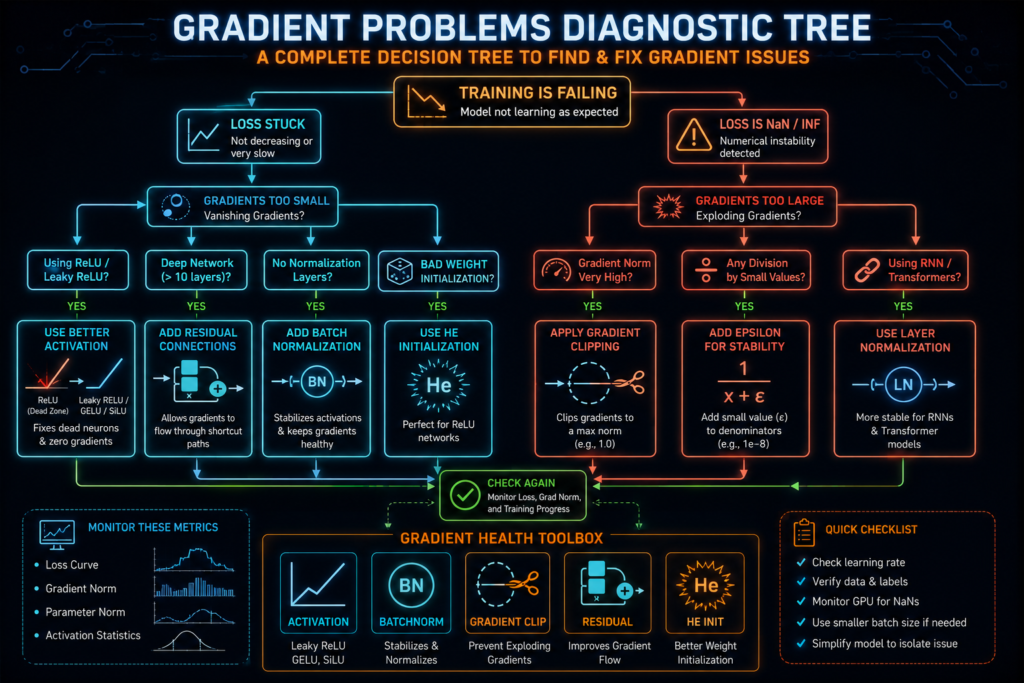
11. Visual Guide: When to Use What
Here’s a decision tree for diagnosing and fixing gradient problems.
Training Starts
     │
     ▼
Is loss stuck?
├── Yes → Check gradient norms
│          │
│          ▼
│   Is grad_norm < 1e-7?
│   ├── Yes → VANISHING GRADIENTS
│   │          Fix:
│   │          ├── Replace Sigmoid with ReLU
│   │          ├── Add Batch Normalization
│   │          ├── Use He initialization
│   │          └── Add Residual connections
│   └── No → Check if weights are updating
│             ├── Yes → Your model might just be too small
│             └── No → Increase learning rate carefully
│
└── No → Is loss becoming NaN?
         ├── Yes → EXPLODING GRADIENTS
         │          Fix:
         │          ├── Add gradient clipping (clip_grad_norm_)
         │          ├── Reduce learning rate
         │          ├── Use better initialization
         │          └── Add Batch Normalization
         └── No → Your model is training correctly! 🎉

Quick Reference Table
| Problem | Symptom | Detection | Fix |
|---|---|---|---|
| Vanishing | Loss stuck, weights not updating | grad_norm < 1e-7 | ReLU, BatchNorm, He init, Residuals |
| Exploding | Loss becomes NaN | grad_norm > 100 | Gradient clipping, lower LR |
| Dead ReLU | Neurons output 0 | Activation stats show zeros | LeakyReLU, proper init |
| NaN Gradients | Loss NaN, training crashes | torch.isnan(grad).any() | Lower LR, gradient clipping |
12. FAQs :
Why is my PyTorch training loss stuck at a constant number?
Classic vanishing gradients. Check your activation functions. If you’re using Sigmoid in a deep network, switch to ReLU. Add Batch Normalization. Use He initialization.
Why does my PyTorch loss suddenly become NaN?
Exploding gradients. Immediately add torch.nn.utils.clip_grad_norm_(model.parameters(), max_norm=1.0) after loss.backward(). Also check your learning rate – it might be too high.
How to check if my weights are actually changing?
Track weight norms across epochs:
for name, param in model.named_parameters():
    if param.requires_grad:
        print(f"{name}: {param.data.norm().item():.4f}")
If the values don’t change, you have vanishing gradients.
Why is layer.weight.grad returning None?
You’re checking before loss.backward(). Gradients only exist after backward pass.
# ❌ BAD
print(model.fc1.weight.grad)  # None

# ✅ GOOD
loss.backward()
print(model.fc1.weight.grad)  # Now it works
How does Batch Normalization prevent vanishing gradients?
It normalizes activations to have mean 0 and variance 1. This keeps them in a healthy range where gradients don’t vanish or explode.
Does Automatic Mixed Precision cause vanishing gradients?
In FP16 mode, yes. Numbers below 2^-24 become zero. Use GradScaler to prevent underflow.
scaler = torch.cuda.amp.GradScaler()
with torch.cuda.amp.autocast():
    output = model(x)
    loss = criterion(output, y)
scaler.scale(loss).backward()
scaler.step(optimizer)
scaler.update()
What’s the difference between clip_grad_norm_ and clip_grad_value_?
clip_grad_norm_ scales gradients so their total norm is ≤ max_norm. Preserves direction.
clip_grad_value_ clips each individual value to ±clip_value. Changes direction.
13. The Bottom Line :
| Concept | What It Does |
|---|---|
| Vanishing Gradients | Gradients become zero → weights stop updating → loss stuck |
| Exploding Gradients | Gradients become infinite → weights blow up → loss NaN |
| PyTorch Hooks | Spy devices that monitor/modify gradients during backprop |
| Gradient Clipping | Mathematical fix for exploding gradients |
| He Initialization | Prevent vanishing gradients for ReLU networks |
| Xavier Initialization | Prevent vanishing gradients for Sigmoid/Tanh networks |
| Batch Normalization | Normalize activations to prevent both vanishing and exploding |
| Residual Connections | Gradient superhighway that bypasses layers |
Vanishing gradients kill training by making gradients zero; exploding gradients kill training by making gradients infinite.
Use PyTorch hooks to detect these problems in real-time, and use ReLU, BatchNorm, He initialization, and residual connections to prevent them.
For production, add gradient clipping and proper initialization to keep your gradients healthy and your training stable.
Your Action Plan
| Step | Action |
|---|---|
| 1 | Add gradient logging to your training loop |
| 2 | Use clip_grad_norm_ for exploding gradients |
| 3 | Replace Sigmoid with ReLU for deep networks |
| 4 | Use He initialization for ReLU networks |
| 5 | Add Batch Normalization before activations |
| 6 | Add residual connections for very deep networks |
| 7 | Use hooks when debugging tricky issues |
🚀 The Ultimate Checklist
- Check gradient norms in every epoch
- Set
clip_grad_norm_afterloss.backward() - Use ReLU for deep networks
- Use He/Kaiming initialization for ReLU
- Add Batch Normalization before activations
- Add residual connections for 50+ layer networks
- Monitor for NaN gradients
- Track weight changes across epochs
- Use hooks for deep debugging
- Clean up hooks to prevent memory leaks

