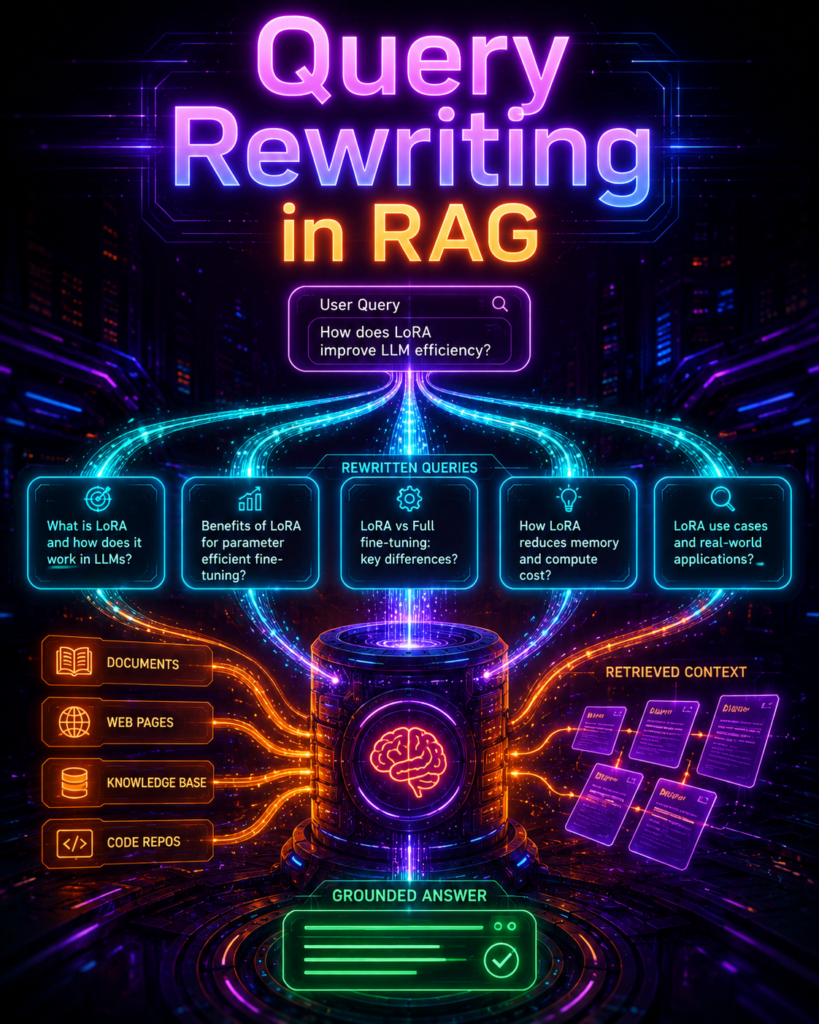
Learn query rewriting in RAG with simple explanations and working code. Fix messy user queries, improve retrieval accuracy by 10-20%, and master HyDE, multi-query & contextual rewriting.
Table of Contents
The Problem: Why Your RAG System Sometimes Fails
What Is Query Rewriting? (Super Simple)
Why Does It Matter? A Real-World Story
The 5 Types of Query Rewriting (With Examples)
Core Techniques Explained Simply
How to Implement Query Rewriting (Step-by-Step)
When Should You Use It?
How Do We Know It’s Working?
Common Problems and How to Handle Them
What to Do Next
Frequently Asked Questions
The Bottom Line
1. The Problem: Why Your RAG System Sometimes Fails
Picture this: You’ve built a RAG system—a chatbot that answers questions using your company’s documents. You’re proud of it. It works… sometimes.
A user asks: “Hey, can you tell me about the thing we discussed in the meeting last week about the new pricing?”
Your system searches for “thing we discussed meeting last week new pricing” and finds… absolutely nothing useful.
The problem isn’t your RAG system. It’s your user’s question.
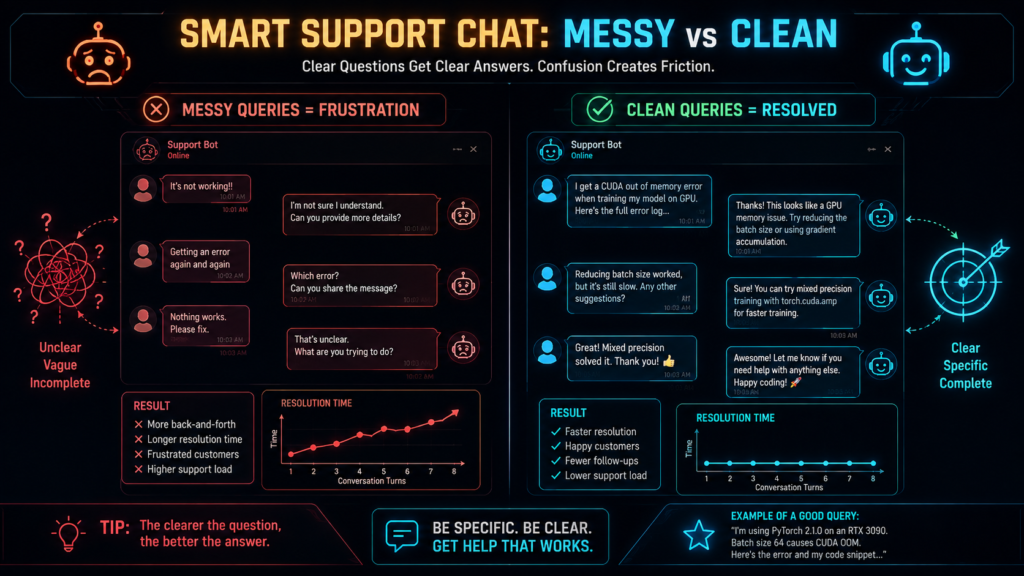
Users are messy. They use pronouns (“it,” “that,” “they”). They’re conversational (“hey, can you…”). They refer to things from earlier in the conversation. And your vector database just wants a clean search query.
This is where query rewriting comes in. It’s like having a translator between your messy user and your picky search engine.
2. What Is Query Rewriting?
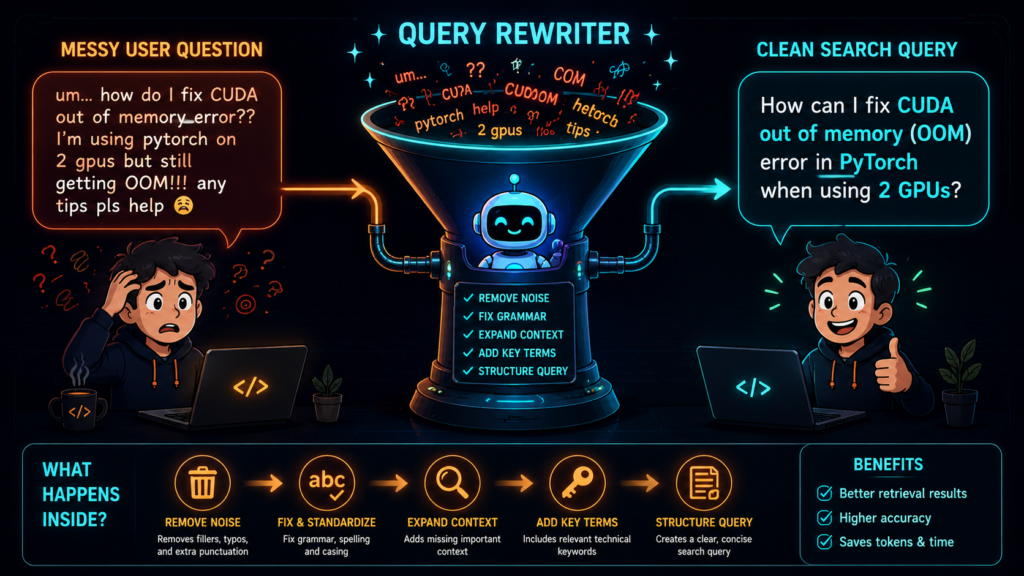
Query rewriting is just taking a messy, confusing question and turning it into a clear, searchable one—before you search your documents.
The One-Sentence Definition :
Query rewriting converts a user’s raw question into one or more search-friendly queries to help your RAG system find better information.
What It Does
Here’s the transformation:
| Before (Messy) | After (Clean) |
|---|---|
| “Hey, like, how much does it cost?” | “iPhone 15 price” |
| “What about that thing we talked about?” | “Project deadline update” |
| “why did my bill go up so much??” | “reasons for sudden bill increase” |
Important: You don’t answer the question during rewriting. You just make it easier to find the right documents. The answering happens later, after we’ve retrieved the good stuff.
The Simple Analogy
Imagine you walk into a library and ask the librarian:
“Hey, so like, you know that book about the guy with the, uh, round table? And the knights? I need the one with the—you know, the sword in the stone thing?”
A good librarian doesn’t just walk to the catalog and search for “guy with round table knights sword stone.” They figure out you mean “Le Morte d’Arthur” and hand you the right book.
Query rewriting is that librarian.
3. Why Does It Matter?
Let me tell you about a problem that many teams face.
Imagine you’re running a customer support chatbot for a large company. Users ask questions all day. Some are clear. Some are… not.
A team I worked with was building exactly this. They had good technology—vector search, a good LLM, the works. But their system kept giving mediocre answers. Users would ask follow-ups, and the system would get confused.
The root cause? The system wasn’t understanding follow-up questions properly.
When a user said: “How much does it cost?” after asking about the iPhone 15, the system was searching for “how much does it cost” and finding random pricing pages instead of iPhone pricing.
The fix? They added contextual query rewriting. The system started understanding that “it” meant “iPhone 15.”
The result? Their retrieval success rate went from around 62% to around 87%—a significant jump. Users got better answers faster. Support tickets dropped.
The exact numbers vary by system, but the pattern is consistent: query rewriting is one of the highest-impact changes you can make to a RAG system.
The Key Lesson :
“Fix retrieval first.”
Before you spend money on complex agents, fancy reasoning, or expensive models, get the basics right. Query rewriting + hybrid search + reranking solves 80% of RAG problems at 20% of the complexity.
4. The 5 Types of Query Rewriting
There are five main ways people rewrite queries. Don’t worry about memorizing them all—just know they exist for different situations.
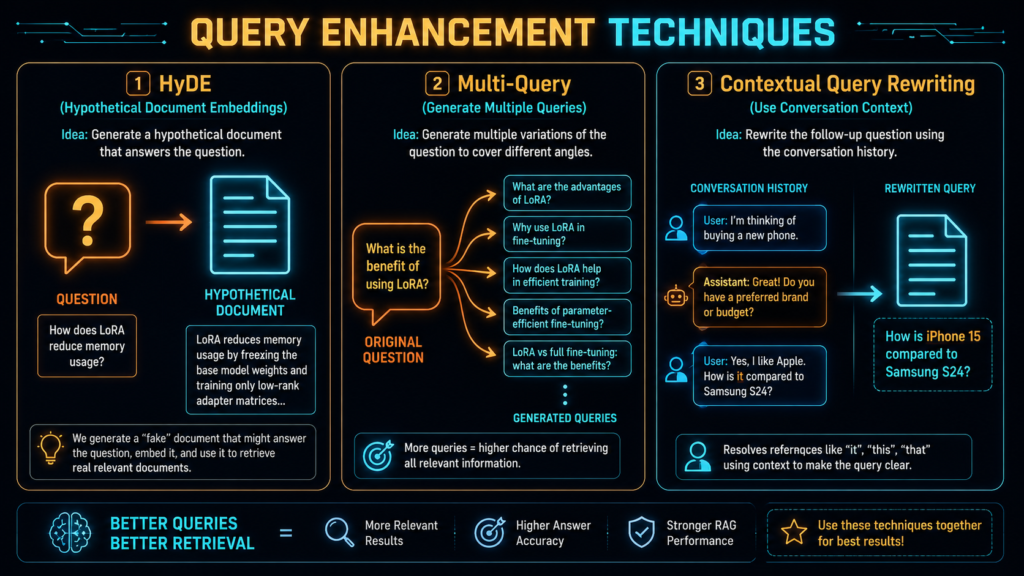
Type 1: HyDE (Fake Answer Trick)
What it does: Instead of searching for the question, the system imagines what the perfect answer would look like and searches for documents that match that.
| User Question | HyDE Rewrite |
|---|---|
| “How do I fix this API error?” | “The API connection error occurs when the authentication token is invalid or expired. Check your API key in the Authorization header…” |
When to use: When the question is vague and you’re not getting good results.
Example: Imagine you ask: “Tell me about pandas.” Instead of searching for “pandas,” the system imagines a fake answer: “Pandas are large bamboo-eating bears native to China…” and finds documents that look like that. If you meant the Python library, the fake answer would mention data frames and analysis, pointing you to different documents.
Type 2: Multi-Query Expansion (The “Ask the Same Question in Different Ways” Trick)
What it does: Generates 3-5 different versions of the same question to catch different phrasings.
| User Question | Multiple Variations |
|---|---|
| “Compare React and Vue” | “React performance vs Vue performance”, “React framework benchmarks”, “Vue.js performance analysis” |
When to use: When users use different words than your documents.
Type 3: Step-Back Prompting (The “Get the Big Picture First” Trick)
What it does: First asks a broader question, then the specific one.
| User Question | Step-Back Rewrite |
|---|---|
| “Why does my bike chain keep slipping?” | “Physics of bicycle chain tension and gear engagement” |
When to use: For questions that need background understanding first.
Type 4: Sub-Question Decomposition (The “Break It Down” Trick)
What it does: Splits one complicated question into smaller, simpler ones.
| User Question | Decomposed Queries |
|---|---|
| “Compare the climate of Paris and London” | “Climate of Paris”, “Climate of London” |
When to use: When users ask multi-part questions.
Type 5: Contextual Rewriting (The “Remember What We’re Talking About” Trick)
What it does: Uses the conversation history to clarify ambiguous questions.
| Conversation | User Question | Rewritten |
|---|---|---|
| User: “What’s the iPhone 15 price?” Assistant: “$799” User: “How much storage?” | “How much storage does it have?” | “How much storage does the iPhone 15 have?” |
When to use: In multi-turn conversations (this is the most common use case).
5. Core Techniques Explained Simply
Let’s dive a little deeper into the most important ones.
HyDE: The “Fake Answer” Trick
The problem it solves: There’s a big gap between short questions and long documents. Your question is short. Documents are long. When you turn both into numbers (embeddings), they don’t match well.
The solution: Generate a fake answer that looks like a document. Now your “question” looks more like a document, and the matching works better.
Simple example:
You ask: “How to fix a bike chain?”
HyDE imagines a fake answer: “When a bicycle chain slips on the gears, the issue is often caused by improper tension or worn components. The chain should have about 1-2 cm of play. If it’s too loose, adjust the tensioner…”
Now search for documents that look like THIS fake answer
When it works best: When the user’s question is very short or vague.
Why beginners find it confusing: HyDE seems backwards. Why search for answers when you don’t have them? It helps to think of it like this: If you don’t know where a building is, you might describe what it looks like. HyDE describes what the answer would look like to help find it.
Multi-Query Expansion: The “Different Angles” Trick
The problem it solves: Users and documents use different words for the same thing. You say “heart attack.” Documents say “myocardial infarction.”
The solution: Generate multiple versions of the question with different words.
Simple example:
User asks: “What’s the difference between React and Vue?”
System generates:
“React performance vs Vue performance”
“React framework benchmarks”
“Vue.js vs React comparison”
When it works best: When there’s a vocabulary mismatch.
Contextual Rewriting: The “Wait, What Were We Talking About?” Trick
The problem it solves: In a conversation, users say “it” and “that” without explaining what they mean.
The solution: Use the conversation history to figure out what “it” refers to.
Simple example:
User: “What’s the iPhone 15 price?”
Assistant: “It starts at $799.”
User: “How much storage does it have?” → Rewritten to: “How much storage does the iPhone 15 have?”
When it works best: In any multi-turn conversation (this is the most common use case).
6. How to Implement Query Rewriting (Step-by-Step)
Let’s actually build this. I’ll keep the code simple and working.
Option 1: The Super Simple Version (No AI Required)
Sometimes you don’t even need an LLM. Here’s a basic version that handles 80% of cases:
import re

class SimpleRewriter:
    def __init__(self):
        # Common words to remove
        self.filler_words = [
            "hey", "hi", "hello", "please", "can you", "could you",
            "would you", "tell me", "i want to know", "thanks", "thank you"
        ]

    def rewrite(self, query):
        # Start with the query
        q = query.lower().strip()

        # Remove filler words
        for filler in self.filler_words:
            q = q.replace(filler, "")

        # Remove extra spaces and punctuation
        q = re.sub(r'[^\w\s]', '', q)
        q = ' '.join(q.split())

        return q

# Try it
rewriter = SimpleRewriter()
print(rewriter.rewrite("Hey, can you tell me about REST APIs please?"))
# Output: "rest apis"
Pros: Fast, free, always works.
Cons: Won’t handle complex cases.
Option 2: Contextual Rewriter (For Conversations)
This is the most common production fix. It uses a cheap AI model to handle conversations:
# You'll need a cheap model like gpt-4o-mini or similar
# Install: pip install openai

import openai

def contextual_rewrite(question, history, client):
    """
    Rewrite a follow-up question so it stands alone.
    """
    # Format the conversation history
    history_text = ""
    for turn in history[-4:]:  # Only last 4 turns
        history_text += f"User: {turn['user']}\n"
        history_text += f"Assistant: {turn['assistant']}\n"

    # Create the prompt
    prompt = f"""
    You are a helpful assistant that rewrites questions to be standalone.

    Conversation history:
    {history_text}

    User's latest question: {question}

    Rewrite this question to be clear and standalone:
    """

    # Call the AI (use a cheap model!)
    response = client.chat.completions.create(
        model="gpt-4o-mini",  # Cheap model
        messages=[{"role": "user", "content": prompt}],
        temperature=0.1,  # Keep it consistent
        max_tokens=100
    )

    return response.choices[0].message.content.strip()

# Usage
history = [
    {"user": "What's the iPhone 15 price?", "assistant": "It starts at $799."}
]

question = "How much storage does it have?"
rewritten = contextual_rewrite(question, history, openai_client)
print(rewritten)
# Output: "How much storage does the iPhone 15 have?"
Option 3: The Complete Simple Pipeline
Here’s everything put together:
class QueryRewriter:
    def __init__(self, llm_client=None):
        self.llm = llm_client
        self.simple = SimpleRewriter()

    def rewrite(self, question, history=None):
        # Step 1: Try the simple version first
        simple_rewrite = self.simple.rewrite(question)

        # Step 2: If the simple version changed something, use it
        if simple_rewrite != question.lower():
            return simple_rewrite

        # Step 3: If there's a history, do contextual rewriting
        if history and len(history) > 0:
            try:
                contextual = contextual_rewrite(
                    question, history, self.llm
                )
                return contextual
            except Exception:
                # If the AI fails, fallback to the original
                return question

        # Step 4: Nothing worked, return original
        return question

# Usage
rewriter = QueryRewriter(openai_client)
clean_query = rewriter.rewrite(
    "How much storage does it have?",
    history=[{"user": "What's the iPhone 15 price?", "assistant": "$799"}]
)
Important: Error Handling
In production, things fail. Always have a fallback:
def safe_rewrite(question, history, llm_client):
    try:
        # Try the AI rewrite
        result = contextual_rewrite(question, history, llm_client)
        if result:  # Make sure we got something
            return result
    except Exception as e:
        # Log the error
        print(f"Rewrite failed: {e}")

    # Fallback: clean up manually
    return clean_query_manually(question)
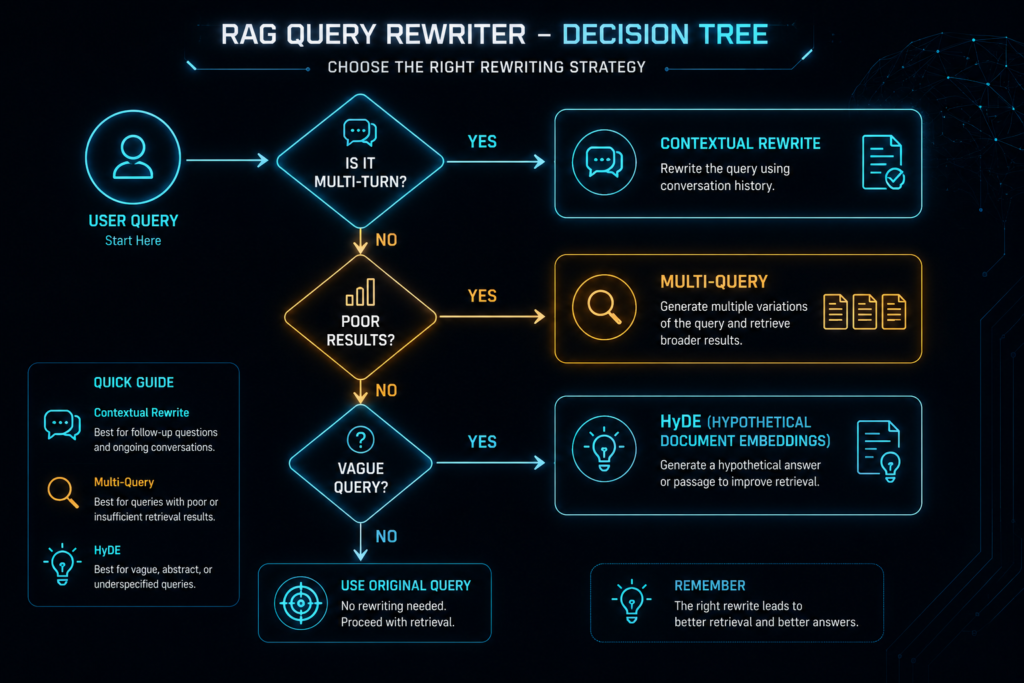
7. When Should You Use It?
✅ Use Query Rewriting When:
| Situation | Why |
|---|---|
| Users ask messy, conversational questions | It cleans them up |
| You have multi-turn conversations | It resolves “it” and “that” |
| Users use different words than your documents | It expands the vocabulary |
| You’re seeing poor search results | It often helps by 10-20% |
| You’re building a RAG system | It’s considered basic best practice |
❌ Skip It (or Keep It Simple) When:
| Situation | Why |
|---|---|
| Queries are already short and technical | Less benefit |
| Latency is critical | Each rewrite adds a small delay |
| You’re using exact codes/IDs | Exact matches don’t need rewriting |
| You’re building a simple single-turn system | Less need |
The Golden Rule :
Fix retrieval first.
Before you add complex agents, fancy reasoning, or expensive models, get the basics right. Start with query rewriting. It’s one of the highest impact changes you can make.
8. How Do We Know It’s Working?
You can’t just assume your rewrite is helping. Here’s how to check.
Simple Test: Before and After
The easiest way: run your system with and without query rewriting and compare.
original_result = search(original_query)
rewritten_result = search(rewritten_query)

# Compare which one found more relevant documents
print(f"Original results: {original_result}")
print(f"Rewritten results: {rewritten_result}")
Important: Check Against the ORIGINAL Question
When evaluating, always check if the rewritten query still answers the ORIGINAL question. A rewritten query that changes the meaning is worse than no rewrite at all.
More Concrete Metrics
| Metric | What It Means | How to Measure |
|---|---|---|
| Relevant Documents Found | How many useful documents were retrieved | Count how many of the top 5 results are relevant |
| Groundedness | Is the answer supported by documents? | Compare the final answer against the retrieved documents |
| Semantic Drift | Did the rewrite change the meaning? | Compare the similarity between original and rewritten query |
A Simple Example
Let’s say you have 10 test questions. For each one:
Run the system with original query → Check if answer is good
Run the system with rewritten query → Check if answer is good
Compare the results
If the rewritten query gives better results for 7 out of 10 questions, it’s working!
The Common Mistake
People often measure rewrite quality by comparing the rewritten query to the original query. That’s wrong.
Always evaluate retrieval relevance against the original user question. The user asked the original question—that’s what matters.
Example Evaluation Code :
def evaluate_rewrite(test_questions, search_function):
    results = []

    for q in test_questions:
        # Original query
        original_results = search_function(q)

        # Rewritten query (use your rewriter)
        rewritten = rewrite(q)
        rewritten_results = search_function(rewritten)

        # Compare
        results.append({
            "question": q,
            "rewritten": rewritten,
            "original_relevant": count_relevant(original_results),
            "rewritten_relevant": count_relevant(rewritten_results),
            "meaning_changed": semantic_similarity(q, rewritten) < 0.8
        })

    return results
9. Common Problems and How to Handle Them :
Problem 1: The Rewrite Changes the Meaning
What happens: The rewriter adds something that wasn’t there.
User: “How do I sort an array?”
Rewriter: “How do I sort an array in Python?” (User didn’t say Python!)
Solution: Always validate the rewrite. Check if it changed the meaning.
def validate_rewrite(original, rewritten):
    # Check if the rewritten query is too different
    # If it is, use the original instead
    similarity = calculate_similarity(original, rewritten)
    return rewritten if similarity > 0.8 else original
Problem 2: The Rewrite Adds Fake Constraints
What happens: The rewriter makes assumptions.
User: “Compare React and Vue.”
Rewriter: “Compare React and Vue performance benchmarks for large applications.” (Added “benchmarks” and “large applications”)
Solution: Start with a simple heuristic version and only add the LLM version when needed. Always validate.
Problem 3: The Rewrite Adds Nothing
What happens: You’re paying for an LLM call that changes nothing.
Solution: Only call the LLM when necessary.
def should_rewrite(query):
    if len(query.split()) < 5:  # Already short and clean
        return False
    if any(word in query for word in ["it", "that", "they"]):  # Needs context
        return True
    return True
Problem 4: The Rewrite Is Too Slow
What happens: Each rewrite adds 50-200ms latency.
Solution: Use the cheapest, fastest model.
| Model | Cost (approx) | Speed |
|---|---|---|
| gpt-4o-mini | ~$0.60 per 1M tokens | Fast |
| claude-3-haiku | ~$0.25 per 1M tokens | Very Fast |
| qwen-turbo | ~$0.03 per 1M tokens | Very Fast |
Rule of thumb: Use the cheapest model that works. Rewriting doesn’t need a top-tier model.
Problem 5: The Conversation History Is Too Long
What happens: After 5-10 turns, the rewrite quality degrades because there’s too much context.
Solution: Only use the last 2-3 turns.
def get_recent_history(history, max_turns=3):
    # Only use the last few turns
    return history[-max_turns*2:]  # User + Assistant pairs
Problem 6: HyDE Seems Confusing
What happens: Beginners find HyDE hard to understand. It seems backwards.
Solution: Think of it like this: If you don’t know where a building is, you might describe what it looks like. HyDE describes what the answer would look like to help find it.
Example: If you ask “What’s a panda?”, HyDE generates: “Pandas are large bears native to China that primarily eat bamboo…” This looks like a document, so the retrieval system finds documents that look like this—which are exactly the documents you want!
10. What to Do Next ?
For Absolute Beginners
Just use a simple heuristic—no AI needed. Strip the filler words, expand acronyms, and handle basic pronouns.
Add multi-turn support—handle “it” and “that” in conversations.
Measure the impact—compare results with and without rewriting.
Iterate based on what you see.
For People with Some Experience
Add the LLM version—use a cheap model like gpt-4o-mini.
Try HyDE—if queries are vague, this helps a lot.
Add multi-query expansion—if users use different vocabulary than your documents.
Monitor everything—track failures and iterate.
The One Rule :
Start simple, then add complexity when needed.
Most RAG systems don’t need complex rewriting. A simple heuristic + cheap LLM for contextual rewrites handles 90% of cases.
11. Frequently Asked Questions
What is query rewriting in simple terms?
It’s taking a messy user question and cleaning it up before searching your documents.
How much does query rewriting help?
It typically improves retrieval results by 10-20%. The exact number depends on your specific dataset.
Do I need an expensive AI model for rewriting?
No! Use the cheapest model that works. gpt-4o-mini, claude-3-haiku, or even heuristic-based rewriting work well.
Can query rewriting be done without AI?
Yes. Simple heuristic rewriting (removing filler words, expanding acronyms) works for many cases.
What’s the most common use case?
Multi-turn conversations. Resolving “it,” “that,” and “they” in follow-up questions.
What is HyDE?
HyDE generates a fake answer and searches for documents that look like that answer. Useful for vague questions.
How do I know if my rewrite is working?
Compare search results with and without rewriting. Also check if the final answer is better grounded in the documents.
What’s the “clarification trap”?
Deciding whether to guess what the user meant (rewrite) or ask for clarification. Asking too many questions frustrates users.
Should I always use query rewriting?
No. If your queries are already clean and technical, the benefit may be minimal.
Is query rewriting enough to fix RAG?
It helps a lot, but combine it with hybrid search and reranking for best results.
What’s the main tradeoff?
Latency vs accuracy. Each rewrite adds 50-200ms but improves results.
Can I use multiple rewriting techniques together?
Yes. For example, use contextual rewriting for conversations, then HyDE for vague queries.
12. The Bottom Line :
What You’ve Learned :
| Concept | Simple Definition |
|---|---|
| Query Rewriting | Cleaning up messy questions before search |
| Contextual Rewriting | Resolving “it” and “that” in conversations |
| HyDE | Using a fake answer to find real documents |
| Multi-Query Expansion | Asking the same question multiple ways |
| Evaluation | Checking if the rewrite actually helps |
The Golden Rule :
Fix retrieval first.
Before you spend money on complex agents or expensive models, get the basics right. Query rewriting + hybrid search + reranking solves 80% of RAG problems at 20% of the complexity.
Your Action Plan
Start with the simple heuristic rewriter—it’s free and fast.
Add contextual rewriting—handle “it” and “that” in conversations.
Try HyDE if queries are vague.
Add multi-query expansion if vocabulary mismatch is a problem.
Always validate—check that the rewrite didn’t change meaning.
Use a cheap model for LLM-based rewrites.
Monitor everything—track failures and iterate.
The Reality Check :
Don’t expect magic numbers—10-20% improvement is a good realistic expectation.
The numbers depend on your data—what works for one system might not work for another.
Start simple—heuristic first, add LLM when needed.
Test on your own data—benchmarks are useful, but your users matter most.
Now go make your RAG system find the right documents! 🚀
And remember: A clean query is worth a thousand extra tokens.

