Stop building linear RAG that fails. Master LangGraph’s cyclic workflows, self-correction, and memory to build agents that actually know when to search again.
Why agents need LangGraph (and why standard RAG fails)
Let’s be honest: you’ve probably built a RAG system that worked… until it didn’t.
You know the drill. The user asks a question. Your system retrieves some documents. It generates an answer. Everyone claps. Then someone asks a slightly tricky question, the retrieval returns garbage, and your LLM confidently hallucinates a beautiful, wrong answer.
Standard RAG is a one-way street:
Retrieve → Generate → Done.
If the retrieved documents are garbage, the LLM generates garbage. There is no loop, no evaluation, no recovery. It’s like a self-driving car that never looks back at the road—it just drives straight and hopes for the best.
Enter Agentic RAG
Agentic RAG changes the game entirely:
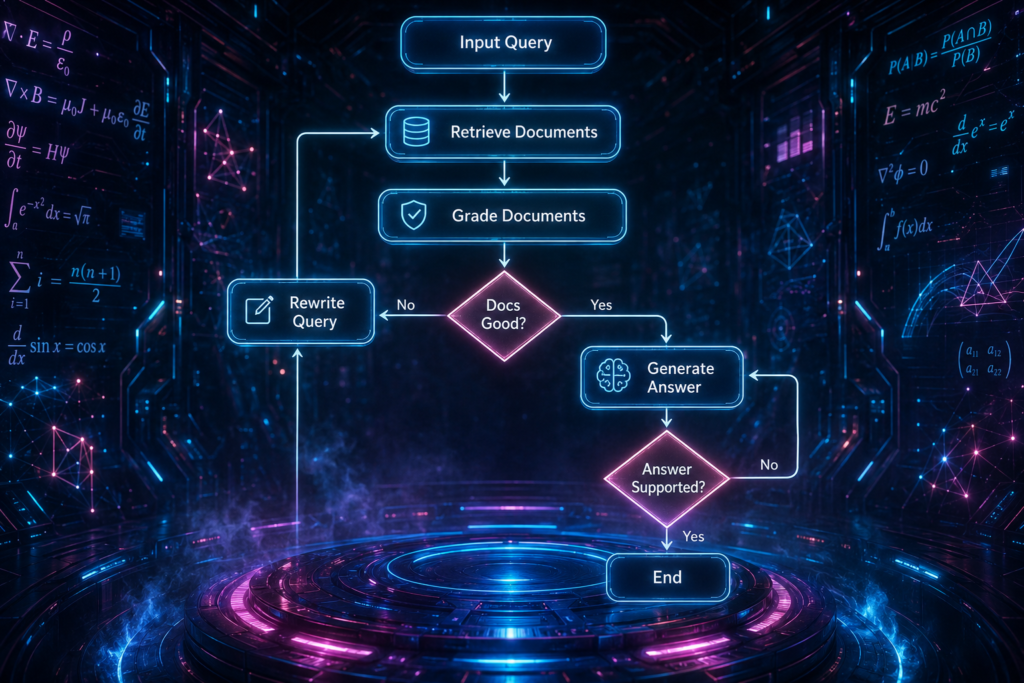
Retrieve → Evaluate → (If bad: Rewrite Query → Retrieve Again) → Generate → (If unsupported: Regenerate) → Done.
Agentic RAG has a brain and a loop. It can evaluate retrieved documents, realize they are irrelevant, rewrite its own search query, and search again before answering. It can check its own work and say, “Wait, I’m not sure this is right, let me try again.”
This is what makes agentic RAG feel intelligent. It’s not just smarter—it’s more self-aware.
Why LangGraph?
Standard LangChain uses linear Chains (LCEL). They’re great for simple, predictable pipelines. But agentic RAG requires loops and decision-making, which requires a Cyclic Graph architecture.
This is the exact pain point LangGraph solves. It is a library (part of LangChain ecosystem) for creating reliable, controllable, stateful multi-step applications with LLMs. It is built from the ground up for agentic workflows. It gives you:
State management that persists across steps
Conditional branching with LLM-powered routers
Loops that can continue until the job is done
Human-in-the-loop for enterprise compliance
Parallel execution for speed
Checkpointing for persistent memory across sessions
The foundational mechanics: State, Nodes, and Edges:
Most documentation skips over the foundational mechanics. Then beginners struggle because they don’t understand how data actually moves through the system. Here is what actually matters:
The State (StateGraph):
StateGraph lets you model your workflow as a graph:
- Nodes = Functions/steps (e.g., call LLM, run tool, summarize).
- Edges = Routing rules (normal or conditional).
- State = Shared data structure passed between nodes (like a persistent “memory”).
It compiles into a runnable graph (powered by Pregel runtime under the hood — inspired by Google’s Pregel for bulk synchronous parallel execution). This enables:
- Loops (ReAct-style agent loops)
- Branching/conditional routing
- Persistence & checkpoints (human-in-the-loop, resume after crash)
- Streaming, interrupts, parallel execution
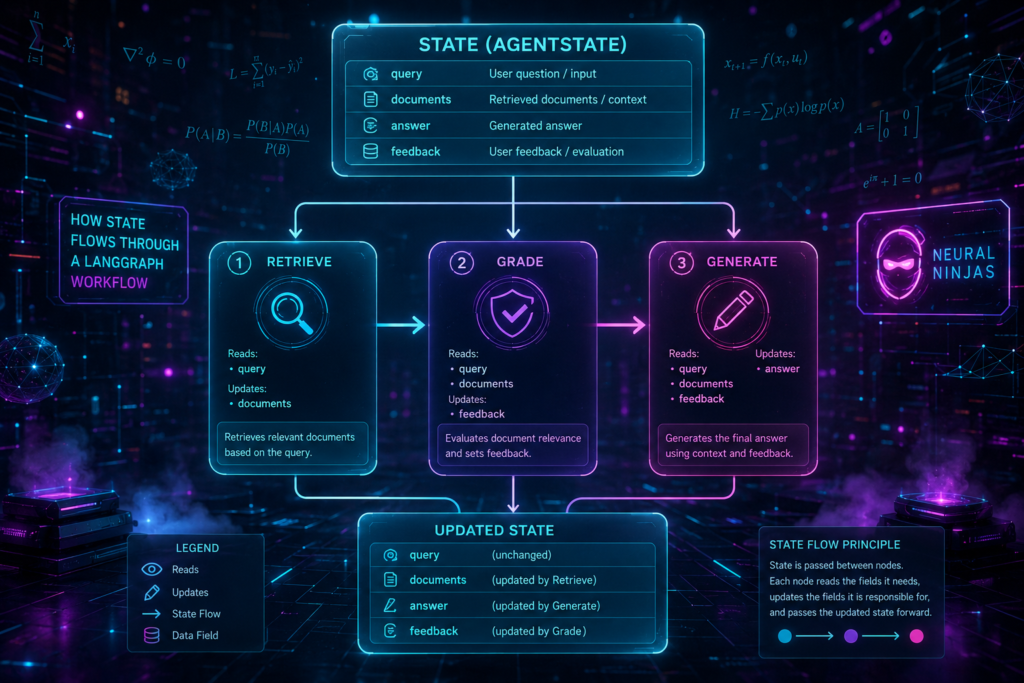
Think of the State as a global dictionary (or Pydantic model) that gets passed from node to node.
Every node:
reads this dictionary,
does some work,
and updates it.
This is the single source of truth. Every node reads from it, writes to it, and passes it along.
from typing import Annotated, List
from typing_extensions import TypedDict
import operator
class AgentState(TypedDict):
query: str
documents: Annotated[List[str], operator.add]
answer: str
feedback: str
Here’s what each field does:
query: The user’s original questiondocuments: A list of retrieved documents (theoperator.addmeans new documents get appended, not overwritten)answer: The generated answerfeedback: Evaluation feedback from the grading step
This is your agent’s working memory. Everything it knows lives here.
Nodes vs. Edges:
Node = a Python function doing the work (e.g.,
retrieve_documents,grade_documents).Nodes are simple python functions that take the current state and return a partial update. When you
add_node(), you’re telling LangGraph, “Here’s a worker function.”Edge = the pathway connecting nodes. They define the flow/control between nodes in a StateGraph. When you
add_edge(), you’re telling it, “After this node finishes, go to that node.”- Normal Edges (add_edge(source, destination)): Always go from one node to another (fixed path).
- Conditional Edges (add_conditional_edges(source, routing_function)): Dynamically decide the next node based on the current state (e.g., LLM decides “tools” or “END”).
- START & END: Special nodes — START is the entry point, END stops execution.
Conditional Edges (The Router):
This is where the magic happens. A conditional edge uses an LLM or a heuristic to act as a traffic cop.
If the document is good → route to Generate.
If the document is bad → route to Rewrite Query.
They allow dynamic routing in your graph — the next node is decided at runtime based on the current state (usually by an LLM or a routing function). This is how you build Self-RAG vs Corrective RAG (CRAG) logic.
from langgraph.graph import StateGraph
def route(state):
if “tool_calls” in state[“messages”][-1]:
return “tools” # go to tools node
else:
return END # or “summarizer”, etc.
How to add them:
graph.add_conditional_edges(
“agent”, # source node
route, # routing function
{“tools”: “tools”, END: END} # optional mapping for clarity
)
Unlike fixed add_edge(“A”, “B”), conditional edges make your agent intelligent & flexible — perfect for ReAct loops, multi-agent routing, or decision-making workflows.
The three essential agentic workflows
A production-ready Agentic RAG system has three core workflows. Let’s break each one down with real code.
1. Pre-Retrieval Routing
The agent decides where to search. Is this a math question, or should I query the Vector Database? Should I search internal documents or hit the web?
def route_query(state: AgentState) -> str:
query = state[“query”].lower()
if “calculate” in query or “math” in query or “formula” in query:
return “math_tool”
if “latest” in query or “current” in query or “breaking” in query:
return “web_search”
return “vector_search”
This is LangChain vs LangGraph routing in action. In LangChain, routing is linear. In LangGraph, routing is dynamic and can change based on context.
2. Post-Retrieval Grading (CRAG)
The agent grades the retrieved chunks for relevance. If they’re irrelevant, it triggers a web search fallback or rewrites the query.
def grade_documents(state: AgentState) -> str:
docs = state[“documents”]
query = state[“query”].lower()
query_terms = set(query.split())
# Check if any document contains key terms from the query
for doc in docs:
doc_lower = doc.lower()
if len(query_terms.intersection(set(doc_lower.split()))) >= 2:
return “generate”
# If no relevant docs found, trigger correction
return “rewrite_query”
In production, you’d use an LLM grader for more nuanced decisions. But the pattern is the same: evaluate, decide, and act.
This is the core of Corrective RAG (CRAG).
3. Generation and Hallucination Checking (Self-RAG)
After generating the answer, the agent checks its own work. Is the answer actually supported by the documents?
def check_hallucination(state: AgentState) -> str:
answer = state[“answer”]
docs = state[“documents”]
# Simple heuristic: check if answer references document content
# Production systems use LLM-based groundedness checks
for doc in docs:
# Check if key phrases from answer appear in documents
answer_sentences = answer.split(“.”)
for sentence in answer_sentences[:3]: # Check first few sentences
if any(phrase in doc.lower() for phrase in sentence.lower().split()[:5]):
return “end”
# If answer seems unsupported, regenerate
return “regenerate”
This is the core of Self-RAG. The agent checks its own work, catches hallucinations, and corrects them before the user ever sees them.
Connecting the Workflows
User Query
↓
Pre-Retrieval Routing (Where to search?)
↓
Retrieve Documents
↓
Post-Retrieval Grading (Are these relevant?)
↓ (if relevant)
Generate Answer
↓
Hallucination Check (Is the answer supported?)
↓ (if supported)
Final Answer
Building the graph: Step-by-step code
Now let’s put it all together with working code.
Step 1: Define the State
from typing import Annotated, List
from typing_extensions import TypedDict
import operator
class AgentState(TypedDict):
query: str
documents: Annotated[List[str], operator.add]
answer: str
feedback: str
iteration: int # Track how many times we’ve looped
Step 2: Define the Node Functions
def retrieve_documents(state: AgentState) -> AgentState:
“””Simulate document retrieval from a vector database.”””
query = state[“query”]
# In production, this would be a real vector search
docs = [
f”Document about {query} – 2024 version”,
f”Another document related to {query}”,
f”General information about {query}”
]
state[“documents”] = docs
state[“iteration”] = state.get(“iteration”, 0) + 1
return state
def grade_documents(state: AgentState) -> dict:
“””Grade whether documents are relevant.”””
docs = state[“documents”]
query = state[“query”].lower()
# Simple relevance check
relevant = any(query.split()[0] in doc.lower() for doc in docs)
return {“documents_grade”: “relevant” if relevant else “irrelevant”}
def rewrite_query(state: AgentState) -> AgentState:
“””Rewrite the query based on feedback.”””
old_query = state[“query”]
# In production, use an LLM to rewrite
state[“query”] = f”{old_query} latest guidelines detailed policy”
state[“feedback”] = f”Rewrote query from ‘{old_query}’ due to irrelevant documents”
return state
def generate_answer(state: AgentState) -> AgentState:
“””Generate an answer based on retrieved documents.”””
docs = state[“documents”]
query = state[“query”]
# In production, this would call an LLM
state[“answer”] = f”Based on the documents, here’s what I found about {query}: {docs[0][:100]}…”
return state
def check_hallucination(state: AgentState) -> dict:
“””Check if the answer is grounded in the documents.”””
answer = state[“answer”]
docs = state[“documents”]
# Simple groundedness check
grounded = any(doc[:50] in answer for doc in docs)
return {“answer_grounded”: grounded}
Step 3: Compile the Graph
from langgraph.graph import StateGraph, END
# Initialize the graph
workflow = StateGraph(AgentState)
# Add all nodes
workflow.add_node(“retrieve”, retrieve_documents)
workflow.add_node(“grade”, grade_documents)
workflow.add_node(“rewrite”, rewrite_query)
workflow.add_node(“generate”, generate_answer)
workflow.add_node(“validate”, check_hallucination)
# Set the entry point
workflow.set_entry_point(“retrieve”)
# Add edges
workflow.add_edge(“retrieve”, “grade”)
# Conditional edge from grade
def grade_router(state):
if state.get(“documents_grade”) == “relevant”:
return “generate”
return “rewrite”
workflow.add_conditional_edges(
“grade”,
grade_router,
{
“generate”: “generate”,
“rewrite”: “rewrite”
}
)
# Loop back from rewrite to retrieve
workflow.add_edge(“rewrite”, “retrieve”)
# After generation, validate
workflow.add_edge(“generate”, “validate”)
# Conditional edge from validate
def validate_router(state):
if state.get(“answer_grounded”):
return END
# If not grounded, regenerate
return “generate”
workflow.add_conditional_edges(
“validate”,
validate_router,
{
END: END,
“generate”: “generate”
}
)
# Compile
app = workflow.compile()
Step 4: Run the Graph
# Set recursion limit to prevent infinite loops
config = {“recursion_limit”: 10}
# Invoke the graph
result = app.invoke(
{“query”: “What is the leave policy for Bengaluru?”},
config=config
)
print(f”Final Answer: {result[‘answer’]}”)
print(f”Number of iterations: {result.get(‘iteration’, 0)}”)
print(f”Feedback: {result.get(‘feedback’, ‘None’)}”)
Recursion Limits: Saving Your API Budget
Infinite loops are the silent killer of agentic systems. A single bug can burn through your entire monthly API budget in minutes.
# ALWAYS set a recursion limit
config = {“recursion_limit”: 10} # Max 10 iterations
try:
result = app.invoke({“query”: “What is the leave policy?”}, config=config)
except RecursionError:
print(“Agent got stuck in a loop. Check your conditional edges!”)
Pro tip: Start with a low recursion limit (e.g., 3-5) during development. Increase it only after you’ve verified your routing logic works correctly.
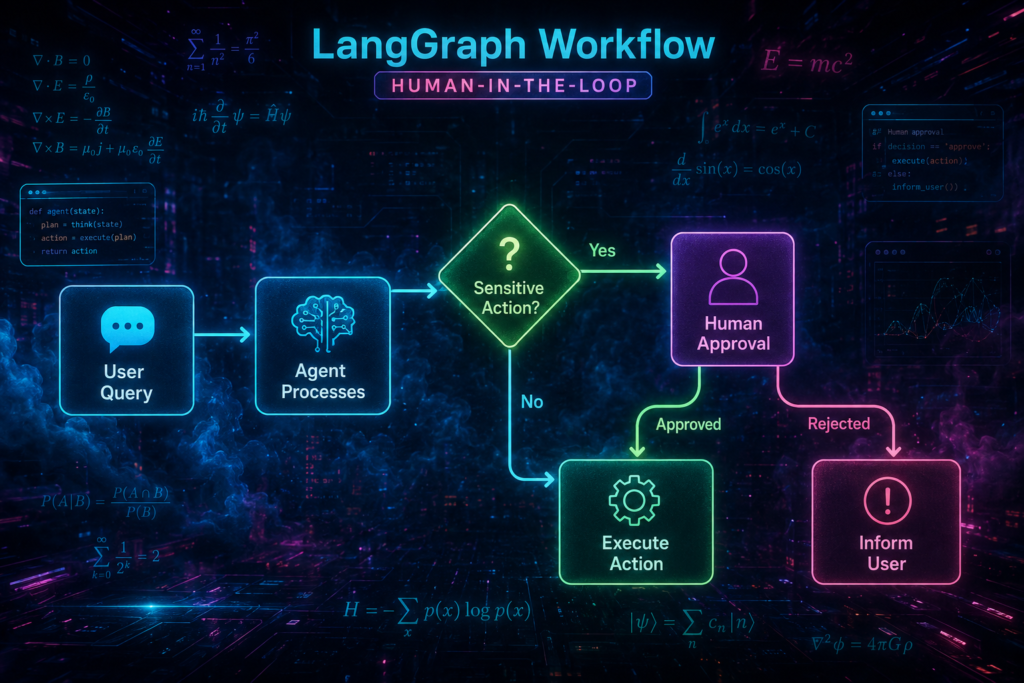
Human-in-the-Loop (HITL) for enterprise compliance
Companies are terrified of fully autonomous agents executing destructive actions without oversight. And honestly, they should be.
The Concept
The graph can be paused at specific nodes to wait for a human to click Approve or Reject before continuing.
The Code Hook
from langgraph.checkpoint.memory import MemorySaver
# Add a checkpointer for persistence
checkpointer = MemorySaver()
# Compile with interrupt before sensitive nodes
app = workflow.compile(
checkpointer=checkpointer,
interrupt_before=[“execute_action_node”, “send_email_node”]
)
The state freezes and waits for an external state update to resume.
Real-World Example:
# User asks to update a policy document
config = {“configurable”: {“thread_id”: “policy_update_123”}}
# This will pause before the write operation
result = app.invoke({“query”: “Update the Bengaluru leave policy to 20 days”}, config=config)
# Check if it’s waiting for approval
if app.checkpointer.get_state(config).next:
print(“Waiting for human approval…”)
# Show the proposed changes to a human
print(f”Proposed update: {result[‘proposed_change’]}”)
# Human approves
# Resume the graph
result = app.invoke(None, config=config)
This is how you build enterprise-grade Agentic RAG that actually gets deployed in regulated industries.
Persistent memory and checkpointing
A business RAG system must remember user history across different sessions. Nobody wants to repeat their preferences every time they open the chat.
The Concept
LangGraph manages state across time using Threads. Each thread represents a conversation or a workflow instance.
The Code Hook
from langgraph.checkpoint.sqlite import SqliteSaver
# Use a persistent database backend
checkpointer = SqliteSaver.from_conn_string(“checkpoint.db”)
app = workflow.compile(checkpointer=checkpointer)
# Pass a thread_id to ensure the agent pulls the exact history for that user
config = {“configurable”: {“thread_id”: “user_123”}}
# First session
result1 = app.invoke({“query”: “I work in the Bengaluru office”}, config=config)
# Second session (next day)
result2 = app.invoke({“query”: “What is the leave policy?”}, config=config)
# The agent remembers the office location from the first session!
This is how you build persistent memory in LangGraph. The checkpointer saves the entire state after every step, so you can resume from exactly where you left off.
Parallel execution (Fan-Out / Fan-In) for speed
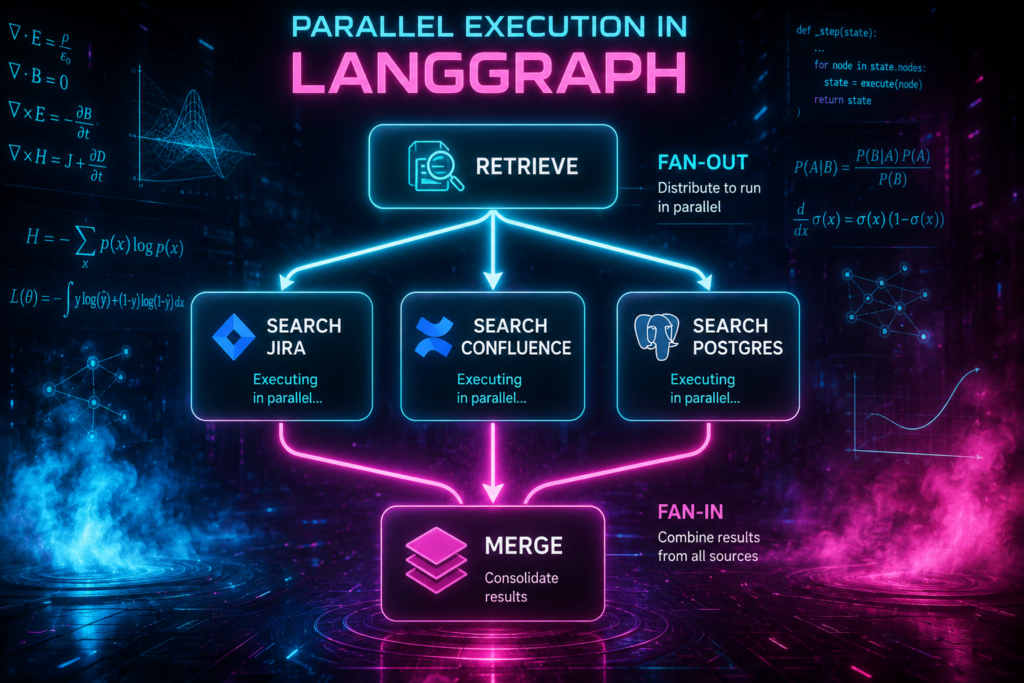
In corporate environments, data is scattered. An enterprise agent might need to search Jira, Confluence, and PostgreSQL simultaneously.
The Concept
Linear searches are too slow. LangGraph can trigger multiple nodes at the exact same time and combine their results.
The Code Hook
def fan_out_search(state: AgentState) -> list:
“””Return a list of nodes to execute in parallel.”””
return [“search_jira”, “search_confluence”, “search_postgres”]
def search_jira(state: AgentState) -> AgentState:
# Search Jira tickets
state[“documents”].append(“Jira ticket: Policy update Q1”)
return state
def search_confluence(state: AgentState) -> AgentState:
# Search Confluence pages
state[“documents”].append(“Confluence page: HR policy 2024”)
return state
def search_postgres(state: AgentState) -> AgentState:
# Search PostgreSQL database
state[“documents”].append(“Database record: Bengaluru leave policy”)
return state
# Add to workflow
workflow.add_node(“search_jira”, search_jira)
workflow.add_node(“search_confluence”, search_confluence)
workflow.add_node(“search_postgres”, search_postgres)
# Add conditional edge for fan-out
workflow.add_conditional_edges(
“retrieve”,
fan_out_search,
[“search_jira”, “search_confluence”, “search_postgres”]
)
# All parallel nodes fan-in to “merge” node
for node in [“search_jira”, “search_confluence”, “search_postgres”]:
workflow.add_edge(node, “merge”)
The state dictionary acts as the Fan-In point, using the operator.add reducer to safely append results from parallel nodes into a single list.
Real-world impact: This can reduce total execution time from 15 seconds to 5 seconds for multi-source queries.
Native tool calling (The Action Engine)
Agentic RAG for businesses is rarely just about reading text. It’s about taking action based on that text.
The Concept
The LLM needs the ability to trigger external Python functions (APIs, SQL queries, web scrapers) dynamically based on the user’s intent.
The Code Hook
from langgraph.prebuilt import ToolNode
from langchain_anthropic import ChatAnthropic
# Define custom tools
def search_database(query: str) -> str:
“””Search the internal database for policies.”””
return f”Results for {query}: Policy found in 2024 documents”
def send_slack_message(message: str) -> str:
“””Send a message to a Slack channel.”””
# In production, this would actually send a Slack message
return f”Slack message sent: {message}”
def create_github_pr(title: str, body: str) -> str:
“””Create a GitHub pull request.”””
return f”PR created: {title}”
tools = [search_database, send_slack_message, create_github_pr]
# Bind tools to the LLM
llm = ChatAnthropic(model=”claude-3-sonnet-20240229″)
llm_with_tools = llm.bind_tools(tools)
# Add ToolNode
workflow.add_node(“tools”, ToolNode(tools))
# Route based on tool calls
def route_tools(state: AgentState) -> str:
if state.get(“tool_calls”):
return “tools”
return “generate”
workflow.add_conditional_edges(“llm”, route_tools)
This is how you build native tool calling in LangGraph. The agent can now take real-world actions, not just answer questions.
Streaming state updates for UI/UX
Users will not stare at a blank screen for 15 seconds while the agent thinks. You need real-time feedback.
The Concept
Stream the agent’s thought process to the frontend so the user sees real-time progress indicators.
“Searching Database…”, “Grading Documents…”, “Generating Answer…”
The Code Hook
# Streaming with updates
for chunk in app.stream(
{“query”: “What is the leave policy for Bengaluru?”},
stream_mode=”updates”
):
# Each chunk contains the current state update
for node_name, node_output in chunk.items():
print(f”Node: {node_name}”)
print(f”State update: {node_output}”)
# Send this to your frontend WebSocket
# Example output:
# Node: retrieve
# State update: {‘documents’: [‘Doc 1’, ‘Doc 2’]}
# Node: grade
# State update: {‘documents_grade’: ‘relevant’}
# Node: generate
# State update: {‘answer’: ‘The leave policy is…’}
You can now show the user exactly what’s happening at every step of the workflow. This builds trust and reduces perceived latency.
Real-world example: Enterprise HR assistant
Let’s put it all together with a real example from an Indian enterprise.
User query:
“What is the leave policy for the Bengaluru office, and how does it compare to Mumbai?”
The Workflow Execution
Pre-Retrieval Routing → decides to search HR policy database
Retrieve Documents → fetches Bengaluru and Mumbai policies
Grade Documents → checks if policies are relevant and up-to-date
Rewrite Query (if needed) → “Bengaluru leave policy 2024 latest”
Generate Answer → drafts comparison
Check Hallucination → verifies answer against source documents
Human-in-the-Loop (if needed) → waits for approval before sending to user
The Result:
Final Answer:
Based on the 2024 policies:
– Bengaluru office: 18 paid leave days + 2 local holiday days
– Mumbai office: 16 paid leave days + 1 local holiday day
The Bengaluru policy offers 2 additional days due to regional exceptions.
Source: HR Policy Document 2024 (v3.2)
This is LangGraph Agentic RAG in action. It’s not just retrieving and generating—it’s evaluating, adapting, and ensuring quality.
Troubleshooting LangGraph
Problem: Infinite loops
Symptoms: Agent keeps rewriting and retrieving forever. API costs skyrocket.
Fix:
Set
recursion_limitin configAdd termination conditions in grading logic
Track iteration count in state and stop after max iterations
if state.get(“iteration”, 0) > 5:
return “end” # Force stop after 5 iterations
Problem: State becomes too large
Symptoms: Token usage spikes, latency increases, context window overflow.
Fix:
Summarize old documents in state
Use memory buffer patterns
Only keep the most relevant documents in state
Problem: Conditional edges route incorrectly
Symptoms: Wrong nodes are executed. The router sends the workflow down the wrong path.
Fix:
Add better heuristics
Use LLM-based classifiers instead of rule-based
Log decision points for debugging
Problem: Parallel execution fails
Symptoms: Results from parallel nodes are lost or duplicated.
Fix:
Use
operator.addreducer in state to handle multiple inputsEnsure operations are idempotent (running twice produces same result)
Add error handling for failed parallel nodes
Problem: Checkpointing not working
Symptoms: User history is lost between sessions.
Fix:
Ensure a unique
thread_idis passed in configUse
SqliteSaverinstead ofMemorySaverfor productionCheck that the database file is persistent across restarts
Quick reference card:
| Concept | What It Does |
|---|---|
| Standard RAG | Linear, one-way street. No recovery from failures. |
| Agentic RAG | Cyclic, self-correcting loop. Can evaluate and adapt. |
| LangGraph | Cyclic Graph architecture for agents. |
| State | Global dictionary passed between nodes. Single source of truth. |
| Nodes | Python functions doing the work. |
| Edges | Pathways connecting nodes. |
| Conditional Edges | LLM-powered routers for decision-making. |
| HITL | Human approval gates for compliance. |
| Checkpointing | Persistent memory across sessions. |
| Parallel Execution | Fan-out / fan-in for speed. |
| Tool Calling | Native action engine for real-world tasks. |
| Streaming | Real-time UI updates for user experience. |
LangGraph is not just another library. It is the foundation for the next generation of Agentic RAG systems. It turns linear RAG pipelines into cyclic, self-correcting workflows that can evaluate, adapt, and recover.
The best part? You don’t need to be a graph theory expert to use it. The API is Pythonic, the patterns are clear, and the examples are everywhere. The future of RAG is not linear. It is cyclic, self-correcting, and agent-powered. And LangGraph is the toolkit that makes it possible.
Want to go deeper? Start with a simple two-node loop: Retrieve → Grade → Rewrite → Retrieve. Then add the third node: Generate → Validate → Regenerate. Then add human-in-the-loop, parallel execution, and tool calling.
Each layer adds more intelligence to your agent. And each layer brings you closer to the holy grail: an AI system that actually earns your trust.

