Discover how the Model Context Protocol (MCP) solves the N×M integration problem, standardizes AI tool connections, and turns LLMs from text completers into context-aware digital operators—with code, architecture, and real-world examples.
The problem MCP actually solves
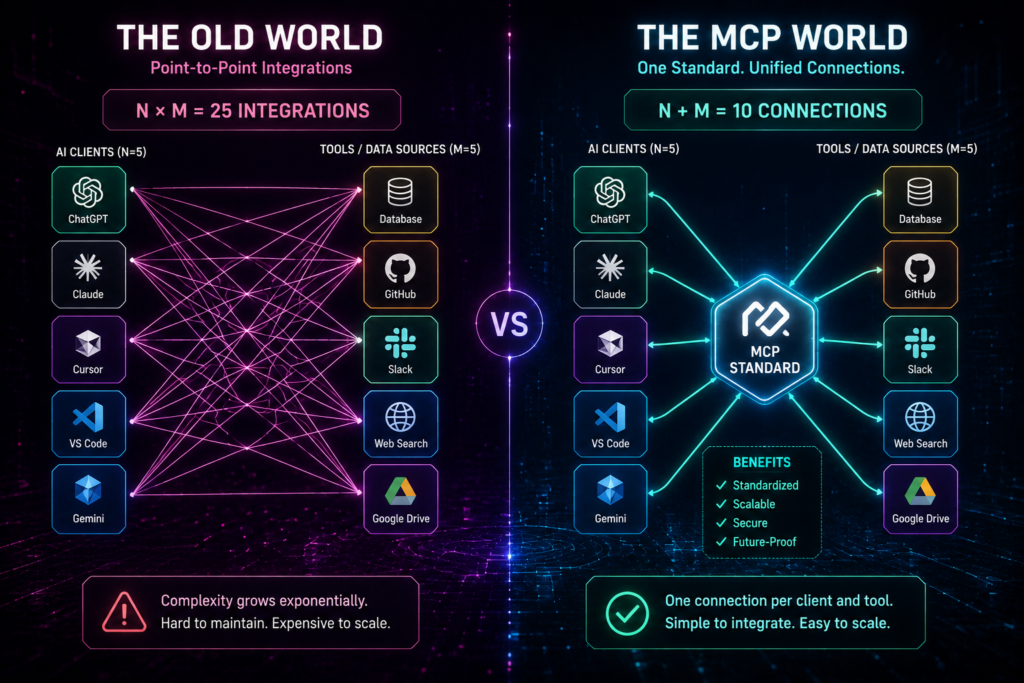
Before MCP, building AI integrations was a mess.
Imagine you have:
4 AI clients: Claude Desktop, Cursor, VS Code, and your custom agent app.
5 data tools: GitHub, Postgres, Slack, Notion, and Google Drive.
In the old world, you needed to write 4 × 5 = 20 custom integration scripts. Every new client meant rewriting integrations for every tool. Every new tool meant writing integrations for every client.
That is the N × M integration problem. It is expensive, fragile, and scales terribly.
MCP (Model Context Protocol) fixes this. It is an open standard introduced by Anthropic that has quickly become a cornerstone of modern AI architecture. Think of it as the USB-C port for AI applications—one standard plug that connects any AI front-end to any external tool or data source.
With MCP, you write one server for your data source, and any MCP-compatible client can connect to it. The math flips from N × M to N + M.
The shift: From text completers to digital operators
Before MCP, LLMs were mostly text completion engines. You gave them a prompt, they gave you text. If you wanted them to do something real—like query a database, send a Slack message, or create a GitHub PR—you had to build custom glue code every time.
MCP changes that. It turns LLMs into context-aware digital operators that can:
read real data from your tools,
execute real actions through standardized interfaces,
and follow domain-specific workflows with pre-written prompt templates.
In short: MCP is the Language Server Protocol (LSP) for LLMs.
High-level architecture: The 3 key roles
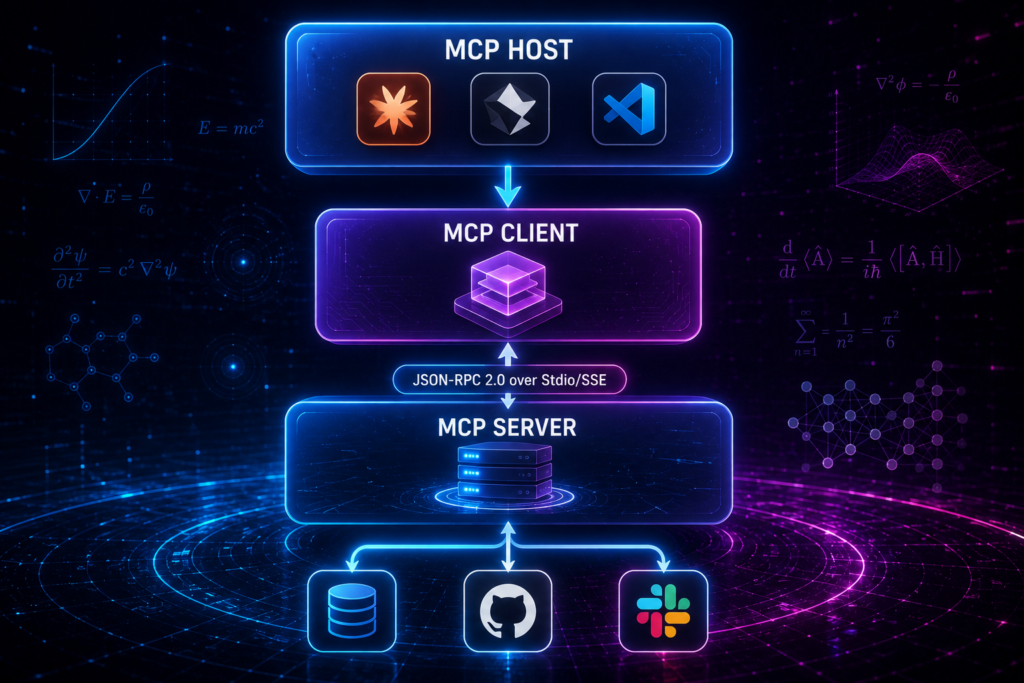
MCP uses a simple client-server framework with three roles:
1. MCP Host
The main AI application or environment the user interacts with. Examples:
Claude Desktop
Cursor IDE
A custom agent app
2. MCP Client
An intermediary process inside the Host that maintains a 1-to-1 connection with a specific MCP Server. The Client speaks the MCP protocol on behalf of the Host.
3. MCP Server
A lightweight program that exposes local or remote tools, databases, or file systems to the LLM. The Server decides what Resources, Tools, and Prompts to expose.
Here is the flow:
[ User ] ──> [ MCP Host (e.g., Cursor) ]
│
[ MCP Client ]
│ (JSON-RPC 2.0 over Stdio/SSE)
▼
[ MCP Server ] ──> [ Database / API / Filesystem ]
The Host talks to the Client. The Client talks to the Server. The Server talks to your actual data or tools.
The three core MCP primitives
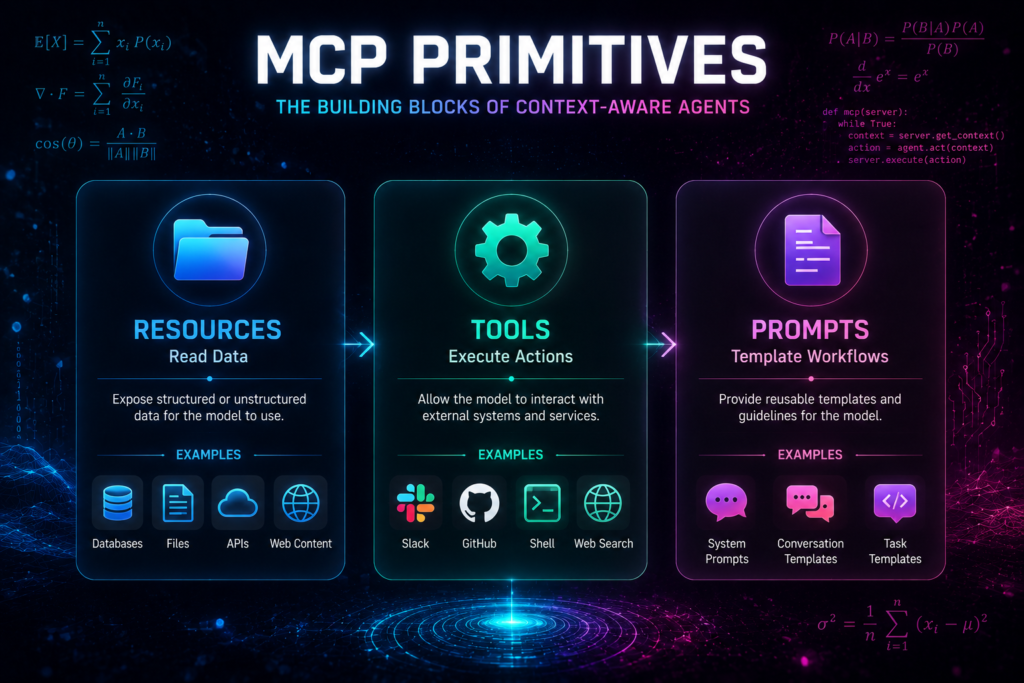
Everything that flows through MCP falls into three categories:
1. Resources (Data Access)
Resources are file-like data or context that the server exposes for the model to read.
Examples:
Application logs
Database schemas
Local files
API readouts
Document excerpts
Think of Resources as the read-only view of your external systems.
2. Tools (Actions)
Tools are executable functions that the LLM can invoke to perform real-world tasks.
Examples:
Running a SQL query
Sending a Slack message
Writing a file
Creating a GitHub PR
Triggering a deployment pipeline
Tools are how the LLM does things, not just reads things.
3. Prompts (Templates)
Prompts are pre-written, parameterizable prompt templates provided by the server to guide the user or LLM through specific domain workflows.
Examples:
“Draft a code review for this PR”
“Summarize this Jira ticket and suggest next steps”
“Generate a SQL query to find top customers by revenue”
Prompts encode best practices and domain expertise directly into the protocol.
(Advanced Bonus): Sampling
MCP also supports Sampling—a feature that allows an MCP Server to request the Host’s LLM to generate completions or process data internally. This enables servers to use the LLM as a computation engine, not just a caller.
Under-the-hood technical mechanics
For the technical readers, here is what MCP actually uses:
Communication Protocol
MCP uses JSON-RPC 2.0 for stateful, asynchronous messaging. This is a well-understood, lightweight RPC protocol that works over multiple transports.
Transport Channels
MCP supports two main transport modes:
1. Stdio (Standard Input/Output)
Ideal for: local desktop servers.
Examples: accessing local files, SQLite databases, or local dev tools.
Pros: low latency, simple setup.
2. SSE (Server-Sent Events / HTTP)
Ideal for: remote cloud servers and distributed systems.
Examples: connecting to cloud APIs, remote databases, or microservices.
Pros: works over standard HTTP infrastructure.
The choice depends on whether your server is local or remote.
Security and permission guardrails
Security is one of MCP’s strongest design principles. Here is why developers can trust it:
Human-in-the-Loop Consent
Tools cannot execute destructive commands (like deleting a table, sending an email, or deploying code) without host-level user authorization. The LLM can propose an action, but a human must approve it.
Process Isolation (Sandboxing)
MCP servers run as isolated processes, preventing runaway LLM agents from having unfettered root access to a host system. Even if an agent goes off the rails, it cannot arbitrarily read or write files outside what the server explicitly exposes.
Fine-Grained Permissions
Servers define exactly which Resources, Tools, and Prompts they expose. The Host can further restrict what the LLM is allowed to see or do. This creates multiple layers of defense.
A concrete “Hello World” code example
Here is how easy it is to write a custom MCP server in Python using the official MCP SDK:
# Minimal Python MCP Server Example
from mcp.server.fastmcp import FastMCP
# Initialize the FastMCP server
mcp = FastMCP(“My First Server”)
@mcp.tool()
def calculate_bmi(weight_kg: float, height_m: float) -> str:
“””Calculate BMI given weight in kg and height in meters.”””
bmi = weight_kg / (height_m ** 2)
return f”Calculated BMI: {bmi:.2f}”
@mcp.resource(“health_info”)
def get_health_info() -> str:
“””Return general health information.”””
return “A healthy BMI range is typically between 18.5 and 24.9.”
@mcp.prompt()
def health_advice_prompt(weight_kg: float, height_m: float) -> str:
“””Generate a prompt template for health advice.”””
return f”Given weight {weight_kg} kg and height {height_m} m, provide personalized health advice.”
if __name__ == “__main__”:
mcp.run()
In about 20 lines, you have:
a Tool (
calculate_bmi),a Resource (
health_info),and a Prompt template (
health_advice_prompt).
Any MCP-compatible Host can now connect to this server and use these primitives.
MCP vs Traditional APIs: Why MCP Wins for Agents
Here is the bottom line: a traditional API is a set of instructions for you, a developer. MCP is a language for your AI agent.
Where Traditional APIs Fall Short for Agents
The “Paradox of Choice” Kills Performance: An enterprise API can easily have 75-100 endpoints. LLMs are surprisingly bad at choosing from a long list of options. Faced with too many choices, they slow down, struggle to differentiate between similar tools, and often pick the wrong one.
The Manual Translation Burden: Your API docs are written for a human developer who can infer context. An AI agent can’t do that. You become a full-time translator, writing a wrapper for every tool.
Your Agent is Flying Blind: Your agent can’t ask your API, “What’s new?” or “What can you do for me?” It only knows about the tools you’ve hard-coded for it.
How MCP Solves These Problems
It Abstracts Complexity for Better Reasoning: Instead of overwhelming the LLM with 100 low-level tools, you give it a handful of powerful, high-level capabilities. For instance, you wouldn’t give it separate tools for
createUser,updateUserAddress, andresetUserPassword. Instead, you’d offer one simple capability:manageUserProfile.It Enables Dynamic Discovery: An agent can connect to an MCP server at runtime and ask, “What can you do?” It can learn about the capabilities available to it on the fly.
It Standardizes Communication: Using the “USB-C for AI” analogy, MCP creates a universal protocol for agent-to-tool communication.
Real-world use cases and ecosystem adoption
MCP is not just theoretical. It is already being used in production scenarios:
AI Software Engineering
Connecting Cursor or Claude Code to a local Postgres database, a GitHub repo, and a test runner. The LLM can now write, test, and debug code automatically—with real access to your repo and database.
Enterprise Search and Knowledge Retrieval
Connecting Claude Desktop to Google Drive, Jira, Slack, and internal wikis. Employees can query company knowledge bases seamlessly, without switching between tools.
Pre-built Servers
The ecosystem already has open-source implementations for PostgreSQL, GitHub, Puppeteer (browser automation), Google Drive, Slack, and more.
You do not need to start from scratch. Stand on the shoulders of existing servers.
Common Setup Errors and Troubleshooting
Error 1: JSON Config Syntax Issues
Trailing commas, unescaped paths, or comments break everything. Fix: Validate with JSON tools; use absolute paths; no comments in JSON.
Error 2: stdout Pollution (Silent Killer)
In stdio transport, stdout is ONLY for JSON-RPC. Any print() or console.log() corrupts the stream. Fix: Log to stderr or use proper logger.
Error 3: PATH and Command Not Found (spawn ENOENT)
GUI apps have different PATH than terminals. Fix: Use full paths to npx/node/python or install globally.
Error 4: Transport Mismatches (stdio vs HTTP/SSE)
Choose based on host support. Local: stdio. Remote: streamable HTTP. Mismatch causes connection refused.
Error 5: Tools Not Showing Up After Connection
Server connects but no tools. Fix: Check server logs for init errors; verify registration decorators; restart host.
Implementation roadmap
A realistic path to adopting MCP:
Phase 1: Experiment locally
Install the MCP SDK.
Write a simple server with one Tool and one Resource.
Connect it to Claude Desktop or Cursor.
Phase 2: Integrate core tools
Build servers for your most-used tools (e.g., Postgres, GitHub, Slack).
Test with your team.
Phase 3: Add Prompts and Workflows
Encode best practices as Prompt templates.
Standardize common workflows.
Phase 4: Production hardening
Add authentication, logging, and monitoring.
Implement human-in-the-loop approvals for destructive actions.
Phase 5: Scale across the organization
Share pre-built servers internally.
Build an internal MCP server registry.
Why MCP matters for India and global enterprises
In Indian enterprise environments, MCP is especially valuable because:
teams use a mix of global and local tools (Jira, Slack, internal ERPs, regional CRMs),
data is scattered across cloud and on-prem systems,
security and compliance require fine-grained access control.
MCP provides a standardized, secure, and auditable way to connect AI agents to this complex landscape.
Quick reference card
MCP solves the N × M integration problem with a universal standard.
Architecture: Host → Client → Server.
Primitives: Resources (read), Tools (act), Prompts (guide).
Transport: Stdio (local) or SSE (remote) over JSON-RPC 2.0.
Security: Human-in-the-loop, process isolation, fine-grained permissions.
Start with a simple server, then scale to production.
MCP is not just another protocol. It is the foundation for the next generation of AI applications. It turns LLMs from text completers into context-aware operators that can read your data, use your tools, and follow your workflows.
If you are a developer, AI engineer, or tech decision-maker, now is the time to start building with MCP. The future of AI is not just smarter models. It is smarter connections. And MCP is the USB-C port that makes it all plug-and-play.

