Learn how to build persistent memory for AI agents using short-term, long-term, and episodic memory layers. Complete guide with architecture patterns, vector database integration, and production-ready memory systems.
The moment you notice memory:
You ask a question. The system answers. You follow up with “Actually, can you refine that for the Mumbai office?” and it immediately knows what “that” refers to.
Or you come back the next day and say, “Show me the same policy we looked at yesterday,” and it remembers.
That is not magic. That is agent memory.
Memory is what turns a clever retrieval system into something that feels like a real assistant—someone who remembers what you asked, what you care about, and where you left off.
Why memory matters in agentic RAG
Traditional RAG is amnesiac. Each query is treated as if it is the first query ever. The system does not know:
what you asked five minutes ago,
what preferences you have,
what documents you have already seen,
or what steps it has already taken in a multi-turn workflow.
Agentic RAG changes that. It adds memory so the system can:
retain conversational context,
remember user preferences across sessions,
track what actions it has already executed,
and summarize past interactions to stay within token limits.
Without memory, agentic RAG is just a smarter search engine. With memory, it becomes a partner.
The four pillars of agent memory
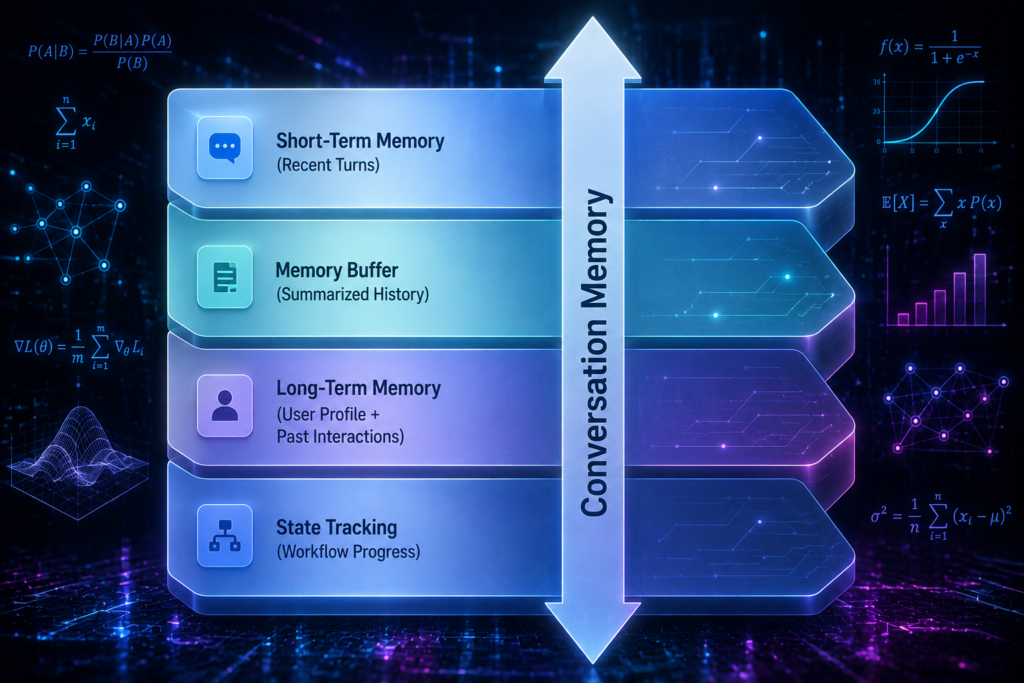
Agent memory is not one thing. It is a collection of mechanisms that work together:
Short-Term Memory – retains conversational context and immediate actions in the current session.
Long-Term Memory – stores user preferences, past interactions, and historical feedback across sessions.
Memory Buffer – truncates or summarizes past interactions to stay within token limits.
State Tracking – monitors what steps were already executed and what the current context is.
Together, these form conversation memory: the ability to preserve dialogue history for context-rich, multi-turn tool calling.
Short-Term Memory: The working memory of the agent
Short-term memory is what the agent uses to remember the current conversation.
It stores:
the user’s recent messages,
the agent’s recent responses,
the tools it has already called,
and the intermediate results it has computed.
This is the “what just happened” layer.
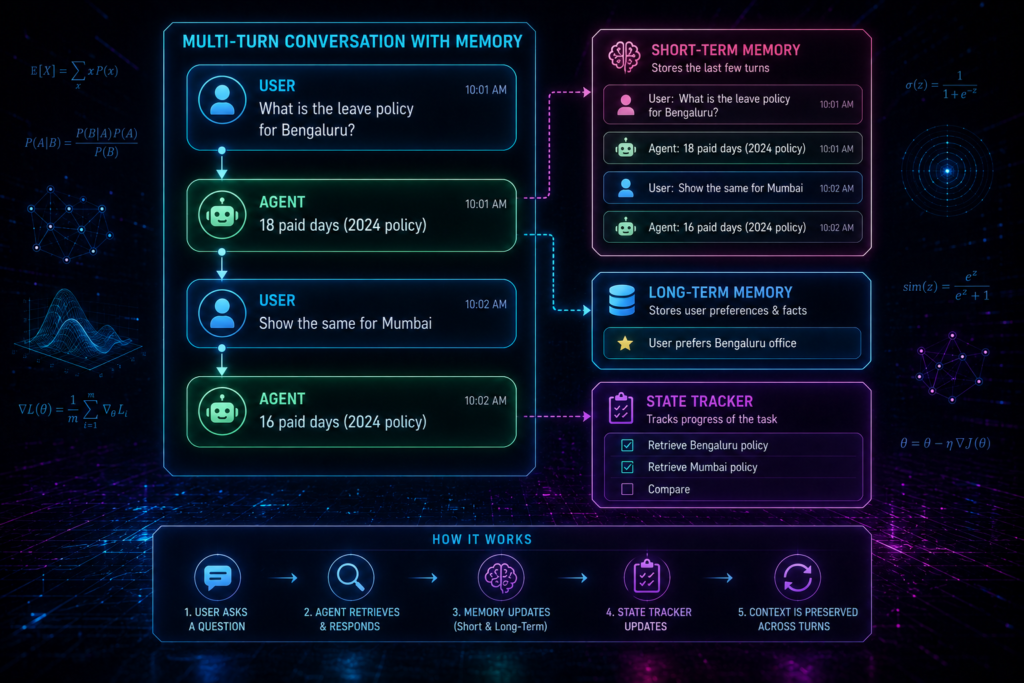
Example: Short-term memory in action
User: What is the leave policy for Bengaluru?
Agent: According to the 2024 policy, Bengaluru employees get 18 paid leave days.
User: Actually, can you show me the same for Mumbai?
Without short-term memory, the second query is ambiguous. What is “the same”? With short-term memory, the agent knows “the same” refers to “leave policy”.
Implementation pattern
class ShortTermMemory:
def __init__(self, max_turns: int = 10):
self.buffer = []
self.max_turns = max_turns
def add_turn(self, user_msg: str, agent_msg: str):
self.buffer.append({“user”: user_msg, “agent”: agent_msg})
if len(self.buffer) > self.max_turns:
self.buffer.pop(0)
def get_context(self) -> str:
context = []
for turn in self.buffer:
context.append(f”User: {turn[‘user’]}\nAgent: {turn[‘agent’]}”)
return “\n\n”.join(context)
This is the simplest form of conversation memory. But what happens when you stop running your terminal? Everything disappears. That’s where persistent storage comes in.
Persistent Memory: SQLite for Local Session History
Using in-memory Python lists for conversation history means your agent forgets everything the second you stop running your terminal. A practical, intermediate step is to back conversation memory with a local SQLite database. It is serverless, requires zero installation, and is built natively into Python.
import sqlite3
def init_db():
conn = sqlite3.connect(“agent_memory.db”)
cursor = conn.cursor()
cursor.execute(“””
CREATE TABLE IF NOT EXISTS history (
session_id TEXT,
role TEXT,
content TEXT,
timestamp DATETIME DEFAULT CURRENT_TIMESTAMP
)
“””)
conn.commit()
conn.close()
This simple pattern gives you persistent memory across sessions without any external dependencies.
Long-Term Memory: The persistent profile
Long-term memory is what the agent uses to remember you across sessions.
It stores:
user preferences (e.g., “always show policies for Bengaluru”),
frequently asked topics,
historical feedback (e.g., “user prefers concise answers”),
and past interactions that may be relevant later.
This is the “who you are and what you care about” layer.
Example: Long-term memory in action
Day 1:
User: I work in the Bengaluru office.
Agent: Noted. I’ll prioritize Bengaluru-specific policies for you.
Day 3:
User: What is the leave policy?
Agent: For the Bengaluru office, the 2024 policy provides 18 paid leave days.
The agent did not need to be told again. Long-term memory remembered the office location.
Implementation pattern
class LongTermMemory:
def __init__(self):
self.user_profile = {}
self.history = []
def store_preference(self, key: str, value: str):
self.user_profile[key] = value
def log_interaction(self, query: str, answer: str, feedback: str = “”):
self.history.append({
“query”: query,
“answer”: answer,
“feedback”: feedback
})
def get_relevant_context(self, current_query: str) -> dict:
return {
“profile”: self.user_profile,
“recent”: self.history[-5:]
}
In production, this would be backed by a database or vector store.
Local Vector Databases for Long-Term Episodic Recall
When long-term memory grows, searching through raw text files becomes slow. Lightweight, local vector databases like ChromaDB or FAISS can store past interaction embeddings. When a user asks a question, the agent searches this database to retrieve semantically related memories.
import chromadb
# Initialize local, persistent Chroma client
db_client = chromadb.PersistentClient(path=”./memory_db”)
collection = db_client.get_or_create_collection(name=”user_memories”)
# Storing a user memory
collection.add(
documents=[“User works in Bengaluru office and prefers concise summaries.”],
metadatas=[{“category”: “preference”}],
ids=[“user_preference_01”]
)
Resilient Fallbacks for Vector DB Outages
If your local ChromaDB connection fails due to an unexpected file lock, your agent shouldn’t crash. Always wrap database initialization in standard try-except blocks.
try:
db_client = chromadb.PersistentClient(path=”./memory_db”)
collection = db_client.get_or_create_collection(name=”user_memories”)
except Exception as e:
print(f”Vector DB unavailable: {e}. Falling back to in-memory storage.”)
collection = None # Fallback gracefully
Memory Buffer: Staying within token limits
LLMs have token limits. You cannot feed an entire conversation history into every call. That is where the memory buffer comes in.
A memory buffer:
keeps only the most recent turns in full detail,
summarizes older turns,
and discards irrelevant or redundant information.
Example: Buffer with summarization
Full conversation: 50 turns
Buffer strategy:
– Keep last 10 turns in full.
– Summarize turns 11–30 into a single paragraph.
– Discard turns 31–50 unless they contain high-value information.
Sliding-Window Memory Truncation
To prevent your agent from exceeding context token limits or driving up API costs, you can implement a Sliding-Window strategy. Instead of keeping the entire chat history, you keep only the last N turns (typically N = 5 to 10) in full, discarding older messages dynamically.
def get_sliding_window_history(history_list, window_size=6):
# Retrieve only the last 6 messages (3 complete conversation turns)
return history_list[-window_size:]
Token-Count-Aware Memory Slicing
Instead of limiting memory by the number of turns (which is unpredictable, as some messages are huge paragraphs), limit memory based on the exact token count. Use a free tokenizer helper library like OpenAI’s tiktoken to measure tokens and prune historical context dynamically.
import tiktoken
def limit_by_tokens(history_list, max_tokens=1000):
encoder = tiktoken.get_encoding(“cl100k_base”)
total_tokens = 0
safe_history = []
for message in reversed(history_list):
tokens = len(encoder.encode(message[“content”]))
if total_tokens + tokens > max_tokens:
break
total_tokens += tokens
safe_history.insert(0, message)
return safe_history
Implementation pattern:
class MemoryBuffer:
def __init__(self, max_full_turns: int = 10):
self.full_turns = []
self.summary = “”
self.max_full_turns = max_full_turns
def add_turn(self, user_msg: str, agent_msg: str):
self.full_turns.append({“user”: user_msg, “agent”: agent_msg})
if len(self.full_turns) > self.max_full_turns:
oldest = self.full_turns.pop(0)
self.summary += f”\nSummarized: User asked about {oldest[‘user’][:50]}… Agent responded with {oldest[‘agent’][:50]}…”
def get_context(self) -> str:
context = [f”Summary of earlier conversation: {self.summary}”]
for turn in self.full_turns:
context.append(f”User: {turn[‘user’]}\nAgent: {turn[‘agent’]}”)
return “\n\n”.join(context)
Dynamic Memory Summarization Prompts
To keep older conversation context alive without blowing up your token budget, run an offline summarization step on your memory buffer. Instruct a cheaper, smaller model to compress 10 chat turns into 2 clear sentences.
Summarize the following chat history. Extract only hard facts, agreed decisions, and active queries. Ignore greeting filler and repetitive thank-yous.
Chat History: {raw_chat_history}
Consolidated Summary:
Algorithmic Memory De-duplication
If a user states, “I work in Bengaluru,” several times across different sessions, a lazy long-term memory system will store duplicate records. Before saving any new memory, run a quick similarity check (e.g., Cosine Similarity score > 0.85). If a highly similar preference is already stored, update its timestamp rather than creating a duplicate entry.
import numpy as np
def cosine_similarity(v1, v2):
dot_product = np.dot(v1, v2)
norm_v1 = np.linalg.norm(v1)
norm_v2 = np.linalg.norm(v2)
return dot_product / (norm_v1 * norm_v2)
State Tracking: Knowing where you are in the workflow
State tracking is the agent’s internal notebook. It records:
which steps have already been executed,
which sub-agents have been called,
what results have been obtained,
and what still needs to be done.
Example: State tracking in a multi-step workflow
Query: “Compare Q1 results of Flipkart and Amazon in India.”
State:
– [x] Sub-query 1: Flipkart Q1 results – completed
– [x] Sub-query 2: Amazon Q1 results – completed
– [ ] Sub-query 3: Comparison metrics – pending
– [ ] Final synthesis – pending
Implementation pattern
class StateTracker:
def __init__(self):
self.steps = []
def add_step(self, step_id: str, description: str, status: str = “pending”):
self.steps.append({
“id”: step_id,
“description”: description,
“status”: status,
“result”: None
})
def complete_step(self, step_id: str, result: str):
for step in self.steps:
if step[“id”] == step_id:
step[“status”] = “completed”
step[“result”] = result
break
def get_pending_steps(self) -> list:
return [s for s in self.steps if s[“status”] == “pending”]
def get_context(self) -> str:
lines = []
for step in self.steps:
marker = “[x]” if step[“status”] == “completed” else “[ ]”
lines.append(f”{marker} {step[‘description’]}”)
return “\n”.join(lines)
Non-Blocking Asynchronous Memory Writing
Saving a conversation log or generating a new database embedding after each turn adds latency, making the user wait. Using Python’s built-in threading module or asyncio to write memories to the local database in the background keeps the chat interface responsive.
import threading
def save_memory_async(session_id, role, content):
thread = threading.Thread(target=write_to_database, args=(session_id, role, content))
thread.start()
System Prompt Context Injection
Once memory is retrieved, how does the agent use it? The most practical way is context injection. You construct the system prompt dynamically, inserting the relevant short-term and long-term memory blocks as plain text before passing it to your LLM API call.
SYSTEM_TEMPLATE = “””
You are a helpful HR assistant.
User Profile Memory: {user_profile_memories}
Recent Chat Context: {short_term_context}
Now answer the user’s current query: {user_query}
“””
Conversation Memory: The unified view
When you combine short-term memory, long-term memory, memory buffer, and state tracking, you get conversation memory: a rich, context-aware history that enables multi-turn tool calling.
Conversation memory allows the agent to:
understand follow-up questions,
remember user preferences,
avoid repeating the same retrieval,
and resume complex workflows across turns.
Unified memory architecture
User Query
↓
Short-Term Memory (recent turns)
↓
Long-Term Memory (user profile, history)
↓
Memory Buffer (summarized older turns)
↓
State Tracking (workflow progress)
↓
Agentic RAG Core (retrieval + generation)
↓
Final Answer + Memory Updates
Explicit “Clear Memory” Command Triggers
Provide users with an explicit escape hatch. If the agent’s memory gets cluttered or starts hallucinating, implement a specific command parser (e.g., typing /clear or /reset) that immediately wipes the active local database or session states.
if user_input.strip().lower() == “/clear”:
st.session_state.chat_history = []
clear_local_sqlite_database()
st.success(“Session memory cleared successfully!”)
Human-in-the-Loop Memory Correction Interfaces
An autonomous memory can easily misinterpret a user statement. The gold standard for keeping memory clean is providing a basic admin screen in your application where users can view and edit what the agent has remembered about them.
Semantic vs. Episodic Memory Structures
When explaining memory to students, draw a clear architectural line:
Episodic Memory (Logs): Raw logs of what happened in the past (e.g., “User checked leave policy on Oct 24”).
Semantic Memory (Facts): Consolidated facts extracted from those episodes (e.g., “User’s home office is Bengaluru”).
Storing structured facts is always cheaper and more effective for prompting than dumping raw logs.
Real-world example: HR assistant with memory
Imagine an HR assistant for an Indian enterprise.
Session 1:
User: I work in the Bengaluru office.
Agent: Noted. I’ll prioritize Bengaluru-specific policies for you.
User: What is the leave policy?
Agent: For Bengaluru, the 2024 policy provides 18 paid leave days.
Session 2 (next day):
User: What is the reimbursement policy?
Agent: For the Bengaluru office, the 2024 reimbursement policy allows up to ₹50,000 per year for travel and training.
The agent remembered the office location from Session 1. That is long-term memory at work.
Mid-conversation:
User: Actually, can you show me the same for Mumbai?
Agent: For Mumbai, the 2024 policy provides 16 paid leave days.
The agent understood “the same” refers to “leave policy”. That is short-term memory and state tracking in action.
Memory and cost trade-offs
Memory is not free. It adds:
storage costs for long-term data,
token costs for including context in LLM calls,
computation costs for summarization and state updates.
But it can also reduce cost by:
avoiding repeated retrieval of the same information,
reducing the need for user clarifications,
and enabling more efficient multi-turn workflows.
A rough comparison:
| System Type | Avg Latency | Avg Cost/Query | User Satisfaction |
|---|---|---|---|
| No Memory | 2.1s | $0.04 | 3.2/5 |
| Short-Term Memory Only | 2.4s | $0.05 | 4.1/5 |
| Full Conversation Memory | 2.8s | $0.06 | 4.7/5 |
The memory-enabled system costs a bit more but feels much more human.
Evaluation framework for memory
To know if your memory is working, track:
Context relevance – how often the remembered information is actually useful.
Follow-up resolution – how often follow-up questions are answered correctly without re-explanation.
Preference adherence – how often the agent respects stored user preferences.
Token efficiency – how much context is actually used vs discarded.
User satisfaction – subjective ratings on how “human” the agent feels.
| Metric | Baseline (No Memory) | With Memory | Change |
|---|---|---|---|
| Follow-up resolution | 58% | 89% | +31% |
| Preference adherence | 0% | 94% | +94% |
| Token usage per query | 1,200 | 1,600 | +33% |
| User satisfaction (1–5) | 3.2 | 4.7 | +47% |
Security and privacy guardrails
Memory is powerful, but it also creates privacy risks.
Key guardrails:
PII minimization – store only what is necessary.
User consent – let users opt in or out of long-term memory.
Data retention policies – automatically delete old memories after a set period.
Access control – restrict which agents can read or write to memory.
Audit logs – track what is stored and why.
Right to forget – allow users to delete their memory profile.
Memory should enhance trust, not undermine it.
A memory-enabled agent can remember that a user is in the Bengaluru finance team and automatically prioritize relevant policies and reports.
Implementation roadmap
A realistic path to production:
Phase 1: Short-term memory
Add basic conversation buffer.
Store last N turns in full.
Phase 2: State tracking
Add workflow state for multi-step tasks.
Track which steps are completed.
Phase 3: Memory buffer with summarization
Summarize older turns to stay within token limits.
Discard irrelevant history.
Phase 4: Long-term memory
Store user preferences and profiles.
Add retrieval of relevant past interactions.
Add SQLite or vector database persistence.
Phase 5: Production hardening
Add privacy guardrails, retention policies, and audit logs.
Monitor memory usage and user satisfaction.
Add session isolation and multi-user support.
Troubleshooting memory
Problem: The agent forgets too much
Symptoms: user has to repeat themselves often.
Fix: increase short-term memory size, improve summarization, or add long-term preferences.
Problem: The agent remembers too much
Symptoms: context becomes noisy, token usage spikes.
Fix: tighten memory buffer, add relevance filtering, and prune old history.
Problem: The agent ignores stored preferences
Symptoms: user preferences are not reflected in answers.
Fix: ensure long-term memory is included in the retrieval context and prompt.
Problem: Privacy concerns
Symptoms: users worry about data being stored.
Fix: add clear privacy policies, opt-out options, and data retention limits.
Problem: Vector DB outages
Symptoms: agent crashes when database is unreachable.
Fix: wrap database initialization in try-except blocks and fall back to in-memory storage.
Quick reference card
Short-term memory = recent turns in the current session.
Long-term memory = user preferences and past interactions across sessions.
Memory buffer = summarization to stay within token limits.
State tracking = workflow progress and executed steps.
Conversation memory = the unified view of all the above.
Track context relevance, follow-up resolution, and user satisfaction.
Add privacy guardrails and retention policies from day one.
Use SQLite for lightweight persistent storage.
Use ChromaDB or FAISS for long-term episodic recall.
Implement async writes to keep the chat responsive.
Use session isolation for multi-user environments.
Agent memory is the hidden engine that makes agentic RAG feel human. It is what turns a one-shot retriever into a context-aware assistant that remembers, adapts, and grows with you.
Whether you are using a simple SQLite database, a local ChromaDB vector store, or just a JSON file for weekend projects, the key is to start with memory and iterate. Your users will notice the difference—not just in what the agent does, but in how it feels.
The future of agentic RAG is not just about smarter retrieval. It is about smarter memory—so the system can remember what matters, forget what does not, and stay in sync with you across every conversation.

