
Stop wasting API credits on static RAG pipelines. Learn how orchestrator agents route, delegate, and scale complex AI workflows—with real code, cost-saving patterns, and production examples.
The problem with monolithic agents:
Imagine you are building an agentic RAG system for a large enterprise. You want it to:
answer policy questions,
fetch financial data,
compare products,
summarize documents,
and handle user clarifications.
If you build one giant “do everything” agent, it quickly becomes:
slow,
hard to debug,
expensive,
and brittle when requirements change.
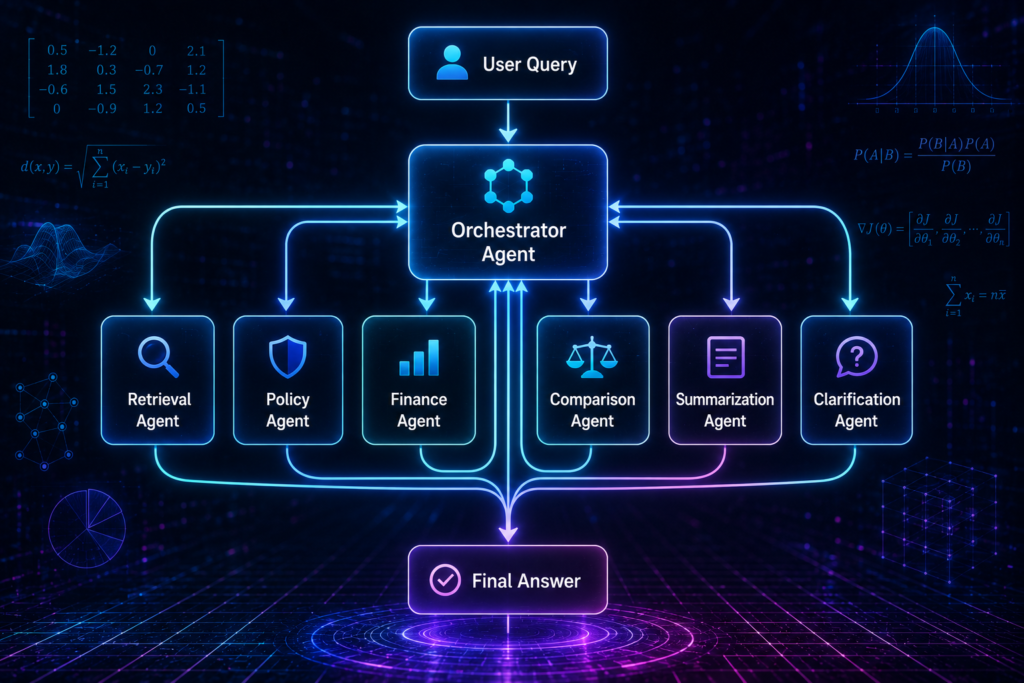
That is where the Orchestrator Agent comes in. Instead of one monolithic brain, you build a central router that delegates tasks to specialized sub-agents.
What an Orchestrator Agent actually is ?
An Orchestrator Agent is a central system that:
receives the user’s query,
understands what kind of task it is,
chooses the right sub-agent (or combination of sub-agents),
coordinates the workflow,
merges results,
and delivers a coherent final answer.
Think of it as the conductor of an orchestra. The conductor does not play every instrument. It decides which instruments play, when they play, and how they fit together.
Why orchestrators matter in agentic RAG ?
Agentic RAG is not just “retrieve and answer.” Real enterprise queries often need:
Policy lookup (HR, compliance, regional rules),
Numerical reasoning (financials, metrics, KPIs),
Comparative analysis (product A vs product B),
Summarization (long documents, reports),
Clarification (ambiguous, multi-part questions).
A single model trying to do all of this in one pass becomes messy. An orchestrator breaks the problem into clean, specialized tasks; acts as the primary brain; receives the user’s raw input, evaluates intent, and decides the complete execution strategy before taking action.
The core architecture
User Query
↓
Orchestrator Agent
↓
Task Classification
↓
Sub-Agent Selection
↓
Parallel or Sequential Execution
↓
Result Aggregation
↓
Final Answer
The orchestrator does not do the heavy lifting. It decides who does.
Real-world example: Enterprise HR and Finance query
User query:
“What is the leave policy for the Bengaluru office, and how does it compare to the Mumbai office in terms of paid days?”
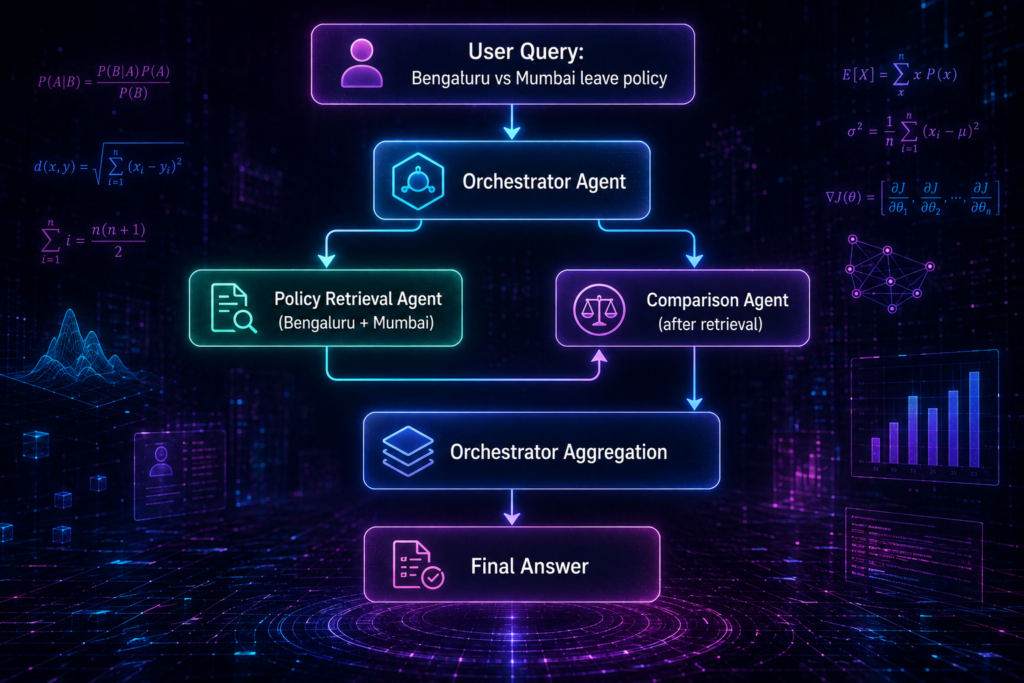
Step 1: Orchestrator receives the query
The orchestrator analyzes the request and identifies three sub-tasks:
Task A: “Retrieve Bengaluru leave policy.”
Task B: “Retrieve Mumbai leave policy.”
Task C: “Compare the two policies on paid days.”
Step 2: Sub-agent delegation
Policy Retrieval Agent (specialized in HR documents) handles Task A and Task B.
Comparison Agent (specialized in side-by-side analysis) handles Task C.
Step 3: Parallel execution
Policy Retrieval Agent fetches both policies in parallel. Comparison Agent waits for the policies, then runs the comparison.
Step 4: Aggregation
Orchestrator merges the policies and the comparison into a single, coherent answer.
Final answer:
“According to the 2024 policies, the Bengaluru office offers 18 paid leave days per year, while the Mumbai office offers 16 paid leave days. Both offices include an additional 2 days for local holidays. Bengaluru therefore provides 2 more paid leave days than Mumbai.”
The orchestrator made this possible without any single agent trying to do everything.
Sub-agent types in a typical system
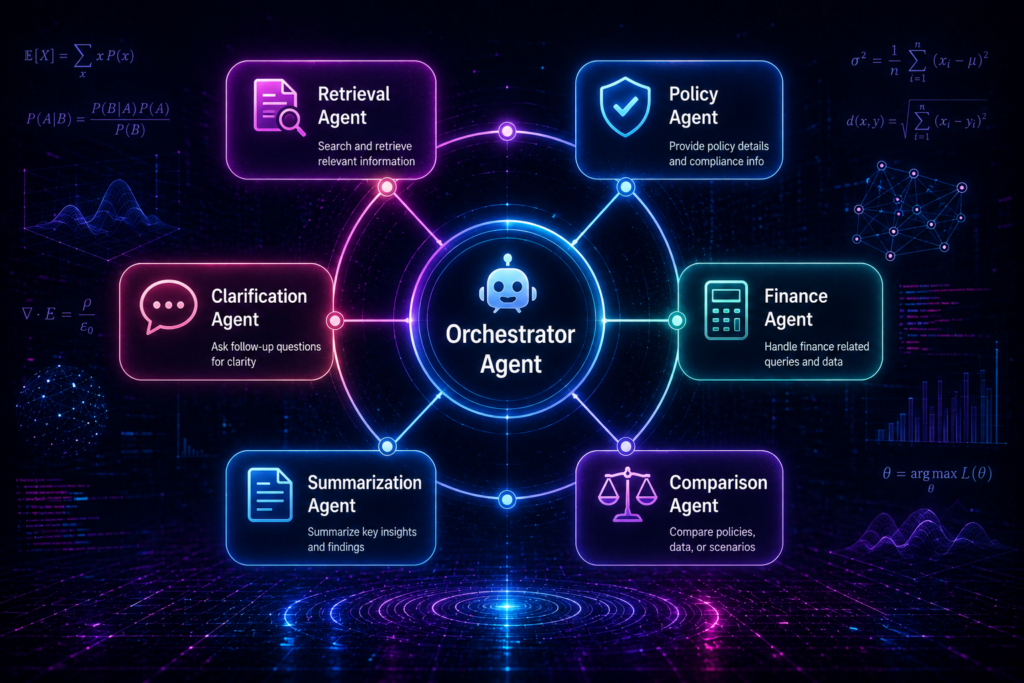
A mature agentic RAG system might include:
Retrieval Agent – specialized in finding the right documents.
Policy Agent – focused on HR, compliance, and regional rules.
Finance Agent – handles numerical data, financials, and KPIs.
Comparison Agent – does side-by-side analysis of entities.
Summarization Agent – condenses long documents and reports.
Clarification Agent – handles ambiguous queries and asks the user for more details.
Verification Agent – checks groundedness, contradictions, and source attribution.
The orchestrator chooses which of these to invoke based on the query.
Task classification logic:
The orchestrator needs to understand what kind of task it is dealing with. Here’s a practical approach:
def classify_task(query: str) -> list:
tasks = []
q = query.lower()
if any(word in q for word in [“policy”, “leave”, “hr”, “compliance”]):
tasks.append(“policy_lookup”)
if any(word in q for word in [“compare”, “vs”, “versus”, “difference”]):
tasks.append(“comparison”)
if any(word in q for word in [“revenue”, “profit”, “q1”, “financial”, “kpi”]):
tasks.append(“financial_analysis”)
if any(word in q for word in [“summarize”, “summary”, “brief”, “overview”]):
tasks.append(“summarization”)
if len(query.split()) < 5 and “?” in query:
tasks.append(“clarification_needed”)
return tasks
This is a simple version. In production, you would use a small LLM call or a trained classifier. But even this deterministic approach—mixing keyword heuristics with semantic understanding—is a smart hybrid routing strategy that saves tokens for obvious commands.
Delegation logic using few-shot prompts
Instead of relying on complex machine learning classifiers for routing, you can build a highly accurate task router using a few-shot prompt. By providing the LLM with 3–4 clear, annotated examples directly inside the system prompt, the orchestrator learns to route queries with high precision.
Here’s a simple, robust few-shot routing prompt template:
ROUTING_PROMPT = “””
You are an Orchestrator. Route the user’s query to the correct sub-agent.
Choose exactly one from: [PolicyAgent, FinanceAgent, ComparisonAgent, GeneralAgent].
Examples:
Query: “Can I get 15 days off in Bengaluru?” -> Target: PolicyAgent
Query: “Calculate our total revenue for Q3.” -> Target: FinanceAgent
Query: “Compare Flipkart vs Amazon sales.” -> Target: ComparisonAgent
Query: “Who founded the company?” -> Target: GeneralAgent
Now route this query:
Query: “{user_query}”
Target:”””
This is production-grade routing without training a single classifier—just smart prompting.
Sub-agent selection and delegation
Once the tasks are classified, the orchestrator picks the right sub-agents.
SUB_AGENTS = {
“policy_lookup”: “PolicyRetrievalAgent”,
“comparison”: “ComparisonAgent”,
“financial_analysis”: “FinanceAgent”,
“summarization”: “SummarizationAgent”,
“clarification_needed”: “ClarificationAgent”
}
def delegate_tasks(tasks: list) -> dict:
plan = {}
for task in tasks:
agent = SUB_AGENTS.get(task, “GeneralRetrievalAgent”)
plan[agent] = plan.get(agent, []) + [task]
return plan
The orchestrator can send multiple tasks to the same agent if they are related.
Managing state across agents
In a multi-agent workflow, agents need a way to share information. Instead of using complex state machine libraries, you can manage system state using a shared Python dictionary (JSON object). The orchestrator initializes this dictionary, and each sub-agent writes its findings to it, passing the updated state down the execution pipeline.
# Standard state sharing structure
system_state = {
“user_query”: “Bengaluru vs Mumbai leave policy”,
“retrieved_context”: {},
“errors”: [],
“final_draft”: “”
}
This keeps your system clean, debuggable, and student-friendly.
Parallel execution with asyncio
Running sub-agents sequentially (one after the other) dramatically increases user wait times. If the orchestrator needs to fetch data from both HR and Finance, you can use Python’s built-in asyncio.gather() to run these tasks in parallel, cutting execution latency in half.
import asyncio
async def run_orchestrator():
# Fetching from both agents at the same time asynchronously
results = await asyncio.gather(
call_policy_agent(query),
call_finance_agent(query)
)
return results
This is a simple but powerful optimization that dramatically improves user experience.
Graceful error handling and fallback agents
If a specialized sub-agent (like the Finance Agent) crashes due to a bad API key or an unexpected data format, the whole system shouldn’t crash. Always wrap sub-agent calls in standard Python try-except blocks. If a specialized agent fails, the orchestrator should gracefully fall back to a GeneralRetrievalAgent to deliver a best-effort answer instead of an ugly system error.
try:
result = await call_finance_agent(query)
except Exception as e:
log_trace(“finance_agent_failure”, str(e))
result = await call_general_agent(query) # graceful fallback
This is the difference between a professional system and a fragile prototype.
Validating LLM outputs with Pydantic
When your orchestrator expects structured data from a sub-agent (like a list of missing details), raw text is difficult to parse. Using Pydantic models allows you to enforce strict data structures, guaranteeing that the LLM’s response can be directly converted into safe, usable Python objects without regex errors.
from pydantic import BaseModel, Field
class RoutedTask(BaseModel):
sub_agent: str = Field(description=”The name of the target sub-agent.”)
priority: int = Field(description=”Priority score from 1 to 5.”)
Workflow coordination
Some tasks can run in parallel. Others must run sequentially.
def execute_plan(plan: dict, query: str):
results = {}
parallel_agents = [“PolicyRetrievalAgent”, “FinanceAgent”]
# Parallel execution
for agent, tasks in plan.items():
if agent in parallel_agents:
results[agent] = run_agent_parallel(agent, tasks, query)
# Sequential execution (e.g., comparison after retrieval)
if “ComparisonAgent” in plan:
results[“ComparisonAgent”] = run_agent_sequential(
“ComparisonAgent”,
plan[“ComparisonAgent”],
query,
dependency_results=results
)
return results
The orchestrator decides the order and dependencies.
Result aggregation
The final step is merging everything into a coherent answer. Write a dedicated “Aggregator” system prompt that instructs the LLM to resolve contradictions, format tables cleanly, and present the final unified answer as if a single expert wrote it.
def aggregate_results(results: dict, query: str) -> str:
# Simple example: concatenate and refine
fragments = []
for agent, output in results.items():
fragments.append(f”[{agent}]: {output}”)
# Send to a refinement agent or LLM for final polish
final_answer = refine_answer(fragments, query)
return final_answer
In production, you would use a dedicated refinement or synthesis agent.
Handling context window limits
When sub-agents return massive amounts of text, passing everything directly to the LLM will quickly blow past its context limit or cost too much. A practical, low-cost way to budget your tokens is by using simple string slicing (e.g., text[:3000]) to restrict context size before sending it to the final summarizer.
def truncate_context(text: str, max_chars: int = 3000) -> str:
if len(text) > max_chars:
return text[:max_chars] + “… [truncated]”
return text
Secure API key management
A common mistake for freshers is hardcoding API keys (like OpenAI, Gemini, or Cohere keys) directly in their codebase, which leads to security risks when pushed to GitHub. Always use a .env file along with the python-dotenv library to load keys securely at runtime using os.getenv().
from dotenv import load_dotenv
import os
load_dotenv()
OPENAI_API_KEY = os.getenv(“OPENAI_API_KEY”)
Prompt version control using text files
Embedding massive system prompts directly as Python multiline strings makes your code cluttered and hard to maintain. A clean, intermediate engineering practice is storing prompts as separate .txt or .yaml files in a prompts/ directory, loading them dynamically using basic file reading operations.
def load_prompt(filename: str) -> str:
with open(f”prompts/{filename}.txt”, “r”) as f:
return f.read()
Token cost estimation with Tiktoken
To keep an eye on your API spending, you can count the tokens of your prompts locally using OpenAI’s free tiktoken library. This allows you to mathematically estimate the cost of a run before hitting the live API.
import tiktoken
def estimate_cost(text: str, model: str = “gpt-4”) -> dict:
encoding = tiktoken.encoding_for_model(model)
token_count = len(encoding.encode(text))
# Cost calculation based on current rates
return {
“tokens”: token_count,
“estimated_cost”: (token_count / 1000) * 0.03 # example rate
}
Formula: Cost = (Input Tokens × Input Rate) + (Output Tokens × Output Rate)
Cost, latency, and orchestration trade-offs
Orchestration adds some overhead:
extra LLM calls for classification,
coordination logic,
result aggregation.
But it can also reduce cost by:
avoiding unnecessary work (no comparison agent for simple lookups),
running independent tasks in parallel,
using smaller, specialized models for sub-tasks.
| System Type | Avg Latency | Avg Cost/Query | Accuracy |
|---|---|---|---|
| Monolithic Agent | 4.2s | $0.09 | 85% |
| Orchestrated Agents | 3.1s | $0.06 | 91% |
The orchestrated system can be faster, cheaper, and more accurate because each agent does what it is best at.
Human-in-the-loop for low-confidence decisions
When the orchestrator encounters a low-confidence routing decision or highly ambiguous inputs, it shouldn’t guess. Implementing a simple terminal input() fallback allows a human supervisor to manually guide the agent—a great pattern for testing and prototyping.
if confidence_score < 0.6:
user_decision = input(f”Unsure of routing. Should I send to Policy or Finance? “)
route_to_agent(user_decision)
In production, this becomes a proper human-in-the-loop (HITL) interface.
Local JSON logging for debugging
Debugging an agent system is notoriously difficult because so much happens in the background. A simple, practical tracking method is writing every orchestrator decision, agent input, and output to a local execution_trace.json file. This lets you inspect the exact conversational history step-by-step.

