
Learn how LangGraph reducers work in state updates, what happens without a reducer, how to define custom reducers, how parallel branches merge, and how to avoid common mistakes. Complete guide with real code examples.
1. What Are Reducers? The Core Idea
A reducer tells LangGraph how to combine the old value and the new value for a state key.
That’s it. That’s the whole idea.
The Mental Model
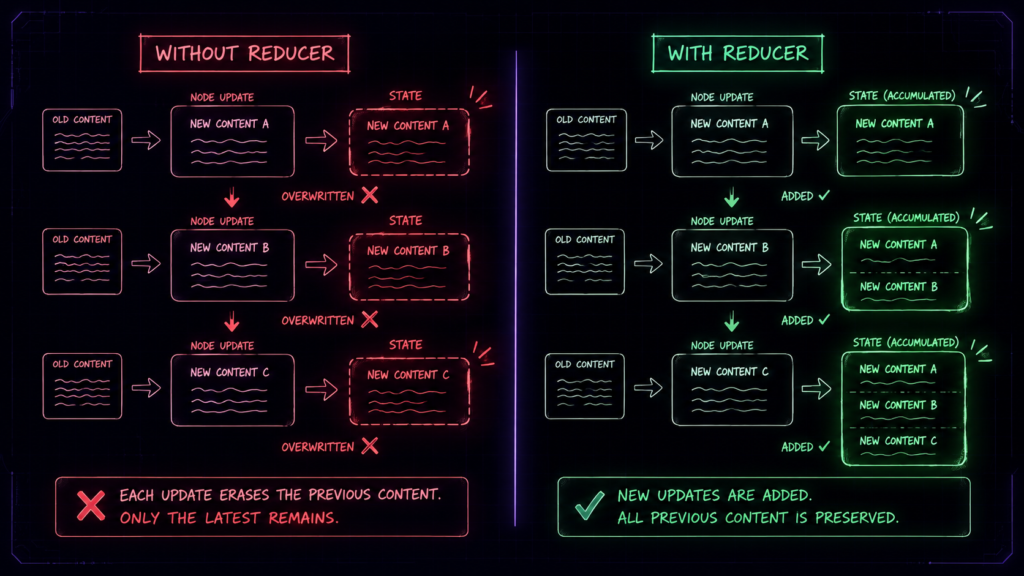
Imagine you have a whiteboard. On it, you write down information as your agent works.
Without a reducer: Every time you write something new, you erase the entire board and write fresh.
With a reducer: You keep what’s already there and add or update based on a rule.
The Two Behaviors
| Scenario | What Happens |
|---|---|
| No reducer | New value overwrites old value |
| Reducer defined | LangGraph merges old and new according to your rule |
That’s the heart of LangGraph state management.
2. Why Reducers Matter: The Default Behavior Problem
Here’s the thing that trips up 90% of beginners.
The Default: “Forget Everything”
If you don’t define a reducer for a state key, LangGraph uses the default behavior:
The newest node output replaces the previous value for that key.
That means if:
Node 1 sets
messages = ["Hello"]Node 2 sets
messages = ["World"]Result:
messages = ["World"](Node 1’s output is LOST)
Real-World Example: Why This Breaks Things
Imagine you’re building a customer support agent:
# ❌ WRONG – No reducer
class State(TypedDict):
messages: List[str] # No reducer defined
user_info: dict
tickets: List[str]
When multiple nodes try to update messages:
Node 1 says: “user said: My package is late”
Node 2 says: “assistant replied: I’ll check that”
Result: The user’s message disappears!
Your agent becomes amnesiac – it forgets everything after each step.

The Fix: Reducers Save the Day
With a reducer, you tell LangGraph: “Don’t overwrite! Add the new messages to the old ones.”
# ✅ RIGHT – With reducer
from typing import Annotated, List
import operator
class State(TypedDict):
messages: Annotated[List[str], operator.add] # Now messages accumulate!
Now Node 1 and Node 2 can both add messages, and nothing is lost.
3. Where Reducers Shine:
Use Case 1: Chat History
Your agent is having a conversation. It needs to remember what was said 5 turns ago.
class State(TypedDict):
messages: Annotated[List[str], operator.add] # Appends every new message
# Result: [“Hi”, “I need help”, “What’s the issue?”, “My order is late”]
Use Case 2: Multi-Step Research
Your agent is researching a topic. Each node finds new information.
class State(TypedDict):
documents: Annotated[List[dict], operator.add] # Accumulates all docs
# Result: [doc1, doc2, doc3] – nothing gets lost
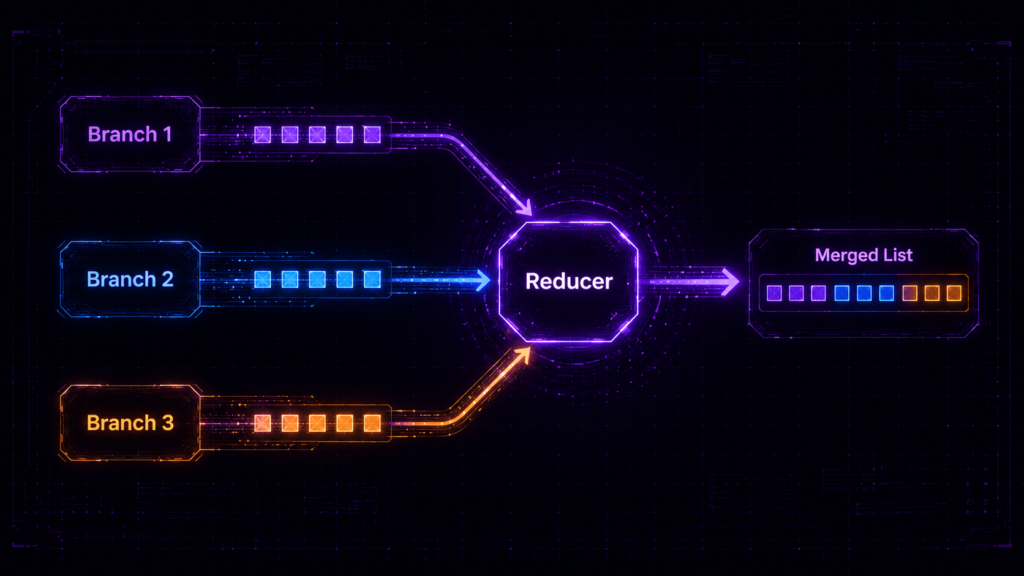
Use Case 3: Parallel Branches
Your agent explores multiple options in parallel. Each branch adds its findings.
class State(TypedDict):
candidates: Annotated[List[dict], operator.add]
# Branch 1 adds: [“Option A: cheap but slow”]
# Branch 2 adds: [“Option B: expensive but fast”]
# Branch 3 adds: [“Option C: balanced”]
# Result: All options preserved
Use Case 4: Scoring and Ranking
Multiple branches evaluate the same data and produce scores. You need to keep the best.
class State(TypedDict):
best_solution: dict # Custom reducer keeps the highest score
Use Case 5: Tool Outputs in Agentic Workflows
Your agent calls tools. Each tool returns data that needs to be saved.
class State(TypedDict):
tool_results: Annotated[List[dict], operator.add]
# GitHub tool returns: {“repo”: “my-repo”, “issues”: […]}
# Jira tool returns: {“ticket”: “JIRA-123”, “status”: “open”}
# Both preserved
4. When to Use Each Type of Reducer ?
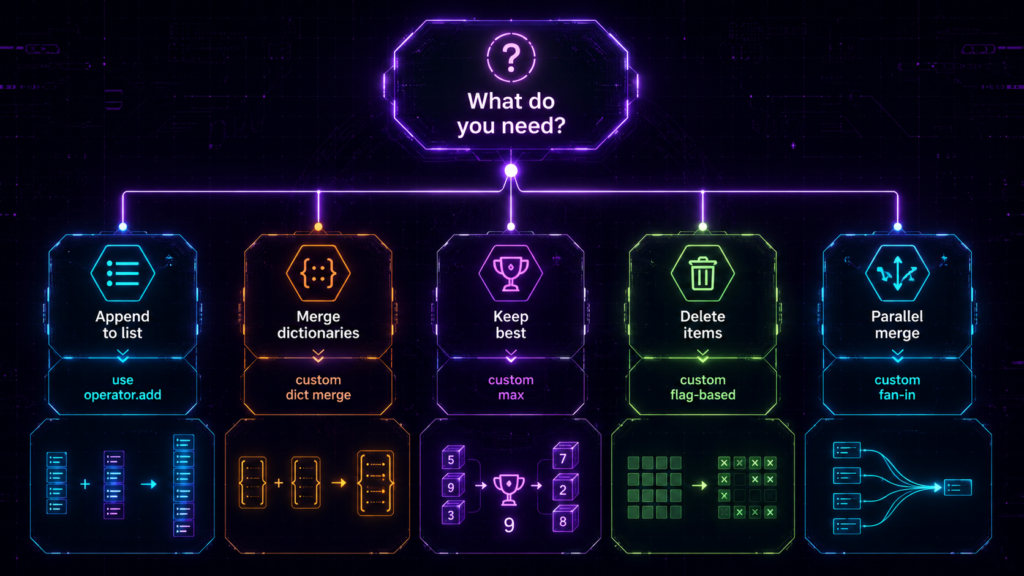
| Situation | Reducer to Use | Why |
|---|---|---|
| Accumulating chat messages | operator.add | Appends messages in order |
| Building a document list | operator.add | Preserves all documents |
| Merging dictionary updates | Custom merge dict | Updates specific fields |
| Keeping only the best result | Custom max reducer | Filters by score |
| Deleting specific items | Custom flag-based reducer | Removes by condition |
| Parallel branch outputs | operator.add or custom fan-in | Merges all branch results |
| Counter or accumulator | Custom sum reducer | Adds numbers together |
5. How to Build Reducers: Step-by-Step Guide
Let’s build every type of reducer you’ll ever need. I’ll explain each one like you’ve never coded before.
Step 1: Understanding operator.add
operator.add is the most common reducer for one simple reason: it appends new items to an existing list.
Without operator.add (The Nightmare)
# ❌ WITHOUT REDUCER
class State(TypedDict):
messages: List[str] # No reducer
# Node 1 runs
state = {“messages”: [“User: Hello”]}
# Node 2 runs
state = {“messages”: [“Assistant: Hi there!”]}
# Result:
print(state[“messages”]) # [“Assistant: Hi there!”]
# User’s message is GONE!
With operator.add (The Solution)
# ✅ WITH REDUCER
from typing import Annotated, List
import operator
class State(TypedDict):
messages: Annotated[List[str], operator.add]
# Node 1 runs
state[“messages”] = [“User: Hello”] # State: [“User: Hello”]
# Node 2 runs
state[“messages”] = [“Assistant: Hi there!”] # State: [“User: Hello”, “Assistant: Hi there!”]
# Result:
print(state[“messages”]) # [“User: Hello”, “Assistant: Hi there!”]
# BOTH messages are preserved!
The Magic Behind It
When LangGraph sees Annotated[List[str], operator.add], it internally does:
# Old value: [“User: Hello”]
# New value: [“Assistant: Hi there!”]
# operator.add treats them like:
# [“User: Hello”] + [“Assistant: Hi there!”] = [“User: Hello”, “Assistant: Hi there!”]
Step 2: Custom Reducers for Lists (Beyond Simple Append) :
Sometimes you need more than just appending. Maybe you want to avoid duplicates, or merge intelligently.
Custom Reducer: Append Without Duplicates
from typing import Annotated, List
def append_without_duplicates(current: List[str], new: List[str]) -> List[str]:
“””
Append new items, but only if they don’t already exist.
“””
if current is None:
return new
if new is None:
return current
# Track what we already have
existing = set(current)
result = current.copy()
# Add only unique items
for item in new:
if item not in existing:
result.append(item)
existing.add(item)
return result
class State(TypedDict):
unique_docs: Annotated[List[str], append_without_duplicates]
# Usage:
# Node 1: unique_docs = [“doc1”, “doc2”]
# Node 2: unique_docs = [“doc2”, “doc3”]
# Result: [“doc1”, “doc2”, “doc3”] – doc2 not duplicated!
Custom Reducer: Limit List Size (Keep Only Last N)
from typing import Annotated, List
def keep_last_n(current: List[str], new: List[str], max_size: int = 10) -> List[str]:
“””
Keep only the last N items in the list.
“””
if current is None:
return new
if new is None:
return current
# Combine and take only last N
combined = current + new
return combined[-max_size:]
class State(TypedDict):
recent_messages: Annotated[List[str], keep_last_n]
Real-world use: You don’t want infinite memory. Keep only the last 10 messages to save tokens.
Step 3: Dictionary Merging (Update Specific Fields)
Sometimes your state has a dictionary, and you want to update specific keys without losing others.
Shallow Merge (Update Top-Level Keys)
from typing import Annotated, Dict
def merge_dicts(current: Dict, new: Dict) -> Dict:
“””
Update the dictionary with new values.
Existing keys are updated, new keys are added.
“””
if current is None:
return new
if new is None:
return current
merged = current.copy()
merged.update(new) # Shallow merge
return merged
class State(TypedDict):
user_info: Annotated[Dict, merge_dicts]
# Usage:
# Node 1: user_info = {“name”: “Alice”, “email”: “alice@email.com”}
# Node 2: user_info = {“email”: “new@email.com”, “premium”: True}
# Result: {“name”: “Alice”, “email”: “new@email.com”, “premium”: True}
# Name is preserved! Email is updated! Premium is added!
Deep Merge (Update Nested Keys)
def deep_merge_dicts(current: Dict, new: Dict) -> Dict:
“””
Recursively merge nested dictionaries.
“””
if current is None:
return new
if new is None:
return current
merged = current.copy()
for key, value in new.items():
if key in merged and isinstance(merged[key], dict) and isinstance(value, dict):
# Recursively merge nested dicts
merged[key] = deep_merge_dicts(merged[key], value)
else:
merged[key] = value
return merged
class State(TypedDict):
config: Annotated[Dict, deep_merge_dicts]
# Usage:
# Node 1: config = {“model”: {“name”: “gpt-4”, “temperature”: 0.7}, “debug”: False}
# Node 2: config = {“model”: {“temperature”: 0.9}, “retry”: 3}
# Result: {“model”: {“name”: “gpt-4”, “temperature”: 0.9}, “debug”: False, “retry”: 3}
# model.name is preserved! model.temperature is updated! debug is preserved!
Step 4: Best Score Selection (Keep Only the Highest)
Multiple branches produce results with scores. You want to keep only the best one.
from typing import Annotated, Dict
def keep_best_score(current: Dict, new: Dict) -> Dict:
“””
Keep the result with the highest score.
Both dicts must have a ‘score’ key.
“””
if current is None:
return new
if new is None:
return current
# Compare scores
if new.get(“score”, 0) > current.get(“score”, 0):
return new
return current
class State(TypedDict):
best_candidate: Annotated[Dict, keep_best_score]
# Usage:
# Node 1: best_candidate = {“name”: “Option A”, “score”: 0.75}
# Node 2: best_candidate = {“name”: “Option B”, “score”: 0.92}
# Result: {“name”: “Option B”, “score”: 0.92} – Option B wins!
Real-world use: You have 5 parallel LLM calls evaluating solutions. Keep the one with the highest confidence score.
Step 5: Deletion Logic (Removing Items)
Reducers don’t delete automatically. You must design deletion yourself.
Simple Deletion Reducer
from typing import Annotated, List
def delete_reducer(current: List[str], new: Dict) -> List[str]:
“””
If new contains a ‘delete’ flag, remove the specified item.
Otherwise, append the item.
“””
if current is None:
return []
# Check if this is a delete request
if new.get(“operation”) == “delete”:
target = new.get(“item”)
return [x for x in current if x != target]
# Otherwise, add the item
new_item = new.get(“item”)
if new_item:
return current + [new_item]
return current
class State(TypedDict):
tasks: Annotated[List[str], delete_reducer]
# Usage:
# Node 1: tasks = {“operation”: “add”, “item”: “Review PR”} -> tasks: [“Review PR”]
# Node 2: tasks = {“operation”: “add”, “item”: “Deploy”} -> tasks: [“Review PR”, “Deploy”]
# Node 3: tasks = {“operation”: “delete”, “item”: “Review PR”} -> tasks: [“Deploy”]
# Node 4: tasks = {“operation”: “add”, “item”: “Test”} -> tasks: [“Deploy”, “Test”]
Complex Deletion with Conditions
def smart_delete_reducer(current: List[Dict], new: Dict) -> List[Dict]:
“””
Delete items based on conditions.
“””
if current is None:
return []
if new.get(“operation”) == “delete_by_id”:
target_id = new.get(“id”)
return [x for x in current if x.get(“id”) != target_id]
elif new.get(“operation”) == “delete_by_type”:
target_type = new.get(“type”)
return [x for x in current if x.get(“type”) != target_type]
elif new.get(“operation”) == “clear_all”:
return []
else:
# Default: add the new item
return current + [new]
class State(TypedDict):
items: Annotated[List[Dict], smart_delete_reducer]
Step 6: Parallel Branches and Fan-In
This is where reducers really shine.
The Problem
In a parallel workflow:
Branch 1 updates
results = ["Result from Branch 1"]Branch 2 updates
results = ["Result from Branch 2"]Branch 3 updates
results = ["Result from Branch 3"]
Without a reducer: Only the last branch’s result survives!
With a reducer: All results are preserved!
Solution: operator.add for Parallel Branches
from typing import Annotated, List
import operator
class State(TypedDict):
results: Annotated[List[str], operator.add]
# Each branch adds its result
# Branch 1: results = [“Branch 1: Found error in login”]
# Branch 2: results = [“Branch 2: Found performance issue”]
# Branch 3: results = [“Branch 3: Found security vulnerability”]
# Final: [“Branch 1: Found error in login”, “Branch 2: Found performance issue”, “Branch 3: Found security vulnerability”]
Advanced: Parallel Branch with Scoring
def merge_branch_results(current: List[Dict], new: Dict) -> List[Dict]:
“””
Collect all branch results and optionally sort them.
“””
if current is None:
return [new] if new else []
if new is None:
return current
# Add the new result
current = current + [new]
# Optional: Sort by confidence score
return sorted(current, key=lambda x: x.get(“confidence”, 0), reverse=True)
class State(TypedDict):
branch_results: Annotated[List[Dict], merge_branch_results]
# Branch 1 adds: {“path”: “Path A”, “confidence”: 0.8}
# Branch 2 adds: {“path”: “Path B”, “confidence”: 0.9}
# Branch 3 adds: {“path”: “Path C”, “confidence”: 0.7}
# Final: [{“path”: “Path B”, “confidence”: 0.9}, {“path”: “Path A”, “confidence”: 0.8}, {“path”: “Path C”, “confidence”: 0.7}]
# Sorted by confidence!
6. Common Beginner Mistakes (And How to Fix Them)
Mistake 1: Expecting Append Without a Reducer
The Mistake:
class State(TypedDict):
messages: List[str] # No reducer
# Node 1: messages = [“Hi”]
# Node 2: messages = [“Hello”]
# Result: [“Hello”] – “Hi” is GONE!
The Fix:
class State(TypedDict):
messages: Annotated[List[str], operator.add]
# Now messages accumulate: [“Hi”, “Hello”]
Mistake 2: Putting Async Logic Inside a Reducer
The Mistake:
async def bad_reducer(current, new):
result = await call_api() # ❌ Reducers CANNOT be async
return result
The Fix:
def good_reducer(current, new):
# Only synchronous, pure logic
return current + new
Why: Reducers are called during state updates. They must be fast and deterministic. Async calls would break the execution flow.
Mistake 3: Using One Reducer for Everything
The Mistake:
def universal_reducer(current, new):
# Trying to handle lists, dicts, and numbers with one function
pass
The Fix:
# Use different reducers for different keys
class State(TypedDict):
messages: Annotated[List[str], operator.add] # For chat history
config: Annotated[Dict, merge_dicts] # For configuration
score: Annotated[int, keep_highest] # For scoring
Why: Different data types need different merge logic.
Mistake 4: Mutating State In Place
The Mistake:
def bad_reducer(current, new):
current.append(new) # ❌ Mutating current
return current
The Fix:
def good_reducer(current, new):
return current + [new] # ✅ Creates new list
Why: State should be immutable for debugging and time travel.
Mistake 5: Forgetting to Handle None
The Mistake:
def bad_reducer(current, new):
return current + new # ❌ Fails if current or new is None
The Fix:
def good_reducer(current, new):
if current is None:
return new
if new is None:
return current
return current + new
Why: Nodes might return None for certain keys.
Mistake 6: Making Reducers Access Other State Keys
The Mistake:
def bad_reducer(current, new, all_state):
# Trying to access other keys
return current + all_state[“other_key”]
The Fix:
def good_reducer(current, new):
# Only uses current and new values
return current + new
Why: Reducers must be pure and independent.
7. Best-Use Reference Table :
| Use Case | Best Reducer Style | Code Example |
|---|---|---|
| Chat History | operator.add | messages: Annotated[List[str], operator.add] |
| Document List | operator.add | docs: Annotated[List[str], operator.add] |
| Tool Outputs | operator.add | results: Annotated[List[dict], operator.add] |
| Dictionary Updates | Custom merge dict | config: Annotated[Dict, merge_dicts] |
| Deep Nested Updates | Custom deep merge | settings: Annotated[Dict, deep_merge_dicts] |
| Best Score Selection | Custom max reducer | best: Annotated[Dict, keep_best_score] |
| Counter/Sum | Custom sum reducer | total: Annotated[int, sum_values] |
| Deletion | Custom flag-based reducer | tasks: Annotated[List, delete_reducer] |
| Parallel Branch Outputs | operator.add or custom fan-in | branches: Annotated[List, merge_branch_results] |
| Unique Items Only | Custom duplicate removal | unique_items: Annotated[List, remove_duplicates] |
| Limit Size | Custom size limiter | recent: Annotated[List, keep_last_10] |
8. The Bottom Line
The Mental Model :
Remember this one thing:
No reducer = overwrite
Reducer defined = merge
operator.add= append lists
Custom reducer = your own merge rule
That’s the entire idea.
| Concept | Rule |
|---|---|
| Default behavior | New value overwrites old value |
| With reducer | New and old values are merged according to your rule |
operator.add | Appends lists together |
| Custom reducer | Your own merge logic |
| Async in reducers | NOT allowed – must be synchronous |
| Mutating state | NOT allowed – return new values |
The Key Insight :
Reducers are not a small LangGraph detail. They are the mechanism that makes state in cyclic and parallel graphs actually work.
Without reducers: Your graph overwrites itself. Data is lost.
With reducers: Your graph accumulates memory, merges branches, preserves history, and behaves like a real agent system.
The final truth: Reducers are the secret sauce of LangGraph. Master them, and your state management becomes simple, predictable, and powerful. Ignore them, and your agent will be an amnesiac mess.

