
PDFs breaking your RAG system? Learn production-ready layout-aware chunking to preserve tables, headers, and document structure. Python code included.
1. The Problem: Why Your RAG System Hates PDFs
Let me tell you about my first RAG project.
I was building a system for a financial services company. They had thousands of PDF reports – earnings calls, quarterly filings, annual reports. Everything a hedge fund could want.
I was excited. I had my vector database ready. I had my LLM ready. I had my embeddings ready.
I took a beautiful quarterly earnings report. I parsed it. I split it into 500-character chunks. I embedded everything. I was ready.
Then came the first test question:
“What was the revenue growth in the Asia-Pacific region during Q3?”
My beautiful RAG system returned:
“The region showed significant improvement in the third quarter…”
Useless.
I tried another question:
“Show me the balance sheet from Q2.”
My system returned a random paragraph about expense ratios.
I was devastated. What went wrong?
The problem wasn’t the LLM. The problem wasn’t the embeddings. The problem was the chunking.
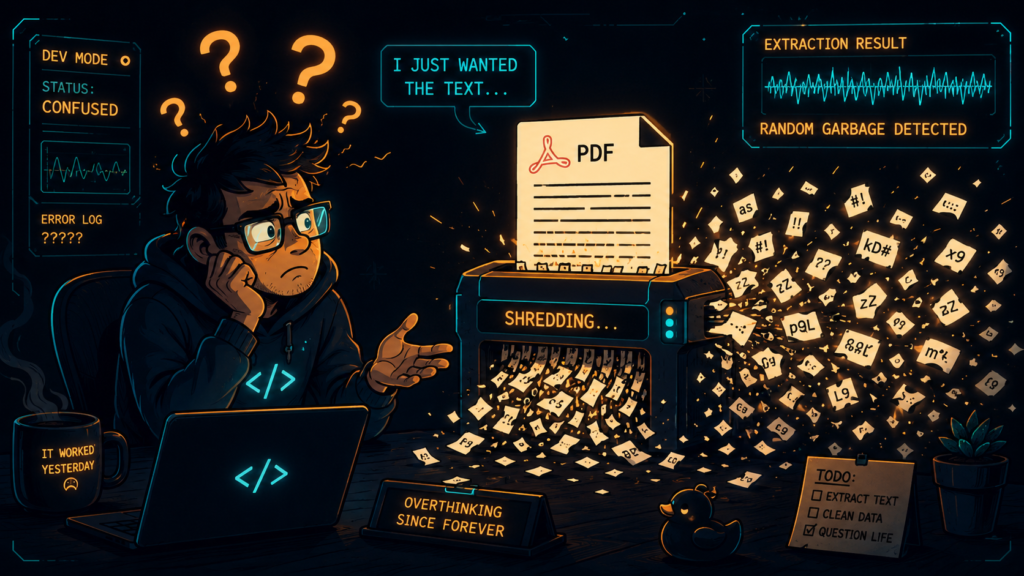
PDFs Are Not Text Files
Here’s what nobody told me: A PDF is not clean text. It’s a layout artifact with:
Headings and subheadings that organize information
Multiple columns that confuse reading order
Tables with data that only makes sense when kept together
Captions and footnotes that provide critical context
Charts and figures that convey visual information
Reading order problems that scramble content
When you apply fixed-size token chunking to this, you destroy the structure that gives the document meaning.
2. The Real Cost of Bad Chunking
Let me paint you a picture of what actually happens.
Scenario: A Financial Analyst’s Nightmare
You’re building a RAG system for a hedge fund. They’re paying you a lot of money. The system needs to answer questions like:
“What was the Q3 revenue for the North American division?”
Here’s what your naive chunking system does:
Original Table:
Quarterly Revenue by Region (in millions)
Region | Q1 | Q2 | Q3 | Q4
North Am | 145 | 158 | 162 | 170
Europe | 98 | 102 | 107 | 112
Asia-Pac | 120 | 135 | 140 | 150
Your Chunking System Splits It Into:
Chunk 1: “Quarterly Revenue by Region (in millions)”
Chunk 2: “Region | Q1 | Q2 | Q3 | Q4”
Chunk 3: “North Am | 145 | 158 | 162 | 170”
Chunk 4: “Europe | 98 | 102 | 107 | 112”
Chunk 5: “Asia-Pac | 120 | 135 | 140 | 150”
The Problem:
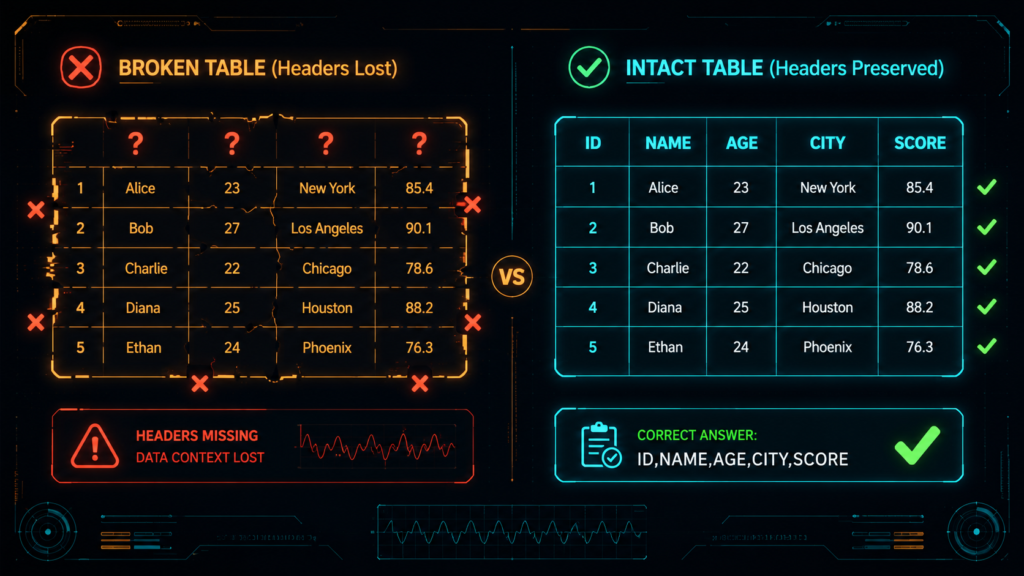
Chunk 2 (the headers) gets separated from the data
The retrieval system finds Chunk 3 because the word “North Am” appears
But Chunk 3 doesn’t have headers
The LLM gets “North Am | 145 | 158 | 162 | 170” with no context
The LLM guesses: “Q3 revenue was 162”
The correct answer: “Q3 revenue was 162” (actually, it’s right in this case, but the LLM doesn’t know that!)
When It Gets Worse
Now try this question:
“What was Asia-Pacific’s revenue in Q2?”
The retrieval finds Chunk 5: “Asia-Pac | 120 | 135 | 140 | 150”
But without headers, the LLM doesn’t know which number is Q2. It might guess 135. It might guess 140. It might hallucinate 132.
The result? Your system is unreliable. The hedge fund can’t trust it. They stop using it. You lose the client.
3. What Is Layout-Aware Chunking?
Let me explain this simply.
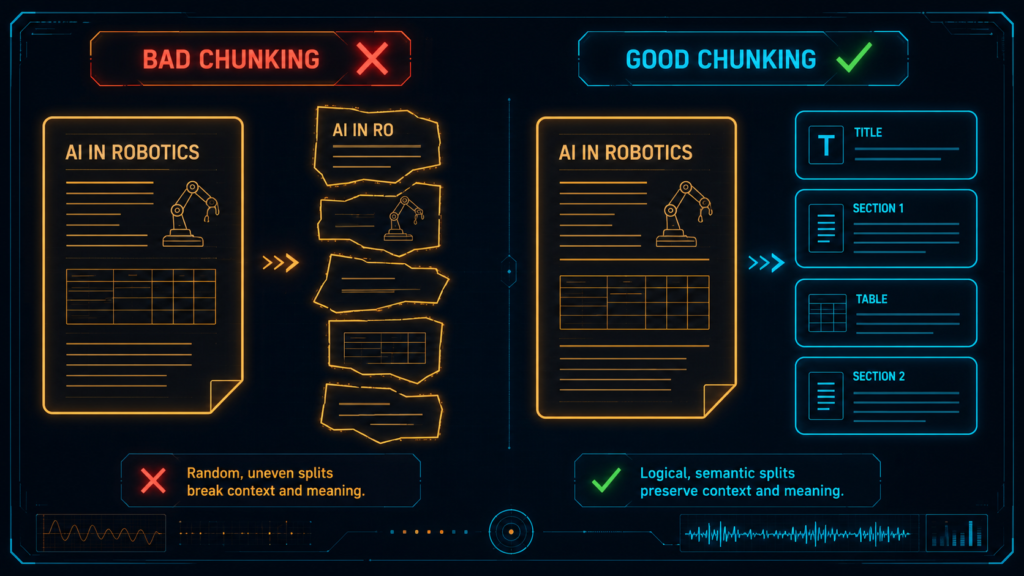
Layout-aware chunking is just a fancy way of saying: “Chunk your document the way a human would read it.”
A human wouldn’t read a table by:
Reading the title
Then skipping to the middle of the table
Then reading the column headers separately
Then coming back to the data
A human reads the title, looks at the headers, reads the data row by row, and connects everything together.
Layout-aware chunking does the same thing. It:
Preserves document structure (headings stay with their sections)
Keeps tables intact (tables don’t get split mid-row)
Retains headings with their sections (subheadings stay with their content)
Only falls back to token-based splitting when structure is too large to fit
Think of it this way:
Bad chunking: “Let me shred this PDF into random pieces and hope the LLM can reassemble it.”
Good chunking: “Let me cut this PDF into logical sections that each make sense on their own.”
4. The Four Strategies You Actually Need {#strategies}
Let me walk you through the strategies that actually work in production.
Strategy 1: Structural Chunking
What it is: You split the document by its hierarchy – title, sections, subsections, paragraphs, tables.
When to use it: Clean, well-structured documents like reports, papers, or manuals.
Why it works: Each chunk is a coherent semantic unit. The LLM gets complete context.
Think of it like: Cutting a book by chapters, not by page numbers.
Strategy 2: Atomic Tables
What it is: You treat each table as a single unit that never gets broken apart.
When to use it: Small to medium tables (under 50 rows, fits in context window).
Why it works: Tables are semantic units. Splitting them breaks meaning.
Think of it like: Keeping an entire spreadsheet intact instead of cutting it into strips.
Strategy 3: Table Summarization for Embedding
What it is: You create a natural language summary of the table for search, but return the full raw table to the LLM.
When to use it: Large tables that don’t embed well as raw numbers.
Why it works: You get good search (summaries embed well) AND good answers (LLM sees full data).
Think of it like: Using a book summary to find the right book, but then reading the full book.
Strategy 4: Parent-Child Hierarchical Chunking
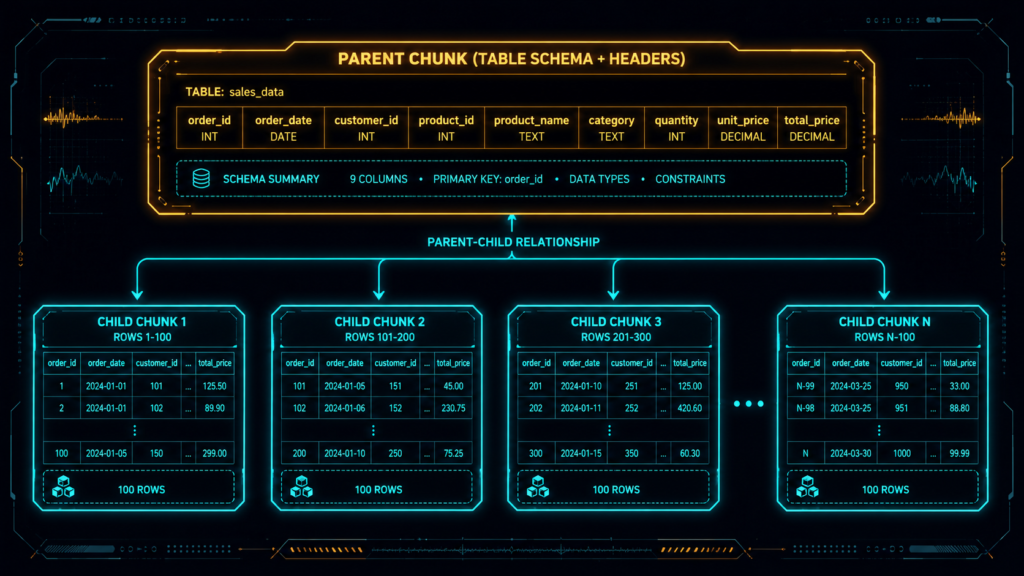
What it is: You create two types of chunks – “parent” chunks (full table schema) and “child” chunks (row-level data).
When to use it: Very large tables (over 100 rows, or over 5000 tokens).
Why it works: You can find specific rows (child chunks) but still have the full table context (parent chunk).
Think of it like: Keeping a map (parent) and individual street-level zoom-ins (children).
Bonus: Vision-Based Retrieval (The Nuclear Option)
What it is: You bypass text extraction entirely and use vision-language models on PDF pages.
When to use it: Scanned PDFs, complex multi-column layouts, charts and figures.
Why it works: It preserves layout, structure, and visual grouping that text extraction loses.
Think of it like: Taking a photo of the page and using that for search, instead of trying to read the text.
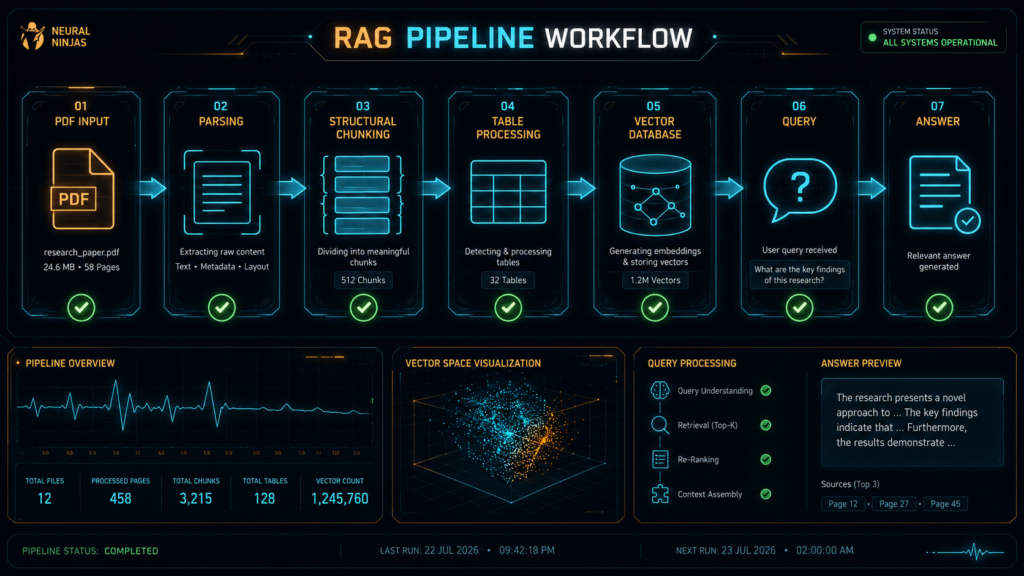
5. How to Build It: A Step-by-Step Journey
Okay, now let’s actually build this thing. But I’ll walk you through it slowly, explaining each piece as we go.
Step 1: Parse the PDF Properly
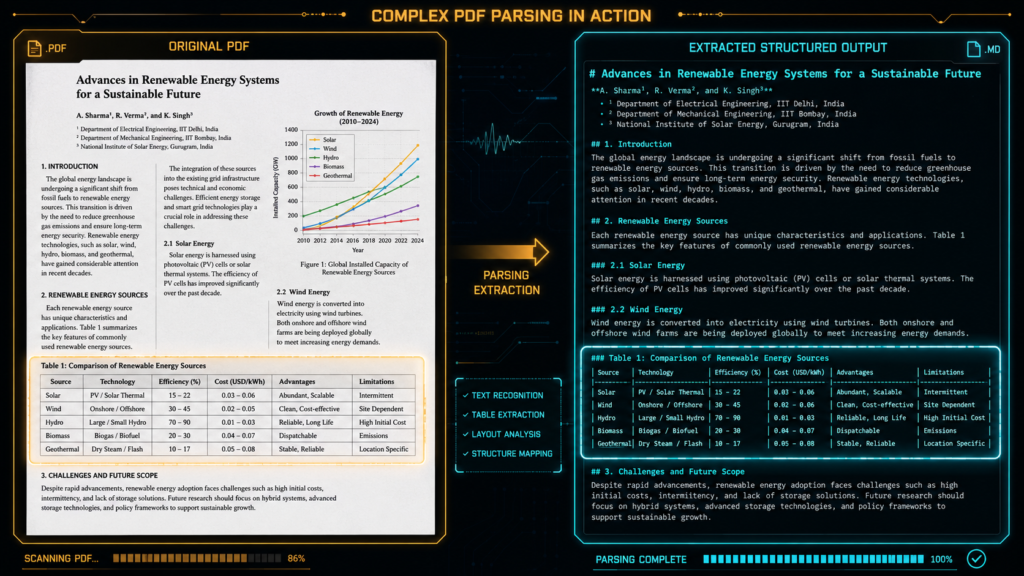
PDF Parse = “Read the PDF, understand its contents, and break it down into different parts.”. Before you can chunk, you need to extract the document with its structure intact.
Your options:
Docling (Free, open-source, good for structured docs)
Unstructured.io (Paid, enterprise-ready, handles complex layouts)
LlamaParse (Cloud-based, best for complex PDFs)
Here’s a simple example with Docling:
# First, install Docling
# pip install docling
from docling.document_converter import DocumentConverter
# Create a converter
converter = DocumentConverter()
# Parse your PDF
result = converter.convert(“q3_earnings_report.pdf”)
# Extract the structured content
markdown_content = result.document.export_to_markdown()
html_content = result.document.export_to_html()
dict_content = result.document.export_to_dict()
What’s happening here?
Docling reads the PDF and understands its structure
It identifies headings, tables, paragraphs, and their hierarchy
It preserves reading order (crucial for multi-column documents)
It extracts tables with their headers and structure
Step 2: Identify the Elements
Now you need to understand what’s in your document.
# Get the structured document
document = result.document
# Let’s see what’s inside
print(f”Document has {len(document.pages)} pages”)
# Iterate through elements
for element in document.iter_elements():
if element.type == “heading”:
print(f”Heading: {element.text} (Level: {element.level})”)
elif element.type == “paragraph”:
print(f”Paragraph: {element.text[:50]}…”)
elif element.type == “table”:
print(f”Table: {element.title} with {len(element.rows)} rows”)
elif element.type == “caption”:
print(f”Caption: {element.text}”)
What you’re doing here:
You’re examining the document’s structure
You’re identifying what type of content you have
You’re noting the hierarchy and relationships
Step 3: Structural Chunking
Now let’s chunk by structure. This is the foundation.
class StructuralChunker:
def __init__(self):
self.chunks = []
self.current_section = None
def chunk_document(self, document):
“””Chunk the document by its hierarchy”””
for element in document.iter_elements():
if element.type == “heading”:
# Save the current section if it exists
if self.current_section:
self.chunks.append(self.current_section)
# Start a new section
self.current_section = {
“type”: “section”,
“heading”: element.text,
“level”: element.level,
“content”: [],
“tables”: [],
“metadata”: {
“page”: element.page,
“section_path”: element.path
}
}
elif element.type == “paragraph”:
if self.current_section:
# Add to current section
self.current_section[“content”].append(element.text)
else:
# Create a section for orphan paragraphs
self.current_section = {
“type”: “section”,
“heading”: “Untitled”,
“level”: 0,
“content”: [element.text],
“tables”: [],
“metadata”: {“page”: element.page}
}
elif element.type == “table”:
if self.current_section:
# Store table with its section
self.current_section[“tables”].append(element)
else:
# Create a section just for this table
self.current_section = {
“type”: “section”,
“heading”: element.title or “Table”,
“level”: 0,
“content”: [],
“tables”: [element],
“metadata”: {“page”: element.page}
}
# Don’t forget the last section
if self.current_section:
self.chunks.append(self.current_section)
return self.chunks
What this code does:
It reads through the document element by element
When it sees a heading, it starts a new section
All paragraphs and tables under that heading go into the same section
Each section becomes a separate chunk
Step 4: Handle Tables with Care
Tables need special treatment. Here’s how:
import pandas as pd
class TableHandler:
def handle_table(self, table_element):
“””Extract a table as a complete semantic unit”””
# Convert table to DataFrame
df = pd.DataFrame(
table_element.data,
columns=table_element.headers
)
# Create a natural language summary
summary = f”Table: {table_element.title or ‘Untitled Table’}\n”
if table_element.caption:
summary += f”Description: {table_element.caption}\n”
summary += f”Columns: {‘, ‘.join(df.columns)}\n”
summary += f”Total Rows: {len(df)}\n”
# Add a preview for context
summary += f”\nPreview:\n{df.head(3).to_string()}”
# Create the complete table chunk
table_chunk = {
“type”: “table”,
“title”: table_element.title or “Untitled Table”,
“caption”: table_element.caption or “”,
“headers”: df.columns.tolist(),
“data”: df.values.tolist(),
“summary”: summary,
“markdown”: df.to_markdown(),
“html”: df.to_html(),
“metadata”: {
“page”: table_element.page,
“source”: table_element.source,
“section”: table_element.section
}
}
return table_chunk
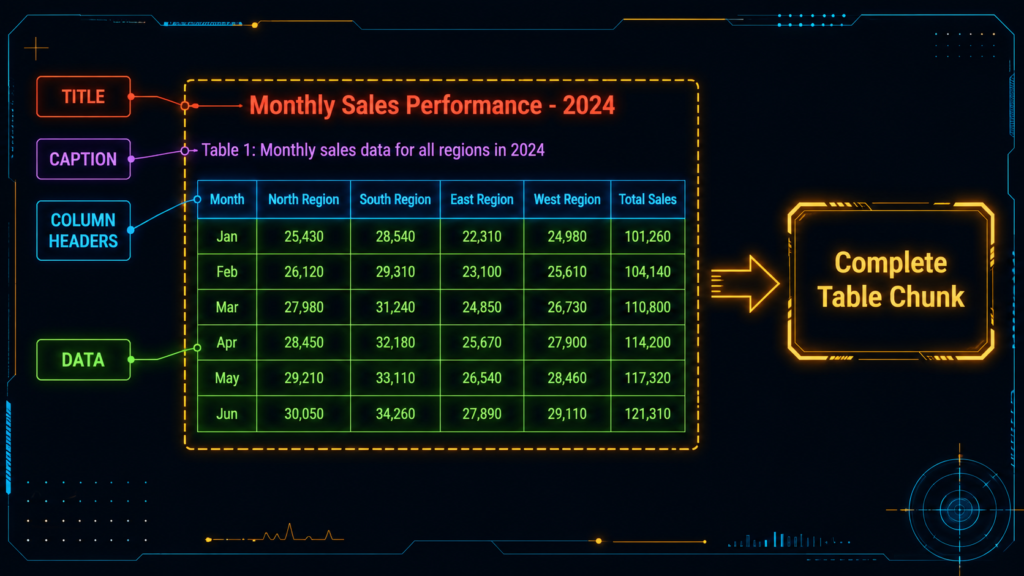
What this does:
It captures the complete table (title, caption, headers, data)
It creates both a summary (for search) and raw format (for generation)
It preserves all metadata (page, source, section)
It never splits the table
Step 5: Decide How to Handle Each Table
Not all tables are equal. Here’s how to decide:
class TableStrategySelector:
def select_strategy(self, table, context_window=4096):
“””Choose the right strategy for this table”””
# Estimate token count
token_estimate = len(str(table.data)) / 4
if token_estimate < context_window:
# Small table – use atomic chunk
return “atomic”
elif len(table.data) < 100:
# Medium table – use summary embedding + raw return
return “summary_embedding”
else:
# Large table – use parent-child
return “parent_child”
The logic:
Small tables (< 50 rows, fits in context): Keep atomic
Medium tables (50-100 rows): Use summaries for search
Large tables (> 100 rows): Use parent-child pattern
Step 6: Parent-Child Chunking for Large Tables
For large tables, you need both detail AND context:
def parent_child_chunking(table_element, row_batch_size=20):
“””Create parent and child chunks for large tables”””
chunks = []
df = pd.DataFrame(
table_element.data,
columns=table_element.headers
)
# PARENT CHUNK: Full schema and structure
parent = {
“type”: “parent_table”,
“title”: table_element.title or “Untitled Table”,
“caption”: table_element.caption or “”,
“headers”: df.columns.tolist(),
“schema”: ” | “.join(df.columns.tolist()),
“total_rows”: len(df),
“metadata”: {
“page”: table_element.page,
“source”: table_element.source
},
“chunk_type”: “parent”
}
chunks.append(parent)
# CHILD CHUNKS: Row batches with headers
for i in range(0, len(df), row_batch_size):
batch = df.iloc[i:i+row_batch_size]
child = {
“type”: “child_table”,
“headers”: df.columns.tolist(),
“rows”: batch.values.tolist(),
“row_range”: f”{i+1}-{min(i+row_batch_size, len(df))}”,
“parent_id”: id(table_element),
“metadata”: {
“page”: table_element.page,
“source”: table_element.source
},
“chunk_type”: “child”
}
chunks.append(child)
return chunks
How this works:
The parent chunk contains the table schema, headers, and structure
Each child chunk contains a batch of rows with headers
When a user asks a row-level question, the system finds the relevant child
But the parent provides context about the full table
This gives you both precision AND context
6. When to Use Each Strategy ?
Let me give you a simple decision guide:
Use Structural Chunking When:
Your document has clear headings and sections
It’s a report, paper, or manual
Section boundaries are semantically meaningful
You want to keep content with its context
Skip it when: The document has no clear structure
Use Atomic Tables When:
The table has less than 50 rows
It fits in your context window
The table is self-contained
You need the complete table for answers
Skip it when: The table is too large for the context window
Use Table Summarization When:
The table is medium-sized (50-100 rows)
Raw numbers don’t embed well
You need high search recall
You have the budget for generating summaries
Skip it when: The table is small enough for atomic chunks
Use Parent-Child When:
The table has over 100 rows
You need row-level retrieval
You want both detail AND context
You’re building a production system
Skip it when: The table is small enough for simpler strategies
Use Vision-Based When:
The PDF is scanned or has poor OCR
It has complex multi-column layouts
It contains charts and figures
Text extraction keeps failing
Skip it when: You have clean digital PDFs
7. Real Example: Processing a Financial Report
Let me walk you through a complete example using a real quarterly earnings report.
The Document
50 pages
15 financial tables
20 sections
40 paragraphs of analysis
Step 1: Parse the Document
from docling.document_converter import DocumentConverter
converter = DocumentConverter()
result = converter.convert(“q3_earnings_report.pdf”)
document = result.document
print(f”Found {len(document.pages)} pages”)
Step 2: Apply Structural Chunking
chunker = StructuralChunker()
sections = chunker.chunk_document(document)
print(f”Created {len(sections)} structural chunks”)
for section in sections:
print(f”Section: {section[‘heading’]} (Level {section[‘level’]})”)
print(f” Paragraphs: {len(section[‘content’])}”)
print(f” Tables: {len(section[‘tables’])}”)
Output:
Created 32 structural chunks
Section: Q3 2023 Earnings Report (Level 0)
Paragraphs: 2
Tables: 0
Section: Executive Summary (Level 1)
Paragraphs: 3
Tables: 0
Section: Quarterly Revenue by Region (Level 1)
Paragraphs: 1
Tables: 1
Section: Asia-Pacific Breakdown (Level 2)
Paragraphs: 2
Tables: 1
Step 3: Process Tables
table_handler = TableHandler()
table_strategy = TableStrategySelector()
for section in sections:
for table in section[‘tables’]:
# Choose the right strategy
strategy = table_strategy.select_strategy(table)
if strategy == “atomic”:
chunk = table_handler.handle_table(table)
print(f”Atomic table: {chunk[‘title’]} ({len(chunk[‘data’])} rows)”)
elif strategy == “summary_embedding”:
chunk = table_handler.handle_table(table)
summary = table_handler.generate_summary(chunk)
print(f”Summary table: {chunk[‘title’]}”)
print(f” Summary: {summary[:100]}…”)
elif strategy == “parent_child”:
chunks = parent_child_chunking(table, row_batch_size=20)
print(f”Parent-child table: {chunks[0][‘title’]}”)
print(f” Parent: 1 chunk”)
print(f” Children: {len(chunks)-1} chunks”)
Step 4: Test with Real Questions
test_questions = [
“What was North America’s revenue in Q3?”,
“Show me the Asia-Pacific breakdown for Q2”,
“What were the total expenses for Q3?”,
“Compare revenue across all regions for Q4″
]
for question in test_questions:
# Retrieve relevant chunks
relevant_chunks = vector_search(question)
# Generate answer
answer = llm.generate(question, relevant_chunks)
# Check if answer is correct
is_correct = verify_answer(answer, question)
print(f”Question: {question}”)
print(f”Answer: {answer}”)
print(f”Correct: {is_correct}”)
print(“—“)
8. How to Know If You’re Doing It Right {#evaluation}
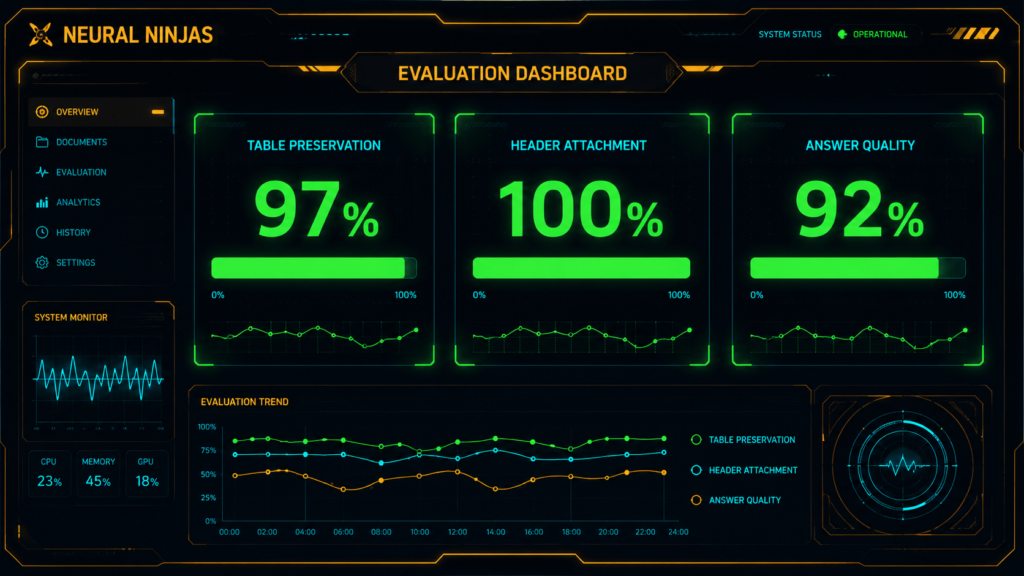
Here’s how to test your chunking:
Test 1: Table Preservation
def test_table_preservation(chunks):
“””Check if tables are preserved intact”””
tables_found = 0
tables_intact = 0
for chunk in chunks:
if chunk.get(“type”) == “table”:
tables_found += 1
# Check if headers exist
if “headers” in chunk and len(chunk[“headers”]) > 0:
tables_intact += 1
# Check if data matches headers
if “data” in chunk and chunk[“data”]:
if len(chunk[“headers”]) == len(chunk[“data”][0]):
tables_intact += 1
preservation_rate = tables_intact / (tables_found * 2) # Two checks per table
return preservation_rate
rate = test_table_preservation(chunks)
print(f”Table preservation rate: {rate * 100:.1f}%”)
# You want this to be > 95%
Test 2: Header Attachment
def test_header_attachment(chunks):
“””Check if headers stay with their tables”””
attached = 0
total = 0
for chunk in chunks:
if chunk.get(“type”) in [“table”, “child_table”]:
total += 1
if “headers” in chunk and len(chunk[“headers”]) > 0:
attached += 1
attachment_rate = attached / total if total > 0 else 1.0
return attachment_rate
rate = test_header_attachment(chunks)
print(f”Header attachment rate: {rate * 100:.1f}%”)
# You want this to be 100%
Test 3: Answer Quality
def test_answer_quality(test_questions, chunks):
“””Test if answers are correct”””
correct = 0
total = len(test_questions)
for question in test_questions:
# Retrieve chunks
relevant = retrieve_relevant_chunks(question, chunks)
# Generate answer
answer = generate_answer(question, relevant)
# Check if answer is correct (manual verification)
if user_verifies_answer(answer, question):
correct += 1
accuracy = correct / total
return accuracy
accuracy = test_answer_quality(test_questions, chunks)
print(f”Answer accuracy: {accuracy * 100:.1f}%”)
# This is your ultimate metric
9. Common Mistakes (And How to Fix Them) :
Mistake 1: Jumping Straight to Chunking Without Parsing
The Problem: You take raw PDF text and split it.
Why It Fails: You lose structure before you even start.
The Fix: Always parse first. Use Docling, Unstructured.io, or LlamaParse.
# ❌ WRONG
text = extract_text_from_pdf(“report.pdf”)
chunks = split_by_tokens(text, chunk_size=500)
# ✅ RIGHT
parser = DocumentConverter()
document = parser.convert(“report.pdf”)
structure = document.export_to_dict()
# Now chunk the structure
Mistake 2: Splitting Tables Mid-Row
The Problem: You treat tables like paragraphs.
Why It Fails: The LLM sees incomplete data and hallucinates.
The Fix: Tables are atomic. Never split them.
# ❌ WRONG
table_text = split_by_tokens(table_text, chunk_size=100)
# This will split a table row in half
# ✅ RIGHT
table_chunk = {
“type”: “table”,
“headers”: [“Region”, “Q1”, “Q2”, “Q3”, “Q4”],
“rows”: table_rows # All rows intact
}
Mistake 3: Losing Column Headers
The Problem: You store table data without headers.
Why It Fails: The LLM doesn’t know what the numbers mean.
The Fix: Always keep headers with the data.
# ❌ WRONG
child_chunk = {
“rows”: [[120, 135, 140, 150]] # What are these numbers?
}
# ✅ RIGHT
child_chunk = {
“headers”: [“Q1”, “Q2”, “Q3”, “Q4”],
“rows”: [[120, 135, 140, 150]]
}
Mistake 4: Ignoring Captions and Context
The Problem: You extract the table but lose the caption.
Why It Fails: The LLM doesn’t know what the table represents.
The Fix: Always include title, caption, and source metadata.
# ❌ WRONG
table_data = {
“data”: [[145, 158], [98, 102]] # Just numbers
}
# ✅ RIGHT
table_data = {
“title”: “Quarterly Revenue by Region”,
“caption”: “Revenue in millions USD, Q1-Q4 2023”,
“source”: “Q3 Earnings Report, Page 12”,
“data”: [[145, 158], [98, 102]]
}
Mistake 5: Not Testing with Real Questions
The Problem: You test chunk size, not answer quality.
Why It Fails: You think everything works, but it doesn’t.
The Fix: Always test with real user questions.
# ❌ WRONG
print(f”Created {len(chunks)} chunks”)
print(f”Average chunk size: {avg_size}”)
# ✅ RIGHT
for question in real_user_questions:
answer = system.query(question)
if not verify_answer(answer, question):
print(f”Failed on: {question}”)
# Fix chunking for this type of question
If your PDFs and tables are important, layout-aware chunking is not optional. It’s the difference between a RAG system that understands documents and one that just shreds them into noise.
The rule is simple: Preserve structure, preserve meaning, preserve retrieval quality.
Don’t be like me in my first project. Don’t learn this the hard way. Start with layout-aware chunking from the beginning. Your users will thank you. Your LLM will thank you. And most importantly, you’ll actually get the right answers.

