Build four AI agents that analyze the same customer review at the same time using LangGraph, Groq, strict structured outputs, fan-out/fan-in orchestration, shared state, and deterministic priority scoring.
Imagine opening your support dashboard on Monday morning to 10,000 unread customer reviews.
One user is furious about a crashing bug, another wants dark mode, someone got double-billed, and an enterprise client is threatening to churn immediately.
You could dump every review into a single, massive LLM prompt:
“Tell me the sentiment, issue, urgency, churn risk, department, and priority…”
While that works for simple scripts, it fails in production AI architecture.
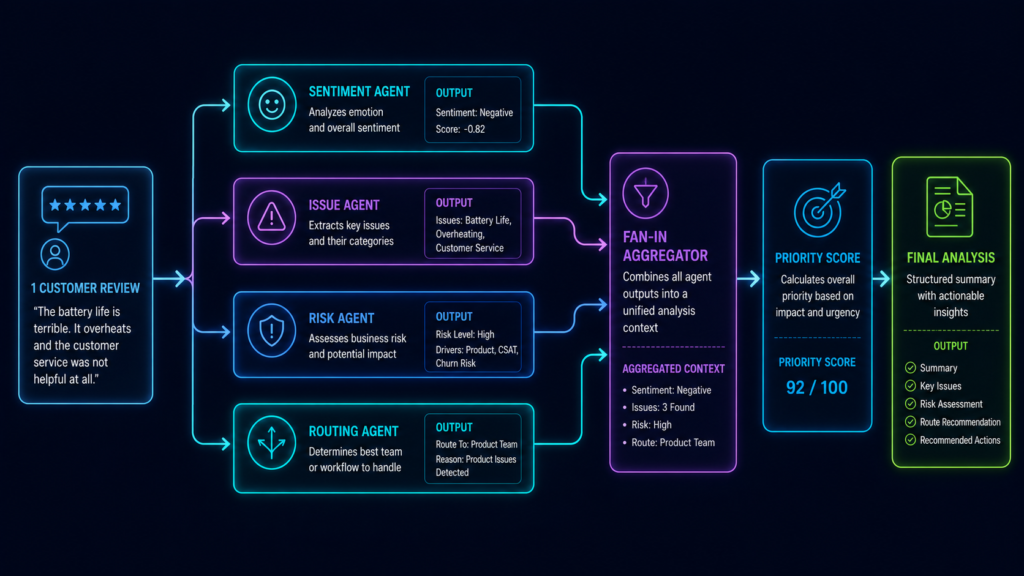
In a real company, you don’t ask one person to do everything. You have a Sentiment Analyst, Product Specialist, Risk Manager, and Routing Lead inspecting the same ticket from different angles.
We can design our AI workflows the exact same way using LangGraph:
                    ┌── Sentiment Agent ──────┐
                    │                          │
Customer Review ────┼── Issue Agent ──────────┤
                    │                          ├── Fan-In Aggregator
                    ├── Risk Agent ────────────┤          │
                    │                          │          ↓
                    └── Routing Agent ─────────┘    Priority Score
The Power of the Fan-Out / Fan-In Pattern
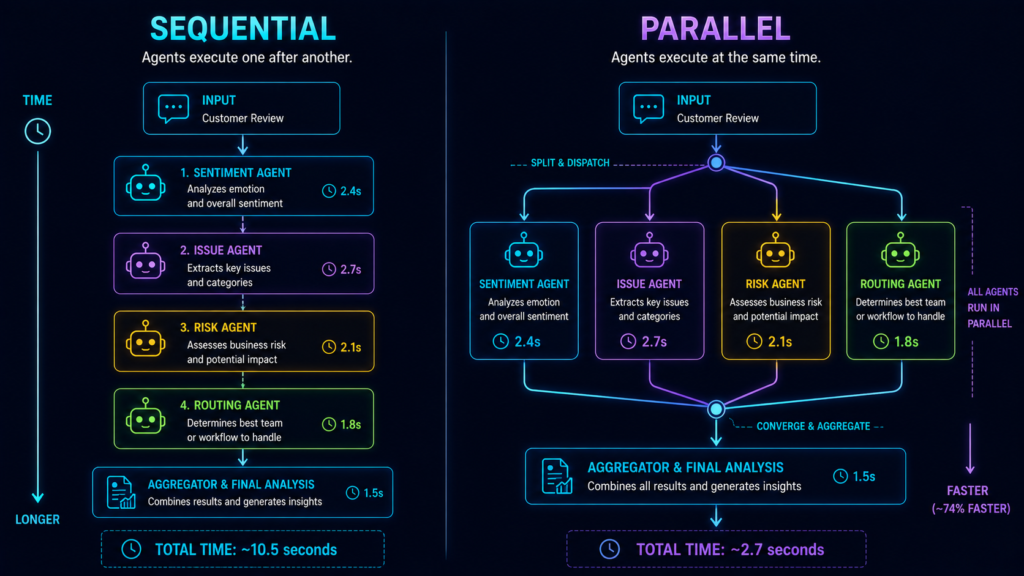
Instead of waiting for one agent to finish before calling the next, all four specialist agents run in parallel.
This tutorial breaks down one of the most essential enterprise multi-agent patterns:
LangGraph handles this natively. Any nodes triggered in the same graph super-step execute concurrently, drastically reducing overall latency.
What You Will Build in This Tutorial
We are not building a toy demo. In this guide, you will:
Orchestrate 4 Specialist Agents using LangGraph and Groq.
Enforce Strict Structured Outputs using Pydantic JSON schemas.
Calculate Deterministic Priority Scores using pure Python math (not hallucinations).
Handle Real-World API Limits with automated exponential backoff retries.
Process 100 Real Reviews in Batch using
.jsonlstreaming datasets.
📦 Dataset Included: You don’t need to write test data from scratch. The downloadable source code folder contains
data/customer_reviews.jsonlwith 100 pre-built synthetic customer reviews ready to run.
🚀 Coming in Part 2: We will connect this multi-agent backend to a full-stack FastAPI Customer Intelligence Dashboard with real-time KPI metrics, sentiment graphs, and interactive ticket filters.
What Are We Building?
Instead of forcing one AI to do everything, we will use a LangGraph parallel workflow to divide the work. For every customer review, four specialized AI agents will answer four specific questions simultaneously:
Sentiment Agent: How angry or happy is the customer?
Issue Agent: What is the exact technical problem?
Risk Agent: How urgent is this, and will they cancel their account (Churn Risk)?
Routing Agent: Which department needs to fix this?
Example:
Imagine a customer writes: “PDF uploads crash every time. We have a deadline today. I will switch products if this blocks us!”
Our four independent AI agents analyze this at the exact same time and output:
Sentiment: Negative (Frustration: 9/10)
Issue: PDF upload bug
Risk: Urgency 10/10, Churn Risk 9/10
Routing: Engineering Department
Once the AI agents finish, a standard Python function combines their answers to calculate a final score: Priority = 96.5/100 (CRITICAL).
The Golden Rule of Parallel AI Execution
Notice a crucial detail: The Issue Agent doesn’t need to wait for the Sentiment Agent. The Routing Agent doesn’t care what the Risk Agent is doing. Because they don’t rely on each other’s data, this is the perfect use case for parallel execution.
The Easiest Test for LangGraph Parallelism: Always ask yourself: Does Task B need the output of Task A?
If YES: They are Sequential (Task A → Task B).
If NO: They are Parallel (Both start at the exact same time).
Project Structure
Our finished Part 1 project looks like this:
multi-perspective-customer-feedback-analyzer/
│
├── data/
│   └── customer_reviews.jsonl
│
├── outputs/
│   └── analyzed_reviews.jsonl
│
├── src/
│   ├── __init__.py
│   ├── agents.py
│   ├── aggregator.py
│   ├── data_loader.py
│   ├── graph.py
│   ├── llm.py
│   ├── report.py
│   ├── schemas.py
│   └── state.py
│
├── tests/
│   └── test_priority.py
│
├── .env.example
├── requirements.txt
├── run_single.py
├── run_batch.py
└── README.md
Think of the files as different responsibilities:
customer_reviews.jsonl → raw input

schemas.py             → what must agent answers look like?
state.py               → what information travels through LangGraph?
llm.py                 → how do we communicate with Groq?
agents.py              → what do our four specialists do?
graph.py               → who runs when?
aggregator.py          → how do four answers become one?
run_single.py          → test one review
run_batch.py           → process all 100
report.py              → convert results into useful intelligence
Install the dependencies:
python -m venv venv
venv\Scripts\Activate.ps1
pip install -r requirements.txt
Create .env:
GROQ_API_KEY=your_real_key_here
GROQ_MODEL=openai/gpt-oss-120b
We use openai/gpt-oss-120b because Groq currently supports Strict Structured Outputs for this model. With strict: true, Groq uses constrained decoding so the response conforms to the supplied JSON Schema.
Our Input: 100 Reviews in JSONL
A few lines from customer_reviews.jsonl look like:
{"id": "CUST-001", "feedback": "The latest update crashes every time I upload a PDF. I have retried five times and I am seriously considering another app if this is not fixed soon."}
{"id": "CUST-002", "feedback": "I love the new dashboard. Dark mode would make it much easier to use at night."}
{"id": "CUST-003", "feedback": "I was charged twice for the same monthly subscription. Please refund the duplicate payment immediately."}
JSONL means JSON Lines. Instead of storing one giant JSON array, each line contains one JSON object.
Our data_loader.py reads those lines:
import json
from pathlib import Path


def load_reviews(path: str | Path):
    path = Path(path)
    reviews = []

    with path.open("r", encoding="utf-8") as f:
        for line_number, line in enumerate(f, start=1):
            if not line.strip():
                continue

            item = json.loads(line)

            if "id" not in item or "feedback" not in item:
                raise ValueError(f"Invalid review at line {line_number}")

            reviews.append(item)

    return reviews
The transformation is simple:
JSONL text
   ↓
json.loads()
   ↓
Python dictionary

{
    "id": "CUST-001",
    "feedback": "The latest update crashes..."
}
That dictionary eventually becomes the initial input to LangGraph.
First Make the Agent Outputs Predictable
By default, LLMs love to write long essays. If you ask an AI agent for a customer’s sentiment, it might reply: “The customer appears extremely frustrated because…”
Our LangGraph aggregator doesn’t want an essay. It needs structured, predictable data (like JSON) to run deterministic math calculations.
This is where we use Python Pydantic Schemas to lock down the AI’s output. In our schemas.py file, we define the exact data contracts our multi-agent workflow must follow.
from typing import Literal
from pydantic import BaseModel, ConfigDict, Field

class StrictModel(BaseModel):
    """Rejects any fake fields the LLM tries to invent."""
    model_config = ConfigDict(extra="forbid")

class SentimentResult(StrictModel):
    sentiment: Literal["positive", "neutral", "negative"]
    frustration_score: int = Field(ge=0, le=10)
    reason: str
Breaking Down the AI Boundaries:
Literal: Forces the AI to choose exact words. The sentiment cannot magically become “very_angry”. It is strictly locked to “positive”, “neutral”, or “negative”.Field(ge=0, le=10): Forces the AI to score frustration strictly between a minimum of 0 and a maximum of 10.extra="forbid": Prevents the LLM from hallucinating and adding unexpected data fields.
We apply these same strict boundaries to our other three parallel AI agents:
# The Issue Agent must categorize the exact problem
class IssueResult(StrictModel):
    issue_type: Literal["bug", "feature_request", "billing", "usability", "performance", "security", "support", "general_feedback"]
    issue: str
    feature_request: str | None

# The Risk Agent calculates urgency and churn probability
class RiskResult(StrictModel):
    urgency_score: int = Field(ge=0, le=10)
    churn_risk_score: int = Field(ge=0, le=10)
    churn_signal: str

# The Routing Agent assigns the ticket to a specific department
class RoutingResult(StrictModel):
    department: Literal["Engineering", "Product", "Billing", "Support", "Security", "Customer Success"]
    reason: str
Finally, we define the master template—FinalAnalysis—which describes the exact object our workflow produces after all parallel agents finish their tasks:
class FinalAnalysis(StrictModel):
    customer_id: str
    feedback: str
    sentiment: SentimentResult
    issue: IssueResult
    risk: RiskResult
    routing: RoutingResult
    priority_score: float = Field(ge=0, le=100)
    priority_level: Literal["LOW", "MEDIUM", "HIGH", "CRITICAL"]
The Big Takeaway :
Instead of begging the LLM to format its text correctly, these Pydantic models act as a rigid mold. They answer one crucial question: “What exact shape is this data allowed to have?”
LangGraph State: The Shared Memory of Parallel AI Agents
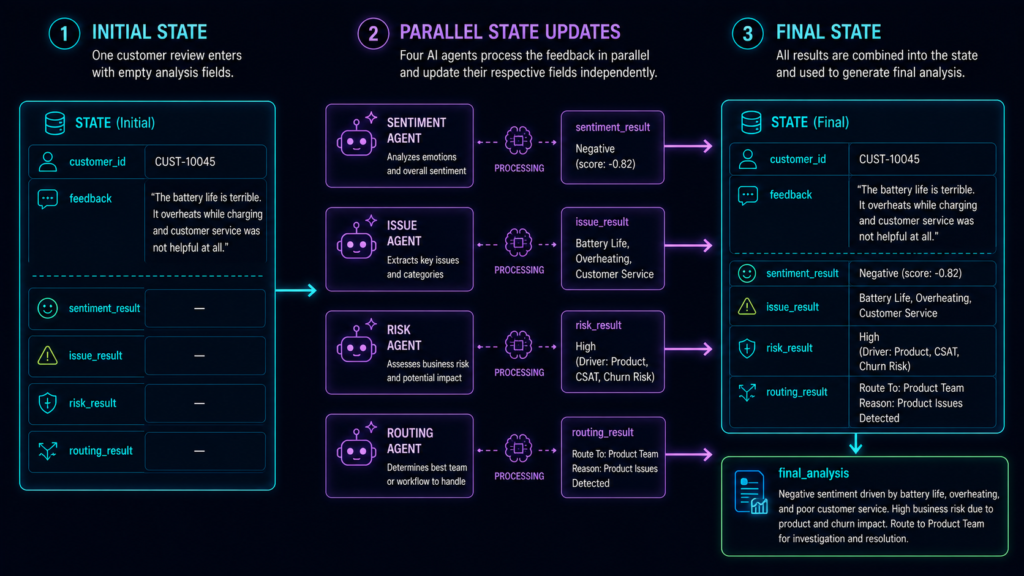
In LangGraph, State is the single most important concept. Think of it as a shared project clipboard passed between workers. Every node reads data from previous steps, performs its task, and writes its updates back to this shared memory.
Here is the exact schema in state.py:
from typing_extensions import TypedDict
from .schemas import SentimentResult, IssueResult, RiskResult, RoutingResult, FinalAnalysis

class FeedbackState(TypedDict, total=False):
    customer_id: str
    feedback: str

    # Dedicated state keys for each parallel worker
    sentiment_result: SentimentResult
    issue_result: IssueResult
    risk_result: RiskResult
    routing_result: RoutingResult

    final_analysis: FinalAnalysis
How State Evolves During Parallel Execution ?
To visualize how LangGraph manages concurrent updates, look at the state lifecycle:
| Stage | customer_id / feedback | Agent Result Keys | final_analysis |
| $T_0$ (Start) | Populated with raw input | EMPTY | EMPTY |
| $T_1$ (After Fan-Out) | Unchanged | All 4 keys filled concurrently | EMPTY |
| $T_2$ (After Fan-In) | Unchanged | All 4 keys preserved | Fully computed |
The Secret to Avoiding LangGraph Concurrency Errors :
When running parallel branches in LangGraph, multiple nodes execute simultaneously.
The Trap: If multiple parallel nodes try to write to the same state key at the same time, LangGraph throws a concurrent update conflict unless you define a custom state reducer.
The Solution: We assign each specialist agent its own dedicated state key (
sentiment_result,issue_result,risk_result,routing_result).
Because every agent writes to a distinct key, all four workers can update the shared state concurrently without conflicts or complex reducer logic. Once all four slots are filled, the aggregator node cleanly combines them into final_analysis.
Building a Reusable Groq API Gateway for Structured Outputs
We have four different AI agents, but we do not want to write the same Groq API boilerplate four times. That is bad coding!
Instead, we create one central gateway function in our llm.py file. This function uses Pydantic to magically convert our Python models into a strict JSON Schema, and then feeds it directly to the Groq LLM.
# 1. Initialize the Groq Client
MODEL = os.getenv("GROQ_MODEL", "openai/gpt-oss-120b")
client = Groq(api_key=os.getenv("GROQ_API_KEY"))

def call_structured_llm(schema_name, schema_model, system_prompt, feedback):
    # 2. Convert the Pydantic model into a JSON Schema
    schema = schema_model.model_json_schema()

    # 3. Call the Groq API and force it to use our exact schema
    response = client.chat.completions.create(
        model=MODEL,
        messages=[
            {"role": "system", "content": system_prompt},
            {"role": "user", "content": feedback},
        ],
        response_format={
            "type": "json_schema",
            "json_schema": {
                "name": schema_name,
                "strict": True,       # Forces the LLM to follow the rules!
                "schema": schema,
            },
        },
    )

    # 4. Extract the JSON text and validate it back into a Python object
    raw = response.choices[0].message.content
    data = json.loads(raw)
    return schema_model.model_validate(data)
The AI Data Pipeline :
Look at how beautifully the data transforms without you having to write custom parsers: Pydantic Model ➔ JSON Schema ➔ Groq LLM ➔ JSON Text ➔ Python Dictionary ➔ Validated Pydantic Object.
💡 JSON Schema vs. JSON Mode Why did we use
type: "json_schema"instead of the older JSON Object mode? Because standard JSON Mode only asks the AI to return any valid JSON. Strict JSON Schema acts like a bouncer—it forces the LLM to return the exact structure your Python code expects. This eliminates parsing crashes in production!
Build Four Specialist Agents
In a Multi-Agent AI architecture, you don’t want one bloated prompt trying to do everything. Instead, we create four focused AI specialists.
Let’s look at the Sentiment Agent. Its only job is to read the review, judge the customer’s mood using Groq, and update its specific piece of the LangGraph state.
def sentiment_agent(state: FeedbackState):
    started = _start("Sentiment Agent") # Start timing

    # Ask the Groq LLM to analyze the text using our strict Pydantic schema
    result = call_structured_llm(
        schema_name="sentiment_analysis",
        schema_model=SentimentResult,
        system_prompt=(
            "You are a customer sentiment specialist. Analyze only the supplied "
            "feedback. Classify sentiment, score frustration from 0 to 10, and "
            "give one concise evidence-based reason. Do not invent facts."
        ),
        feedback=state["feedback"],
    )

    _end("Sentiment Agent", started) # Stop timing

    # Update ONLY the 'sentiment_result' slot in the shared state
    return {"sentiment_result": result}
The Agent Data Flow :
Here is exactly what happens inside this function:
Input: It reads the raw
state["feedback"].Work: The Groq LLM evaluates the text based on the strict system prompt.
Output: It generates a perfectly formatted structured JSON response:
{
  "sentiment": "negative",
  "frustration_score": 9,
  "reason": "Repeated failure and threat to switch products"
}
How the LangGraph State Transforms :
Before the agent runs, the state is empty. After it runs, the slot is filled:
BEFORE:
sentiment_result = emptyAFTER:
sentiment_result = SentimentResult(...)
The Beauty of Multi-Agent Specialization :
The other three agents—Issue Agent, Risk Agent, and Routing Agent—use this exact same pattern. We just swap out the system prompts and tell them to update their own state keys (issue_result, risk_result, and routing_result).
This is multi-agent orchestration without the mess. Every AI worker has exactly one job, making the entire workflow incredibly reliable and easy to debug.
Fan-Out: Triggering Parallel AI Agents
This is where the real magic happens. In graph.py, we build our LangGraph StateGraph and define the parallel execution paths.
from langgraph.graph import StateGraph, START, END

# 1. Initialize the Graph
builder = StateGraph(FeedbackState)

# 2. Register the Nodes (Our AI Workers)
builder.add_node("sentiment_agent", sentiment_agent)
builder.add_node("issue_agent", issue_agent)
builder.add_node("risk_agent", risk_agent)
builder.add_node("routing_agent", routing_agent)
builder.add_node("fan_in_aggregator", aggregate_results)

# 3.The FAN-OUT: Connect START to all 4 agents simultaneously
builder.add_edge(START, "sentiment_agent")
builder.add_edge(START, "issue_agent")
builder.add_edge(START, "risk_agent")
builder.add_edge(START, "routing_agent")
How Fan-Out Works :
Because the START node has four outgoing paths, the LangGraph API automatically activates all four AI agents in parallel at the exact same time. Splitting one input into multiple parallel tasks is called a Fan-Out architecture.
             ┌── Sentiment Agent
             │
START ───────┼── Issue Agent
             │
             ├── Risk Agent
             │
             └── Routing Agent
Fan-In: Converging the Multi-Agent Workflow
Once our parallel AI agents finish analyzing the customer review, we need to collect their independent answers into one place to make a final decision.
# 4. The FAN-IN: Route all 4 agents into a single aggregator node
builder.add_edge("sentiment_agent", "fan_in_aggregator")
builder.add_edge("issue_agent", "fan_in_aggregator")
builder.add_edge("risk_agent", "fan_in_aggregator")
builder.add_edge("routing_agent", "fan_in_aggregator")

# 5. Finish the workflow
builder.add_edge("fan_in_aggregator", END)

# 6. Compile and lock the graph
feedback_graph = builder.compile()
How Fan-In Works
We don’t want four scattered answers. We merge all four branches into the fan_in_aggregator node. Bringing multiple parallel paths back together is called Fan-In.
Finally, calling builder.compile() structurally checks the entire multi-agent workflow for errors and locks it so it is ready to run!
Sentiment ─────┐
Issue ─────────┤
Risk ──────────┼── Aggregator → END
Routing ───────┘

Proving LangGraph Parallel Execution in the Terminal
Architecture diagrams are great, but real developers trust terminal logs. Let’s prove our LangGraph agents are actually running at the exact same time. We added two simple Python helper functions in agents.py to track the execution time and the active background thread:
import time
import threading
def _start(agent_name: str):
started = time.perf_counter()
# Log the exact CPU thread being used
print(f”[START] {agent_name} | thread={threading.current_thread().name}”)
return started
def _end(agent_name: str, started: float):
elapsed = time.perf_counter() – started
print(f”[END] {agent_name} | {elapsed:.2f}s”)
When we run our workflow (python run_single.py), the terminal spits out this beautiful evidence:
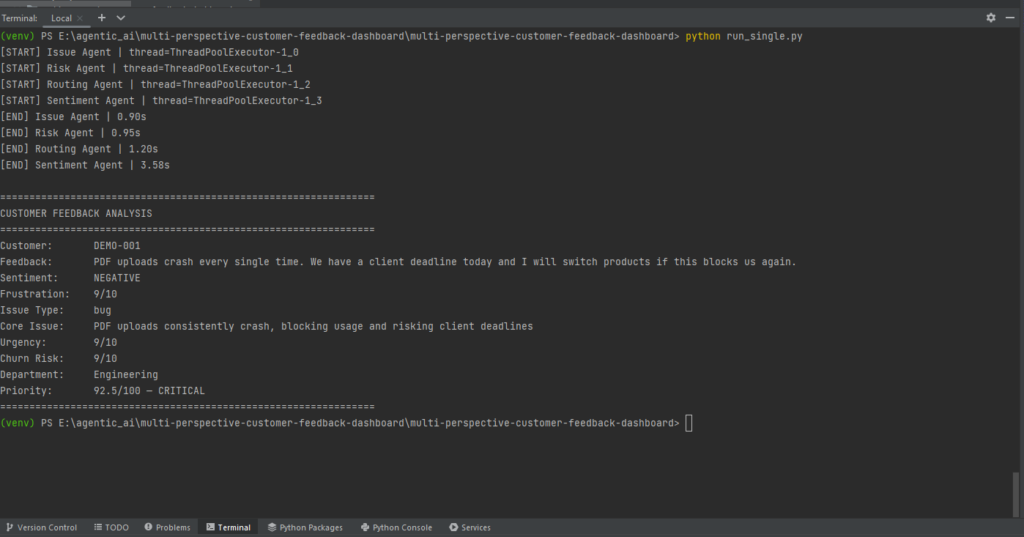
The Ultimate Proof of Parallelism :
Look closely at the logs above. All four [START] messages fire before a single agent finishes.
Notice the thread names? Each AI agent is assigned to a completely different ThreadPoolExecutor worker. This is undeniable proof of parallel AI agent execution.
Because they run simultaneously across different threads, whichever agent gets a response from the LLM first will finish first. This means the completion order will constantly change—and that is exactly how healthy parallel workflows are supposed to behave!
⚡ LangGraph Parallel Multi-Agent Simulator
Test how one customer review fans out into 4 parallel AI agents simultaneously, then converges via Fan-In.
{
  "status": "Ready to execute parallel graph..."
}The Fan-In Aggregator: AI Judgment Meets Deterministic Python
Our branches finally converge at the Fan-In Aggregator. Notice something important here: this node is deliberately not an LLM agent. It is just standard Python code.
Why? Because of this golden rule of AI engineering:
Use LLMs for subjective judgment. Use ordinary code for deterministic math.
Asking an AI “How urgent does this complaint sound?” is a perfect use case. But asking an AI to calculate a weighted math formula is a waste of API tokens and time.
The Priority Score Logic :
Instead of guessing, our aggregator takes the structured data from our parallel agents and calculates a hard, deterministic math score:
# 1. Convert text sentiment into a hard severity number
SENTIMENT_SEVERITY = {"positive": 0, "neutral": 4, "negative": 10}
sentiment = SENTIMENT_SEVERITY[state["sentiment_result"].sentiment] * 10

# 2. Scale AI urgency and churn risks to 100
urgency = state["risk_result"].urgency_score * 10
churn = state["risk_result"].churn_risk_score * 10

# 3. Calculate the final weighted Priority Score
score = (urgency * 0.40) + (churn * 0.35) + (sentiment * 0.25)
The Math in Action
Let’s look at our frustrated PDF-upload customer. Here is how the normal Python math evaluates the AI’s data:
Urgency (10/10): 100 × 0.40 = 40
Churn Risk (9/10): 90 × 0.35 = 31.5
Sentiment (Negative): 100 × 0.25 = 25
Total Priority Score = 96.5 / 100 ➔ CRITICAL (Scores 81–100)
The Final LangGraph State :
Once this calculation finishes, the aggregator generates the FinalAnalysis object. Our shared LangGraph state journey is now complete!
customer_id✅feedback✅sentiment_result✅ (Written by Parallel Agent)issue_result✅ (Written by Parallel Agent)risk_result✅ (Written by Parallel Agent)routing_result✅ (Written by Parallel Agent)final_analysis✅ (Created by Fan-In Aggregator)
One Review’s Complete Journey
This is the entire transformation:
Raw JSONL Review
      ↓
Python Dictionary
      ↓
Initial FeedbackState
      ↓
     FAN-OUT
      ↓
┌─────┼─────┬─────┐
↓     ↓     ↓     ↓
Sent Issue Risk Routing
↓     ↓     ↓     ↓
Structured Pydantic Results
└─────┼─────┴─────┘
      ↓
Updated Shared State
      ↓
    FAN-IN
      ↓
Aggregator
      ↓
Priority Calculation
      ↓
FinalAnalysis
Our actual test produced:
Customer:       DEMO-001
Sentiment:      NEGATIVE
Frustration:    9/10
Issue Type:     bug
Urgency:        10/10
Churn Risk:     9/10
Department:     Engineering
Priority:       96.5/100 — CRITICAL
That is the whole multi-agent system in one customer journey.
Scaling Up: Batch Processing 100 Reviews
Once our LangGraph workflow successfully processes a single review, it is time to scale. Our run_batch.py script loads all 100 customer reviews and runs them through the pipeline.
# Load all 100 raw customer reviews
reviews = load_reviews(DATA_FILE)

# Process reviews sequentially to prevent API crashes
for index, review in enumerate(reviews, start=1):

    # Run the graph for each review
    result = feedback_graph.invoke(
        {
            "customer_id": review["id"],
            "feedback": review["feedback"],
        },
        config={"max_concurrency": 4}, # Allows our 4 agents to run in parallel
    )

    # Save the structured 'result' to a JSONL file...
When building production-ready AI agents, there is a massive difference between parallel agents and parallel batches.
Inside one review: The 4 specialist agents run in Parallel (Fan-out).
Across the dataset: The 100 reviews process Sequentially (Review 1 ➔ Review 2 ➔ Review 3).
Why do we do this? If we launched 100 reviews at the exact same time, our script would trigger 400 simultaneous LLM requests. The Groq API would instantly block us for hitting rate limits! Looping sequentially keeps your AI pipeline stable and crash-free.
Saving the Final Output :
As each review finishes, the script writes the final structured analysis into outputs/analyzed_reviews.jsonl.
Do not lose this file! In Part 2 of this tutorial, we will feed this exact data into a beautiful FastAPI Customer Intelligence Dashboard.
The Real-World Problem We Hit: Groq Rate Limits
When we first tested our batch of 100 reviews, the script suddenly crashed with a groq.RateLimitError: 429.
Why did this happen? Because 100 reviews × 4 parallel agents = 400 simultaneous LLM API calls. This massive spike easily hits Groq’s free-tier limits (like the 8K Tokens Per Minute cap for gpt-oss-120b).
The Solution: Exponential Backoff (Auto-Retry)
Instead of letting an API limit kill our entire application, we update our llm.py file to catch the error, pause briefly, and automatically retry. This technique is called Exponential Backoff.
except RateLimitError:
    # If we hit the max retries, stop the program
    if attempt == max_retries - 1:
        raise

    # Calculate a smart wait time (e.g., 1.2s, 2.5s, 4.1s)
    wait_time = min((2 ** attempt) + random.uniform(0, 1), 30)

    print(f"[RATE LIMIT] Groq quota reached. Retrying in {wait_time:.1f}s...")

    # Pause the agent, then try the API call again
    time.sleep(wait_time)
How the Flow Changes:
❌ Without Retry:
429 Error➔ App Crashes✅ With Retry:
429 Error➔ Wait 1.2s ➔ Auto-Retry ➔ Workflow Continues!
Parallelism does not mean unlimited concurrency. Just because LangGraph can run hundreds of agents at the exact same time doesn’t mean your LLM provider will allow it. A production-ready AI workflow must always throttle itself to respect external API rate limits.
What Did 100 Reviews Produce?
Our completed run analyzed:
Reviews analyzed: 100Sentiment:
Negative   59
Neutral    23
Positive   18
Issue types included:
bug                  33
feature_request      27
general_feedback     13
billing              11
performance           7
Priority:
CRITICAL   22
HIGH       16
MEDIUM     28
LOW        34
And department routing:
Engineering          34
Product              27
Billing              14
Customer Success     11
Security              8
Support               6
The highest-priority results included:
CUST-047 | 92.5 | CRITICAL | Engineering
CUST-088 | 92.5 | CRITICAL | Support
CUST-093 | 92.5 | CRITICAL | Billing
We have transformed:
100 pieces of messy customer text
              ↓
400 specialist perspectives
              ↓
100 structured analyses
              ↓
prioritized business intelligence
That is much more useful than asking one chatbot to “summarize these reviews.”
What You Actually Learned ?
This project was not really about customer reviews.
Customer feedback simply gave us a realistic problem for learning a reusable architecture:
One Input
   ↓
Independent Specialist Agents
   ↓
Parallel Fan-Out
   ↓
Structured State Updates
   ↓
Fan-In
   ↓
Deterministic Aggregation
   ↓
Final Decision
You now know how to use:
- LangGraph
StateGraphto model an AI workflow. - Shared state to track data as it transforms.
- Specialized agents instead of one oversized prompt.
- Fan-out to start independent work in parallel.
- Fan-in to synchronize results.
- Groq strict structured outputs for predictable agent responses.
- Pydantic to define and validate data contracts.
- Normal Python for deterministic business logic.
- Concurrency logging to prove agents actually execute in parallel.
- Rate-limit retries so external API limits do not immediately kill a batch job.
- JSONL batch processing to scale the same graph from one review to 100.
Most importantly, you should now be able to look at another problem and ask:
Which tasks genuinely depend on each other—and which ones could happen at the same time?
That question is where useful parallel agent architecture begins.
Next: Turn This into a FastAPI AI Dashboard
Right now our final intelligence lives in:
outputs/analyzed_reviews.jsonlUseful?
Yes.
Beautiful?
Not exactly.
In Part 2, we will use the same working multi-agent backend and turn it into an online FastAPI dashboard with:
KPI Cards
+
Sentiment Analytics
+
Priority Distribution
+
Department Routing
+
Issue Breakdown
+
Searchable Review Explorer
+
Live Customer Feedback Analyzer
The live analyzer will work like this:
Browser
   ↓
FastAPI
   ↓
LangGraph
   ↓
4 Parallel Agents
   ↓
Fan-In Aggregator
   ↓
Priority Score
   ↓
Browser Result
So Part 2 is not a different project.
It is the visual application layer built directly on top of what we created here.
And just like Part 1, the complete Part 2 FastAPI dashboard source code will be provided, so you will not need to reconstruct a large frontend by copying scattered snippets from the article.
Part 1 source download includes the complete tested project and all 100 synthetic customer reviews in customer_reviews.jsonl.
The core orchestration is finished. Next, we give it a face.


[…] Part 1, our LangGraph multi-agent system successfully turned messy customer reviews into structured […]