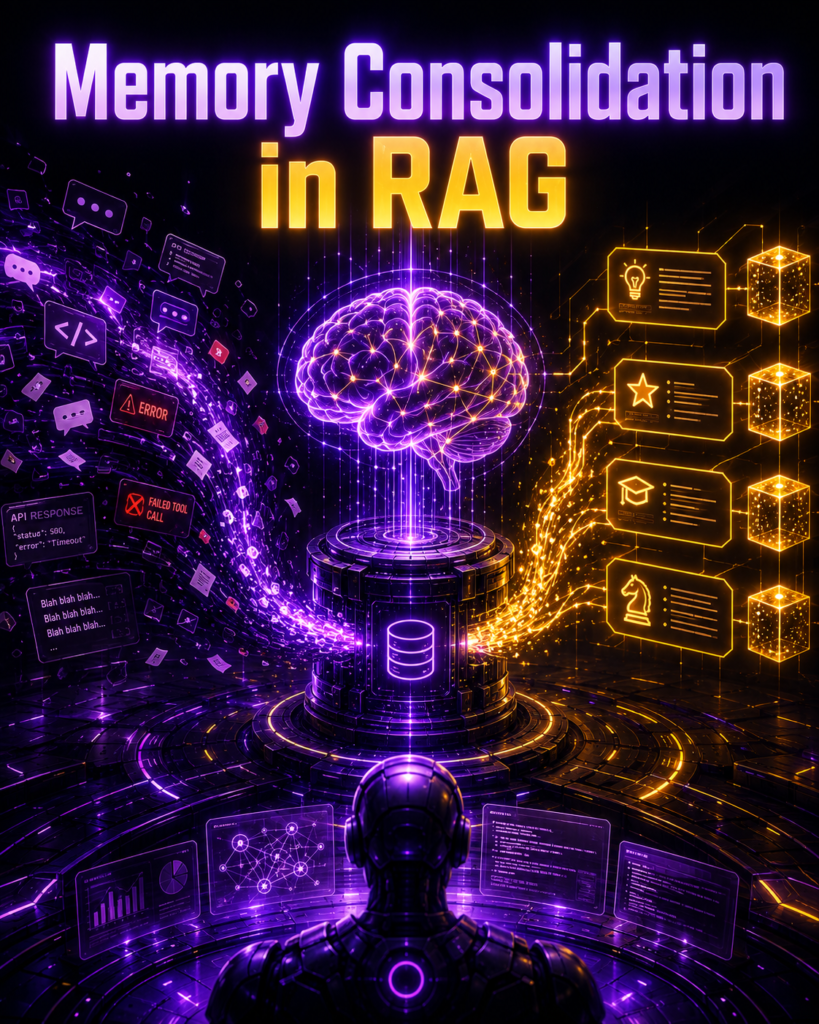
Your AI agent does not become smarter by remembering everything. It becomes smarter by knowing what to remember, what to update, and what to forget.
Imagine an AI coding agent working for months. It generates thousands of chat messages, API responses, code errors, and user preferences.
Most beginners build AI agent memory like this:
Conversation → Embeddings → Vector Database → Semantic Search
This basic setup works at first. But as data grows, the system breaks down. Your agent might retrieve an outdated 8-month-old preference instead of a rule you made yesterday. Failed code snippets get pulled up as “good” solutions.
Just dumping data into a Vector DB creates a messy conversation history, not a smart brain. The more you chat, the more confused the AI gets.
The Solution: Reflection & Memory Consolidation
To build a reliable long-term memory for AI agents, you need two missing pieces: Reflection (learning from actions) and Memory Consolidation (saving only what matters).
Here is the correct AI memory architecture:
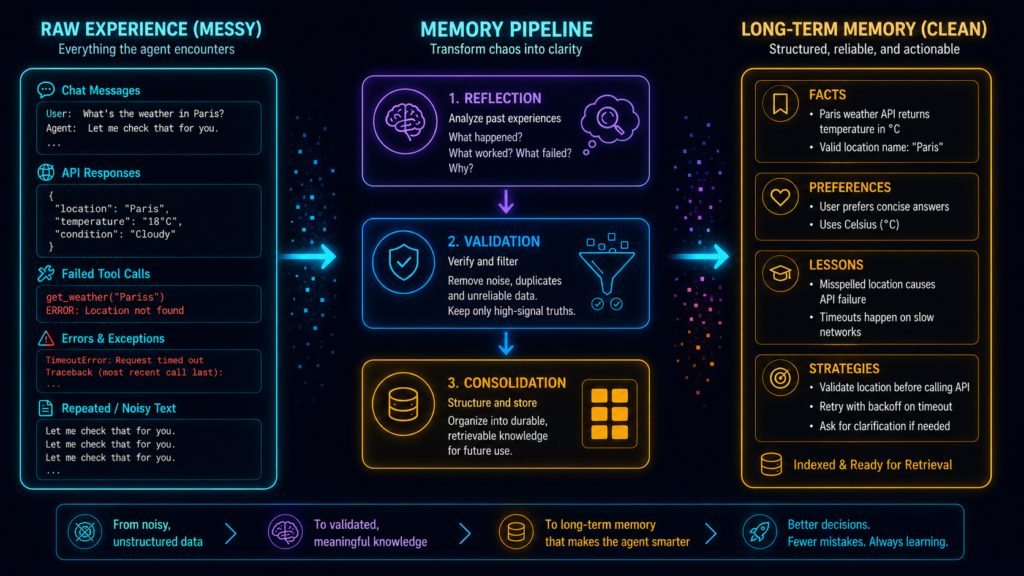
Experience → Reflection → Validation → Consolidation → Conflict Resolution → Long-Term Memory
Instead of blindly saving everything, this pipeline filters out the junk, updates old facts, and forgets useless data. That is the true difference between a simple chat log and a production-grade AI agent memory system.
1.Reflection: Store the Lesson, Not the Failure
A failed tool call is useless history. To build smart AI agent memory, your agent must actually learn from its mistakes.
The Problem
Suppose your agent tries to fetch data from an API:
GET /customers -> 401 Unauthorized
It figures out the issue and retries with authentication:
GET /customers (with Bearer Token) -> 200 OK
A basic, dumb memory system saves both of these steps. This just fills your database with useless noise.
The Solution
An intelligent, reflective agent looks at the failure, throws away the junk, and extracts a single permanent rule:
LESSON: “The
/customersAPI always requires Bearer-token authentication.”
What is AI Reflection?
In very simple terms: Reflection is when an AI looks at its past actions, figures out what failed, and writes down a rule so it never makes that exact mistake again.
This concept is based on the famous Reflexion framework. It allows LLM agents to critique their own work and use text-based feedback to improve future answers—all without needing expensive model fine-tuning or changing the underlying weights.
Tiny Practical Example
def reflect_on_tool_result(result: dict) -> str | None:

    if result["status_code"] == 401:
        return (
            f"{result['endpoint']} requires authentication. "
            "Include valid credentials before retrying."
        )

    return None
Run it:
result = {
    "endpoint": "/customers",
    "status_code": 401
}

lesson = reflect_on_tool_result(result)

print(lesson)
Output:
/customers requires authentication.
Include valid credentials before retrying.
Instead of remembering:
API failed with 401.we remember:
This API requires authentication.That difference is enormous.
2. Memory Consolidation: Turn 100 Events Into 3 Useful Memories
Raw history tells the agent what happened. Consolidated memory tells it what still matters.
Imagine a user chats with your AI over several sessions:
Session 1: “I mostly write Python.”
Session 3: “I build backend apps.”
Session 6: “I prefer FastAPI over Flask.”
Session 9: “Explain code step-by-step.”
Session 12: “I use Windows, no Linux commands.”
You could waste tokens and search through all five old conversations every time. Or, you can consolidate them into one clean, structured profile:
{
  "preferred_language": "Python",
  "backend_framework": "FastAPI",
  "operating_system": "Windows",
  "explanation_style": "step-by-step"
}
That is memory consolidation:
Memory consolidation is the process of transforming noisy experiences into compact, useful, durable memories.
The important word is transforming. Good memory management is not just dumping everything into a vector database:
vector_db.add(everything) # This creates memory bloat. It is:Experience
↓
Is this important?
↓
Is it trustworthy?
↓
Does it already exist?
↓
Does it contradict something?
↓
Create / Update / Ignore

3. First Rule: Never Store Everything
If every event becomes memory, your memory database eventually becomes a garbage database.
If your AI agent remembers every single chat message, error, and API response, your database will quickly turn into a garbage dump. This fills up your LLM context window with useless noise and skyrockets your API costs.
To fix this, you must split your AI agent memory management into two distinct layers:
1. Short-Term Memory (Temporary) Information the agent only needs right now to finish the current job.
Examples: Chat history, rough drafts, tool outputs, and API error codes.
Action: Delete this when the task is done.
2. Long-Term Memory (Persistent) Information that makes the AI smarter for future conversations.
Examples: User preferences (e.g., “Use FastAPI”), validated facts, and successful coding strategies.
Action: Keep this forever.
(Note: Modern frameworks like LangGraph handle this perfectly by splitting thread-scoped state (short-term) from persistent cross-conversation stores (long-term).)
Build a “Memory Gate” (Filter Before You Save)
How do you stop useless data from sneaking into your long-term memory? You build a Memory Gate.
Think of a Memory Gate as a VIP bouncer for your database. Before any piece of data is saved, the Python code checks if it is actually important.
Here is how simple the logic is:
def should_store_memory(event: dict) -> bool:
    # The VIP List: Only these types of data are allowed to be saved
    important_types = {
        "user_preference",
        "stable_fact",
        "important_decision",
        "successful_strategy",
        "user_correction"
    }

    # Check if the current event is on the VIP list
    return event.get("type") in important_types
Let’s test it in action:
events = [
    # A useless system log
    {"type": "tool_output", "content": "Request completed in 240 ms"},

    # A highly useful user fact
    {"type": "user_preference", "content": "User prefers FastAPI"}
]

for event in events:
    if should_store_memory(event):
        print("STORE:", event["content"])
    else:
        print("IGNORE:", event["content"])
The Output:
IGNORE: Request completed in 240 ms
STORE: User prefers FastAPI
While production-level AI agent memory architectures will have more complex code, the golden rule remains exactly the same:
Just because your AI observed something, doesn’t mean it deserves to be saved.
4. The Vector Search Trap: RAG Is Not Agent Memory
A vector database can tell you which memory sounds similar. It cannot tell you which memory is currently true.
Imagine your AI agent saves these three facts in a vector database over time:
January: “I prefer Python.”
May: “I’m testing out Rust.”
Yesterday: “I strictly use Go for all new projects.”
If you ask the agent, “Which programming language should we use?”, a standard Vector Search (RAG) will probably retrieve all three.
Why? Because they are all “semantically similar” to your question. The database doesn’t understand that Python is an outdated preference and Go is the current rule.
Semantic Similarity only asks: “What words look related?”
True AI Agent Memory must ask: “What is accurate, new, and useful today?”
Those are two very different problems.
How to Fix This: Don’t Rank by Similarity Alone
If your AI only looks at vector similarity, the outdated “Python” memory might score 95%, beating the new “Go” memory at 89%. The AI will write your code in the wrong language!
To fix this, you must calculate a Combined Memory Score. Instead of just looking at keywords, score your memories based on three factors:
# A simple Python formula for scoring AI agent memory
def memory_score(memory):
    return (
        0.50 * memory["similarity"] +  # How related is it to the prompt?
        0.30 * memory["recency"] +     # How fresh/new is the information?
        0.20 * memory["importance"]    # Is it a core rule or just casual chat?
    )
By adding Recency (time) and Importance (weight) to the math, the new “Go” preference easily outranks the old “Python” preference.
The Golden Formula for Agent Memory Retrieval:
Memory Score = Relevance + Recency + Importance + Validity
The Ultimate Takeaway: Use a vector database to fetch a broad list of candidates. But never blindly trust the “most similar” vector as the absolute truth. Always score and filter them before feeding them to your LLM.
5.Handling Contradictions: Why Memory Must Be Editable
The most dangerous thing an AI agent can remember isn’t a fake fact. It is an outdated fact.
Imagine your agent’s database has this memory: {"preferred_language": "Python"}
Today, you tell the agent: “I use Go now. Stop giving me Python examples.”
A basic, poorly designed AI memory system will simply use INSERT to save the new text. Now your database looks like this:
preferred_language = Pythonpreferred_language = Go
Congratulations. Your agent now remembers both and is completely confused.
The Solution: Smart Memory Updates (State Transitions)
To build reliable long-term memory for AI agents, the memory must be editable. Instead of blindly adding new facts, the system must check the existing database and make a logical choice:
Brand New Fact? →
CREATEit.Exact Same Fact? →
REINFORCEit (make it stronger).Contradicting Fact? →
SUPERSEDEit (replace the old truth with the new truth).
Practical Python Code for Memory Consolidation
Here is the exact Python logic to handle conflicting AI memories smoothly:
def consolidate_preference(current_value: str | None, new_value: str):

    # If the agent doesn't know anything yet, create a new memory
    if current_value is None:
        return {"action": "CREATE", "value": new_value}

    # If the agent already knows this, reinforce the existing memory
    if current_value == new_value:
        return {"action": "REINFORCE", "value": new_value}

    # If the facts clash, replace the old fact with the new one
    return {
        "action": "SUPERSEDE",
        "old_value": current_value,
        "value": new_value
    }

# Let's test it: The user changes their preference from Python to Go
decision = consolidate_preference(current_value="Python", new_value="Go")
print(decision)
The Result:
{
    "action": "SUPERSEDE",
    "old_value": "Python",
    "value": "Go"
}
The Best Database Practice: Don’t Delete the Past
In a production environment, you shouldn’t permanently delete the word “Python”. Instead, use status labels.
Keep the old record for historical tracking:
{
  "key": "preferred_language",
  "value": "Python",
  "status": "superseded"
}
And set the new record as the current truth:
{
  "key": "preferred_language",
  "value": "Go",
  "status": "active"
}
Now, your AI agent retains a perfect history of the user’s journey without ever confusing the past with the present.
6.The 3 Types of AI Agent Memory: Semantic, Episodic, and Procedural
Stop throwing every piece of data into the exact same database. Not all memories solve the same problem.
To build a truly smart AI agent, you must separate its memory into three distinct categories (a structure officially used by modern frameworks like LangChain and LangMem):
1. Semantic Memory (Facts) — “What do I know?” This stores hard facts, preferences, and static knowledge.
Example: The user works on Windows. The database is PostgreSQL. The API requires an OAuth token.
2. Episodic Memory (Experiences) — “What happened before?” This stores past events, successes, and failures so the agent learns from history.
Example: Last time I explained Docker, the user got confused. The localhost example worked much better.
3. Procedural Memory (Rules & Behavior) — “How should I act?” This stores strategies, workflows, and operating instructions.
Example: Always explain networking with visual diagrams first. Validate API keys before retrying a failed call.
How to Code This Separation ?
By creating separate “namespaces” (storage buckets) in your code, your AI agent knows exactly where to look for different types of information.
# Set up dedicated namespaces for each memory type
semantic_namespace = ("users", "user_123", "semantic")
episodic_namespace = ("users", "user_123", "episodic")
procedural_namespace = ("users", "user_123", "procedural")
The Result? Faster, Laser-Accurate Retrieval:
Need a hard user fact? → Search Semantic Memory.
Need an example of what worked last time? → Search Episodic Memory.
Need strict instructions on how to reply? → Search Procedural Memory.
By organizing data this way, your agent stops confusing past experiences with current rules, making its reasoning much cleaner and more reliable.
7.Store Long-Term Memory in LangGraph
An AI agent is useless if it forgets everything the second your script stops running. To give your agent persistent long-term memory, LangGraph provides a built-in Store feature.
Here is a beginner-friendly LangGraph memory example in Python:
Step 1: Set Up the Memory Store
from langgraph.store.memory import InMemoryStore

store = InMemoryStore()
Step 2: Create a “Namespace” (The Folder System) .Think of a Namespace exactly like a folder path on your computer. It keeps data perfectly organized so the AI knows exactly where to look.
# Creates a folder path: users -> user_123 -> preferences
namespace = ("users", "user_123", "preferences")
Step 3: Store and Retrieve the Fact
# 1. Save the memory into the namespace
store.put(
    namespace,
    "backend_preferences",
    {"language": "Python", "framework": "FastAPI"}
)

# 2. Retrieve it later
memory = store.get(namespace, "backend_preferences")
print(memory.value)
# Output: {'language': 'Python', 'framework': 'FastAPI'}
Why Are Namespaces So Important? Without namespaces, every memory gets dumped into one giant, confusing pile. This simple “folder structure” is an absolute lifesaver when you scale your AI application to handle:
Thousands of different users
Multiple AI agents working together
Different ongoing projects
Separate memory types (like separating strict facts from temporary notes)
8. Summaries vs Structured Facts: Use Both
A summary can compress 5,000 tokens beautifully—and quietly delete the one fact you needed.
Suppose a session contains:
Language = Python
OS = Windows
Database = PostgreSQL
Deployment = Docker
Deadline = October 18
The model summarizes:
The user is building a Python backend and prefers beginner-friendly guidance.
Beautiful summary.
Terrible database.
We lost:
Windows
PostgreSQL
Docker
October 18
For durable facts, structured memory is safer.
from pydantic import BaseModel
from typing import Optional


class UserMemory(BaseModel):
    preferred_language: Optional[str] = None
    operating_system: Optional[str] = None
    database: Optional[str] = None
    container_tool: Optional[str] = None
Then store:
{
  "preferred_language": "Python",
  "operating_system": "Windows",
  "database": "PostgreSQL",
  "container_tool": "Docker"
}
Use summaries for:
What happened during this session?
Use structured facts for:
What facts must survive precisely?
Use episodic memories for:
What useful experience should influence future behavior?
You do not have to choose one representation for everything.
9.Negative Transfer: How Bad Memory Makes AI Agents Dumber
If your AI agent saves a hallucination or an error today, it will confidently repeat that mistake tomorrow.
Imagine your AI writes a broken SQL query with a simple typo: SELECT * FORM users; (Using FORM instead of FROM).
The code fails. But if your system automatically saves every output, the agent will retrieve this broken code next week and use it again.
This is called Negative Transfer—when bad past experiences hurt future AI performance. Instead of learning, the memory actually amplifies the mistake.
How to Fix It: Stop Blindly Saving Data To prevent AI hallucinations from becoming permanent facts, you must stop the agent from saving raw experiences directly into long-term memory.
❌ The Wrong Pipeline: Experience → Memory
✅ The Right Pipeline (The Fix): Experience → Reflection → Validation → Memory
Instead of saving the failed code, force the AI to reflect, validate the error, and store the lesson.
❌ Bad Memory (Storing the mistake): “Example to use:
SELECT * FORM users;“✅ Good Memory (Storing the lesson): “LESSON: SQL uses ‘FROM’, not ‘FORM’. Always validate SQL before executing.”
The Golden Rule: Never store the failure. Store the correction.
10. Never Trust Reflection Blindly
The agent that made the mistake is not automatically qualified to certify its own explanation of the mistake.
Suppose the API returns:
403 ForbiddenThe model reflects:
The endpoint does not exist.
But 403 normally indicates an authorization/access problem—not necessarily a missing endpoint.
If that reflection enters permanent memory, you’ve created a new false belief.
Whenever possible, validate reflections using external signals:
HTTP response
Compiler
Unit tests
Database result
Schema validator
Tool result
Human correction
Reward signal
A simple example:
def validate_lesson(
    lesson: str,
    tool_result: dict
) -> bool:

    if tool_result["status_code"] == 401:
        return "authentication" in lesson.lower()

    return False
Then:
lesson = reflect_on_tool_result(result)

if lesson and validate_lesson(lesson, result):
    save_memory(lesson)
The architecture becomes:
Agent Experience
      ↓
Reflection
      ↓
External Evidence
      ↓
Validated?
   ↙        ↘
 NO         YES
 ↓           ↓
Reject      Memory
Reflection is useful.
Validated reflection is much safer.
11. Memory Decay: Your Agent Needs Permission to Forget
A memory system that can only grow eventually becomes slower, noisier, and more expensive.
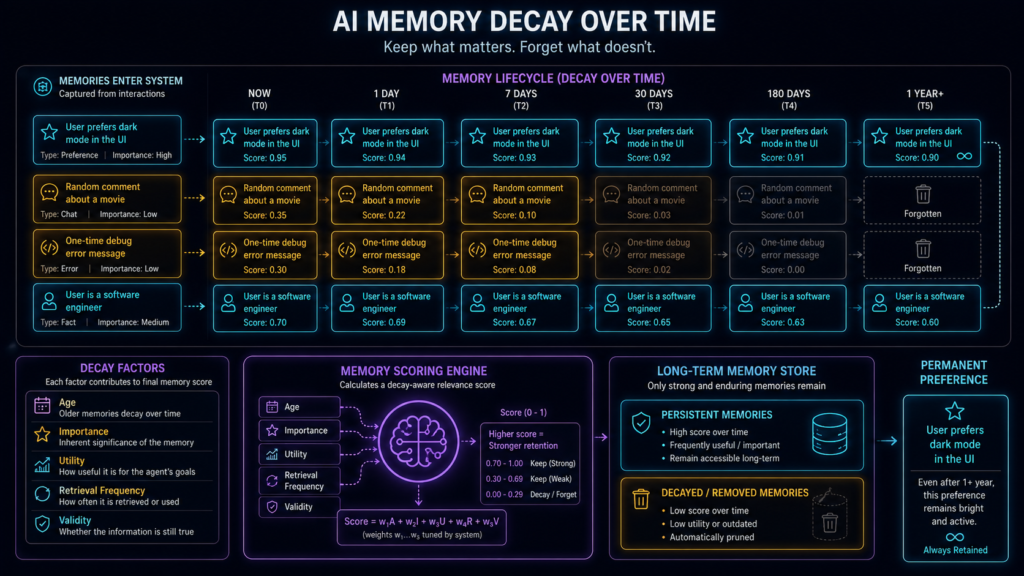
If an AI agent remembers every single detail forever, its database eventually becomes slow, expensive, and full of useless noise. To stay fast and smart, your AI needs memory decay—the ability to forget.
But you shouldn’t just delete old memories automatically after 30 days. Why? Look at this comparison:
Memory A: “User prefers dark mode.” (2 years old)
Memory B: “Meeting tomorrow at 3 PM.” (4 days old)
Memory A is two years old but is still highly important. Memory B is only four days old but becomes completely useless after tomorrow.
So, forgetting cannot depend on a calendar alone. A smart AI memory policy decides what to keep based on:
Age: How old is the fact?
Utility & Importance: Is this still useful for the user?
Retrieval Frequency: How often does the agent actually use this memory?
The Code: Exponential Decay in Python
Instead of a hard delete, we can give memories a “score” that naturally fades over time using a math concept called exponential decay.
However, we also add a permanent tag for core user preferences that should never be forgotten.
import math

# Step 1: Gradually lower the memory score over time
def recency_score(age_days: float, decay_rate: float = 0.03):
    return math.exp(-decay_rate * age_days)

# Step 2: Set a rule for what gets deleted
def should_forget(memory, score):
    # Never forget permanent facts (like "prefers dark mode")
    if memory.get("permanent"):
        return False

    # Forget temporary facts when their score drops too low
    return score < 0.15
The Golden Rule of AI Agent Memory: Memories should fade away based on their actual usefulness, not just their age.
12. When Should an Agent Reflect?
Reflecting after every message is not intelligence. It’s a token bill.
Forcing your AI agent to reflect after every single message isn’t intelligence—it’s just a massive LLM token bill. Constant reflection slows down your application (high latency) and wastes money.
Smart AI memory architectures use Event-Driven Reflection. This means the agent only stops to “think” and learn when something meaningful actually happens.
The Best Triggers for Agent Reflection:
Mistakes & Corrections: A task fails, a code validator rejects the output, or the user explicitly corrects the agent.
Major Milestones: The agent successfully finishes a complex task and needs to save the winning strategy.
System Limits: An important decision is made, the chat session ends, or the short-term memory buffer gets full.
The Logic in Code:
# Stop and learn only when things go wrong
if task_failed or user_corrected_agent:
    reflect_on_mistakes()

# Save facts only when a milestone is reached
if important_decision_made or memory_is_full:
    consolidate_to_long_term_memory()
The Golden Rule: AI Agent reflection must always be triggered by specific events or milestones. Never run it blindly after every single chat message.
13. Reflection Inside LangGraph
Reflection becomes much easier to control when it is a node instead of a vague instruction hidden inside a prompt.
Imagine:
START
  ↓
Execute
  ↓
Evaluate
  ↓
Success?
 ↙      ↘
YES      NO
 ↓        ↓
END    Reflect
          ↓
       Retry
Define state:
from typing import TypedDict


class AgentState(TypedDict):
    task: str
    result: str
    success: bool
    reflection: str
    retry_count: int
Reflection node:
def reflection_node(state: AgentState):

    reflection = (
        "Inspect the failed attempt and identify "
        "one actionable lesson for the retry."
    )

    return {
        "reflection": reflection,
        "retry_count": state["retry_count"] + 1
    }
Routing:
def route_after_evaluation(state):

    if state["success"]:
        return "end"

    if state["retry_count"] >= 2:
        return "end"

    return "reflect"
The key idea:
Attempt 1 fails
      ↓
Learn something
      ↓
Attempt 2 changes
If nothing changes between retries, your “agent” is just rerunning the same failure.
14. Multi-Agent Memory: Don’t Give Everyone Everything
Sharing every memory with every agent sounds collaborative until four agents start drowning in each other’s noise.
Imagine:
Researcher
Coder
Reviewer
The Researcher needs:
sources
search history
research findings
The Coder needs:
requirements
architecture
validated research
coding conventions
The Reviewer needs:
requirements
acceptance criteria
implementation
known risks
So separate:
Shared Memory
validated project facts
important decisions
requirements
Agent-Specific Memory
role-specific lessons
successful strategies
specialized experiences
Workflow State
current intermediate data
temporary tool outputs
current task status
Namespaces make this straightforward:
shared = (
    "project",
    "project_42",
    "shared"
)

researcher = (
    "project",
    "project_42",
    "researcher"
)

coder = (
    "project",
    "project_42",
    "coder"
)
Researcher stores scratch information locally.
After validation:
store.put(
    shared,
    "provider_streaming",
    {
        "fact": "Provider supports streaming",
        "validated": True
    }
)
Now the Coder receives the conclusion.
Not:
14 Google searches
6 failed queries
32 snippets
3 rejected hypotheses
Remember:
Share conclusions, not noise.
15. The Complete Memory Consolidation Pipeline
This is the piece worth stealing for your own agent.
def process_experience(event):

    # 1. Reject obvious noise
    if not should_store_memory(event):
        return

    # 2. Reflect when appropriate
    lesson = None

    if event["type"] in {
        "tool_failure",
        "user_correction"
    }:
        lesson = reflect_on_event(event)

    # 3. Validate reflection
    if lesson:
        if not validate_reflection(
            lesson,
            event
        ):
            return

    # 4. Extract structured memory
    memory = extract_memory(
        event=event,
        lesson=lesson
    )

    # 5. Find related existing memory
    existing = find_matching_memory(
        memory
    )

    # 6. Decide what should happen
    action = resolve_memory(
        existing=existing,
        new_memory=memory
    )

    # 7. Persist final memory state
    write_memory(action)
Read that once as English:
Something happens
      ↓
Is it worth remembering?
      ↓
Reflect if necessary
      ↓
Verify the lesson
      ↓
Extract useful information
      ↓
Check existing memory
      ↓
Create / Reinforce / Update / Supersede / Ignore
      ↓
Store
That is memory consolidation in practice.
16. The Architecture You Actually Want
Stop thinking Agent → Vector DB. Think memory lifecycle.
                         USER
                           │
                           ▼
                       ┌───────┐
                       │ AGENT │
                       └───┬───┘
                           │
                     EXPERIENCE
                           │
                           ▼
                    SHORT-TERM STATE
                           │
                           ▼
                    Worth remembering?
                      ↙          ↘
                    NO            YES
                    │              │
                 DISCARD       REFLECTION
                                   │
                              VALIDATION
                                   │
                             CONSOLIDATION
                                   │
                       ┌───────────┼───────────┐
                       ▼           ▼           ▼
                    SEMANTIC    EPISODIC   PROCEDURAL
                     MEMORY      MEMORY      MEMORY
                       └───────────┼───────────┘
                                   │
                            MEMORY RETRIEVAL
                                   │
                     relevance + recency +
                     importance + validity
                                   │
                                   ▼
                                 AGENT
                                   │
                         reinforce / update
                            / forget
The vector database can live inside this architecture.
But it is not the architecture.
17. End-to-End Example: One Sentence Changes Future Agent Behavior
This tiny example explains the entire purpose of long-term agent memory.
Current memory:
{
  "backend_framework": "Flask"
}
User says:
“I don’t use Flask anymore. Use FastAPI.”
The memory manager extracts:
new_memory = {
    "key": "backend_framework",
    "value": "FastAPI"
}
Existing memory:
old_memory = {
    "key": "backend_framework",
    "value": "Flask"
}
Consolidation decides:
decision = {
    "action": "SUPERSEDE",
    "old": "Flask",
    "new": "FastAPI"
}
Long-term memory becomes:
{
  "backend_framework": {
    "value": "FastAPI",
    "status": "active"
  }
}
Three weeks later the user says:
“Build me a small REST API.”
The agent retrieves:
backend_framework = FastAPIand writes FastAPI code.
No fine-tuning.
No giant conversation replay.
No searching through three weeks of chat logs.
Past experience changed future behavior.
That is useful agent memory.
18. Memory Consolidation vs Fine-Tuning
Your agent can learn something new without changing a single model weight.
Fine-tuning:
Training Data
     ↓
Optimization
     ↓
Model Weights Change
Memory:
Experience
     ↓
Reflection
     ↓
Consolidation
     ↓
External Memory Changes
Fine-tuning changes the model.
Memory changes the context available to the model in future interactions.
That makes memory:
- fast to update;
- user-specific;
- reversible;
- easy to inspect;
- useful for continuously changing information.
But because it is easy to update, it is also easy to poison.
Hence:
Reflection
+
Validation
+
Consolidation
rather than blind storage.
19. Seven Agent Memory Problems — One Cheat Sheet
| Developer Problem | Root Cause | Better Approach |
|---|---|---|
| Irrelevant memories | Vector similarity only | Relevance + recency + importance + validity |
| Context/token explosion | Saving everything | Short-term vs long-term memory gate |
| Old facts conflict | Append-only memory | Update/supersede/version memories |
| Agent repeats mistakes | Failed experiences stored blindly | Reflection + validation |
| Memory grows forever | No forgetting policy | Utility-aware decay/archive/delete |
| Summaries lose details | Excessive compression | Structured facts + summaries + episodes |
| Agents repeat each other’s work | Bad memory scope | Shared + role-specific + workflow memory |
20. Frequently Asked Questions
What is memory consolidation in AI agents?
Memory consolidation transforms noisy interactions and experiences into smaller, durable memories that can improve future agent behavior.
Instead of storing every message, the system extracts useful facts, preferences, lessons, strategies, or experiences.
What is reflection in AI agents?
Reflection means evaluating a previous action or outcome to determine:
- what happened;
- what worked;
- what failed;
- why it failed;
- what should change next time.
Is RAG the same as agent memory?
No.
RAG primarily retrieves relevant external knowledge.
Agent memory stores information derived from previous interactions, experiences, preferences, decisions, and outcomes.
Both can use vector databases, but they solve different problems.
Why is vector search alone bad for agent memory?
Because similarity does not automatically represent:
- truth;
- freshness;
- importance;
- authority;
- supersession;
- usefulness.
An outdated memory can be more semantically similar than the correct current memory.
Should AI agents remember every conversation?
Usually no.
Raw conversation history can be retained separately for auditing if required, while long-term operational memory should be selectively extracted and consolidated.
How should AI agents handle outdated memories?
Use revision semantics such as:
CREATE
REINFORCE
UPDATE
SUPERSEDE
DELETE
instead of endlessly appending facts.
Should AI memories expire?
Some should.
Others should not.
Expiration should depend on factors such as importance, utility, validity, recency, and the type of memory rather than age alone.
Can reflection make an agent smarter?
Reflection can improve future decisions when useful lessons are extracted from previous outcomes.
But self-reflection is not automatically correct.
Important reflections should be validated whenever possible.
What are semantic, episodic, and procedural memory?
Semantic memory: facts.
Episodic memory: useful past experiences.
Procedural memory: strategies or rules describing how the agent should behave.
Does memory consolidation require a vector database?
No.
Structured databases, key-value stores, document stores, graph databases, vector databases, or combinations of them can all participate in a memory architecture.
The correct storage system depends on the memory type and retrieval requirements.
Final Rule of Thumb
Do not build this:
Chat
 ↓
Embeddings
 ↓
Vector DB
 ↓
Top-K Results
 ↓
Agent
Build this:
Experience
     ↓
Reflection
     ↓
Validation
     ↓
Consolidation
     ↓
Structured Memory
     ↓
Conflict Resolution
     ↓
Selective Retrieval
     ↓
Better Future Action
     ↓
Reinforce / Update / Forget
A vector database gives your agent recall.
Reflection gives it lessons.
Consolidation gives those lessons structure.
Conflict resolution keeps them current.
Forgetting keeps them useful.
And selective retrieval gives the agent the right memory at the right time.
The real question in AI agent memory is therefore no longer:
“How do I store more conversations?”
It is:
“What deserves to become memory?”
“When should that memory change?”
“When should the agent stop believing it?”
“And when should it forget it completely?”
Solve those problems and you are no longer building a chatbot with a vector database attached.
You are building an agent that can actually learn from experience.

