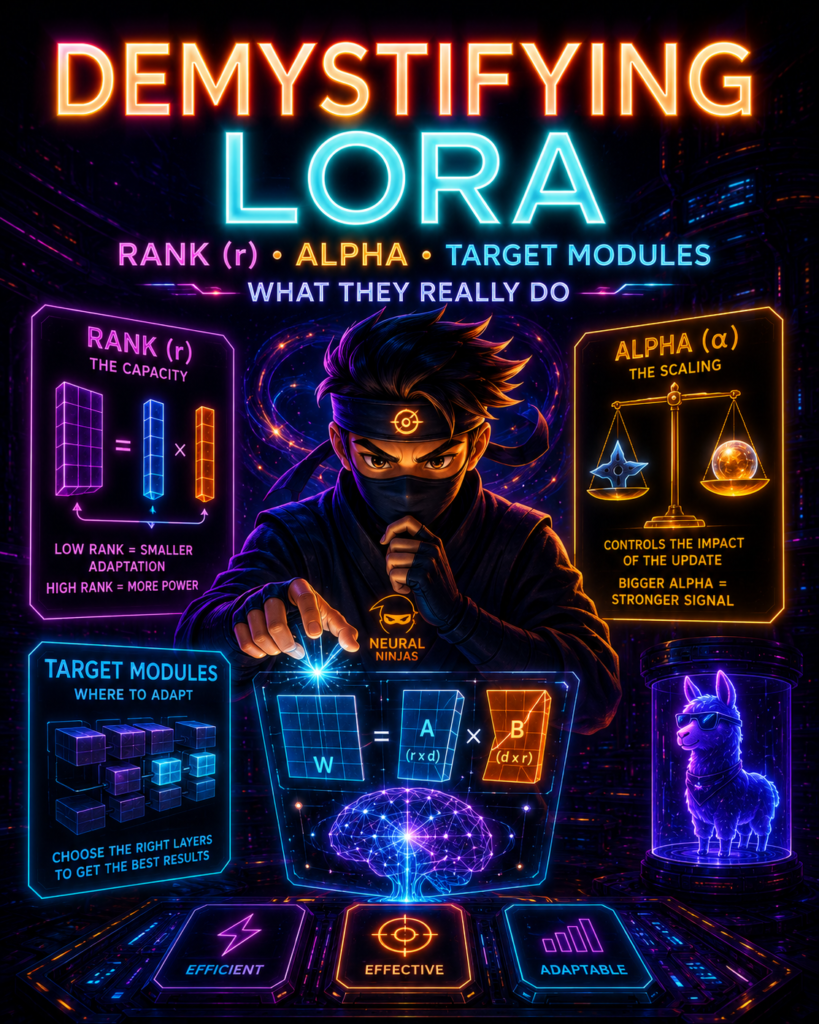
Stop copying LoRA configs from random tutorials! Learn what rank (r), lora_alpha, and target_modules actually do. Get concrete recommendations for coding assistants, creative writing, and domain adaptation.
Table of Contents
The Pain Point: Why You’re Here
The “100 Clips on a Piano” Analogy
What Is LoRA? The One-Minute Refresher
Rank (r): The Color Palette Budget
Alpha (lora_alpha): The Volume Knob
The Alpha Trap: Why Your Model Stopped Learning
Target Modules: Where to Put the Clips
Concrete Recipes for 2026
Learning Rate, Dropout & Other Key Parameters
The Tuning Playbook: How to Actually Find the Right Values
QLoRA: What Changes When You Quantize
Advanced: LoRA Variants You Should Know
Frequently Asked Questions
The Bottom Line
1. The Pain Point: Why You’re Here
Let me guess. You’ve been copying and pasting LoRA configs from random tutorials. Every tutorial shows the same pattern:
lora_config = LoraConfig(
    r=16,
    lora_alpha=32,
    target_modules=["q_proj", "v_proj"]
)
You have no idea why these numbers work. You just know they “work.” And when they don’t work? You’re stuck. No clue which knob to turn.
This article fixes that. No heavy math. No jargon. Just clear explanations of what these parameters actually do, with concrete recommendations for different use cases.
2. The “100 Clips on a Piano”:
Before we dive into the technical details, let me give you a mental model that’ll make everything click.
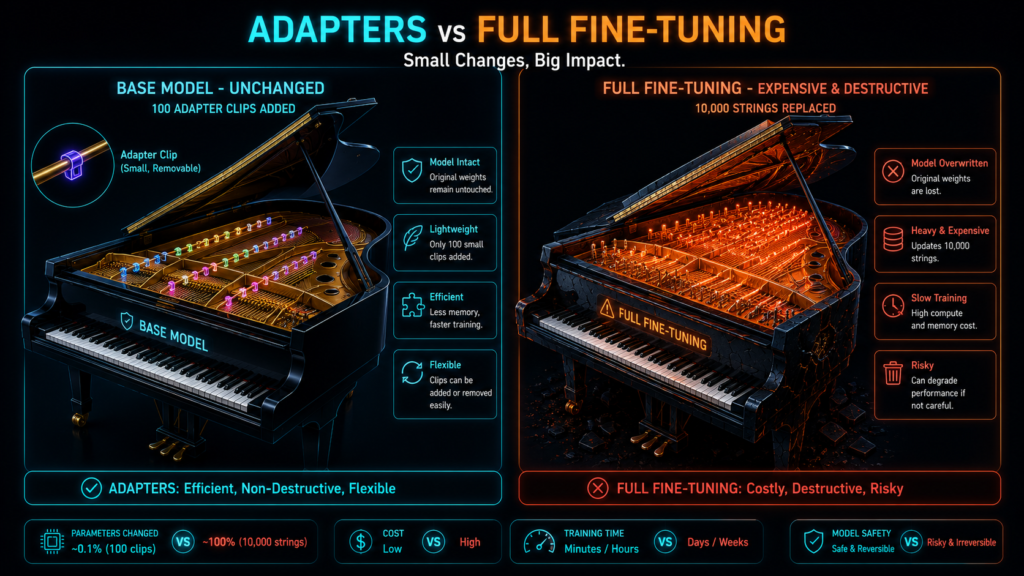
Think about a grand piano with 10,000 strings. Each string is perfectly tuned for classical music. Now you want to play jazz.
Full fine-tuning is like restringing all 10,000 strings. It destroys the original tuning, takes a massive workshop, and you can never go back.
LoRA is like snapping 100 small “tuner clips” onto the most important strings. The original tuning stays untouched. You only need a small toolbox. And you can pop the clips off later when you want to go back to classical.
That’s LoRA in a nutshell. You’re not changing the model. You’re adding small, removable adjustments.
3. What Is LoRA? The One-Minute Refresher
LoRA (Low-Rank Adaptation) is a technique that fine-tunes LLMs by adding small trainable matrices instead of updating all weights.
The Core Idea:
Freeze the original model weights
Inject trainable low-rank matrices into specific layers
Train only these small matrices
Merge them back when done
Result: You train a tiny fraction of parameters but can get surprisingly close to full fine-tuning performance.
The Reality Check on Performance
Many tutorials claim LoRA achieves “~90-95% of full fine-tuning performance.” The truth is more nuanced.
Performance depends heavily on:
Task complexity: Simple style transfer? LoRA matches full FT easily. Complex reasoning or factual recall? The gap widens.
Dataset size: With small datasets, LoRA can actually outperform full FT (less overfitting). With massive datasets, the gap grows.
Model size: Larger models show smaller gaps between LoRA and full FT.
A 2024 study found that on math reasoning tasks, LoRA achieved 85% of full FT performance at rank 8, improving to 92% at rank 64. On code generation, the gap was even smaller—LoRA at rank 16 reached 94% of full FT. Meanwhile, on factual recall tasks, the gap was larger, with LoRA maxing out at around 82% even at high ranks.
Bottom line: LoRA works incredibly well for most practical applications, but be cautious with claims of “95% across all tasks.” Test on your specific use case.
The Math:
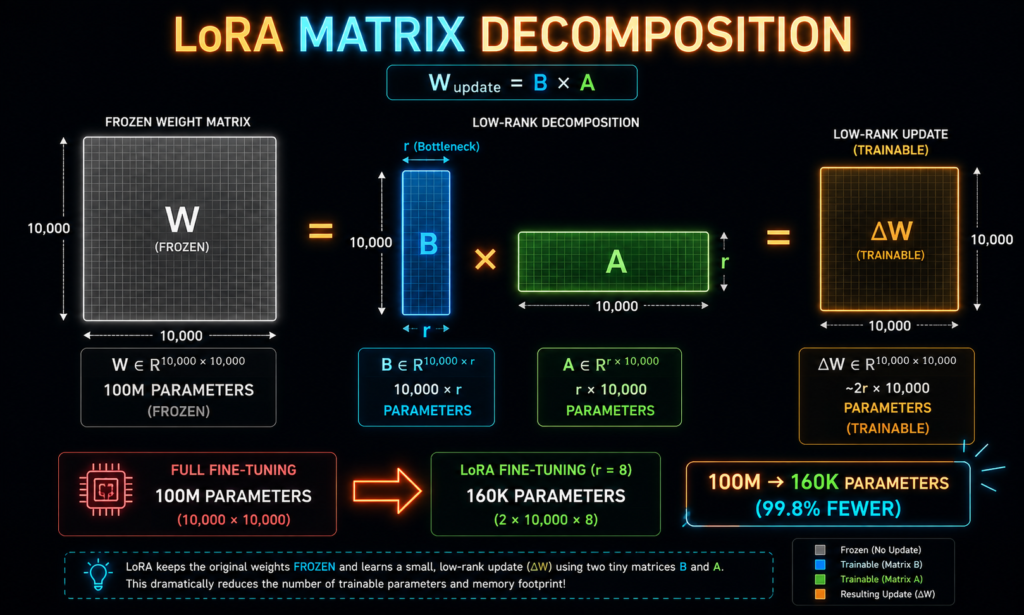
For a weight matrix W0 of size d × k, LoRA introduces:
W = W0 + B × A
Where B is d × r and A is r × k, and r is the rank.
Instead of changing a 10,000×10,000 matrix (100 million parameters), you change two smaller matrices: 10,000×16 and 16×10,000 (just 320,000 parameters total).
4. Rank (r): The Color Palette Budget
What It Does
Rank (r) controls how much the adapter can learn. Think of it as the “expressivity budget.”
The Color Palette Analogy
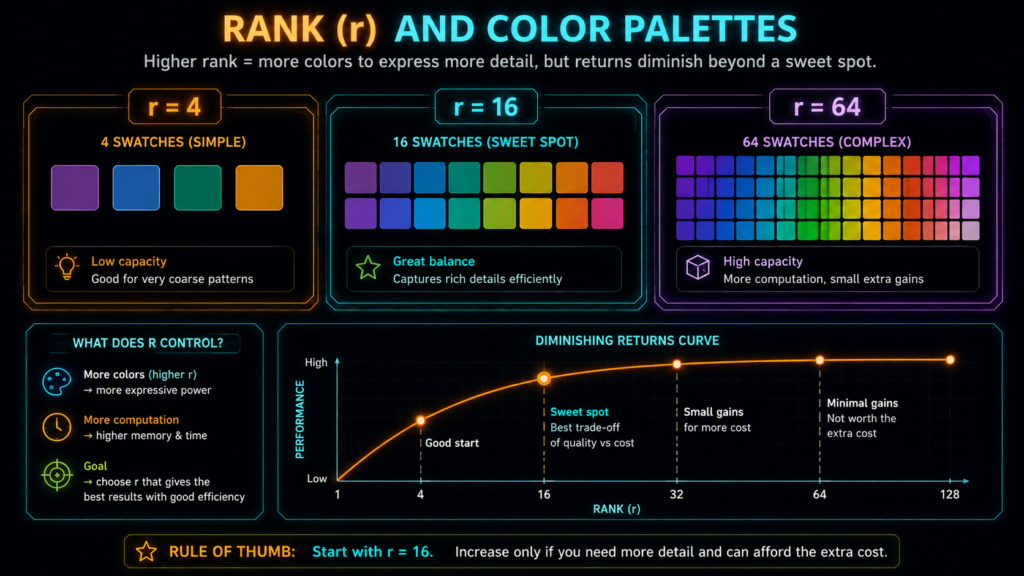
Rank is like the number of colors a painter can mix:
r=4: 4 base colors. Good for simple adjustments.
r=16: 16 base colors. The sweet spot for most tasks.
r=64: 64 base colors. More capacity, but diminishing returns.
More colors let you paint more detailed domain shifts, but you hit diminishing returns fast. Going from r=16 to r=128 rarely makes the model 8x smarter, but it does eat 8x the VRAM.
What the Research Says?
| Rank | Trainable Params | Typical Use | Performance vs Full FT |
|---|---|---|---|
| r=4 | Very Low | Simple formatting, narrow behavior | ~70-80% |
| r=8 | Low | Style transfer, basic tasks | ~75-85% |
| r=16 | Medium | Sweet spot – start here | ~85-92% |
| r=32 | Higher | Coding, complex reasoning | ~88-94% |
| r=64 | High | Heavy domain adaptation | ~90-95% |
Important: These percentages are approximate and task-dependent. A complex domain shift will need higher rank than a simple style transfer. There’s no universal “best” rank.
The Diminishing Returns
The rank-r model only has (d × r + r × k) trainable parameters. For a 7B model with d=k=4096:
r=16: ~134K parameters (0.002% of total!)
r=32: ~268K parameters
r=64: ~536K parameters
The insight: Most fine-tuning updates live in a low-dimensional space. You don’t need to update all 7B parameters—just finding the right low-rank subspace is enough.
When to Go Lower or Higher
Go lower (r=4-8) when:
You have a small dataset (<5,000 examples)
You just need to change tone or output format
You’re worried about overfitting
VRAM is extremely limited
Go higher (r=32-64) when:
You have a large dataset (>50,000 examples)
You’re fine-tuning for coding or complex reasoning
You need heavy domain adaptation (medical, legal, finance)
You’ve tried r=16 and validation loss still hasn’t flattened
The Golden Rule
Start with r=16. Only increase if validation loss doesn’t improve. Only decrease if you’re overfitting. And remember: the “best” rank depends on your task, dataset, and model—not just a number from a tutorial.
5. Alpha (lora_alpha): The Volume Knob
What It Does
Alpha (lora_alpha) controls how loud the LoRA adapter is compared to the frozen base model.
Formula :
Effective Scaling = lora_alpha / r
This is it. This is the only math you need to understand LoRA scaling.
The Volume Knob Analogy
Base model: The volume of a radio playing classical music.
LoRA adapter: Your voice (the new information).
Alpha: Your volume knob. How loud is your voice compared to the radio?
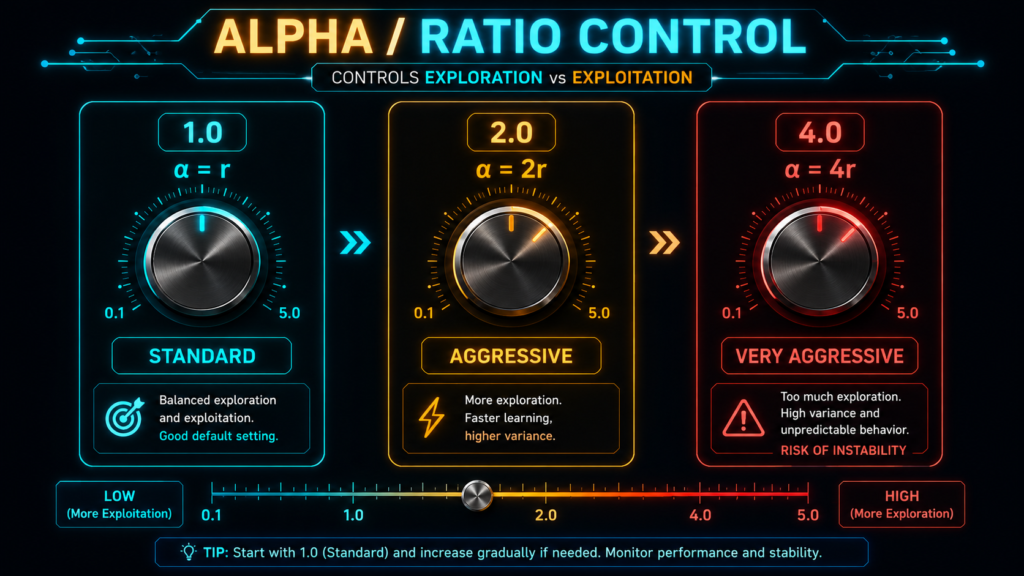
alpha = r → Scaling = 1.0. Your voice matches the radio volume.
alpha = 2r → Scaling = 2.0. Your voice is twice as loud. Aggressive.
alpha = r/2 → Scaling = 0.5. Your voice is half as loud. Subtle.
What This Actually Means ?
| Configuration | Scaling (alpha/r) | Effect |
|---|---|---|
| r=16, alpha=16 | 1.0 | Standard. Balanced. Safe starting point. |
| r=16, alpha=32 | 2.0 | The “standard” you see everywhere. Aggressive but safe. |
| r=8, alpha=32 | 4.0 | Very aggressive. Use when you want maximum adaptation. |
| r=32, alpha=16 | 0.5 | Very conservative. Adapter barely changes the model. |
Why Alpha Exists
Why not just scale the LoRA output directly? The lora_alpha parameter exists because:
It allows you to change rank without re-tuning alpha
It controls how quickly the adapter influences the base model
It’s a historical artifact from the original LoRA paper
The key insight: A larger alpha relative to rank makes the adapter more aggressive. It applies its learned patterns more strongly.
6. The Alpha Trap: Why Your Model Stopped Learning
This is the most common mistake LoRA beginners make.
The Trap
If you double your rank (e.g., r=8 to r=16) but leave alpha the same (alpha=16), you just halved your adapter’s scaling.
| Config | Scaling (alpha/r) | Effect |
|---|---|---|
| r=8, alpha=16 | 2.0 | Normal |
| r=16, alpha=16 | 1.0 | Suddenly weaker! |
| r=16, alpha=32 | 2.0 | Back to normal |
Developers do this constantly and wonder why their model “stopped learning.”
How to Fix It
Always maintain your alpha/r ratio.
If you increase rank from 16 to 32, double alpha from 16 to 32.
If you decrease rank from 16 to 8, halve alpha from 16 to 8.
The Rule of Thumb
Start with alpha = rank (scaling = 1.0). If the model needs to shift domains aggressively, use alpha = 2 × rank (scaling = 2.0).
But Wait—There’s Another Perspective
Some research suggests that keeping scaling constant across rank changes might be suboptimal. A 2025 study found that at higher ranks, a scaling slightly above 1.0 (e.g., 1.5-2.0) performed better than exactly 1.0.
The pragmatic answer: Start with alpha=r (scaling=1.0). If the model isn’t adapting enough, increase alpha to 2r. If the model is unstable, decrease alpha. Treat the scaling factor as a tunable parameter, not a fixed law.
7. Target Modules: Where to Put the Clips
What It Does
Target modules tells LoRA which layers to adapt. Think of it as choosing where to put the tuning clips on the piano.
The Breakdown
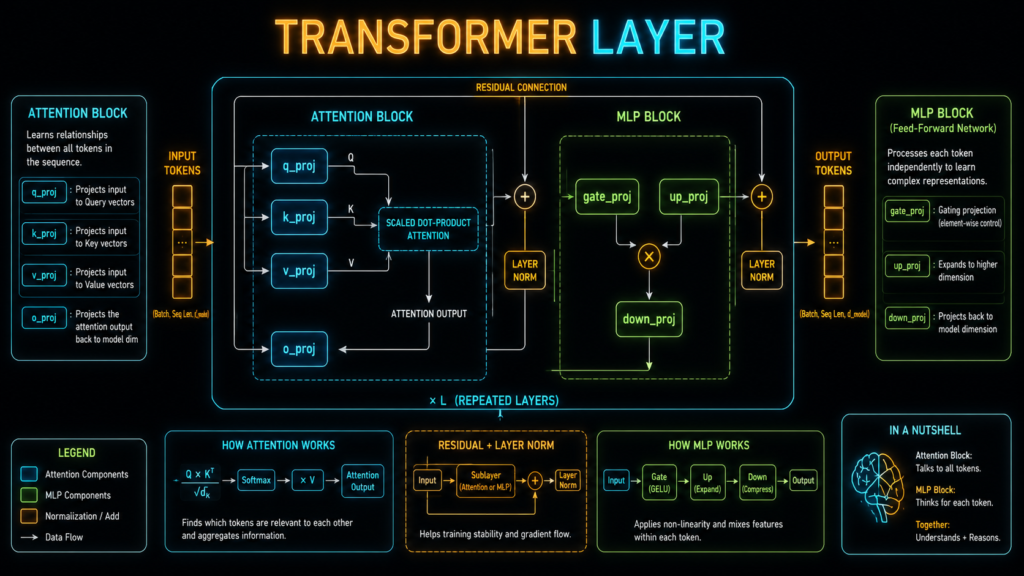
Transformer layers in most models:
┌─────────────────────────────────────────────┐
│           Transformer Layer                  │
│  ┌─────────────────────────────────────┐    │
│  │     Self-Attention                  │    │
│  │  ┌─────────────────────────────┐  │    │
│  │  │  q_proj: Query projection   │  │    │
│  │  │  k_proj: Key projection     │  │    │
│  │  │  v_proj: Value projection   │  │    │
│  │  │  o_proj: Output projection  │  │    │
│  │  └─────────────────────────────┘  │    │
│  └─────────────────────────────────────┘    │
│  ┌─────────────────────────────────────┐    │
│  │     MLP (Feed-Forward)              │    │
│  │  ┌─────────────────────────────┐  │    │
│  │  │  gate_proj: Gating          │  │    │
│  │  │  up_proj: Expansion         │  │    │
│  │  │  down_proj: Compression     │  │    │
│  │  └─────────────────────────────┘  │    │
│  └─────────────────────────────────────┘    │
└─────────────────────────────────────────────┘
When to Use Which Target Modules
| Configuration | VRAM Usage | Best For |
|---|---|---|
["q_proj", "v_proj"] only | Low | Simple style transfer, format changes |
["q_proj", "k_proj", "v_proj", "o_proj"] | Medium | Changing how the model attends to information |
["q_proj", "k_proj", "v_proj", "o_proj", "gate_proj", "up_proj", "down_proj"] | Higher | Full capability – the 2026 standard |
Target all major linear layers:
target_modules = [
    "q_proj", "k_proj", "v_proj", "o_proj",  # Attention
    "gate_proj", "up_proj", "down_proj"      # MLP
]
Why? Research has shown that targeting all major layers is crucial for matching the performance of full fine-tuning. The MLP layers act like the model’s knowledge base—targeting them is essential for teaching new facts or heavy domain adaptation.
The “all-linear” Shortcut
target_modules = "all-linear"
This targets all linear layers automatically. It’s the recommended approach for QLoRA-style training and ensures you don’t miss any important modules.
Model-Specific Module Names
Different models use different naming conventions. Here are the most common ones:
| Model | Attention Modules | MLP Modules |
|---|---|---|
| Llama/Mistral/Qwen2 | q_proj, k_proj, v_proj, o_proj | gate_proj, up_proj, down_proj |
| GPT2 | c_attn, c_proj | c_fc |
| Bloom | query_key_value, dense | dense_h_to_4h, dense_4h_to_h |
| Phi-3 | qkv_proj, o_proj | gate_up_proj, down_proj |
Pro tip: Use target_modules="all-linear" to avoid hunting for module names. PEFT handles the mapping automatically.
8. Concrete Recipes :
Here are the exact configurations for different use cases. No guessing. Just copy-paste.
Recipe 1: Simple Chat/Style Formatting
Use Case: Changing output format, adding emojis, making responses more conversational.
from peft import LoraConfig

lora_config = LoraConfig(
    r=8,
    lora_alpha=16,
    target_modules=["q_proj", "v_proj"],
    lora_dropout=0.0,
    bias="none",
    task_type="CAUSAL_LM"
)
Why it works: Minimal capacity needed just to change tone or output structure. Targeting only attention modules saves VRAM.
Training: LR=2e-4, 2-3 epochs, warmup=10%
Recipe 2: Coding Assistant
Use Case: Teaching a model to write Python, JavaScript, or domain-specific code.
lora_config = LoraConfig(
    r=32,
    lora_alpha=64,
    target_modules=["q_proj", "k_proj", "v_proj", "o_proj",
                    "gate_proj", "up_proj", "down_proj"],
    lora_dropout=0.0,
    bias="none",
    task_type="CAUSAL_LM"
)
Why it works: Coding requires precise syntax and deep reasoning patterns. MLP layers (knowledge base) must be adapted. More “colors” (rank) needed for the complex patterns.
Training: LR=2e-4, 2-3 epochs, warmup=10%
Recipe 3: Heavy Domain Adaptation (Medical/Legal)
Use Case: Teaching a model to understand medical terminology, legal documents, or highly specialized domains.
lora_config = LoraConfig(
    r=64,
    lora_alpha=128,
    target_modules=["q_proj", "k_proj", "v_proj", "o_proj",
                    "gate_proj", "up_proj", "down_proj"],
    lora_dropout=0.05,
    bias="none",
    task_type="CAUSAL_LM"
)
Why it works: You are forcing the model far from its base distribution. It needs maximum capacity (high rank) and a loud “volume” (high alpha). Higher dropout helps prevent overfitting on small domain datasets.
Training: LR=1e-4 (lower for stability), 3-5 epochs, warmup=5%, weight_decay=0.01
Recipe 4: Small Dataset (<5,000 examples)
Use Case: You have limited data and want to avoid overfitting.
lora_config = LoraConfig(
    r=8,
    lora_alpha=16,
    target_modules=["q_proj", "k_proj", "v_proj", "o_proj"],
    lora_dropout=0.1,
    bias="none",
    task_type="CAUSAL_LM"
)
Why it works: Lower rank acts as regularization, reducing overfitting. Higher dropout helps prevent memorization. Use fewer epochs (1-2).
9. Learning Rate, Dropout & Other Key Parameters
Learning Rate: The Nuanced View
The learning rate defines how much the model’s weights are adjusted during each training step. But the “right” LR depends on multiple factors.
Factor 1: Model Size
| Model Size | Recommended LR |
|---|---|
| 1-3B | 2e-4 to 5e-4 |
| 7-13B | 2e-4 (standard) |
| 30-70B | 1e-4 to 2e-4 |
| 100B+ | 1e-4 or lower |
Why? Larger models are more sensitive to LR changes. A step that works for a 7B model might destabilize a 70B model.
Factor 2: Dataset Size
| Dataset Size | Recommended LR | Rationale |
|---|---|---|
| Small (<5k) | 1e-4 to 2e-4 | Lower LR prevents overfitting |
| Medium (5k-50k) | 2e-4 (sweet spot) | Balanced learning |
| Large (>50k) | 2e-4 to 5e-4 | More data can handle higher LR |
Factor 3: Task Difficulty
| Task Type | Recommended LR |
|---|---|
| Simple style transfer | 3e-4 to 5e-4 |
| Domain adaptation | 2e-4 |
| Complex reasoning | 1e-4 to 2e-4 |
| Unstable training | Drop to 1e-4 or below |
The Practical Rule:
Start at 2e-4 for most 7-13B models
If loss is unstable, drop to 1e-4
If training is too slow, try 3e-4 (but watch for instability)
LoRA Dropout
Dropout randomly sets a fraction of LoRA activations to zero during training to prevent overfitting.
| Setting | When to Use |
|---|---|
| 0.0 | Default. Usually sufficient. |
| 0.05-0.1 | Only if you see overfitting (train loss falling, val loss rising) |
Important: Recent research suggests that for short training runs common in fine-tuning, lora_dropout may be an unreliable regularizer. Start with 0.0 and only add dropout if you see clear overfitting.
Other Parameters
| Parameter | Recommendation | Rationale |
|---|---|---|
| Warmup Steps | 5-10% of total steps | Gradual start prevents early instability |
| Weight Decay | 0.01 | Prevents overfitting, safe default |
| Epochs (Small Dataset) | 1-2 | Prevents overfitting |
| Epochs (Medium Dataset) | 2-3 | Sweet spot for most instruction tuning |
| Epochs (Large Dataset) | 3-5 | More data can handle more epochs |
| Bias | “none” | Typically not needed for LoRA |
10. The Tuning Playbook: How to Actually Find the Right Values ?
Here’s a systematic approach to tuning your LoRA hyperparameters.
Step 1: Lock a Baseline
Start from working defaults for your model. For Llama-2-7B:
lora_config = LoraConfig(
    r=16,
    lora_alpha=16,
    lora_dropout=0.0,
    target_modules=["q_proj", "k_proj", "v_proj", "o_proj",
                    "gate_proj", "up_proj", "down_proj"],
    bias="none",
    task_type="CAUSAL_LM"
)
Step 2: Run an LR Range Test
Run a short “LR range test”: increase LR linearly over a few hundred steps, plot loss vs LR, choose LR just before loss blows up.
# Conceptually:
# Step 1: Try LR = 1e-5, 3e-5, 1e-4, 3e-4, 1e-3
# Step 2: Run each for 200 steps
# Step 3: Plot loss curves
# Step 4: Choose LR that gives smooth, descending loss
Step 3: Triage Hyperparameters in Tiers
Tier 1 (Most Impact): Learning Rate,
lora_alpha, Warmup RatioTier 2 (Moderate Impact):
rank, Dropout, Weight DecayTier 3 (Lowest Impact): Target Modules (but still important)
Step 4: The Tuning Process
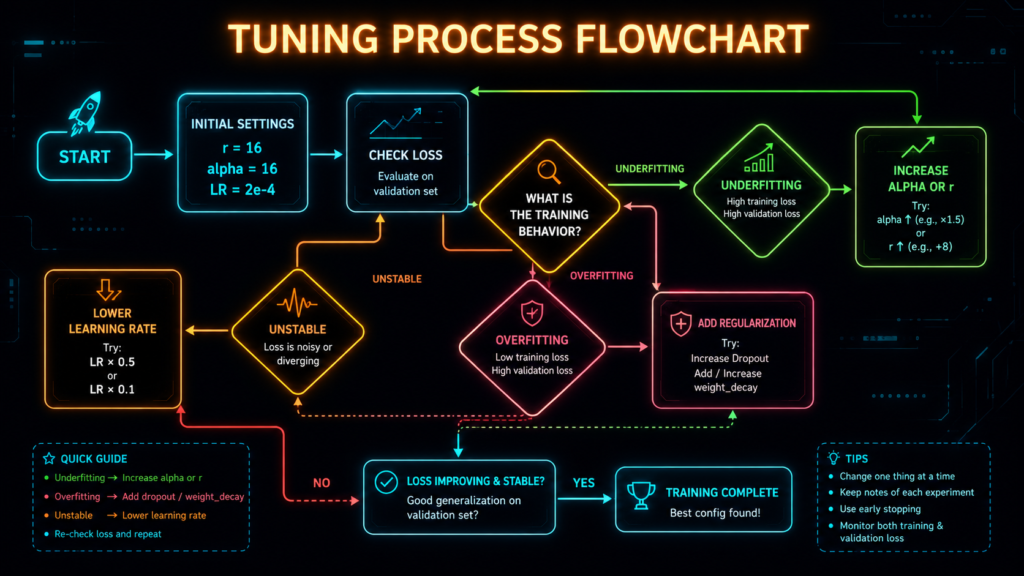
Start:
r=16, alpha=16, LR=2e-4, warmup=10%If underfitting (val loss high, outputs generic):
First: Set
alpha=32(scaling=2.0)Still underfitting? Set
r=32Still? Try
LR=3e-4
If overfitting (train loss falls, val loss rises):
Add
dropout=0.05-0.1Enable
weight_decay=0.01Reduce epochs
Reduce LR to
1e-4
If unstable loss:
Reduce LR to
1e-4Or keep r fixed and lower alpha
Check for data quality issues
Step 5: Validate with a Hold-Out Set
Always keep a separate test set that the model has never seen. This is your final checkpoint before production.
11. QLoRA: What Changes When You Quantize
What Is QLoRA?
QLoRA reduces memory requirements by training LoRA adapters over a 4-bit quantized base model. It’s the reason you can fine-tune a 70B model on a single consumer GPU.
The Key Differences :
| Aspect | LoRA | QLoRA |
|---|---|---|
| Base Model Precision | 16-bit (BF16/FP16) | 4-bit (NF4) |
| GPU Memory (7B) | ~14 GB | ~4.8 GB |
| GPU Memory (70B) | ~140 GB | ~48 GB |
| Training Speed | Baseline | ~45% slower |
| Accuracy | Baseline | Slightly lower (1-3% on complex tasks) |
| Hardware | 24GB+ GPU | 8-16GB GPU |
How Quantization Affects LoRA
1. Parameter Counts Stay the Same
The number of trainable parameters is identical for the same r. QLoRA only changes the precision of the base model, not the adapter.
2. Training Stability Can Change
Quantization introduces noise. Some models handle this well; others need lower learning rates.
Recommended LR for QLoRA: Start at 1e-4 instead of 2e-4. If stable, try 2e-4.
3. Target Modules Still Matter
The same target_modules recommendations apply. If anything, targeting all-linear becomes even more important because quantization already loses some precision.
4. Evaluation Differences
A QLoRA model might look worse on perplexity but equal on downstream tasks. Always evaluate on your actual task, not just loss curves.
QLoRA-Specific Recommendations
| Parameter | LoRA Recommendation | QLoRA Recommendation | Why? |
|---|---|---|---|
| Learning Rate | 2e-4 | 1e-4 (start) | Quantization noise requires gentler updates |
| Rank | r=16 | r=16 | Same capacity needs |
| Alpha | alpha=16 | alpha=16 | Same scaling logic |
| Dropout | 0.0 | 0.0-0.05 | Slightly more regularization helpful |
| Warmup | 10% | 10% | Same |
| Epochs | 2-3 | 2-3 | Same |
When to Use QLoRA vs LoRA
Use QLoRA when:
You have limited GPU memory (single 8-16GB card)
You want to fine-tune large models (30B+) on consumer hardware
You’re prototyping and need to iterate quickly
You can accept a small accuracy tradeoff for massive memory savings
Use LoRA when:
You have ample GPU memory (24GB+)
You need maximum accuracy on complex reasoning tasks
Training speed is critical
You’re fine-tuning smaller models (7B or less)
The Hidden Cost of QLoRA
QLoRA isn’t just “LoRA but cheaper.” There are real tradeoffs:
| Metric | Impact |
|---|---|
| Training Time | ~34% longer for same epochs |
| Inference Speed | ~45% slower |
| Accuracy | Slightly lower (1-3% on complex tasks) |
| Merge Stability | Merging LoRA into a 4-bit base can cause small accuracy drops |
The pragmatic answer: If you have a 24GB+ GPU, use LoRA. If you only have 8-16GB, QLoRA is a lifesaver.
12. Advanced: LoRA Variants You Should Know :
DoRA (Weight-Decomposed Low-Rank Adaptation)
DoRA decomposes weights into magnitude and direction components.
lora_config = LoraConfig(
    r=16,
    lora_alpha=32,
    target_modules="all-linear",
    use_dora=True,
    task_type="CAUSAL_LM"
)
When to use: Consistently outperforms LoRA on instruction-following tasks. Slightly higher memory (~10%).
Performance: +2-3% on most benchmarks at the same rank.
rsLoRA (Rank-Stabilized LoRA)
Scales LoRA outputs to stabilize training with different ranks.
lora_config = LoraConfig(
    r=64,
    lora_alpha=64,
    use_rslora=True,
    target_modules="all-linear"
)
When to use: When experimenting with different ranks. Helps maintain consistent behavior across rank values. Recommended for r > 32.
LoftQ (LoRA-Fine-Tuning-aware Quantization)
Initializes LoRA weights to compensate for quantization error.
from peft import LoftQConfig

loftq_config = LoftQConfig(loftq_bits=4, loftq_iter=5)
lora_config = LoraConfig(
    r=16,
    lora_alpha=32,
    target_modules="all-linear",
    init_lora_weights="loftq",
    loftq_config=loftq_config,
    task_type="CAUSAL_LM"
)
When to use: Better initial quality after quantization. Faster convergence. ~1-2% better final accuracy.
Vera (Vector-Based Random Matrix Adaptation)
Alternative to LoRA that uses random matrices to reduce memory further.
When to use: Extreme memory constraints. Less proven than LoRA in production.
13. Frequently Asked Questions
What does lora_alpha do?
lora_alpha controls the scaling factor of the LoRA adapter. The actual scaling is alpha / r. A higher alpha makes the adapter more aggressive.
What rank should I use for LoRA?
Start with r=16. Try r=32 if underfitting. Only go to r=64 if you have clear headroom. Evidence shows little gain past 16-32 for many tasks.
What is the best lora_alpha to rank ratio?
Start with alpha = rank (scaling = 1.0). If the model needs to shift domains aggressively, use alpha = 2 × rank (scaling = 2.0).
What are target_modules in LoRA?
Target modules specify which layers of the model get LoRA adapters. In 2026, the standard recommendation is targeting all major linear layers (attention + MLP).
Does QLoRA use the same parameters?
Yes, QLoRA uses the same LoRA parameters (r, alpha, target_modules) but trains on a quantized base model. It uses less VRAM but is slightly slower and may be less accurate.
Can I use multiple LoRA adapters?
Yes. PEFT supports adapter switching, stacking, merging, and routing. You can load different adapters for different tasks.
How do I merge a LoRA adapter for deployment?
Use model.merge_and_unload() to merge adapter weights with the base model for zero-latency inference.
Does LoRA work for all model sizes?
Yes, but the optimal parameters vary. Larger models generally tolerate higher learning rates. Start conservative and tune.
How many epochs should I run?
Start with 2-3 epochs. Monitor validation loss. If it’s still dropping, continue. If it plateaus or rises, stop.
14. The Bottom Line
The Three-Sentence Summary
Rank (r) is your capacity budget – more rank = more ability to learn, but diminishing returns. Start with r=16 and adjust based on validation loss.
Alpha is your volume knob – controls how aggressively the adapter applies its learning, with scaling = alpha / r. Keep alpha = r (scaling=1.0) to start.
Target modules are where you put the clips – target all major linear layers for best results, especially MLP layers for knowledge-based tasks.
The Quick Reference
| Parameter | What It Does | Default | When to Change |
|---|---|---|---|
| r (Rank) | Capacity / expressivity | 16 | Up if underfitting, down if overfitting |
| lora_alpha | Scaling strength | 16 (or 2r) | Up for aggressive adaptation |
| target_modules | Which layers to adapt | all-linear | Down to q/v only for simple tasks |
| learning_rate | Training step size | 2e-4 | Down if unstable |
| lora_dropout | Regularization | 0.0 | Up if overfitting |
The One Rule to Remember
The rank and alpha ratio matters more than the absolute values.
r=16, alpha=16= scaling 1.0r=16, alpha=32= scaling 2.0r=32, alpha=32= scaling 1.0
Maintain your ratio when you change rank!
The Reality Check
Don’t believe “95% across all tasks.” Performance depends on your specific use case.
Don’t trust specific numbers without context. “r=16 achieves 97.8% of rank=64” varies by dataset and model.
Validate on YOUR data. Every dataset and model behaves differently.
Start simple. r=16, alpha=16, all-linear, LR=2e-4. Adjust from there.
Your Action Plan
Start with the baseline config (r=16, alpha=16, all-linear, LR=2e-4)
Run a quick experiment with 10-20% of your dataset
Check for underfitting or overfitting using validation loss
Tune based on the playbook – adjust alpha first, then rank
Don’t blindly copy r=16 – validate on YOUR data
If using QLoRA, start with LR=1e-4
And remember: Rank is capacity, alpha is volume, and target modules are where you apply them. Test everything on your own data.


[…] Demystifying LoRA: What Rank (r), Alpha, and Target Modules Actually Do – Demystifying LoRA: What Rank (r), Alpha, and Target Modules – neuralninjas.in […]