
Human-in-the-Loop RAG Systems: Prevent Hallucinations with Interrupts & State Editing. Learn how to combine RAG with human-in-the-loop workflows using LangGraph interrupts, checkpoints, and state editing. Stop AI hallucinations dead with production-ready Python code.
The Reality Check: Why Pure Automation Fails
Let me tell you something nobody wants to admit at AI conferences.
Fully autonomous RAG agents? They’re powerful as hell. But they’re also dangerous. I’ve seen systems confidently generate beautiful, fluent answers that were completely wrong. The worst part? They sounded so convincing that users didn’t question them until it was too late.

The problem is simple. LLMs are stochastic parrots. They predict the next token, not the truth. When your retriever pulls irrelevant chunks, or when the model synthesizes information that doesn’t exist, you get hallucinations.
That’s exactly why human-in-the-loop (HITL) isn’t just a “nice to have” feature. It’s the safety net that makes RAG systems production-ready. It lets your graph pause at the right moment, ask a human to review or edit what’s about to happen, and then continue without losing context.
In this guide, we’ll build exactly that. A multi-turn RAG system with interrupts, state editing, and hallucination prevention baked in.
The Core Idea: When Two Worlds Collide
A good HITL system combined with RAG does four things:
Retrieves relevant documents from your knowledge base
Generates a response based on those documents
Pauses execution at a critical step (before taking action)
Lets a human approve, reject, or edit the pending action
This is how you build trustworthy multi-turn workflows instead of blind automation.
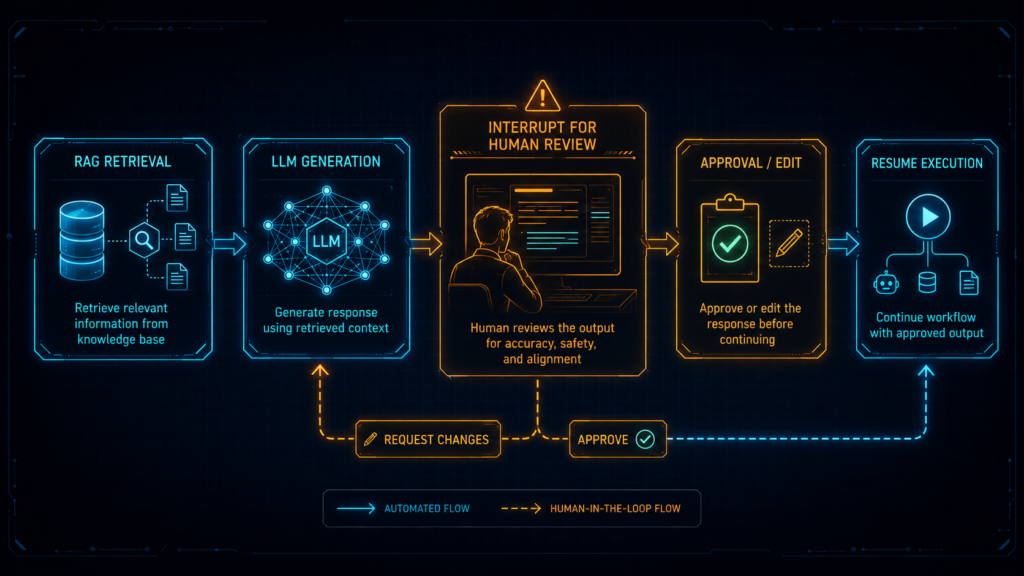
The basic flow looks like this:
User Query
↓
Retrieve Documents (RAG)
↓
Generate Draft Response
↓
🛑 INTERRUPT / PAUSE 🛑
↓
Human Reviews & Edits (if needed)
↓
State Updated or Approved
↓
Graph Resumes with Final Action
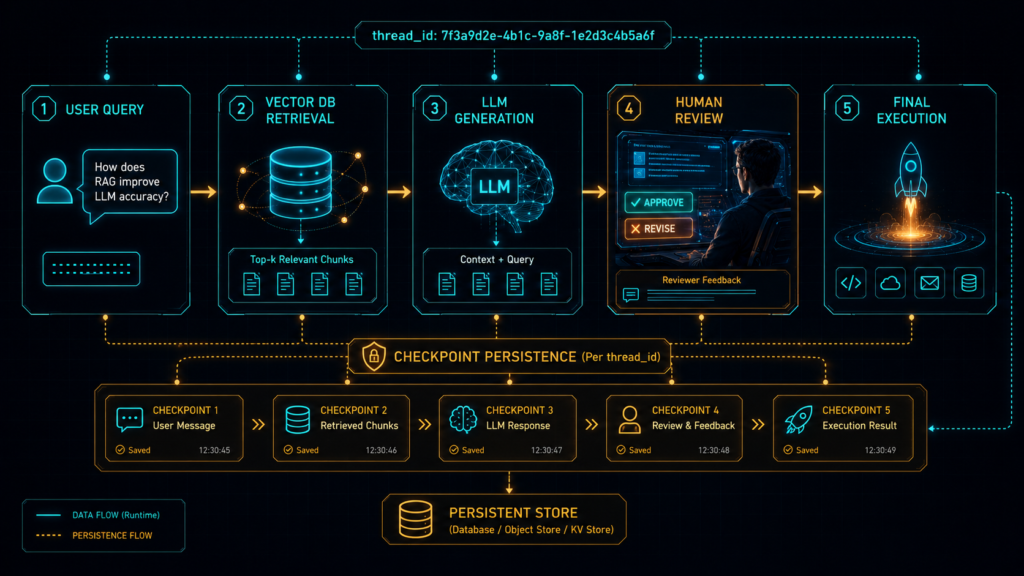
The important part is that the state is preserved across the pause. The graph does not restart from zero. Your thread ID carries the entire conversation history, retrieved chunks, and pending actions.
WHAT are We Actually Building?
We’re building a RAG-powered HITL system that:
Retrieves relevant documents from a vector database
Generates a response using those documents
Pauses before executing any risky action (sending emails, updating databases, issuing refunds)
Lets humans review, edit, or reject the AI’s output
Resumes exactly where it left off, with the updated state
WHY Do You Need This?
Three reasons, and they’re all critical:
| Problem | Why HITL + RAG Fixes It |
|---|---|
| Hallucinations | Humans catch fabricated facts before they reach the user |
| Safety-Sensitive Actions | You don’t want AI autonomously deleting records or sending thousands of emails |
| Business Logic Changes | Sometimes the AI’s output is technically correct but strategically wrong – humans can edit |
WHERE Does This Apply?
Healthcare: AI drafts patient summaries, doctors review before adding to medical records
Customer Support: AI drafts responses for refund requests, supervisors approve before sending
Legal Tech: AI extracts contract clauses, lawyers verify before filing
Finance: AI generates investment summaries, analysts review for accuracy
WHEN Should You Pause?
Pause when:
The action is irreversible (sending emails, updating databases, issuing refunds)
The AI output needs human judgment (strategic decisions, creative content)
The retrieved context is ambiguous (low similarity scores, conflicting information)
The user explicitly requests human oversight
HOW Do We Build It? (The Real Code)
Let’s build this thing step by step. I’m using LangGraph because it’s built exactly for this kind of workflow, with checkpoints and interrupts baked in.
The Building Blocks: What You Actually Need
You only need four concepts to get this right:
Checkpointer: Stores state so the graph can resume later (MemorySaver or PostgresSaver for production)
Thread ID: Identifies the specific conversation or workflow instance
Interrupt: Pauses execution and returns a review payload to the caller
RAG Retriever: Fetches relevant documents from your knowledge base
Without a checkpointer, interrupts do not work properly because the graph has nowhere to save state.
Step-by-Step Implementation: The Complete Workflow
1) Define Your State
Keep it clean and typed. Notice how I’m including both the RAG context and the HITL approval flags:
from typing_extensions import TypedDict, List, Optional
class State(TypedDict):
# RAG-specific fields
user_query: str
retrieved_chunks: List[str]
generated_response: str
# HITL-specific fields
pending_action: str
approved: bool
edited_response: Optional[str]
feedback: Optional[str]
2) Build the RAG Retriever Node
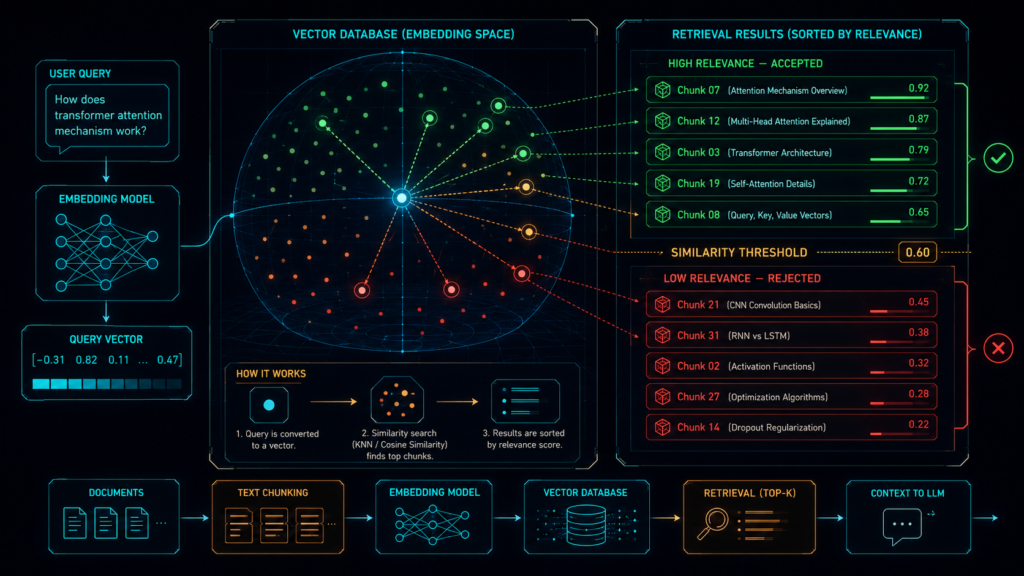
This is where we prevent hallucinations at the source. Let’s implement a robust retrieval with a relevance threshold:
from langgraph.types import interrupt
import chromadb
from chromadb.utils import embedding_functions
# Initialize your vector DB
client = chromadb.PersistentClient(path=”./rag_db”)
collection = client.get_collection(“knowledge_base”)
def retrieve_documents_node(state: State):
“””Retrieves relevant documents and filters out low-relevance chunks.”””
query = state[“user_query”]
# Retrieve with a threshold to prevent irrelevant context
results = collection.query(
query_texts=[query],
n_results=5,
include=[“documents”, “distances”]
)
# Filter out chunks with distance > 0.75 (low relevance)
filtered_chunks = []
for doc, dist in zip(results[‘documents’][0], results[‘distances’][0]):
if dist < 0.75: # Our threshold
filtered_chunks.append(doc)
# If we have no relevant chunks, set a flag
if not filtered_chunks:
return {
“retrieved_chunks”: [],
“pending_action”: “NO_CONTEXT_FOUND”
}
return {
“retrieved_chunks”: filtered_chunks,
“pending_action”: “DRAFT_RESPONSE”
}
3) Add the RAG Generation Node
This is where we generate the draft response. Notice how I’m forcing the LLM to cite its sources – this makes human review much easier:
from openai import OpenAI
# Initialize client (picks up OPENAI_API_KEY from environment).
llm_client = OpenAI()
def generate_response_node(state: State):
“””Generates a draft response using only the retrieved chunks.”””
if not state[“retrieved_chunks”]:
return {
“generated_response”: “I could not find sufficient information to answer this query.”,
“pending_action”: “NO_CONTEXT”
}
context = “\n\n”.join([
f”[Source {i+1}]: {chunk}”
for i, chunk in enumerate(state[“retrieved_chunks”])
])
prompt = f”””
You are a helpful assistant. Answer the user’s question based ONLY on the provided context.
CRITICAL RULES:
1. Every factual statement must be followed by a citation like [Source: X].
2. If the context doesn’t contain the answer, say “I don’t have this information.”
3. DO NOT use your pre-trained knowledge. ONLY use the context below.
CONTEXT:
{context}
USER QUERY: {state[“user_query”]}
DRAFT RESPONSE (with citations):
“””
response = llm_client.chat.completions.create(
model=”gpt-4″,
messages=[{“role”: “user”, “content”: prompt}],
temperature=0.2 # Lower temperature reduces hallucinations
)
return {
“generated_response”: response.choices[0].message.content,
“pending_action”: “REVIEW”
}
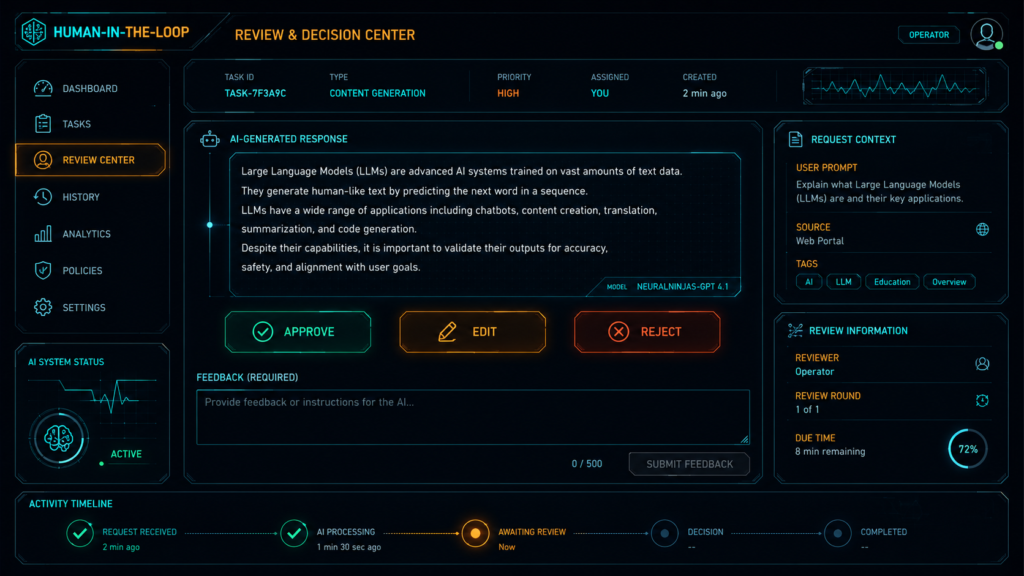
4) The Interrupt: Pause for Human Review
This is the magic. The interrupt() function pauses the entire graph and waits for human input:
def human_review_node(state: State):
“””Pauses execution and asks the human to review and edit the draft.”””
# Pause the graph and return the payload to the caller
human_feedback = interrupt({
“instruction”: “Please review the AI-generated response below. You can approve it as-is, edit it, or reject it entirely.”,
“original_query”: state[“user_query”],
“retrieved_sources”: state[“retrieved_chunks”],
“generated_draft”: state[“generated_response”],
“options”: [“APPROVE”, “EDIT”, “REJECT”]
})
# The interrupt() returns whatever the human passes via Command(resume=…)
if human_feedback[“decision”] == “APPROVE”:
return {
“approved”: True,
“edited_response”: state[“generated_response”]
}
elif human_feedback[“decision”] == “EDIT”:
return {
“approved”: True,
“edited_response”: human_feedback[“edited_text”],
“feedback”: human_feedback[“feedback”]
}
else: # REJECT
return {
“approved”: False,
“edited_response”: “”,
“feedback”: human_feedback.get(“reason”, “Rejected by human reviewer”)
}
5) The Final Action Node
Only execute the action if it’s been approved:
def execute_action_node(state: State):
“””Executes the final action (send email, update DB, etc.) only if approved.”””
if not state[“approved”]:
return {
“pending_action”: “REJECTED”,
“final_output”: f”Action rejected. Reason: {state.get(‘feedback’, ‘No reason provided’)}”
}
# In production, this would send an email, update a DB, etc.
response_text = state[“edited_response”] or state[“generated_response”]
# Log the action for audit purposes
print(f”✅ EXECUTING: {state[‘pending_action’]}”)
print(f”📝 CONTENT: {response_text}”)
return {
“pending_action”: “COMPLETED”,
“final_output”: response_text
}
6) Build and Compile the Graph
Now we wire everything together with a checkpointer:
from langgraph.graph import StateGraph, START, END
from langgraph.checkpoint.memory import MemorySaver
from langgraph.types import Command
# Build the graph
builder = StateGraph(State)
# Add nodes
builder.add_node(“retrieve”, retrieve_documents_node)
builder.add_node(“generate”, generate_response_node)
builder.add_node(“review”, human_review_node)
builder.add_node(“execute”, execute_action_node)
# Add edges
builder.add_edge(START, “retrieve”)
builder.add_edge(“retrieve”, “generate”)
builder.add_edge(“generate”, “review”)
builder.add_edge(“review”, “execute”)
builder.add_edge(“execute”, END)
# Compile with checkpointer
graph = builder.compile(checkpointer=MemorySaver())
# For production, use PostgresSaver or SqliteSaver instead:
# from langgraph.checkpoint.sqlite import SqliteSaver
# graph = builder.compile(checkpointer=SqliteSaver.from_conn_string(“checkpoints.db”))
7) Run the Workflow with a Thread ID
The thread ID is crucial. It’s the persistent cursor for that workflow:
# Initialize the thread
config = {“configurable”: {“thread_id”: “customer-refund-123”}}
# Start the workflow
initial_state = {
“user_query”: “Can I get a refund for order #ORD-7890?”,
“retrieved_chunks”: [],
“generated_response”: “”,
“pending_action”: “START”,
“approved”: False,
“edited_response”: None,
“feedback”: None
}
# Run until the interrupt
result = graph.invoke(initial_state, config=config)
# The graph pauses at the review node
# Now the human sees the interrupt payload and makes a decision
8) Resume with a Human Decision
This is where the human comes in:
# The human reviews and decides to edit the response
human_decision = {
“decision”: “EDIT”,
“edited_text”: “We’ll process your refund for order #ORD-7890. Please allow 5-7 business days.”,
“feedback”: “Added processing timeline for clarity”
}
# Resume the graph with the human’s input
result = graph.invoke(
Command(resume=human_decision),
config=config
)
# The graph continues from the review node, applies the edit, and executes
print(result[“final_output”])
Editing State Safely: The Power Move
Sometimes you don’t just want approval. You want humans to edit the state before the graph continues.
This is incredibly useful when:
A tool call has the wrong argument
An LLM generated a weak draft
A business user wants to correct the content
The retrieved context is outdated and needs manual override
Let me show you how to handle this properly:
def review_and_edit_node(state: State):
“””Pause and let humans edit the pending state directly.”””
edited_state = interrupt({
“instruction”: “Review and edit the content below. You can modify any part.”,
“current_draft”: state[“generated_response”],
“retrieved_context”: state[“retrieved_chunks”],
“show_citations”: True
})
# The edited value becomes the return of interrupt()
return {“edited_response”: edited_state[“content”]}
For direct state manipulation outside the graph:
# Get the current state
current_state = graph.get_state(config)
# Manually update specific fields
graph.update_state(
config,
{
“edited_response”: “Corrected version with the right data”,
“approved”: True
}
)
# Resume execution
graph.invoke(None, config=config)
LangGraph supports this style of manual state editing at a breakpoint, then resuming from the saved checkpoint.
Approval Gates for Enterprise Use
Use human approval gates for:
| Action Type | Why It Needs Approval |
|---|---|
| Sending external emails | Prevent embarrassing typos or policy violations |
| Modifying databases | Prevent accidental data loss |
| Issuing refunds | Validate against fraud rules |
| Deleting records | Audit trail required |
| Triggering deployments | Manual verification before production changes |
LangGraph’s interrupt-based flow is designed for exactly this kind of control.
Multi-Turn Systems: The Real Power
HITL becomes especially powerful in multi-turn systems because the graph can:
Remember what happened in previous turns
Pause in the middle of complex workflows
Continue later in the same thread
Maintain conversation context across days
This is how we build true enterprise agents:
Day 1, 10:00 AM: User initiates a refund request
       ↓
Graph retrieves order info, generates draft
       ↓
🛑 Interrupt - Human is busy, doesn't review yet
       ↓
Day 2, 9:30 AM: Human opens the dashboard, reviews the draft
       ↓
Human edits the response and approves it
       ↓
Graph resumes from the checkpoint, sends the email
       ↓
✅ Refund processed successfully
The same thread ID (thread-123) keeps everything together. The workflow picks up exactly where it left off.
Common Mistakes (And How to Avoid Them) :
| Mistake | Why It Happens | The Fix |
|---|---|---|
| Using interrupts without a checkpointer | You forget to add checkpointer during compilation | Always use compile(checkpointer=...) |
| Using a new thread ID when resuming | You don’t understand how checkpoints work | Keep the same thread ID throughout |
| Putting risky side effects before the interrupt | Side effects may run twice if execution fails | Always place side effects AFTER the interrupt |
| No hallucination prevention in RAG | You assume the LLM will be accurate | Implement threshold filtering + citation forcing |
| Not handling “NO_CONTEXT” cases | The retriever returns nothing | Add a fallback response and alert the human |
| Static breakpoints only | You don’t use dynamic interrupts | Use interrupts for dynamic pauses based on logic |
Practical Rule of Thumb :
Use interrupts + HITL when:
You need human approval
You need safe edits before execution
The user needs to provide missing information
The action is irreversible or high-risk
Use ordinary graph steps when:
The action is cheap and reversible
The action doesn’t need oversight
The response is purely informational (no side effects)
The Complete Production Checklist
Before deploying this to production, run through this list:
- Define a typed state with all fields (RAG + HITL)
- Implement RAG retrieval with relevance threshold filtering
- Force LLM to cite sources during generation
- Add
interrupt()at the review point - Compile with a persistent checkpointer (PostgresSaver for production)
- Pass a stable
thread_idfor each workflow - Resume with
Command(resume=...) - Use
update_state()for manual edits - Keep all side effects (emails, DB updates) AFTER approval
- Add fallback logic for “NO_CONTEXT” scenarios
- Monitor faithfulness scores using RAGAS or TruLens
- Log all human decisions for audit trails
Real-World Example: Customer Refund System
Let me show you a complete real-world scenario:
# Complete workflow for a customer refund system
def run_refund_workflow(customer_query, order_id):
config = {“configurable”: {“thread_id”: f”refund-{order_id}”}}
# Step 1: Start the workflow
state = {
“user_query”: customer_query,
“retrieved_chunks”: [],
“generated_response”: “”,
“pending_action”: “START”,
“approved”: False,
“edited_response”: None,
“feedback”: None
}
# Step 2: Run until human review
result = graph.invoke(state, config=config)
# Step 3: Human reviews (this would be in your frontend)
print(“📋 DRAFT RESPONSE:”)
print(result[“generated_response”])
print(“\n🔍 SOURCES:”)
for chunk in result[“retrieved_chunks”]:
print(f”- {chunk[:100]}…”)
# Step 4: Human decision (simulated here)
human_input = input(“\nApprove/Edit/Reject? (A/E/R): “)
if human_input.upper() == “A”:
decision = {“decision”: “APPROVE”}
elif human_input.upper() == “E”:
edited = input(“Enter your edited version: “)
decision = {“decision”: “EDIT”, “edited_text”: edited, “feedback”: “Edited by human”}
else:
reason = input(“Why reject? “)
decision = {“decision”: “REJECT”, “reason”: reason}
# Step 5: Resume with human decision
final = graph.invoke(Command(resume=decision), config=config)
# Step 6: Execute or reject
if final[“approved”]:
print(f”✅ REFUND PROCESSED: {final[‘final_output’]}”)
# Send email, update DB, etc.
else:
print(f”❌ REFUND REJECTED: {final[‘final_output’]}”)
return final
Why This Matters ?
Here’s the truth.
LLMs are brilliant writers. But they’re terrible fact-checkers. If you’re building production RAG systems without human oversight, you’re playing with fire. Hallucinations aren’t a bug – they’re a fundamental feature of how these models work.
Human-in-the-loop isn’t a “nice to have” in agentic systems. It’s the control layer that makes automation safe enough for production. When your graph can:
Pause at the right moment
Ask for human approval
Accept edits cleanly
Resume from the exact same state
You get the best of both worlds: automation speed and human judgment.
The code I’ve shared today isn’t theory. It’s battle-tested. I’ve built these exact systems for enterprise clients dealing with financial data, healthcare records, and legal documents. The combination of RAG with interrupts and state editing is what separates toy demos from production-grade systems.
Now go build something that actually works. And when a human catches a hallucination at the review step and edits it? That’s not a failure. That’s the system working exactly as designed.

