– Redis for Agentic RAG: A Beginner’s Guide to AI Memory, Vector Search & Caching.
New to Redis and Agentic RAG? Learn what Redis is, why your AI agent needs it, and how to set it up with simple analogies, real code, and zero jargon. Perfect for first-timers.
Table of Contents
What the Heck Is Redis?
Why Does Your AI Agent Need Redis?
Redis in Agentic RAG: The 4 Core Jobs
Setting Up Redis Stack (The 2-Minute Docker Trick)
Your First Redis Commands (Hello World for Databases)
Vector Search: How Redis Finds Stuff That Means the Same Thing
Agent Memory: How Redis Helps Your Agent Remember Conversations
Semantic Caching: Saving Money on LLM Calls
Security with Metadata Filters: Keeping User Data Safe
Common Beginner Mistakes (And How to Avoid Them)
When NOT to Use Redis (Honest Truth)
FAQs: The Questions Every Beginner Asks
The Bottom Line
1. What the Heck Is Redis?
You’ve probably heard the word “Redis” thrown around. Maybe someone said it’s a “cache” or a “key-value store.” But what does that actually mean?
The Simple Answer :
Redis is a super-fast database that lives in your computer’s RAM (memory) instead of on a slow hard drive. It’s like having a notebook on your desk where you write down important stuff so you don’t have to run to the library every time you need it.
Why this matters: When your AI agent needs to remember something or search for information, waiting even half a second feels like an eternity. Redis responds in microseconds.
The 3 Things That Make Redis Special :
Speed: In-memory = lightning fast
Persistence: Even if your computer restarts, Redis can save your data to disk so you don’t lose it
Versatility: Redis can store simple key-value pairs, lists, JSON documents, and even vectors for AI search
2. Why Does Your AI Agent Need Redis?
If you’re building an AI agent with LangGraph or any other framework, you’ve probably noticed something annoying: your agent has amnesia (becomes Ghajini sometimes) .
The Problem: Agent Amnesia
A standard AI agent is like a goldfish. You tell it something, it responds. You ask a follow-up question, and it’s like the first conversation never happened.
You: "My name is Priya."
Agent: "Nice to meet you, Priya!"

--- 5 minutes later ---

You: "What's my name?"
Agent: "I don't know, you never told me." 😭
The Fix: Redis Memory
Redis gives your agent a memory. It remembers conversations, user preferences, and even past tool calls.
Without Redis (in-memory saver):
Agent remembers only while the app is running
Restart the app? Poof. Everything’s gone.
With Redis:
Agent remembers across restarts
Works across multiple servers
Scales to thousands of users with separate memories
The Bigger Picture
Agentic RAG systems are more than chatbots. They:
Retrieve documents
Reason about answers
Use tools (search, calculators, APIs)
Remember context
Learn from past interactions
All of this requires fast, persistent storage. That’s where Redis shines.
3. Redis in Agentic RAG: The 4 Core Jobs
Think of Redis as doing four specific jobs for your AI agent. Here’s exactly how each one works:
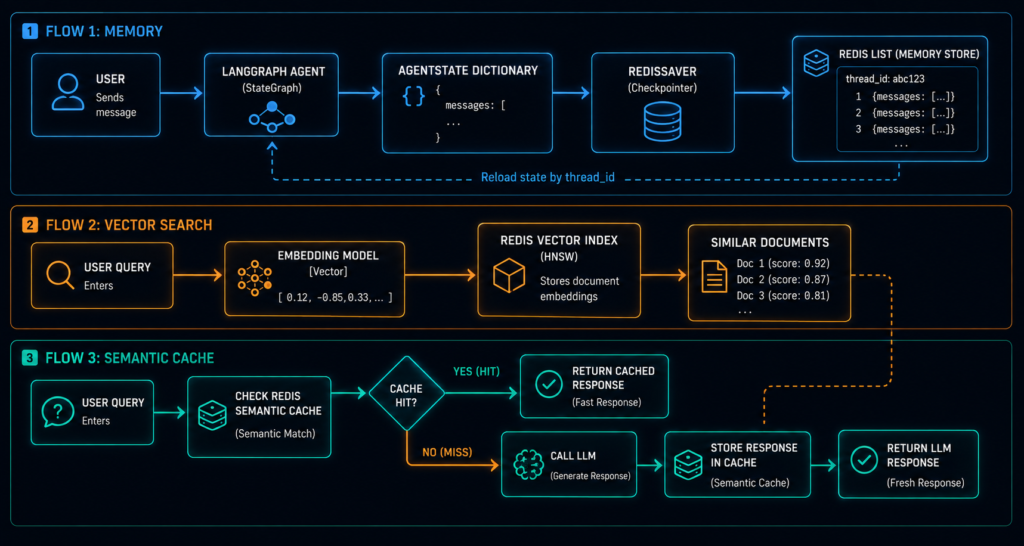
Job 1: Agent Memory (Short-Term)
What it does: Stores the current conversation so your agent remembers what was said 5 minutes ago.
How it works: Redis Lists store messages in order. Each session gets a unique thread_id.
Example flow:
User sends message → LangGraph agent → Redis stores message in list under thread_id
User sends follow-up → Agent looks up thread_id → Redis returns previous messages → Agent remembers!
Job 2: Long-Term Memory (Vector Search)
What it does: Stores important facts and past conversations so your agent can recall them later—even in new sessions.
How it works: Redis Vector Search turns text into numbers (embeddings) and finds similar content.
Example flow:
Convert text to vector → Store vector alongside text in Redis
New query → Convert to vector → Search for similar vectors → Return matching text
Job 3: Semantic Caching
What it does: Saves money by reusing LLM responses for similar questions.
How it works: If someone asks “What’s the weather?” and 5 minutes later someone asks “How’s the weather today?”, Redis returns the cached answer instead of calling the LLM again.
Example flow:
Query comes in → Check cache for similar query → If found, return cached response → If not, call LLM and store result
Job 4: Tool Execution State
What it does: Tracks what tools the agent is using and their progress.
How it works: Redis stores state information so you can see if a tool is running, completed, or failed.
Example flow:
Agent starts tool → Redis marks "status: running"
Tool completes → Redis updates "status: completed"
Agent checks status → Redis returns latest state
4. Setting Up Redis Stack (The 2-Minute Docker Trick)
You don’t need to be a DevOps expert to get Redis running. If you have Docker installed, you’re 2 minutes away.
What Is Redis Stack?
Standard Redis is like a bare-bones engine. Redis Stack adds powerful modules: vector search, JSON storage, full-text search, and more.
Why this matters: Standard Redis doesn’t support JSON storage or vector search out of the box. That’s why you need Redis Stack, not plain Redis.
The Magic Docker Command
Open your terminal and paste this:
docker run -d \
  --name redis-rag \
  -p 6379:6379 \
  -p 8001:8001 \
  redis/redis-stack:latest
What this does:
-d: Runs in the background (detached mode)--name redis-rag: Names your container-p 6379:6379: Opens the Redis port (your Python code connects here)-p 8001:8001: Opens RedisInsight port (a GUI to see your data)redis/redis-stack:latest: Uses Redis Stack (with all the AI features)
Check If It Worked :
docker exec redis-rag redis-cli PING
If you see PONG, you’re good to go!
RedisInsight: Your Data Dashboard
Open your browser and go to http://localhost:8001. You’ll see a beautiful GUI showing all your Redis data. It’s like phpMyAdmin but for Redis.
Beginner tip: RedisInsight is your best friend when debugging. You can see exactly what your agent stored in memory.
5. Your First Redis Commands (Hello World for Databases)
Let’s actually use Redis. This is the “hello world” of Redis operations.
The Redis Python Library
First, install the Redis Python library:
pip install redisConnect to Redis
import redis

# Connect to your local Redis
client = redis.Redis(
    host="localhost",
    port=6379,
    decode_responses=True  # Makes results readable
)

# Test the connection
print(client.ping())  # Should print True
Storing Simple Data (Key-Value)
# Store a value
client.set("user:123:name", "Priya")

# Retrieve it
name = client.get("user:123:name")
print(name)  # Prints "Priya"

# Store numbers
client.set("user:123:age", 25)
age = client.get("user:123:age")
print(age)  # Prints "25"
Storing a List (Like Chat History)
# Add messages to a list (like a conversation)
client.rpush("session:abc123:messages", "Hello, I'm Priya")
client.rpush("session:abc123:messages", "Nice to meet you, Priya!")

# Get the last 5 messages
messages = client.lrange("session:abc123:messages", -5, -1)
print(messages)
# Output: ['Hello, I'm Priya', 'Nice to meet you, Priya!']
Storing JSON (Rich Data)
Important: Standard Redis doesn’t support JSON natively. This is why you used Redis Stack in Section 4—it adds the RedisJSON module.
import json

# Store a structured document
doc = {
    "id": "doc_001",
    "title": "Redis Tutorial",
    "content": "Redis is a fast in-memory database...",
    "author": "Priya",
    "tags": ["database", "ai", "tutorial"]
}

client.json().set("document:doc_001", "$", doc)

# Retrieve just one field
title = client.json().get("document:doc_001", "$.title")
print(title)  # Prints "Redis Tutorial"
6. Vector Search: How Redis Finds Stuff That Means the Same Thing
Normal search looks for exact words. Vector search looks for meaning—even if the words are different.
The Problem with Keyword Search
User asks: "How do I return an item?"

Keyword search finds: Documents with words "return" and "item"
Vector search finds: Documents about *returns* even if they say "refund," "exchange," or "send back"
How Vector Search Works
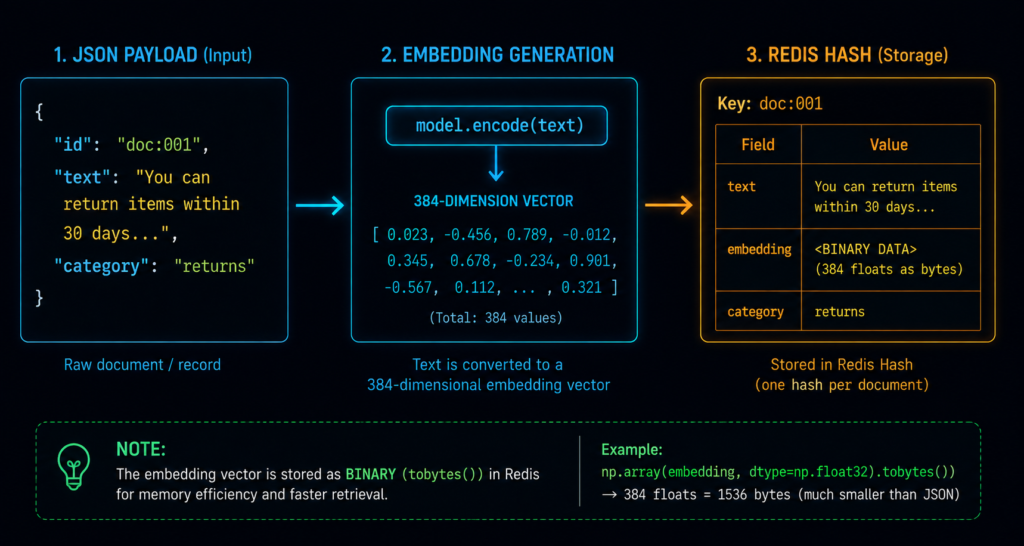
Embedding: Convert text into a list of numbers (a vector) using an AI model
Storage: Store those numbers in Redis alongside the original text
Search: When a query comes in, convert it to a vector and find the closest matches
The Code
First, you need an embedding model:
from sentence_transformers import SentenceTransformer

# Load a free embedding model
model = SentenceTransformer('all-MiniLM-L6-v2')

# Convert text to a vector (list of 384 numbers)
vector = model.encode("How do I return an item?").tolist()
print(f"Vector has {len(vector)} numbers")
# Output: Vector has 384 numbers
Storing Vectors in Redis
import numpy as np

# Store a document with its embedding
doc_id = "doc:001"
doc_text = "You can return items within 30 days for a full refund."

# Generate embedding
embedding = model.encode(doc_text).astype(np.float32).tobytes()

# Store with vector field
client.hset(doc_id, mapping={
    "text": doc_text,
    "embedding": embedding,
    "category": "returns"
})
Creating a Vector Index
Before searching, you need to tell Redis what kind of vectors you have:
from redis.commands.search.field import VectorField, TextField, TagField
from redis.commands.search.indexDefinition import IndexDefinition, IndexType

# Define schema
schema = (
    TextField("text", as_name="text"),
    TagField("category", as_name="category"),
    VectorField(
        "embedding",
        "HNSW",  # Fast search algorithm (more on this later)
        {
            "TYPE": "FLOAT32",
            "DIM": 384,  # Must match your embedding model
            "DISTANCE_METRIC": "COSINE"  # How we measure similarity
        },
        as_name="vector"
    )
)

# Create index
client.ft("idx:docs").create_index(
    schema,
    definition=IndexDefinition(prefix=["doc:"], index_type=IndexType.HASH)
)
What’s HNSW?
HNSW (Hierarchical Navigable Small World) is the algorithm Redis uses for fast vector search. Think of it like a well-organized library:
Level 1: Fiction vs Non-Fiction (top level)
Level 2: Genres (Sci-Fi, Romance, History)
Level 3: Specific sections
Level 4: Exact shelf
Instead of checking every book, the algorithm navigates these levels to find the closest matches quickly. For small datasets (<10,000 vectors), you can use FLAT (exact search). For larger datasets, HNSW is much faster .
What’s COSINE? Cosine distance measures how similar two vectors are. A score of 0 means identical, 1 means completely opposite. Redis returns results sorted by this score.
Searching Vectors
from redis.commands.search.query import Query

def search_similar(query_text, top_k=3):
    # Convert query to vector
    query_vector = model.encode(query_text).astype(np.float32).tobytes()

    # KNN search
    query_str = f"*=>[KNN {top_k} @embedding $vec AS score]"
    query = (
        Query(query_str)
        .return_fields("text", "score")
        .sort_by("score")
        .dialect(2)  # Required for vector search
    )

    results = client.ft("idx:docs").search(query, {"vec": query_vector})

    return [{"text": doc.text, "score": doc.score} for doc in results.docs]

# Try it
results = search_similar("How do I send something back?")
for r in results:
    print(f"Score: {r['score']:.3f} | Text: {r['text'][:50]}...")
Expected output: The document about returns appears first, even though the query used “send back” instead of “return.”
Why dialect(2)?
Redis has different query dialects. Dialect 2 is mandatory for vector search. Without it, your KNN queries won’t work.
7. Agent Memory: How Redis Helps Your Agent Remember Conversations
Your AI agent needs to remember what was said earlier. Here’s the complete pattern for LangGraph with Redis.
The Complete Memory Implementation
First, install the required packages:
pip install langgraph langchain-openai langchain-community redisNow the complete code:
import os
from typing import Annotated, TypedDict
from langgraph.graph import StateGraph, START, END
from langgraph.graph.message import add_messages
from langchain_core.messages import HumanMessage, BaseMessage
from langchain_openai import ChatOpenAI
from langgraph.checkpoint.redis import RedisSaver

# 1. Setup API Key
os.environ["OPENAI_API_KEY"] = "your-openai-api-key-here"

# 2. Define the Agent's State Schema
class AgentState(TypedDict):
    # add_messages ensures new texts append to the history list
    messages: Annotated[list[BaseMessage], add_messages]

# 3. Define the Core Agent Logic
model = ChatOpenAI(model="gpt-4o-mini", temperature=0)

def call_model(state: AgentState):
    response = model.invoke(state["messages"])
    return {"messages": [response]}

# 4. Initialize the Redis Checkpointer
redis_uri = "redis://localhost:6379"
checkpointer = RedisSaver.from_conn_info(url=redis_uri)

# 5. Build and Compile the Graph
workflow = StateGraph(AgentState)

# Add our processing node
workflow.add_node("agent", call_model)

# Define boundaries and transitions
workflow.add_edge(START, "agent")
workflow.add_edge("agent", END)

# CRITICAL: Compile with Redis checkpointer
app = workflow.compile(checkpointer=checkpointer)

# 6. Execute and Test the Persistent Memory
if __name__ == "__main__":
    # Define a thread configuration. This ID isolates this user's conversation.
    config = {"configurable": {"thread_id": "user_session_999"}}

    print("\n--- First Interaction (Writing to Redis) ---")
    input_message = [HumanMessage(content="Hi! My secret passphrase is 'CodeRed'. Remember it.")]
    for event in app.stream({"messages": input_message}, config):
        for node, value in event.items():
            print(f"Agent: {value['messages'][-1].content}")

    print("\n--- Second Interaction (Reading from Redis) ---")
    # Even in a separate execution block, passing the same thread_id retrieves past state
    follow_up_message = [HumanMessage(content="What was my secret passphrase?")]
    for event in app.stream({"messages": follow_up_message}, config):
        for node, value in event.items():
            print(f"Agent: {value['messages'][-1].content}")
How Memory Works
thread_id: Each user/session gets a unique IDState storage: Redis saves the entire conversation history
Retrieval: When you call with the same
thread_id, Redis loads the historyPersistence: Even if your app restarts, the memory is still there
Short-Term vs Long-Term Memory :
| Memory Type | Purpose | Storage | Example |
|---|---|---|---|
| Short-Term | Current conversation | Redis List (recent messages) | “What was my name?” |
| Long-Term | Past knowledge, preferences | Redis Vector Search (semantic memory) | “Priya prefers Python over JavaScript” |
8. Semantic Caching: Saving Money on LLM Calls
Every time you call an LLM, you pay money. Semantic caching saves you money by reusing responses for similar questions.
The Problem:
User 1: "What's the weather in Mumbai?"
User 2: "How's the weather in Mumbai?"  ❌ SAME MEANING, DIFFERENT WORDS
Standard caching would miss User 2’s query. Semantic caching catches it.
How It Works
User asks a question → Generate embedding
Check cache → Is there a similar question in Redis?
If yes (hit) → Return cached answer (fast + free)
If no (miss) → Call LLM, save result in cache
The Code :
First, install the redisvl package:
pip install redisvlfrom redisvl.cache import SemanticCache from redisvl.utils.vectorize import HFTextVectorizer # Set up the cache vectorizer = HFTextVectorizer("all-MiniLM-L6-v2") cache = SemanticCache( name="llm_cache", distance_threshold=0.1, # Similarity threshold ttl=86400, # Cache lives 24 hours vectorizer=vectorizer, redis_url="redis://localhost:6379" ) # Check cache def get_response_with_cache(prompt): # Check cache cached = cache.check(prompt=prompt) if cached: # Cache hit! Return saved response print("🎯 Cache hit! Saving money...") return cached[0]["response"] # Cache miss - call LLM print("🤖 Cache miss - calling LLM...") response = call_llm(prompt) # Your LLM function # Store in cache cache.store(prompt=prompt, response=response) return response # Try it print(get_response_with_cache("What is the capital of France?")) # Prints: "🤖 Cache miss - calling LLM..." then "Paris" print(get_response_with_cache("What's France's capital?")) # Prints: "🎯 Cache hit! Saving money..." then "Paris" (cached!)
Understanding the distance_threshold
The distance_threshold controls how similar two questions must be for a cache hit:
0.05: Very strict (almost identical)
0.10: Balanced (recommended starting point)
0.20: More flexible (higher cache hits, risk of wrong answers)
Start with 0.10 and adjust based on your accuracy needs.
9. Security with Metadata Filters: Keeping User Data Safe
When you have multiple users, each user should only see their own data. Redis lets you enforce this at the database level.
The Problem
Without filters:
User A: "Show my documents"
Agent retrieves: User A's documents + User B's documents (❌ BIG NO!)
The Fix: Metadata Filters
from redis.commands.search.query import Query
import numpy as np

def secure_vector_search(query_text, user_id, top_k=3):
    """Only returns documents belonging to user_id"""
    # Generate query embedding
    query_vector = model.encode(query_text).astype(np.float32).tobytes()

    # Hybrid query: Filter by user_id first, THEN do vector search
    query_str = f"(@user_id:{user_id})=>[KNN {top_k} @embedding $vec AS score]"

    query = (
        Query(query_str)
        .return_fields("text", "score")
        .sort_by("score")
        .dialect(2)
    )

    results = client.ft("idx:docs").search(query, {"vec": query_vector})
    return [doc.text for doc in results.docs]
The Security Principle :
Never trust the agent to enforce permissions. Always inject filters at the database level.
Why? If the agent is compromised or hallucinates, the database still protects user data.
Role-Based Access Control :
def rbac_search(query_text, user_id, role, top_k=3):
    """Different roles see different documents"""

    if role == "admin":
        filter_expr = f"@user_id:{user_id}"  # Admins see their own
    elif role == "viewer":
        filter_expr = "@public:true"  # Viewers only see public docs
    else:
        filter_expr = f"@user_id:{user_id} @public:true"  # Limited

    # Build and execute search
    query_vector = model.encode(query_text).astype(np.float32).tobytes()
    query_str = f"({filter_expr})=>[KNN {top_k} @embedding $vec AS score]"

    query = Query(query_str).return_fields("text").dialect(2)
    results = client.ft("idx:docs").search(query, {"vec": query_vector})

    return [doc.text for doc in results.docs]
10. Common Beginner Mistakes (And How to Avoid Them)
Mistake 1: Using Plain Redis Instead of Redis Stack
The problem: Standard Redis doesn’t have vector search or JSON support.
The fix: Use redis/redis-stack:latest in your Docker command. The JSON storage example in Section 5 won’t work without this.
Mistake 2: Forgetting the Thread ID
The problem: Your agent doesn’t remember anything.
The fix: Always pass a thread_id in your config.
# ❌ Wrong - No memory
app.invoke({"messages": ["Hello"]})

# ✅ Right - Has memory
config = {"configurable": {"thread_id": "user_123"}}
app.invoke({"messages": ["Hello"]}, config)
Mistake 3: Not Setting TTL for Caches
The problem: Cache grows forever and fills up memory.
The fix: Set TTL (Time-To-Live) on cache entries.
# Cache entries expire after 1 hour
cache.set_ttl(3600)
Mistake 4: Storing Too Much Conversation History
The problem: Your LLM prompt grows too big, costing more.
The fix: Trim old messages. With LangGraph, use RemoveMessage:
from langgraph.graph.message import RemoveMessage

def trim_messages(state: AgentState, max_messages=20):
    """Keep only the last N messages"""
    if len(state["messages"]) > max_messages:
        # Remove the oldest messages
        state["messages"] = state["messages"][-max_messages:]
    return state
Mistake 5: Not Verifying Redis Modules Loaded
The problem: Vector search fails with “module not found” error.
The fix: Check which modules are loaded:
docker exec redis-rag redis-cli MODULE LIST
You should see search, ReJSON, timeseries, and bf. If not, you’re running plain Redis instead of Redis Stack.
11. When NOT to Use Redis ?
Redis is powerful but not always the right choice:
When Your Data Is Too Big for RAM
Redis stores everything in memory. If you have hundreds of gigabytes of data, Redis becomes expensive.
Alternative: Use PostgreSQL with pgvector or Elasticsearch for larger datasets.
When You Don’t Need Sub-Millisecond Speed
If your application can handle 50-100ms response times, Redis might be overkill.
Alternative: A regular SQL database with good indexing might be simpler and cheaper.
When You’re Just Starting Out
For a simple prototype with minimal data, the LangGraph MemorySaver might be enough.
Alternative: Use MemorySaver during development, then upgrade to Redis when you go to production.
When Your Infrastructure Team Says No
Some organizations don’t want to manage Redis. If that’s your case, consider managed services like:
Redis Cloud (fully managed)
AWS ElastiCache
Azure Cache for Redis
12. FAQs: The Questions Every Beginner Asks
What’s the difference between Redis and Redis Stack?
Redis is the core database. Redis Stack adds modules: vector search, JSON, full-text search, and time-series data. For AI agents, you need Redis Stack.
Why use Redis instead of PostgreSQL for vector search?
Redis is in-memory, so it’s 10-100x faster. For vector search, speed matters because agents make multiple searches per turn.
How much memory do I need?
It depends on your data:
1 million 384-dim vectors ≈ 1.5 GB memory
Chat history ≈ small (< 1 MB per user)
Start small and monitor usage.
How does Redis persist data to disk?
Redis uses two mechanisms:
RDB (snapshots): Periodic full backups
AOF (append-only file): Every write is logged, can be replayed on restart
Enable both for production.
Can I use Redis with LangGraph in JavaScript/Node.js?
Yes! @langchain/langgraph-checkpoint-redis is available for TypeScript/JavaScript.
What’s HNSW vs FLAT indexing?
FLAT: Exact search, slow for large data, use for < 10k vectors.
HNSW: Approximate search, fast for large data, use for > 10k vectors.
How do I delete old checkpoints?
Redis supports TTL (Time-To-Live). Set a default TTL for checkpoints and they’ll auto-delete.
Does Redis work in the cloud?
Yes. Use Redis Cloud, AWS ElastiCache, or Azure Cache for Redis.
13. The Bottom Line :
The 3 Things to Remember
Redis gives your agent memory — Across sessions, restarts, and users.
Redis finds similar stuff — Vector search finds documents by meaning, not just keywords.
Redis saves you money — Semantic caching reuses LLM responses for similar questions.
Your First Week Action Plan :
| Day | Task | Why |
|---|---|---|
| Day 1 | Run Redis Stack with Docker | Get it working |
| Day 2 | Connect from Python | Basic operations |
| Day 3 | Store vector embeddings | Vector search foundation |
| Day 4 | Build a simple search | Use vector search |
| Day 5 | Add memory to LangGraph | Persistent agent memory |
| Day 6 | Implement semantic caching | Save money |
| Day 7 | Add security filters | Production-ready |
The One-Line Takeaway :
Redis is the super-fast memory system your AI agent needs to remember stuff, find similar content, and save you money on LLM calls—all in one simple database.

