Phase 1: The Foundation — Understanding PII and Why It Matters
What Exactly is PII?
- Full name (Sarah Johnson, José García)
- Email address (sarah.j@gmail.com)
- Phone number (555-123-4567, +34 612 345 678)
- Government IDs (SSN: 123-45-6789, Aadhaar, Passport numbers)
- Financial accounts (IBAN: ES91 2100 0418 4502 0005 1337, Credit card numbers)
- IP addresses and device IDs
- Medical record numbers (MRN)
- Employee IDs
- Location data (home addresses, GPS coordinates)
- Unique combinations like “The only female VP of Engineering in the Boston office born in March 1985”
Why Does PII Matter in RAG?
- HR records with employee SSNs and salaries
- Customer support tickets with email addresses and phone numbers
- Medical logs with patient diagnoses and insurance IDs
- Financial statements with account numbers and transaction histories
When, Why, and How PII is Used in RAG ?
- Ingestion: When raw documents are chunked and embedded
- Retrieval: When relevant chunks containing PII are pulled from the vector DB
- Generation: When retrieved chunks are stuffed into the LLM’s context window
- Tool Execution: When PII is passed as arguments to custom agent tools (e.g., “send_email”)
How Does it Leak?
- Cross-Tenant Retrieval: User from Company A retrieves chunks from Company B
- Prompt Injection: Malicious prompts force the LLM to output raw context
- State Checkpointing: LangGraph saves PII in plain text to disk
- Observability Logs: Full prompts sent to Datadog/Splunk
Phase 2: The Engineering Blueprint — Building the Sanitization Pipeline
The golden rule of PII protection in RAG is simple: Sanitize BEFORE embedding, and filter BEFORE retrieval.
To achieve this, we need a hybrid pipeline. Relying solely on an LLM to detect PII is a bad idea (they are non-deterministic and expensive). Relying solely on Regex misses contextual PII. The industry standard is a Hybrid Detection Pipeline.
Let’s walk through a reference architecture we built, called PII Shield, which uses LangGraph, Microsoft Presidio, and free LLMs.
Screenshot 1: Multi-lingual PII Detection in Action
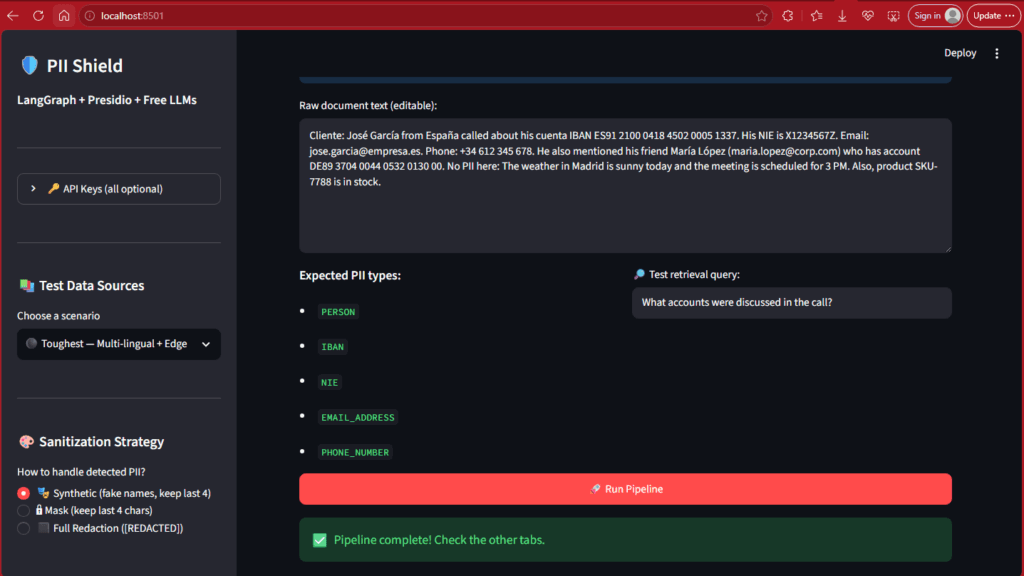
- Mixed Spanish and English text
- International bank accounts (IBAN)
- Spanish national IDs (NIE)
- Complex email addresses and phone numbers
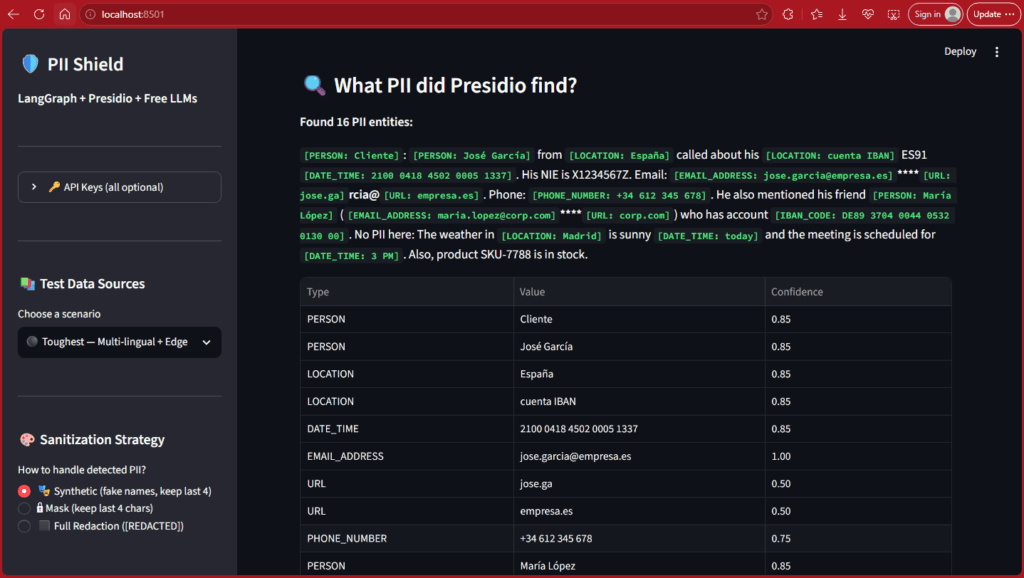
[PERSON: José García]– Spanish name detected[LOCATION: España]– Country identified[EMAIL_ADDRESS: jose.garcia@empresa.es]– Email caught[PHONE_NUMBER: +34 612 345 678]– International phone recognized[IBAN_CODE: DE89 3704 0044 0532 0130 00]– Bank account detected
- Type: The category of PII (PERSON, LOCATION, EMAIL_ADDRESS, etc.)
- Value: The actual detected text
- Confidence: How certain the model is (0.85 = 85% confidence, 1.00 = 100% confidence)
- ✅ Multi-lingual Support: The system seamlessly handles Spanish and English
- ✅ Complex Formats: International phone numbers, IBANs, and national IDs are caught
- ⚠️ False Positives: “Cliente” (customer) is detected as PERSON, and “cuenta IBAN” as LOCATION — this is acceptable over-detection
- ✅ No Missed PII: The critical data (names, emails, accounts) is all caught
Engineering Note: We’re using Microsoft Presidio — a deterministic, self-hosted engine. Not an LLM. Why? Because LLMs are non-deterministic (they might miss PII one day and catch it the next). For compliance, you need 100% predictable behavior.
Screenshot 2: Synthetic Substitution — Preserving Context While Removing Risk
Now here’s where it gets interesting. We could just delete all the PII, right?
Wrong.
If you replace José García with [REDACTED], your LLM loses the ability to reason about the conversation. The sentence structure breaks. Context is destroyed. Instead, PII Shield uses synthetic substitution.
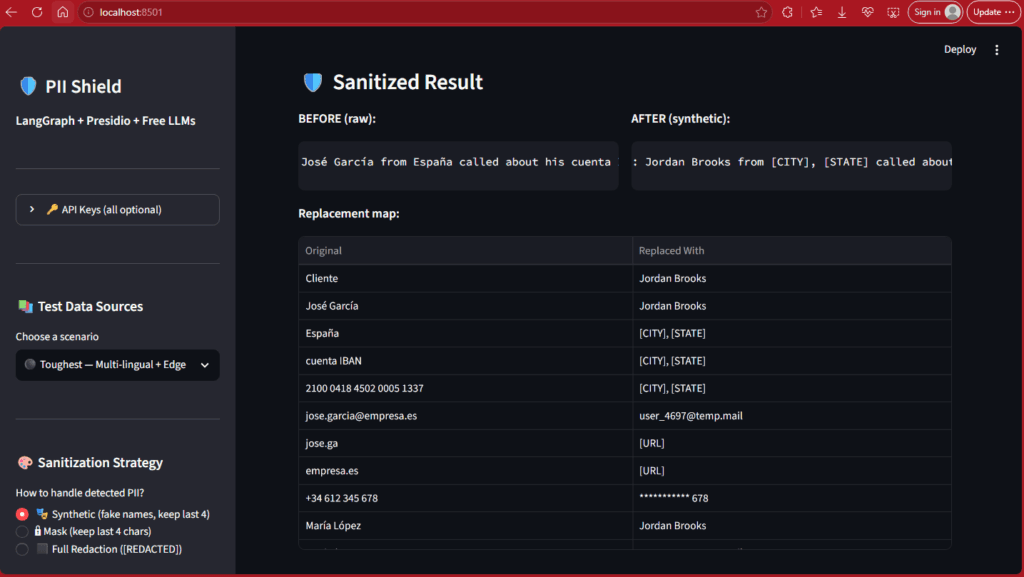
“José García from España called about his cuenta IBAN ES91 2100 0418 4502 0005 1337…”
“Jordan Brooks from [CITY], [STATE] called about his [CITY], [STATE] ES91 [DATE]…”
Cliente→Jordan BrooksJosé García→Jordan Brooks(same fake name for consistency)España→[CITY], [STATE]cuenta IBAN→[CITY], [STATE]jose.garcia@empresa.es→user_4697@temp.mail+34 612 345 678→*********** 678María López→Jordan Brooks
Why This Approach Works ?
✅ Grammar Preserved: “Jordan Brooks from [CITY], [STATE] called about…” still makes grammatical sense.
✅ LLM Reasoning Intact: The AI can still understand that a person called about an account.
✅ Zero Raw PII: The original sensitive data is completely gone.
✅ Deterministic Mapping: “José García” and “María López” both map to “Jordan Brooks” because of deterministic hashing — this ensures consistency across documents.
The Trade-off: Synthetic substitution is slightly slower than simple masking (it needs to generate fake names), but it preserves the LLM’s ability to reason over the sanitized text.
Screenshot 3: The Ultimate Proof — Zero Raw PII in Your Vector DB
Now let’s see what actually gets stored in the vector database. This is the moment of truth.
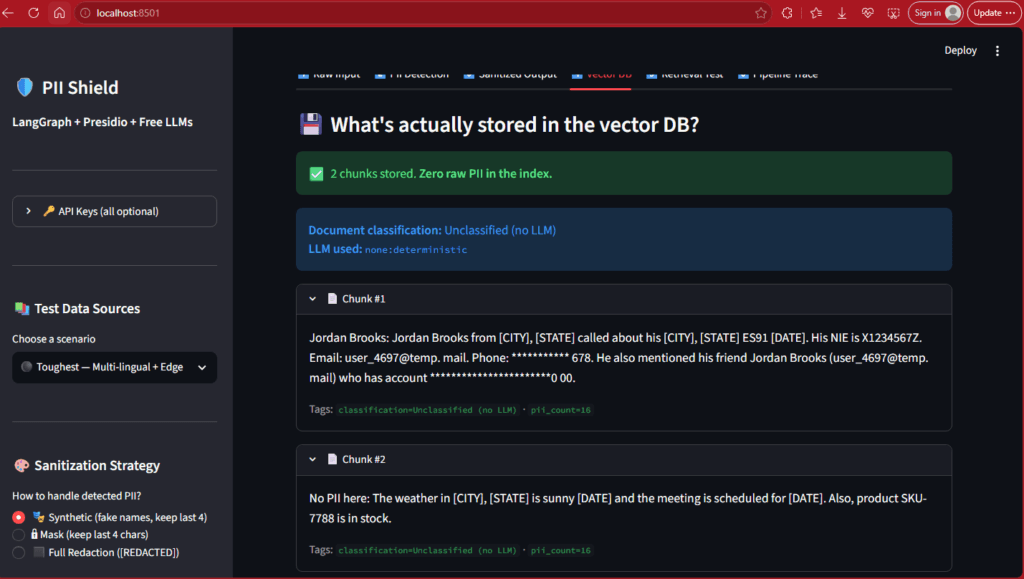
✅ 2 chunks stored. Zero raw PII in the index.
“Jordan Brooks: Jordan Brooks from [CITY], [STATE] called about his [CITY], [STATE] ES91 [DATE]. His NIE is X1234567Z. Email: user_4697@temp.mail. Phone: *********** 678. He also mentioned his friend Jordan Brooks (user_4697@temp.mail) who has account *****************0 00.”
“No PII here: The weather in [CITY], [STATE] is sunny [DATE] and the meeting is scheduled for [DATE]. Also, product SKU-7788 is in stock.”
classification=Unclassified (no LLM)pii_count=16
Why This is Critical:
✅ Zero Raw PII: No “José García”, no “jose.garcia@empresa.es“, no “+34 612 345 678”
✅ Synthetic Data Only: Even if someone hacks your vector database tomorrow, all they’ll find is “Jordan Brooks” and “user_4697@temp.mail” — completely useless synthetic data.
✅ Metadata for Access Control: Each chunk is tagged with classification and pii_count, enabling downstream filtering.
✅ Smart Chunking: The system automatically separated PII-heavy content (Chunk #1) from non-sensitive info (Chunk #2).
The Security Win: The real PII never touched the embedding layer. It was sanitized during ingestion, before chunking and vectorization.
Screenshot 4: The Reality Check — Does Retrieval Still Work?
Here’s the million-dollar question: “If you strip out all the real data, can the vector database still find the right information?”
Let’s test it with a real query.
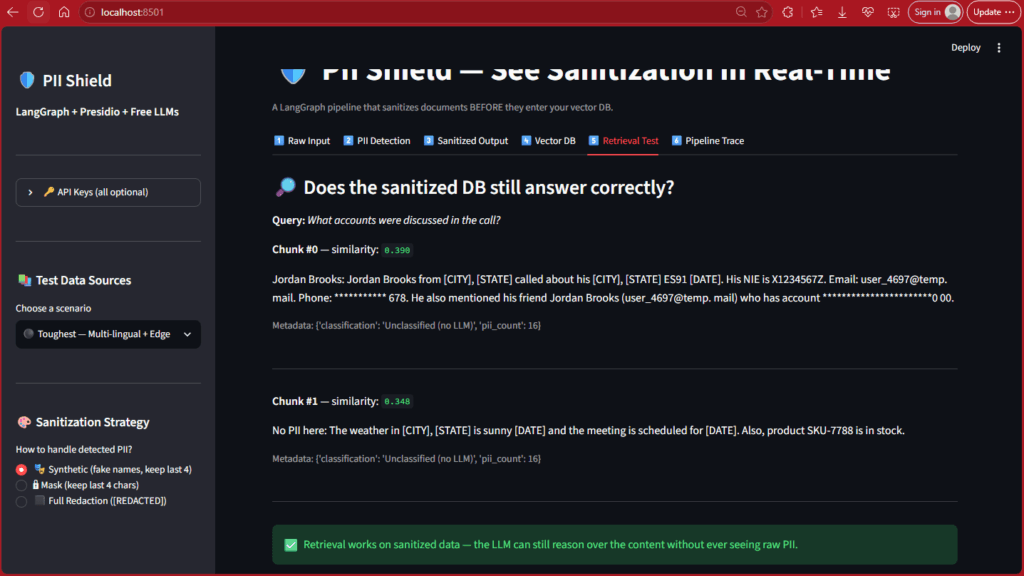
What This Screenshot Shows: The Retrieval Test tab demonstrates semantic search on sanitized data:
Query Used: “What accounts were discussed in the call?”
Results:
Chunk #0 (Winner):
Similarity Score: 0.398
Content: “Jordan Brooks: Jordan Brooks from [CITY], [STATE] called about his [CITY], [STATE] ES91 [DATE]…”
Metadata: {‘classification’: ‘Unclassified (no LLM)’, ‘pii_count’: 16}
Chunk #1 (Irrelevant):
Similarity Score: 0.348
Content: “No PII here: The weather in [CITY], [STATE] is sunny [DATE]…”
Metadata: Same as above
Green Banner at Bottom:
✅ Retrieval works on sanitized data — the LLM can still reason over the content without ever seeing raw PII.
Why This Works ?
✅ Semantic Search Intact: Even though “José García” became “Jordan Brooks” and the IBAN was partially masked, the vector embedding still understood that this chunk was about “accounts discussed in a call”.
✅ Correct Ranking: The relevant chunk (0.398) scored higher than the irrelevant chunk (0.348).
✅ Zero Leakage in Context: The LLM will receive the context to answer the user’s question, but the context contains zero raw PII.
Engineering Reality: A similarity score of 0.398 isn’t perfect — it’s moderate. This proves that sanitization does cause some information loss compared to raw text. This is the core trade-off: you sacrifice a small amount of retrieval precision to gain massive security and compliance.
Screenshot 5: Strategy Comparison — Masking (Keep Last 4)
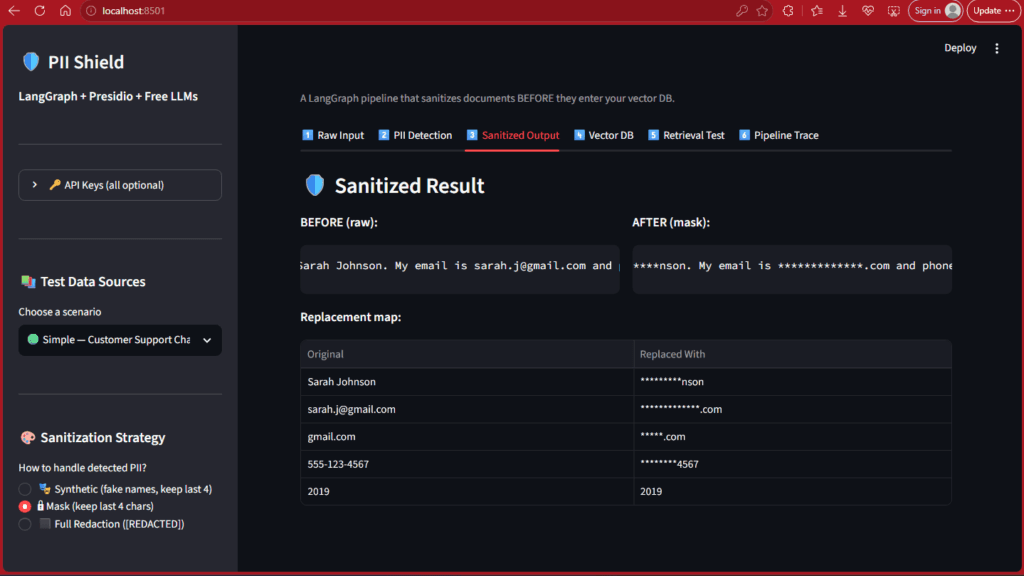
“********nson. My email is **************.com and phone is ********4567…”
sarah.j@gmail.com → **************.com
gmail.com → *****.com
555-123-4567 → ********4567
2019 → 2019 (unchanged — not detected as PII).
When to Use Masking:
✅ Phone Numbers: Last 4 digits often used for verification (“Is this *******4567?”).
✅ Credit Cards: Preserve format while hiding most digits.
✅ Partial Context Needed: When you need some identifying information but not full exposure.
Trade-offs:
Faster than synthetic substitution (no fake name generation).
⚠️ Less Natural for LLM reasoning than synthetic data.
⚠️ Partial Exposure: Last 4 characters still visible (may be a risk in some contexts).
Screenshot 6: Strategy Comparison — Full Redaction (Nuclear Option)
Now let’s see the most aggressive sanitization strategy.
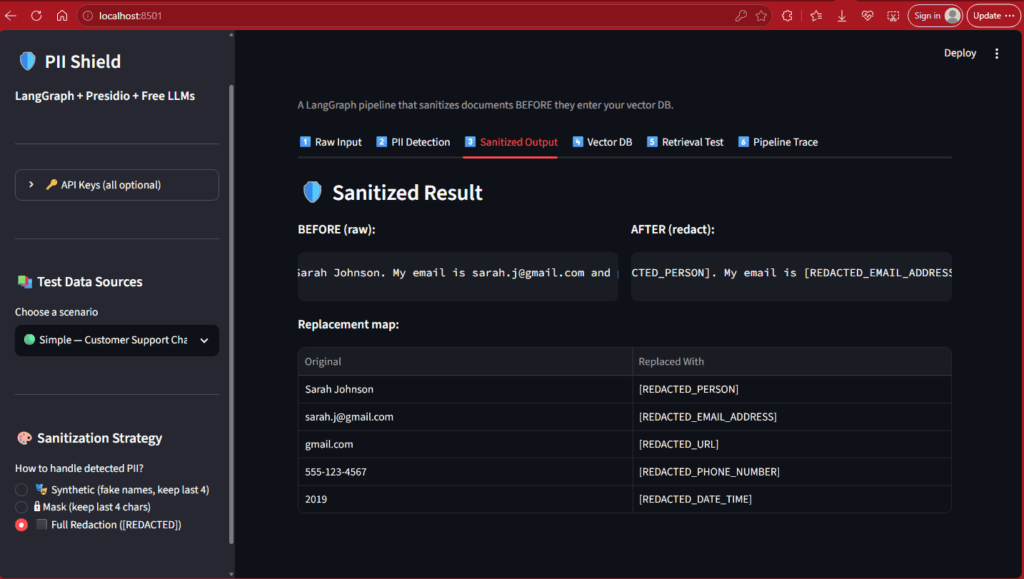
What This Screenshot Shows: The Sanitized Output tab with Full Redaction Strategy selected:
BEFORE (Raw):
“Sarah Johnson. My email is sarah.j@gmail.com and phone is 555-123-4567…”
AFTER (Redact):
“[REDACTED_PERSON]. My email is [REDACTED_EMAIL_ADDRESS] and phone is [REDACTED_PHONE_NUMBER]…”
sarah.j@gmail.com → [REDACTED_EMAIL_ADDRESS]
gmail.com → [REDACTED_URL]
555-123-4567 → [REDACTED_PHONE_NUMBER]
2019 → [REDACTED_DATE_TIME]
✅ Highly Sensitive Data: Maximum protection required.
✅ Compliance Requirements: Some regulations mandate complete removal.
⚠️ Context Destroyed: Sentence structure is broken.
⚠️ LLM Reasoning Degraded: The LLM struggles to reason over heavily redacted text.
Quick Strategy Comparison Table :
| Strategy | Example Output | Speed | Context Preservation | Best Use Case |
| Synthetic | José García → Jordan Brooks | Medium | ⭐⭐⭐⭐ | Customer support, HR docs |
| Masking | 555-123-4567 → ****4567 | Fast | ⭐⭐⭐ | Phone numbers, credit cards |
| Redaction | Sarah Johnson → [REDACTED] | Fastest | ⭐ | Legal docs, maximum security |
Phase 3: Production Realities — What Breaks at Scale
Moving from a demo to a production environment introduces complex challenges. Here is how you handle the hard parts.
1. Maintaining Entity Mapping Tables at Scale:
In the demo, José García became Jordan Brooks. But what happens when José appears in 50 different documents? Or when a new version of a document is uploaded?
The Problem: If Document A maps José to “Jordan Brooks” and Document B maps him to “John Doe”, the LLM will hallucinate that they are two different people.
The Solution: You must use Deterministic Hashing or a Centralized Pseudonymization Dictionary.
Deterministic Hashing: Hash the original PII (e.g., SHA256(“José García”)) and use the first 4 characters to select a fake name from a static pool. This ensures “José García” always maps to “Jordan Brooks” across the entire corpus, without needing a massive database lookup.
Versioning: When a document is updated, re-run the sanitization pipeline. Because the hashing is deterministic, the synthetic names will remain consistent, preserving the semantic graph.
2. Access-Control Metadata Filtering (The Missing Link):
Sanitization protects the content, but it doesn’t protect the access. If a junior employee queries the system, they shouldn’t see the sanitized CEO salary document just because it’s semantically relevant
You must implement Metadata-Based Access Control at two levels:
Pre-Retrieval Filtering: Before the vector search even happens, inject the user’s permissions into the query.
# Pseudo-code for pre-retrieval filtering
filter = {“tenant_id”: user.tenant_id, “clearance_level”: {“$gte”: user.clearance}}
results = vector_db.search(query_embedding, filter=filter)
Post-Retrieval Validation: After the chunks are retrieved, run a final check to ensure the user has access to the specific document_id associated with the chunk. Never trust the vector DB’s filtering alone.
3. Evaluation Methodology: Measuring Residual Leakage:
How do you know your sanitizer actually works in production? You need a rigorous evaluation pipeline.
Constructing a Realistic Test Set: Do not use generic PII (like “John Doe”). Generate a synthetic corpus that mimics your actual data distribution (e.g., Spanish medical records with specific IBAN formats). Inject known PII into this corpus.
Defining Acceptable Leakage Rates: For general privacy (CCPA), a leakage rate of < 0.1% might be acceptable. For HIPAA or PCI-DSS, the acceptable leakage rate is 0.00%.
The Evaluation Loop: Run your test set through the pipeline. Use a secondary, highly sensitive PII scanner (like a different Presidio configuration or a specialized NER model) to scan the output of the vector DB. Track the “Residual Leakage Rate” and alert if it exceeds your threshold.
Phase 4: Advanced Patterns & The Hard Parts :
The “Sandwich” Pattern (Reversible Anonymization) :
For highly complex queries, synthetic substitution might degrade the LLM’s reasoning too much. In these cases, use the Sandwich Pattern:
Anonymize: Replace PII with deterministic tokens (José García → <PERSON_1>)
Process: Pass the sanitized text to the LLM. The LLM reasons over <PERSON_1>
Re-identify: In the final output, swap <PERSON_1> back to José García only if the user has the correct access permissions.
Handling Structured Data and Hidden Metadata :
Presidio is great for text, but PII hides in structured formats. Your ingestion pipeline must include a metadata-stripping phase. Use libraries like pdfplumber to extract text while ignoring hidden OCR layers, and strip HTML comments, zero-width characters, and EXIF data before text extraction.
The Latency Trade-off :
Running Presidio on every chunk adds latency (~50-100ms per document). To mitigate this:
Cache aggressively: If a document hash hasn’t changed, use the cached sanitized chunks.
Asynchronous Processing: For non-real-time ingestion, process documents in the background. For real-time chat, only sanitize the retrieved chunks (Post-Retrieval filtering) rather than the entire corpus.
Conclusion :
PII masking in Agentic RAG is not a compliance checkbox you can add at the end of a sprint. It is a first-class middleware component that must be architected into the agent’s execution loop from day one.
By combining deterministic pattern matching, synthetic substitution, strict state management, and metadata-based access control, you can build a RAG system that is both highly intelligent and fundamentally secure.
Don’t wait for a data breach to realize your vector database was holding secrets it shouldn’t have. Sanitize early, measure your residual leakage, and architect for security by default.

